
Three Checks Before Turning A Flat Illustration Into Parallax Motion
Turning a finished illustration into a multi-plane video scene usually starts with the realization that the artist never drew what sits behind the hero character.


Turning a finished illustration into a multi-plane video scene usually starts with the realization that the artist never drew what sits behind the hero character. Motion artists tasked with building teasers or web hero headers frequently receive a single high-resolution export rather than a neatly structured source canvas. Transforming that flattened composition into movable planes demands an image to layers pipeline that isolates silhouettes while filling the visual holes they leave behind.
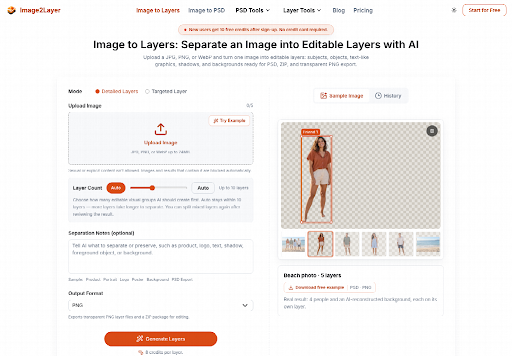
Video compositors rarely need a completely redrawn asset for a short teaser. What they need is depth separation that survives a five-pixel camera drift without exposing hollow cutouts. Image2Layer approaches this separation by detecting semantic groups across the canvas, extracting subjects into RGBA planes, and generating synthetic backing data for regions previously covered by foreground elements.
Verify Background Rebuilding Along The Camera Path
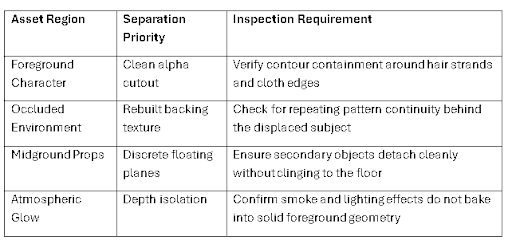
The primary barrier in 2.5D animation is not isolating the front figure, but restoring the environment hidden directly behind shoulders, weapons, and furniture. Traditional workflows required digital painters to clone stamp and paint missing textures by hand before linking layers to a virtual camera. When automated separation runs, verifying how cleanly the background reconstructs determines whether the asset can actually move.
The evaluation focuses on where the hero silhouette intersects complex background textures like brickwork, atmospheric gradients, or foliage. If the generative fill smears surrounding architecture into an unrecognizable soup, the motion designer spends thirty minutes cleaning pixels before placing a single keyframe. Inspecting the rebuilt scenery plate in solo view confirms whether the underlying perspective remains credible under horizontal displacement.
The following criteria help determine whether a reconstructed backing plane is ready for a parallax timeline:
Track Edge Bleed On Subtle Horizontal Drifts
When an After Effects 3D layer shifts across the screen, edge bleed immediately betrays a flat graphic. If part of the character outline remains stamped onto the rebuilt scenery plane, the eye catches a duplicate ghost the moment the camera translates ten pixels sideways. Inspecting the reconstructed background plate in isolation reveals whether color fringing needs manual smoothing before keyframing begins.
A reliable test is moving the foreground element fifty pixels horizontally while scrubbing the timeline. When the background beneath shows a faint halo of the original silhouette, the illusion of genuine three-dimensional space collapses immediately. Spotting this contour bleeding early allows compositors to apply quick feathering or expand the bounding matte before building complex camera movement.
Establish Separation Depths Across Complex Scenery
A convincing parallax shot requires at least three distinct depth tiers: immediate foreground, character plane, and deep environment. Automated processing works within a ceiling of ten layers, which allows animators to isolate discrete props such as a floating lantern or an overhanging branch. Assigning each extracted plane its own z-depth creates genuine spatial separation rather than a two-card puppet show.
Splitting intermediate objects onto separate tiers also simplifies color grading and atmospheric fog passes. Placing a soft mist layer between the extracted character and the far background enhances perceived environmental scale. Image2Layer ensures that each segmented asset retains genuine canvas alignment, so stacking the rendered layers in default position perfectly reproduces the original key visual.
Calibrate Input Quality To Preserve Silhouette Precision
Source quality dictates how accurately an automated system distinguishes overlapping subjects. While the tool accepts uploads between 512 by 512 pixels and 24 megabytes, feeding heavily compressed social media stills introduces compression artifacts that fuse fine contours into adjacent shadows. Starting with an uncompressed PNG or clean export ensures that boundary recognition locks onto genuine graphic boundaries.
Working at dimensions between one and four megapixels provides sufficient resolution for high-definition video timelines without inflating cloud processing times beyond the standard 60 to 120-second window. Testing the separation on a full-scale crop avoids discovering blurry borders after nesting the asset into a larger sequence. High-resolution source assets give the segmentation engine sharper contrast differences along subtle clothing folds and silhouette edges.
When illustrations contain painterly textures or dry brushstrokes, low-resolution files can trick edge detectors into treating brush chatter as separate physical objects. Supplying clean, uncompressed master artwork ensures that natural artistic textures remain intact on their respective character planes rather than breaking into noisy floating shards.
Use Prompt Notes To Isolate Dominant Figures
Dense illustrations featuring crowded street scenes or intricate fantasy armor can cause general segmentation algorithms to fragment single characters into disconnected pieces. Utilizing targeted guidance notes in Image2Layer allows animators to designate the central protagonist as a unified export target. This keeps dynamic character limbs grouped onto a coherent plane while delegating secondary background figures to supporting tiers.
Specifying focal subjects prevents the system from slicing an outstretched sword arm or flowing cape onto an unrelated layer. This directed control saves compositors from having to manually merge disparate PSD layers back together inside external graphics software before rigging the character for motion.
Export Stacked Assets For Timeline Assembly
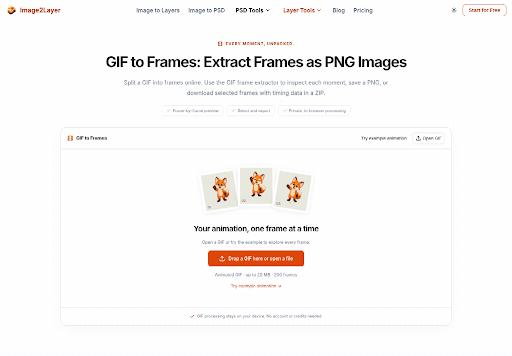
Once the semantic separation completes, bringing the reconstructed layers into production editing requires selecting an appropriate delivery format. Rather than rebuilding transparency manually from individual cutouts, using an image to psd workflow yields a fully stacked canvas where layer order matches the original visual depth. The exported document maintains identical canvas dimensions, enabling immediate import into motion suites.
Each exported layer functions as an RGBA bitmap with preserved alpha channels, meaning compositors can immediately apply parent links, displacement maps, and adjustment curves. Designers collaborating with UI developers can alternatively download transparent PNG packages inside a structured ZIP archive to test interactive hover effects on web layouts.
Having consistent layer names and intact layer ordering streamlines the handoff between concept artists and motion editors. In team settings where deadlines leave little margin for file reconstruction, dropping a ready-to-rig PSD straight into Adobe Premiere or After Effects avoids hours of repetitive asset slicing.
Realistic Limits With Fine Strands And Glassware
Automated layer decomposition encounters natural limits when handling semi-transparent materials, high-frequency flyaway hair, or dense motion blur. Thin transparent bottles and wispy smoke tend to either merge into the solid backdrop or lose their subtle refractive qualities during extraction. Projects featuring delicate translucent elements still require a brief manual masking pass to restore subtle gradient falloffs before the final render.
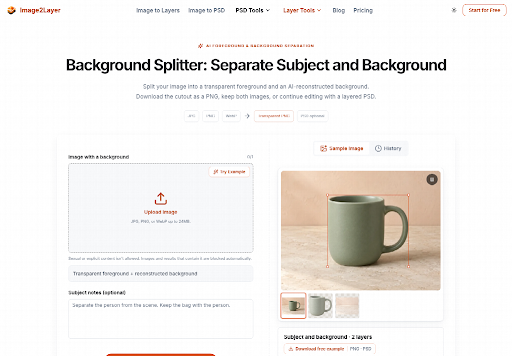
Acknowledging these physical edge limitations keeps production expectations realistic. When an animated sequence prominently features intricate hair waving in the wind or glowing magical effects, running automated layer separation solves ninety percent of the background and prop extraction, leaving only delicate highlights for targeted manual polish.
Matching Layer Extraction To Project Requirements
Adopting automated layer generation reshapes how quickly digital studios can turn static brand assets and conceptual illustrations into engaging promotional motion graphics. The technology does not replace the nuanced eye of an experienced compositor, but it removes hours of tedious manual cloning and masking that previously bottlenecked short-turnaround teaser campaigns.
Independent animators and social media video editors gain the most leverage by using Image2Layer to unlock flat marketing artwork for dynamic camera moves. By auditing background reconstruction early, confirming silhouette boundaries, and accepting necessary hand-touchups on translucent glassware, creative teams can confidently deliver rich multi-plane scenes on accelerated production schedules.
About the Creator
Enjoyed the story? Support the Creator.
Subscribe for free to receive all their stories in your feed.
Comments
There are no comments for this story
Be the first to respond and start the conversation.