
The Best Grammar Checking Tools for Medium Writers in 2026 (Tested on My Own Articles)
Six tools, six very different price tags, and the exact two-step workflow I run before I hit publish
I used to think grammar checkers were a nice-to-have. Then I republished an 8-minute article with a glaring "their" instead of "there" in the second paragraph, watched the read-through rate quietly drop, and never made that mistake again. On Medium, where readers decide in the first three lines whether you're worth their time, a sloppy sentence isn't a small thing. It's the difference between someone finishing your piece and someone bouncing to the next tab.
So I went through every grammar and editing tool I could reasonably test, compared what they actually cost in 2026 (prices on these tools change more often than you'd expect), and figured out which ones genuinely earn a spot in a writer's routine versus which ones are just noise. Here's what I found.
1. Grammarly — the one I still open first
Grammarly is the tool most people already know, and there's a reason it's stayed the default for so many writers, myself included. It corrects in real time, catches tone problems before you accidentally sound curt in a comment reply, and it sits directly inside the Medium editor through its browser extension, so you're never copy-pasting back and forth.
One thing worth knowing: Grammarly quietly restructured its plans in 2026. "Premium" and "Business" are gone, folded into a single tier now called Pro, which covers solo writers and teams of up to 149 people under one roof.
Free — unlimited basic grammar and spelling checks. Genuinely enough to start an 8-minute article.
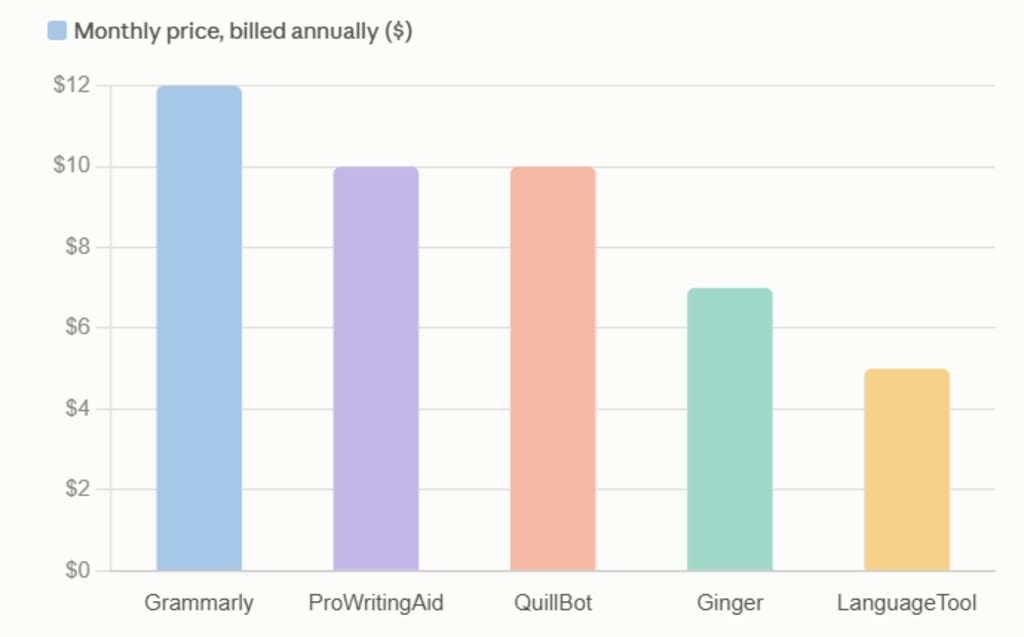
Pro — $12/month billed annually ($144/year), or $30/month if you pay monthly. Adds full-sentence rewrites, tone detection, a plagiarism checker, and a much larger monthly AI prompt allowance.
Enterprise — custom pricing for larger organizations that need admin controls and security review.
My honest take: the free version already catches the majority of what trips people up. I'd only pay for Pro once writing becomes a income stream, not a hobby.
2. ProWritingAid — for when you want to know why
If Grammarly tells you something is wrong, ProWritingAid tells you why it's wrong, and then shows you the pattern across your entire draft. It's less about quick fixes and more about actually improving as a writer over time, which is what pulled me toward it for longer pieces.
Free — 500 words per check, a handful of reports per day.
Premium — $30/month, or $10/month billed annually ($120/year).
Premium Pro — $36/month, or $12/month billed annually — adds AI rewriting credits and live author workshops.
Lifetime — a one-time $399 (Premium) or $699 (Premium Pro), which is genuinely one of the better long-term deals in this entire list if you know you'll be writing for years.
I'll admit the pricing here got more expensive over the past year, but even at the new rates, the annual plan still slightly undercuts Grammarly, and the 25-plus writing reports go deeper than anything else on this list.
3. QuillBot — when a sentence just sounds boring
QuillBot isn't primarily a grammar tool, it's a rewriting tool, and that distinction matters. When a sentence in my draft technically has no errors but still reads flat, QuillBot is what I reach for to give it a second life.
Free — 125 words per paraphrase, plus a basic grammar checker.
Premium — around $10/month billed annually (about $120/year), $13/month billed quarterly, or $19.95/month if you pay monthly.
The 125-word cap on the free plan is tight enough that you'll be pasting in chunks for anything longer than a paragraph, but for spot-fixing a clunky sentence here and there, it's hard to beat.
4. LanguageTool — the quiet, privacy-minded option
LanguageTool doesn't get talked about as much, and I think that's undeserved. It's open-source at its core, supports more than 30 languages, and tends to appeal to writers who are a little more cautious about where their drafts end up being processed.
Free — checks up to 10,000 characters at a time.
Premium — roughly $5/month billed annually, unlocking a 40,000-character limit, tone detection, and a personal dictionary.
If you write in more than one language, or you just want a lighter-weight, more privacy-conscious checker running alongside your main tool, this is the one I'd point you to.
5. Hemingway Editor — the one that doesn't care about grammar at all
This is the outlier on the list, and honestly, my favorite in terms of pure usefulness for Medium specifically. Hemingway doesn't check grammar. It checks readability — flagging dense sentences, passive voice, and paragraphs that are technically correct but exhausting to read. Since most people skim rather than read on Medium, that's arguably more valuable than a grammar pass.
Free — the full web version, no catch, no account required.
Desktop app — a one-time $19.99 payment, which lets you work offline.
No subscription, no recurring bill. Just a tool that quietly makes your paragraphs shorter and your ideas punchier.
6. Ginger Software — the budget-friendly all-rounder
Ginger plays in the same space as Grammarly, minus some of the polish, but its sentence rephrasing and built-in translation make it a reasonable pick if you're writing across languages or just want to spend less.
Free — basic grammar and spell check.
Premium — currently around $7/month billed annually, or roughly $14/month if paid monthly.
It's not going to replace Grammarly for most people, but it's a fair budget alternative if the bigger names feel like overkill for what you write.
How these actually stack up on price
Here's the monthly cost of each tool's main paid plan, billed annually, side by side. (Hemingway isn't shown — it's a flat one-time $19.99, not a subscription, which is honestly part of its appeal.)
What I personally use, and why
After going through all six, my own workflow hasn't actually changed much: Grammarly Free, then Hemingway, in that order.
I run the draft through Grammarly Free first, to clear out the obvious grammar and spelling errors.
Then I paste the whole thing into Hemingway and shorten anything that reads dense or passive.
If I'm working on something longer or more important, I'll run it through ProWritingAid once for the deeper style report — repetition, pacing, sentence variety — things the first two tools don't catch.
Why free tools first? Because they catch the overwhelming majority of real mistakes, and for an 8-minute article, that's usually enough. I only reach for a paid plan when I'm publishing something I expect to be read widely, or when I want the plagiarism check for peace of mind before it goes live.
If you're just getting started, don't overthink this. Open Grammarly Free, paste your draft into Hemingway once you're done, and upgrade later only if you genuinely feel the free tools are holding you back. Most writers never actually hit that ceiling.
What's in your own editing stack? I'm always curious whether other writers have found a combination that beats this one.
About the Creator
Enjoyed the story? Support the Creator.
Subscribe for free to receive all their stories in your feed.
Comments
There are no comments for this story
Be the first to respond and start the conversation.