
Reviewing an Upscaled Video After Social Media Upload
Reviewing Upscaled Video on Social Media

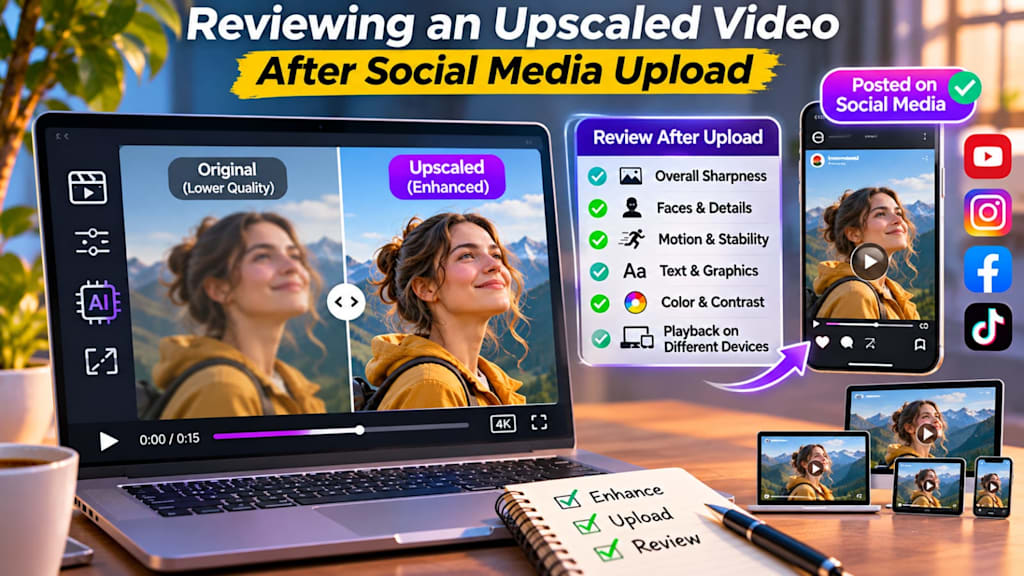
It may be possible to noticeably upscale a video before posting it on social media, but it doesn't stop there after the export. Social media sites will compress, resize and transcodes the uploaded file, and may be different from the file you would have seen on your computer. For this reason, it is important to go through the final published version.
Video can be crisp in an editor and still look soft after upload. Some fine details may become less visible, text may lose sharpness, and motion-heavy scenes can sometimes show additional compression effects.
Using tools that improve video quality with AI can help strengthen clarity before publishing, but it is still important to review the uploaded version to see how the platform has processed the video and whether the enhancement has actually created a better viewing experience.
Why the Uploaded Version Can Look Different From the Export
Social media applications must be capable of sending out videos, reliably, to consumers who have various devices and Internet connections. In order to do this, they typically pack up files that are uploaded and generate several versions of the file at different qualities.
Some of the detail of the original export may be lost in this process. This disparity could be particularly apparent in fast-moving scenes, close-ups with fine-scale details, areas with noise in low-light conditions, and gradient or background colour.
If the source video was enhanced before it was uploaded, the compression of the site may alter the effect of such enhancements. This is why it is always important to check published result independently from the local export.
The quality of the enhanced file will also depend on how well the file resists a second compression.
Review the Video at Normal Playback Speed First
The first exam should be straightforward. Play the uploaded video through from beginning to end on the normal speed.
Never stop or examine each frame. Your first step is to assess the overall experience.
Inquire if the video looks clearer, sharper, and consistent as compared to the original. Watch for natural faces, stable motion and believable imagery.
A video that appears technically clear and crisp might not be the best due to distracting artifacts.
Normal playback yields the most realistic view of what viewers will see. A thorough inspection should only take place after viewing the entire video.
Pay Attention to Faces and Fine Details Carefully
One of the more popular areas to determine if upscaling was successful is on the face.
Too much enhancement can make the face appear overly smooth, overly sharp and/or a bit inconsistent when moving.
Look for close-ups and examine eyes, facial edges, skin texture and hair.
Other nuances like clothing prints, tree branches, signs, hair strands or building lines can also point to issues.
The enhancement might be too loud, or the platform compression might be misbehaving if these areas flicker, shimmer, or crumble when played back. The best one should be more apparent without making the processing process obvious.
Select the Uploaded Version and then compare it to the Original.
One good gauge for judging the result is by comparing the published version to the original source or to the version that was pre-upscaled.
This is to help you determine if the enhancement was worthwhile following compression of social media.
Compare scene at same playback size (if possible). Pay attention to sharpness, movement, color, noise, and the clarity of the text.
It's not just about finding a difference. The aim is to establish if the difference enhances the viewing experience. If the upscaled version appears to be cleaner while retaining a natural appearance, the process has probably paid off.
If it seems more severe, louder, or less steady, the enhancement can be tweaked prior to the next upload.
Pay Attention to Motion and Compression Artifacts
Quality issues can become particularly apparent when it comes to motion.
Fast camera movement and sports footage, crowded scenes, water, grass, smoke and detailed backgrounds are more challenging to compress efficiently.
These areas can look blocky, smeared, or lack fine texture after upload. Although it might look better overall, an upscaled image might have these artifacts more prominently.
For instance, it is sometimes possible to accentuate compression edges by sharpening.
That is why it is important to watch the scenes of motion after upload. A slightly softer image, that remains stable in light, may come across as better than a sharp image that has digital artifacts.
Review Text, Captions and Graphics
Videos on social media frequently feature titles and subtitles, logos, interface graphics, and on-screen graphics.
These elements need to be carefully considered as small text may look softer when compressed on the platform.
If your video has captions or other important labels, ensure that these are seen on a mobile phone screen. Thin fonts and small text may lose their readability more rapidly than bold, high-contrast fonts.
If there is any screen recording or interface demonstration in the video, test if any buttons, menus, and small details are still easy to understand.
In some instances these aspects can be enhanced by upscaling, but as the published version is the one that matters, this is not always the case.
Review on More Than One Device
A video may look different depending on the screen used to view it. A desktop display can show the details, a phone might not show some small details and make the text harder to read.
If possible, check the video that has been uploaded on a cell phone and on a larger screen.
This will help you to get a better sense of what the content will look like to different viewers.
This is particularly significant for social media where a significant proportion of viewers are mobile.
The enhancement should be useful not just on a close-up view of the video on a high-resolution monitor, but also when viewed at normal viewing distance.
After uploading, check Color and Contrast.
Upscaling typically deals with the resolution and details of a video, but uploading can also impact the video's general aesthetic.
Review to see if the colors are still balanced and if highlights and shadows still have detail.
If a video is slightly over or under saturated upon upload, it can be adjusted in future exports.
Comparing skin tones and dark spots during this time is also a good idea.
When the compression of the platform gives a muddy looking shadow or bright (oversaturated) highlight, the next time something subtle can be adjusted in the export to result in a better image.
Use AI Enhancement as Part of the Workflow, Not the Final Check
If the source footage is low resolution or soft, artificial intelligence can boost video quality to produce a cleaner starting point prior to upload. But the enhancement should not be considered the final test of quality.
The social media version is actually the delivery file from the viewers standpoint. This implies that there should be both enhancement and post upload review in the workflow.
This could either enhance the details or help to reduce softness in the image, or help to make older footage more appropriate for modern platforms -- it depends on the success rate, which is determined by how well the footage holds up during compression.
Record Notes for future uploading.
It is also a learning process to watch the published video. Be aware of what worked and what didn't work.
If it seemed to be too much sharpening for a particular amount after upload, don't sharpen it as much the next time. Make text larger (or heavier) if it is hard to read. If any of the motion-heavy scenes lose too much of the detail, try to tweak the export settings or decrease any unneeded processing.
As you progress, you can create a more effective workflow for the platforms you use.
The aim is to develop a consistent process, which will yield clean, natural-looking results, rather than going for perfect technical finish.
Final Thoughts
Upscaling a video is just as vital as checking the video after its posted on social media to ensure that it is enhanced.
The file uploaded may have a different format than the file exported due to compression and processing by the platform.
Reviewing the final post also helps confirm that sharpness, motion, color, and fine details still appear natural after upload.
The overall sharpness, faces, motion, text, graphics, color, and playback quality of various devices should be reviewed.
The best outcome does not always lead to the most acute outcome. Once the platform has processed it, it is the one that is clean, stable, and natural, and is easy to watch.
A final review can also reveal whether any compression artifacts or quality loss need to be addressed in future uploads.
You can take a close look at the finished video and compare it to the original to decide on better enhancement settings for the next video and make a video that will hold up well across social media.
About the Creator
Gulshan
SEO Services, Guest Post & Content Writter.
Enjoyed the story? Support the Creator.
Subscribe for free to receive all their stories in your feed.
Comments
There are no comments for this story
Be the first to respond and start the conversation.