
Most effective approach to separate huge vCard files with thousands of contacts
Simplifying Split vCard Process
Introduction
It might be difficult to organize massive vCard files that contain hundreds of contacts. The format known as vCard, which is often referred to as .vcf files, is widely used for the purpose of storing and sharing contact information. In addition to this, it becomes increasingly challenging to maintain and transfer a file as its size increases. Fortunately, there are methods that are both speedy and simple for dividing these large vCard files into smaller ones that are simple to put together. The purpose of this blog article is to provide information on the most efficient technique of dividing huge vCard files and to provide an easy way to automate the process.
What is a vCard file?
Before we go on to the solution, let's take a moment to discuss what a vCard file actually contains. A vCard file structure is used to hold information on a variety of data, including a person's name, telephone number, and email address.
Why should split large vCard files?
There are a few different reasons why users want to divide up huge vCard files.
- It is difficult to send e-mails or upload large files to cloud storage depending on the file size limit.
- Large vCard files can slow down applications. Splitting them helps files to be flexible and increases efficiency.
- While supporting or recovering contacts, small files are easy to manage and are less likely to become corrupt.
Some restrictions in manual division vCard files are as follows:
- It can be time-consuming manually to separate a large vCard file, especially if hundreds or thousands of contacts are included.
- The work increases the chances of making mistakes manually, such as a lack of contact or formatting the file sections incorrectly. Therefore, the data may be lost or damaged.
- The manual file partition will make it difficult to easily look for the final result of the work that is done. It is difficult to check if everything was shared properly during the process.
- Some applications can be difficult to reach or manage extremely large vCard files; therefore, dividing it can manually cause problems or a crash of performance.
- The manual division of vCard may require an understanding of file structures or lesson editing. People with a lack of technical knowledge may find it challenging or misleading how to share the file correctly.
- If something goes wrong during the manual sharing process, it may not be an easy way to return to the original file until you have a backup, which you can forget to make.
These limitations shed light on why the manual division of vCard files is not the most effective method, especially when working with large files or frequent features.
Automatic approach: Softaken Split vCard Software
When it comes to handling the process of split vCard files in a secure manner, Softaken Split vCard Software is an appropriate tool for handling the process. It offers solutions that are more efficient and automatic. By dividing big vCard files into smaller, more manageable sections, this application provides a straightforward solution that does not need any effort on the user's behalf. The application can save time and effort by finishing the task in a matter of minutes, regardless of the number of contacts users have, which might be hundreds or thousands.
Why choose software?
Here are some of the most important features that make this software the best solution for dividing large vCard files:
- The software is designed to be simple and can be simply operated by beginners. To use it, users do not need to be technical experts. The process is simple, and the user-friendly interface guides throughout the process.
- Within minutes, it can convert the huge vCard files into smaller ones without harming the data integrity.
- When dividing the vCard file, it is important that the contact information remain intact. No data is lost or damaged in the entire division process. All contact information, including numbers, e-mail addresses, and addresses, is preserved in new files.
- The software is compatible with all vCard formats, including vCard 2.1, vCard 3.0 and vCard 4.0. No matter what version the original vCard file is, software can handle it.
- Many vCard files can be shared in an intermediate using the batch ability of this software. Users who want to save time by completing everyone at once and have many large files to split will get this ideal.
- Data loss is one of the most important issues in separating vCard files. Fortunately, there is no data loss, so the contact—which includes all relevant data—will not change.
- This ensures that the data with the entire division process remains confidential and safe. The application will help to manage sensitive contact information carefully.
- If anyone is facing any problems or has questions when using software, it provides excellent customer assistance available 24/7. The team is always ready to help to solve any problem.
How to use software
- First, download the software from the official website and install it on the computer.
- After installation, launch the program.
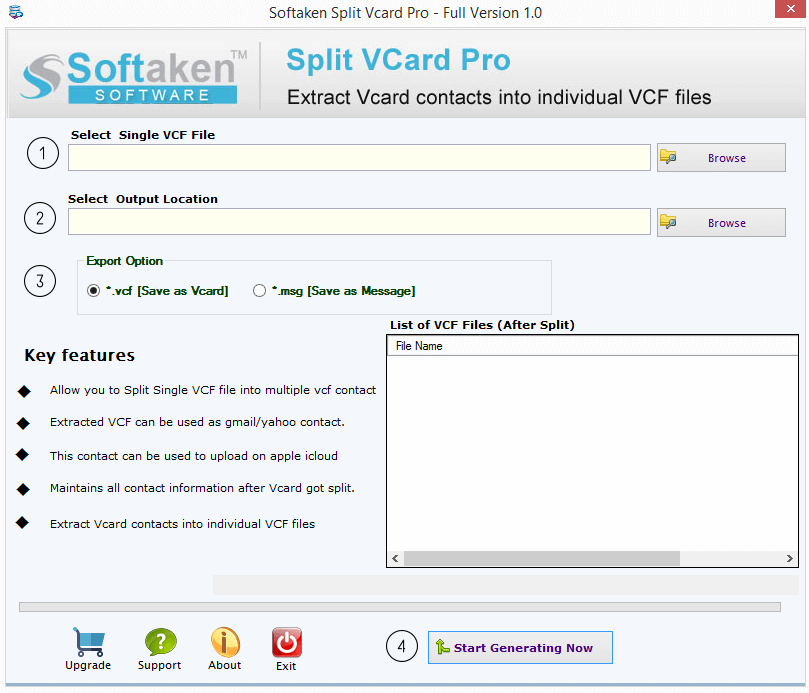
- Click on the “Browse” button to upload the large vCard file users want to split.
- Choose where you want the split files to be saved on your computer.
- Click on the “Split Now” button to begin the splitting process. The software will automatically split the vCard file into smaller files.
- Once the process is complete, users can access the smaller vCard files in the output folder that they have selected earlier.
That’s it! In just a few simple steps, you’ll have your large vCard file split into smaller, more manageable files.
Conclusion
It is not difficult to organize large vCard files with hundreds of contacts. Even if users can personally divide these files, this process is labor-intensive and exposes them to errors. The most effective method of quickly and simply split vCard files is to use Softaken Split vCard Software. It will allow users to divide the vCard data without any problems. This solution is ideal if user requirements are for easy contact organization or easy sharing.
About the Creator
Enjoyed the story? Support the Creator.
Subscribe for free to receive all their stories in your feed.
Comments
There are no comments for this story
Be the first to respond and start the conversation.