
How to Manage Multiple vCard Files from Multiple Devices Without Losing Security?
Merging Multiple vCard files effortlessly
Keeping many vCard files on various devices might be difficult. Contact information including phone numbers, email addresses, and other details is kept in a vCard file format. Although these vCard files are widely used on phones, desktops, and tablets, maintaining them orderly and safe across several devices can become slightly challenging.
This guide will lead you through both manual and professional approaches for managing the multiple vCard files you might have while maintaining the contact data safe and secure.
What is a vCard?
A vCard is a digital file designed for orderly storing contact data. Sharing contacts among devices is mostly accomplished using the vCard format (.vcf). Managing this vCard can become extremely tough if you have your contacts on several devices. vCard files are simple to exchange between devices and programs. You need a simple and safe method to handle contacts that are spread over multiple devices and you want them all in one place without running any danger of losing any data.
For managing multiple vCard files users can merge them for ease of sharing.
Why Merge vCard Files?
Merging your vCard files is important for several reasons-
- Having all your contacts in one location will help you find and handle them effortlessly.
- You ensure that any changes made on one device are reflected across all your devices.
- Merging helps to eliminate possibly unnecessary contacts across multiple devices.
- Organizing your contacts in one single spot guarantees that they are safe and reduces the chance of data loss.
But how do you merge your vCard? Let’s break it down into two approaches- the manual method and the professional method.
Manual Method for Merging vCard Files
The manual approach lets you combine your vCard data without using specialized tools if you're comfortable with slightly more effort. Here's a detailed step-by-step guide-
- Export your contacts in.vcf from all devices (phone, tablet, PC).
- In a text editor—such as Notepad or TextEdit—open all the Vcf files. Paste the contact information from every file into one single file.
- Save the combined file as a new .vcf file.
- Load the just generated combined file into your Apple Contacts, Google Contacts, etc. contact management tool.
- Manually check for duplicate contacts and delete them as needed.
Expert Method for Combining vCard Files
Using expert software will help you merge vCard files more quick and effective method. These tools are designed to handle the merging process automatically. It offer features to help you organize and protect contacts files by merging. Professional software like Softaken Merge vCard Software is the best software to combining vCard files without installation of any other application. It is ready to install on all Windows editions like Windows 11, 10, 8.1, 8, 7, Vista, XP, and others. Users can simply handle this software because it provides a graphical user interface. The free trial version of this application is also available to the users for the evaluation of its features.
Procedure for Installing a Professional Application-
- Install and configure the software on your computer.
- Click on the "Merge vCard" button to include your contacts.
- Browse the VCF files to combine them.
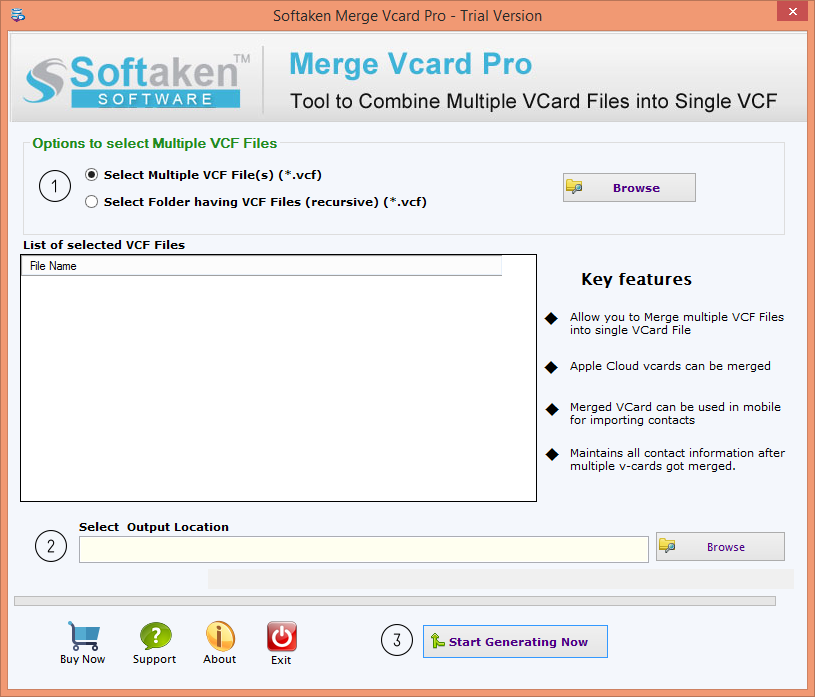
- Choose a location for the newly generated file to be stored.
- To start the processing of contacts, click on the "Convert Now" button.
Comparison of Manual Method vs. Professional Method for merging vCard Files
Manual Method
You export contacts from all your devices, open the files in a text editor, and copy/paste them into one big file. Then, you manually upload this new file into your contact app and clean up any duplicates.
Pros-
No installing required.
Drawbacks-
- Time-consuming, especially if you have lots of contacts.
- More possibility of errors or missing contacts.
- More difficult to arrange and control if you have plenty of files.
- Need to manually check and remove duplicates, which can be tedious.
Professional Method
All of your vCard files are automatically merged by use of specialist software.
Benefits-
- faster and more effective.
- The program runs automatically.
- Easier to manage and organize multiple vCard.
- Features included to safeguard the contact information.
Drawbacks-
- Might refer to it for purchase (though there is a free trial).
- You need to install software on your device.
Which is the best option?
If you want a speedy, accurate, and error-free solution, the expert approach is the ideal one. It saves time, minimizes errors, and makes maintaining your contacts orderly and simple. The manual approach might be suitable for you, though, if you want to set up no software and are fine with spending extra time.
Conclusion
In this blog post, for managing the multiple vCard files from various sources, users can merge them together. This guide will help users decide whether the manual or the professional approach has been used for combining vCard files efficiently without any data loss.
About the Creator
Enjoyed the story? Support the Creator.
Subscribe for free to receive all their stories in your feed.
Comments
There are no comments for this story
Be the first to respond and start the conversation.