
How to Create Smaller vCard Files from a Large Contact Database?
Split vCard Files
Especially when users need to import, maintain, or exchange vast vCard files, handling them might be difficult. A big vCard file can rapidly become unmanageable whether its contact count is hundreds or thousands. Such a file can be too large to be shared over email or other file-sharing systems or exceed the import restrictions of some systems.
Dividing the huge vCard file into smaller, simpler vCard files helps to solve this issue. By splitting the file for users, vCard splitter programs save time and effort and can be used automatically. These programs handle the chore in just a part of the time instead of manually cutting and pasting contacts, thereby enabling keeping organized and simplifying contact management.
Using two distinct approaches—one with an online tool and the other with a professional desktop application—we are going to guide you through the process of breaking apart a sizable vCard file into smaller files in this blog.
What is a vCard?
Contact information is kept in a digital file format called a vCard, also referred to as a VCF file—"Virtual Contact File". It lets users forward specifics such as a person's name, phone number, email address, physical location, job title, company, and even a picture. vCard is widely used for exchanging contact information electronically, and it can be imported into various email clients, contact management apps, or smartphones.
vCard files are usually saved with the .vcf extension and are compatible with popular applications like Gmail, Outlook, Apple Contacts, and more. A flexible tool for handling and sharing contact information, it can also be used to save other facts such as social network accounts, website URLs, and birthday information.
Why would one split a large vCard file?
Users might have to split a big vCard file into smaller ones for various significant reasons.
- Many contact management systems or email clients have restrictions on how many contacts can be imported at once. Users might be able to import just one hundred contacts at once, for instance. In these situations, breaking up the big vCard file into smaller batches guarantees that every import stays within system constraints.
- Large files might be challenging to share by email or cloud storage systems, especially if the file size exceeds constraints. Whether sharing smaller vCard files with friends, clients, or colleagues, they are far simpler to share and receive.
- Dividing vCard files into smaller files lets users arrange their contacts using many groups or categories. They can create distinct vCards for clients, family, business, or personal contacts. This facilitates the management and finding of certain groups of contacts as necessary.
- Breaking up a big file into parts can help to synchronize contacts with several devices or applications more quickly. Independent synchronizing of every smaller file helps to lighten the system's burden.
- Smaller vCard files are simpler for backup and storage if a system fails or data loss occurs. Dividing the contacts into suitable parts helps to prevent losing everything should one file become faulty.
Method 1: Use an online vCard splitter tool
Online vCard Splitter programs provide a quick and easy method for sharing a large vCard file. These tools are straight and accessible through the browser, and they are designed to divide large vCard files into small, more manageable parts.
The following steps are required to use an online vCard split tool:
- Start by searching for "vCard splits" in the preferred search engine. Different types of online tools emerge, which will provide a quick solution for sharing vCard.
- Once users have a tool they like, go to the website and submit the big vCard file. Most Internet programs allow you to drag and drop the file directly to the website or offer a simple-to-use interface with a button stating "Upload."
- Many programs alter the way a user chooses to divide the file. Number of contacts per file - e.g. 100 contacts per vCard file - they can choose. If vCard contains tags or categories, some programs also allow contacts according to these criteria.
- Once the choices have been set, select the "Start" or "Split" button to start the procedure. The tool automatically shares the file and provides a link to download small vCard files.
- Download and arrange small vCard files after the process is finished. Now users have simple-to-management files for backup, sharing or imported files.
Online tools have several benefits.
- Fast and Simple: Most web solutions do not require the installation of any programs; they are user-friendly.
- Free: Small to medium-sized vCard files would be ideal for several free basic splitting programs available online.
- No Installation Required: Users are set to go only to visit the website and upload their files.
Note: Online programs could, however, have restrictions regarding file size and the number of contacts users might divide at once.
Method 2: Use a Professional vCard Splitter Software
A professional vCard splitter program provides a more potent and adaptable option for more difficult tasks, particularly if working with bigger vCard files. Unlike web-based tools, this desktop software lets users split vCard files without the restrictions sometimes found there and offers more sophisticated capabilities. Use the Softaken Split vCard Software for splitting up a vCard file into multiple ones. This software has reliable functionalities that make sure that none of the data of the vCard file is lost during the splitting procedure.
Steps to Use Professional vCard Splitter Software:
- Install and set up the program on the PC.
- Click Split vCard to add the contacts.
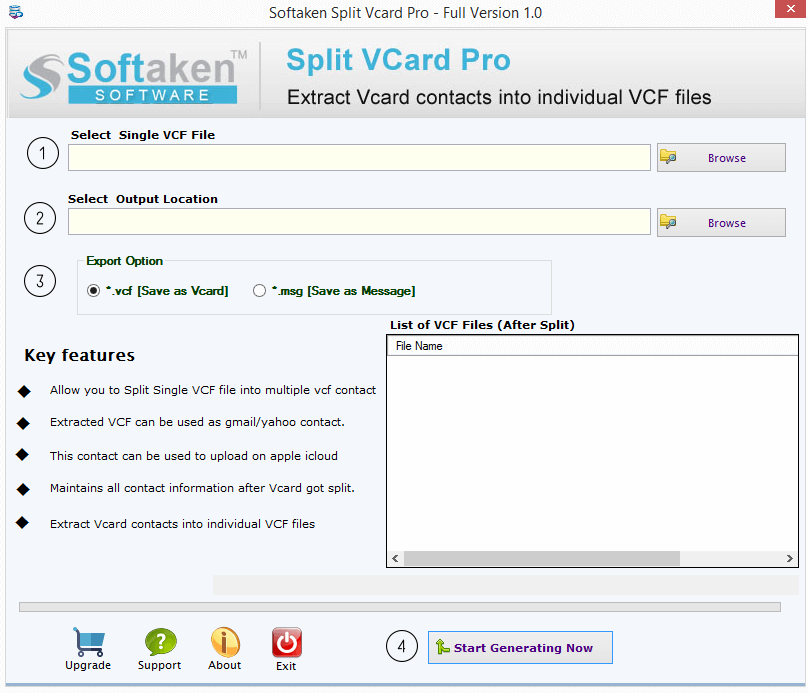
- Browse the VCF files to divide them.
- Choose a location to save the newly created file.
- Click the Convert Now button to start contact processing.
Features of Professional Software:
Here are some simple features of the software:
- It lets you divide a large vCard file—which contains contact information—into smaller, easier-to-manage parts.
- The personal data stays confidential. Not a single thing disappears or changes throughout the process of division.
- The program is user-friendly and has a straightforward interface that is devoid of the required technical knowledge.
- It splits the file quickly; hence, users won't have to wait long.
- This utility handles all users' needs to divide the file; no other program is required.
- There is also a free trial version of this software available to the users.
In essence,
Simplifying contact management, sharing, and importing by breaking a big vCard file into smaller, smaller files is quite beneficial. Both approaches can help to divide big files into smaller, simpler-to-manage parts, whether users decide to utilize professional software for more extensive capabilities or an internet application for an instant solution.
About the Creator
Enjoyed the story? Support the Creator.
Subscribe for free to receive all their stories in your feed.
Comments
There are no comments for this story
Be the first to respond and start the conversation.