
How to Convert a YouTube Video to Study Notes
YouTube Video to Study Notes


YouTube has become one of the most useful learning platforms online. Whether you are studying programming, science, history, language lessons, marketing, or exam preparation, there is usually a video explaining the exact topic you need. The problem starts later, when you want to review the information again.
Most people end up scrubbing through the timeline trying to find one important sentence they remember hearing earlier. A tutorial may contain one step you forgot, a lecture may explain a difficult concept perfectly, or an interview may include a useful quote worth saving. Finding those moments again can take longer than expected.
That is why transcripts are becoming more useful for students, researchers, and everyday learners. Instead of replaying the same video repeatedly, you can turn spoken content into searchable text. Once the information becomes text, it becomes much easier to highlight key points, organize ideas, and create proper study notes.
A good YouTube transcript generator can make that process much faster and easier.
Why Transcripts Help With Studying
Watching a video is useful for understanding concepts the first time. Reading text is often better for revision and review. A transcript gives you something you can search, scan, and organize.
For example, if a one-hour lecture mentions a formula or important definition halfway through the video, you do not need to drag the timeline around trying to find it again. You can search for the exact keyword in the transcript and jump directly to that section.
This becomes especially useful for:
- Online courses
- Technical tutorials
- Research interviews
- Language learning videos
- Exam preparation
- Webinar recordings
- Educational podcasts uploaded to YouTube
Instead of relying only on memory, you create study material you can return to later.
Start With YouTube’s Built-In Transcript
Before using any external tool, it is worth checking whether the video already includes captions. Many YouTube videos have automatic subtitles or creator-uploaded captions.
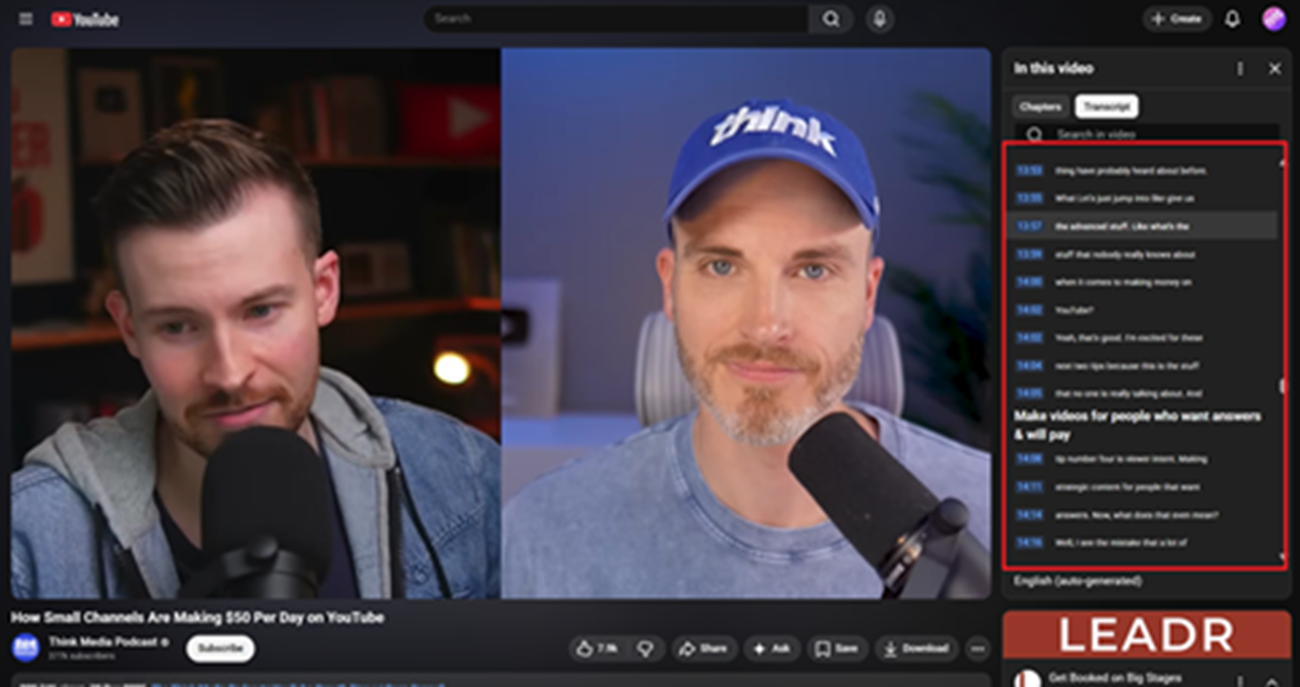
To view them, open the video and look for the transcript option near the description or menu area. If available, YouTube will display the spoken content line by line beside the video.
This works well for short videos or quick reference tasks. You can:
- Read along while the video plays
- Click a line to jump to that section
- Search for keywords manually
- Copy important lines into notes
For many learners, this is enough for simple studying.
However, YouTube transcripts are not always clean or complete.
The Problem With Raw Transcripts
A transcript is useful, but it is still only raw text. Auto-generated captions often contain mistakes, especially with:
Technical terms
Names and places
Fast speech
Accents
Formulas and numbers
Poor audio quality
Long videos can also become difficult to review because the transcript appears as one large block of conversation instead of organized notes.
That means you still need to clean the text, summarize ideas, and organize important sections yourself.
This is where a dedicated YouTube transcript generator becomes more practical.
Using a YouTube Transcript Generator for Better Notes
A YouTube transcript generator helps turn spoken content into editable text that is easier to study from.
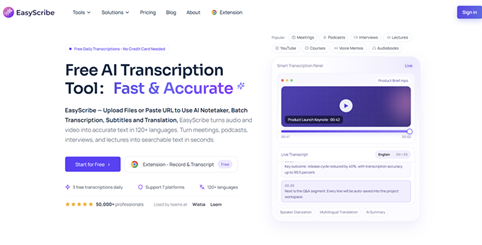
Instead of manually copying captions into another document, you can generate the transcript directly from the video link and work from there.
Tools like EasyScribe simplify this workflow by allowing users to:
- Paste a public YouTube URL
- Generate readable transcripts
- Edit incorrect lines
- Keep timestamps when needed
- Create summaries
- Export notes for later review
This saves a large amount of time when working with long lectures or educational videos.
Step 1: Copy the Video Link
Start by opening the YouTube video you want to study.
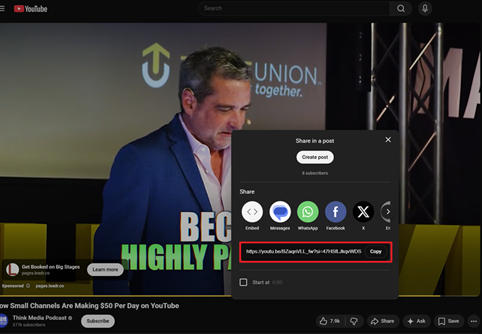
Copy the full video URL from the browser address bar or use the Share option provided below the video player.
Make sure you use the direct video link itself rather than a playlist or channel page.
The video also needs to be publicly accessible. Private or restricted videos may not work properly with transcription tools.
Step 2: Generate the Transcript
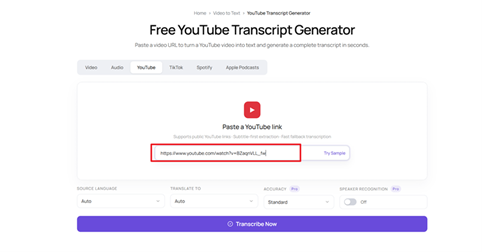
Paste the video URL into the YouTube transcript generator.
If subtitles already exist, the tool may use them first. If not, it can generate a transcript directly from the spoken audio.
The quality of the final text depends heavily on the clarity of the audio. Videos with strong background noise, overlapping speakers, or unclear pronunciation may require additional editing afterward.
Still, even an imperfect transcript is usually much easier to review than repeatedly replaying the video.
Step 3: Clean Up Important Sections
Once the transcript is ready, read through the important sections carefully.
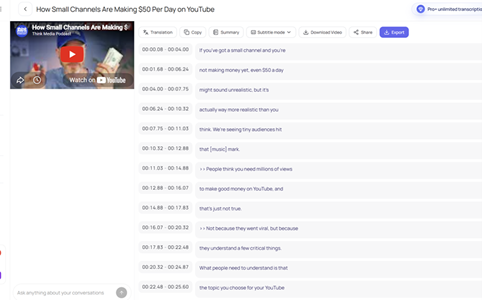
This part matters more than many people realize. Before turning the transcript into final study notes, verify:
- Technical terminology
- Names and spelling
- Dates and statistics
- Quotes
- Equations or formulas
- Research references
Even accurate transcription systems can occasionally misunderstand certain words.
For casual studying, small errors may not matter much. For research, assignments, or exam preparation, checking the details is important.
Step 4: Turn the Transcript Into Study Notes
This is where the transcript becomes genuinely useful.
Instead of keeping everything as one long document, organize the information into sections you can actually review later.
A practical structure usually includes:
- Main topic headings
- Key concepts
- Definitions
- Important quotes
- Examples
- Summary points
- Questions to revise later
Some learners also keep timestamps beside important explanations so they can quickly revisit the original video if needed.
This process transforms passive watching into active learning.
Why This Method Works Better
Most people forget large portions of a video after watching it once. That is normal. Videos are excellent for explaining ideas visually, but they are not always ideal for quick review.
Study notes solve that problem because they reduce long explanations into smaller, searchable information.
A transcript acts as the bridge between video content and written learning material.
Once the information becomes text, you can:
- Search it instantly
- Highlight key points
- Save important sections
- Translate content if needed
- Export notes for future study sessions
That makes learning more efficient, especially when working with long educational content.
Final Thoughts
YouTube contains an enormous amount of useful educational material, but reviewing videos later can become frustrating and time-consuming.
Turning spoken content into text makes studying much easier. If the built-in transcript works well, it may already be enough for quick review. If the captions are missing, inaccurate, or difficult to organize, a YouTube transcript generator provides a much cleaner workflow.
Instead of repeatedly replaying the same lecture or tutorial, you create study material you can search, save, and revisit anytime. Over time, that simple habit can make online learning far more organized and effective.
About the Creator
Sarah
With an experience of 10 years into blogging I have realised that writing is not just stitching words. It's about connecting the dots of millions & millions of unspoken words in the most creative manner possible.
Enjoyed the story? Support the Creator.
Subscribe for free to receive all their stories in your feed.
Comments
There are no comments for this story
Be the first to respond and start the conversation.