
How ChatGPT and AI Tools Are Transforming Video Production
ChatGPT and AI Tool


A video editor's most valuable resource is not another transition or visual effect. It is time to make better creative decisions. Yet much of video production still involves repetitive work: reviewing recordings, finding usable shots, organizing media, preparing rough cuts and adjusting content for different platforms. AI is beginning to change how these tasks are handled. Creators exploring ways to generate videos with ChatGPT can now connect conversational instructions with practical editing workflows through CapCut × Codex. The bigger development is not simply automated editing. It is a shift toward production systems where creative direction and intelligent assistance work together.
Video Production Is Becoming a Workflow Problem, Not Just an Editing Problem
A professional video rarely begins in the editing timeline. It starts with a business objective, an audience and a message that needs to be communicated visually.
Consider a company preparing a product launch campaign. The production team might record interviews, product demonstrations, behind-the-scenes footage and customer reactions. Each recording has potential value, but not every moment belongs in the final video.
Editors must identify useful material, establish a narrative, remove repetition and decide how the footage supports the campaign. When the same material needs to become a YouTube video, a short social clip and a promotional advertisement, the workload increases further.
This is where AI-assisted production becomes interesting. Rather than approaching every task independently, creators can use intelligent assistance to organize source material and prepare an initial editing structure.
The objective is not to automate creativity. It is to reduce the administrative work surrounding it.
What ChatGPT Brings to the Creative Process
ChatGPT can contribute to several stages before the footage reaches the editor. Its usefulness depends on how clearly the creator defines the project.
For example, a marketing team planning an educational video about cybersecurity could use ChatGPT to explore audience concerns, develop a content outline, prepare interview questions and organize the script into logical sections.
However, an effective production brief needs more than a script. It should explain what viewers need to understand and how the information should appear visually.
A useful planning document includes:
Audience profile: Who will watch the video and what do they already know?
Core message: What should viewers remember after watching?
Narrative structure: Which information belongs in the opening, main sections and conclusion?
Visual requirements: Which scenes need demonstrations, screen recordings, graphics, or supporting footage?
Publishing format: Is the final material intended for YouTube, social media, advertising, or internal communication?
This preparation prevents a common production mistake: creating attractive visuals without a clear connection to the subject.
ChatGPT can help develop these elements, but factual claims still require verification. Generated scripts should also receive editorial attention to remove repetition, unsupported statements and language that sounds unnatural when spoken.
CapCut × Codex: Moving From Editing Instructions to an Editable Draft
One of the more practical developments in this area is the connection between conversational AI instructions and an established video editing environment.
CapCut × Codex allows creators to upload existing footage and describe their intended edit using natural language. The workflow can review supplied clips, identify useful moments, remove unwanted sections, arrange selected footage and prepare an editable rough cut in CapCut.
This changes an important part of the editor's routine: preparing the first version of a timeline.
Imagine a creator recording a 30-minute interview for a business channel. The footage contains several useful answers, repeated statements, pauses and unrelated conversation. Instead of beginning with an empty timeline, the creator can provide instructions describing the desired subject, important moments, sequence and target duration.
The workflow helps organize the supplied material into a starting draft. The editor can then review the selection, restore important context, adjust timing and improve the narrative.
CapCut also describes template-matching capabilities within this workflow. These can help creators explore suitable starting points, although the final visual treatment should reflect the project's audience and brand.
The distinction is important: CapCut × Codex is designed to assist with footage review and rough-cut preparation. It should not be confused with a system that independently produces every finished video from a text prompt. <Cite refs={["turn854472search0"]}/>
Which Production Tasks Should Be Automated?
Experienced editors do not automate every available task. They identify where automation offers measurable value without weakening creative control.
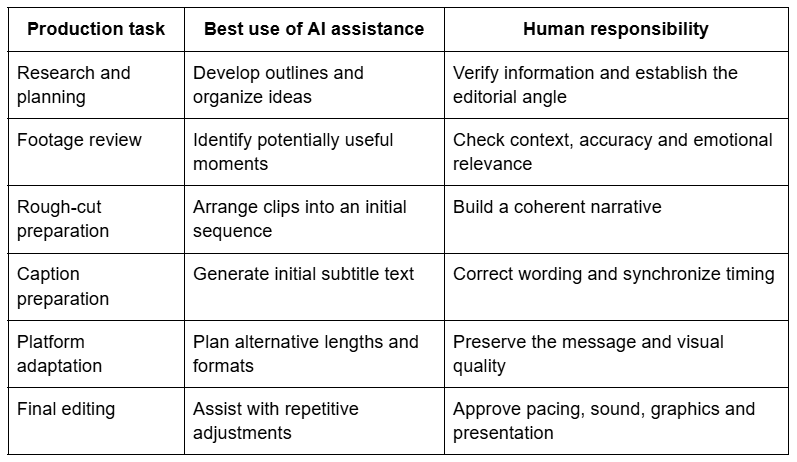
This division of responsibility is particularly useful for teams managing multiple projects. Automation can help standardize repetitive preparation, while experienced editors retain control over the decisions that distinguish one production from another.
The Advantages and Trade-Offs of AI-Assisted Video Production
AI tools can improve production efficiency, but introducing them without a clear process may create additional revisions.
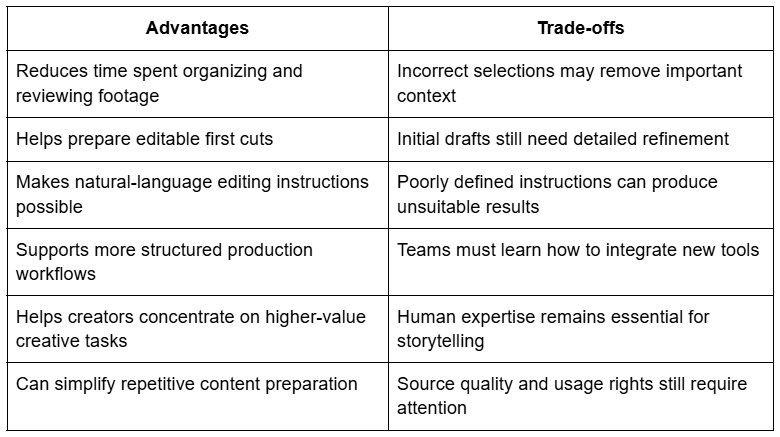
The strongest business case for AI editing is therefore not simply the number of minutes saved. It is the improvement in how production resources are allocated.
If an editor spends less time arranging basic footage, that time can go toward better interviews, stronger visual storytelling and more careful revisions. Those improvements can have a greater impact on the finished video than automation alone.
Why Editing Instructions Need More Than a Simple Prompt
Natural-language editing is convenient, but professional results require precise direction.
A request such as "create an engaging promotional video" leaves several important decisions unanswered. What is the main message? Which clips matter most? Should the opening introduce a problem or show the product immediately? How long should the final sequence be?
A stronger instruction might read:
"Create a 90-second product demonstration using the supplied footage. Open with the product in use, prioritize clips showing its three main features, remove repeated demonstrations and finish with the clearest closing shot. Keep the pacing suitable for a professional business audience."
This brief provides an objective, structure and editing priorities. It also gives the editor a practical standard for evaluating the first cut.
For larger projects, teams can maintain reusable instruction templates. A product demonstration, customer interview and educational explainer each need different editing priorities. Using a tailored brief for each format reduces confusion and unnecessary revisions.
Where AI Editing Can Go Wrong
The limitations of automated editing become obvious when a project depends heavily on context.
An interview may contain a short answer that makes little sense without the question preceding it. A product demonstration may include a visually impressive shot that fails to explain the actual feature. An automated selection could favor attractive footage while overlooking a less polished but more informative moment.
There are also practical considerations involving audio, privacy and licensing. Creators must check whether uploaded footage can legally and appropriately be processed. Music and third-party visuals require suitable usage permissions. Captions should be reviewed, especially when recordings include technical language or unfamiliar names.
Most importantly, editors should watch the complete exported video. A sequence can look convincing in individual sections yet feel disconnected when played continuously.
AI can help prepare the material, but the final quality check remains a professional responsibility.
Building a More Efficient Production System
The greatest benefit comes when AI becomes part of a repeatable production process rather than an isolated experiment.
A practical workflow begins with a clear creative brief. ChatGPT can help develop the outline, script and visual requirements. The team then organizes its source footage and prepares editing instructions. CapCut × Codex can assist with the initial rough cut, after which the editor refines the timeline, audio, captions, transitions, and overall presentation.
Once the project is complete, the team can review which parts of the workflow saved time and which required additional correction. Those observations can improve future briefs and editing decisions.
This approach is more useful than adopting automation simply because a new feature is available. Every tool should solve a specific production problem.
The Next Stage of Professional Video Creation
AI is not removing the need for experienced video professionals. It is changing where their time and attention are most valuable.
ChatGPT can support planning and content development, while connected workflows such as CapCut × Codex help creators move from supplied footage to an editable first cut. The final result still depends on the quality of the source material, the clarity of the instructions and the editor's ability to recognize what makes a video effective.
The production teams most likely to benefit are those that treat AI as a practical assistant rather than an automatic creative director. By combining intelligent preparation with human judgment, they can build faster workflows without compromising the standards that make professional video content worth watching.
About the Creator
Mohammad Akhtar
Mohammad Akhtar is an SEO and SEM Expert with over 10 years of experience in digital marketing and search engine optimization. A 2013 graduate of The Islamia University of Bahawalpur, he has worked with various IT companies.
Enjoyed the story? Support the Creator.
Subscribe for free to receive all their stories in your feed. You could also become a paid subscriber, letting them know you appreciate their work.
Comments
There are no comments for this story
Be the first to respond and start the conversation.