
How an AI Video Upscaler Can Restore the Details Worth Remembering
AI Video Upscaler

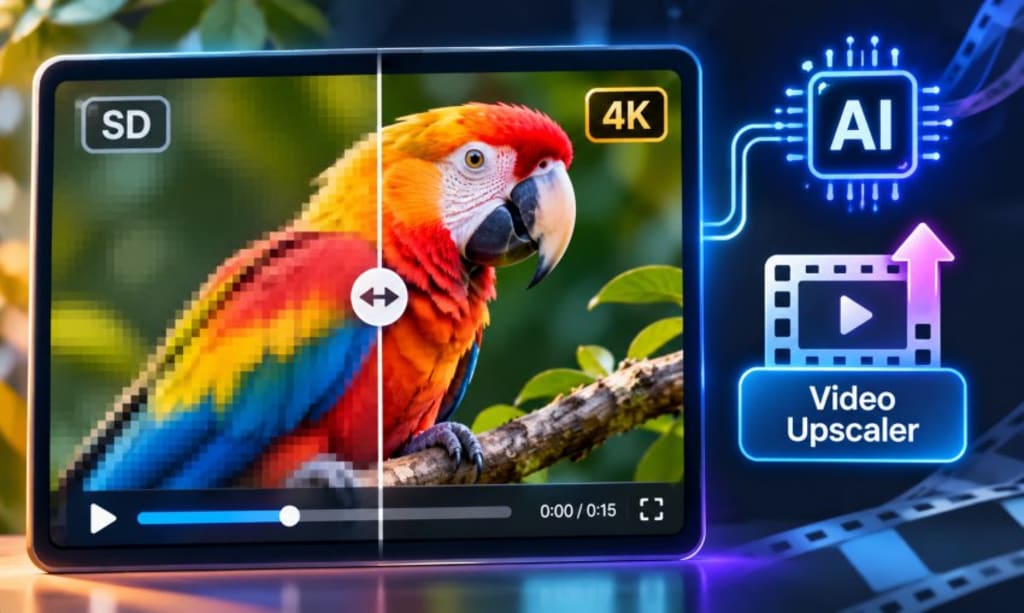
Some of the most memorable travel experiences never make it into professional photographs. They survive in short phone recordings, shaky clips and videos captured without much thought. Years later, those recordings can become surprisingly valuable. A familiar street, a family conversation, or the view from a hotel balcony may bring back details that photographs cannot. Unfortunately, older recordings often look disappointing on modern screens. An AI video upscaler can help improve their visual quality, giving old footage a more polished appearance without requiring an entirely new production.
The Problem With Footage That Has Been Sitting in Your Gallery
Most people record travel videos for immediate enjoyment. They rarely consider how those recordings might look five or ten years later. A clip that once appeared perfectly acceptable on a small phone display may now look noticeably soft on a laptop or television.
Older recording devices often had limited resolution and weaker image processing. Consequently, distant objects lacked definition, while low-light scenes contained visible grain. Some recordings also suffered from compression during sharing.
Travel footage presents another challenge. Unlike controlled studio recordings, holiday videos contain unpredictable movement, changing light and constantly shifting backgrounds.
Consider a recording from a coastal town. The camera moves between colourful buildings, passing pedestrians and the surrounding sea. Each element contains different textures and movement patterns. A low-resolution recording may struggle to preserve all these details.
However, deleting such footage would mean losing a record of an experience. Improving its appearance can make those recordings enjoyable again.
Why Resolution Is Only Part of the Problem
People often associate video quality with resolution. Although resolution matters, it does not explain every visual problem.
A recording can have relatively high resolution and still look unpleasant. Excessive compression, camera shake, poor lighting and motion blur can affect the viewing experience.
For example, increasing a blurry recording from 720p to 4K does not automatically restore its original detail. The software must estimate additional information from the available frames.
This distinction matters when choosing an enhancement method. Resolution improvement, noise reduction, sharpening and stabilisation address different problems.
An effective restoration process begins by identifying the weakness in the original recording. Otherwise, users risk applying unnecessary processing and creating unnatural results.
How AI Video Upscaling Approaches Old Footage
Traditional resizing methods enlarge existing pixels. Unfortunately, this can leave edges looking rough and textures appearing stretched.
AI-based super-resolution takes a different approach. Its models analyse visual patterns and estimate details that could improve the enlarged image.
Depending on the technology, the process can help refine edges, improve perceived sharpness and reduce certain compression-related imperfections.
The video introduces an additional challenge, though. Every frame belongs to a continuous sequence. Details must remain visually consistent as objects move across the screen.
Imagine a recording of waves reaching a beach. If enhancement changes the appearance of the water between consecutive frames, the result may flicker. Such inconsistencies can distract viewers, even when individual frames look impressive.
Therefore, I would judge an enhanced recording while watching the complete sequence. A sharp screenshot alone cannot establish whether the restoration succeeded.
Choosing Which Travel Videos Deserve Restoration
Before opening an editing application, I would review the entire collection. Not every recording needs enhancement and some clips offer better restoration opportunities than others.
Start with footage that contains a memorable subject and reasonably clear original information. A scenic landscape, a family gathering, or an important sightseeing moment makes a worthwhile candidate.
Next, separate recordings according to their condition.
Slightly soft footage: Often provides a useful starting point for resolution enhancement.
Compressed recordings: May benefit from improvements to visible blockiness and image clarity.
Low-light clips: Require particular attention to noise and colour accuracy.
Heavily blurred footage: May have limited improvement potential because important details are missing.
This selection process saves time and helps establish realistic expectations. It also prevents users from spending resources on recordings that cannot produce satisfactory results.
A Better Workflow for Restoring Old Travel Memories
Restoration becomes easier when approached as an organised editing project. Rather than processing an entire holiday archive immediately, I would follow a few practical stages.
Begin With the Best Available Original
Always look for the original recording before using an enhancement tool. Files downloaded from social media or messaging applications may contain additional compression.
An older phone, computer, memory card, or external drive might contain a better copy. Preserve that version before making any changes.
I would also organise recordings into folders based on destination and travel date. This makes comparisons easier and prevents original files from becoming mixed with edited versions.
Test a Short Section First
Choose a representative section containing different visual elements. Ideally, it should include movement, background details and areas with varying lighting.
Process that section before enhancing the complete recording. Then compare the original and improved versions at the same display size.
Look closely at faces, buildings, signs, trees and moving objects. These areas often reveal unwanted sharpening or artificial textures.
If the result looks unnatural, try different settings or reconsider whether the footage needs upscaling.
Complete the Final Edit After Enhancement
Once the visual quality looks acceptable, move towards assembling the final travel video.
Trim unnecessary sections, arrange scenes logically and adjust colours where needed. Keep transitions simple enough to preserve the atmosphere of the original recordings.
Audio deserves similar attention. Original conversations, waves, traffic and street sounds can make old footage feel authentic.
Adding suitable background music may improve the presentation. However, avoid covering sounds that carry personal meaning.
Where CapCut Fits Into the Restoration Process
Finding a suitable editing platform can be challenging for people who rarely work with video. Professional software sometimes offers more controls than casual projects require.
For this reason, accessible enhancement tools can make the process less intimidating. CapCut's video enhancement offering is one option worth examining when preparing older recordings for modern viewing.
The practical approach is to test the available upscaling functionality using a short clip first. Review the output carefully before committing an entire collection.
Pay attention to the available resolution settings, export options and any usage restrictions. These details can affect the final project just as much as the enhancement itself.
More importantly, avoid treating any software as a substitute for careful editing. The strongest result comes from combining suitable technology with sensible creative decisions.
Mistakes That Can Ruin an Otherwise Good Restoration
Overprocessing is probably the most common mistake. People sometimes assume stronger sharpening automatically produces better footage. In reality, excessive adjustments can create harsh edges and unnatural textures.
Another problem involves facial details. AI enhancement may estimate features that were unclear in the original recording. Therefore, inspect close-ups before sharing videos featuring family members or other identifiable people.
Colour correction also requires restraint. A beach should not look unnaturally saturated simply because stronger colours appear more impressive.
Similarly, do not confuse resolution enhancement with stabilisation or frame-rate improvement. These processes address separate technical issues.
Finally, preserve the original recording. An enhanced version should remain an additional copy, not a replacement for the source material.
Preserve the Experience, Not Just the Image Quality
A restored travel video becomes more meaningful when it tells a coherent story. Instead of combining random recordings, consider how the journey unfolded.
A road trip might begin with departure footage, followed by roadside scenery and memorable stops. A family holiday could combine sightseeing, shared meals and spontaneous moments.
Short captions can identify locations or dates without overwhelming the visuals. Meanwhile, original audio can help retain the atmosphere of each destination.
There is also value in creating shorter versions for relatives and friends. A carefully edited collection of memorable scenes often communicates more than an unnecessarily long compilation.
Once finished, store the original and enhanced versions separately. Keep another backup in a different location to protect against accidental loss.
Final Thoughts
Old travel footage carries something that newly created content cannot reproduce: a genuine record of moments that have already passed.
Although older cameras and compressed files can limit their appearance, those recordings do not necessarily belong in forgotten folders. Modern enhancement technology offers practical ways to improve their presentation.
The key is knowing what needs improvement and choosing an appropriate approach. Start with the original files, test representative clips and avoid processing that compromises natural details.
Ultimately, the goal is not to make every recording look professionally filmed. It is to preserve the atmosphere, people and places that made the journey memorable.
About the Creator
Mohammad Akhtar
Mohammad Akhtar is an SEO and SEM Expert with over 10 years of experience in digital marketing and search engine optimization. A 2013 graduate of The Islamia University of Bahawalpur, he has worked with various IT companies.
Enjoyed the story? Support the Creator.
Subscribe for free to receive all their stories in your feed. You could also become a paid subscriber, letting them know you appreciate their work.
Comments
There are no comments for this story
Be the first to respond and start the conversation.