
Don't Crop The Person Out Of The Story Cover
You already wrote the person. The letter on the kitchen table has a crease the first page spent time on, one hand holds the paper flat, and the cover is the picture a reader meets before that sentence.


You already wrote the person. The letter on the kitchen table has a crease the first page spent time on, one hand holds the paper flat, and the cover is the picture a reader meets before that sentence. The photograph still shows a phone charging in the window, a white cable, and a cereal box the prose never mentions. PicEditor AI is the browser editor for the narrower repair: erase that phone, and leave the person, the letter, and the table where the writing put them.
A tight crop looks decisive until the window, the hands, and the edge of the letter leave together. A looser line, the kind that only asks for a more dramatic kitchen, looks generous until the face is no longer the person who was sitting there. Both old fixes work on the clutter and then damage the subject. The cover that survives names a single object, keeps a check against the source file, and is discarded when the person comes back wrong. The source stays in the folder.
Why The Extra Object Steals The Cover
A story cover has the same job as the first page. The reader should meet the person the prose already named. A phone in the window has hard edges and a bright screen, so the eye goes there before it goes to the letter. The cable is a line the composition did not ask for. The cereal box reads as a second subject, a package the story is not about. None of those things is a plot point. They are leftovers from the room where the photo happened to be taken.
A cleaner cover can still break the piece when cleaning means cropping. The crop throws away a strip of the frame until the phone is outside it. When the phone sits near the hands, the strip includes the hands. When it sits near the letter, the strip includes the crease the opening described. PicEditor AI matters here as the place where the removal can be aimed at the leftover alone, so the person the story spent its pages on can stay in the chair.
What A Tight Crop Takes From The Written Scene
Cropping is honest about deletion, and the honesty is the cost. The new frame is smaller, and whatever fell outside it is gone, including parts that were doing narrative work. On this kitchen still, a crop that clears the window often clears the near hand, or it shaves the letter down to a white corner that could be a napkin. The title described a person reading. The cropped file shows a torso and a table edge. The rework is a reshoot, or a rewrite of the opening so the prose stops promising hands the picture deleted.
The Phone Leaves And The Hands Leave With It
Keep the example ordinary: a person, a letter, a wooden table, and a phone on the left of the window. The phone is sharp. At cover size the screen may even be unreadable, which makes it worse, because a reader still tries to decode a glow that will not resolve. The hands and the paper are what the page described. The phone is only where the charger happened to be, and a crop that clears the glow by cutting the left side clears the hands with it.
Removing the phone is a different task from retouching the person. The face, the sleeve, and the crease in the paper have to remain what was photographed. If the edit smooths a real knuckle or rebuilds a jaw, the cover has moved to a different sitter. That kind of drift is a wrong result even after the phone is gone. Compare the source and the pass, and look at everything except the phone. A soft patch where the cable crossed the sill is a failed pass too. It looks blurred beside wood that was in focus, and the eye stops on the patch instead of on the letter.
The rows are a way to choose. Crop when the object is already at the edge and the lost strip was empty wall. Use a vague restyle only when the story wants a new picture, and say so in the line you write. Use the named erase when the object sits on the part the cover needs, which is the usual case with a phone near a hand. If the pass changes the face, it has failed, and it does not get painted over inside the same file.
Name One Object And Keep The Person Seated

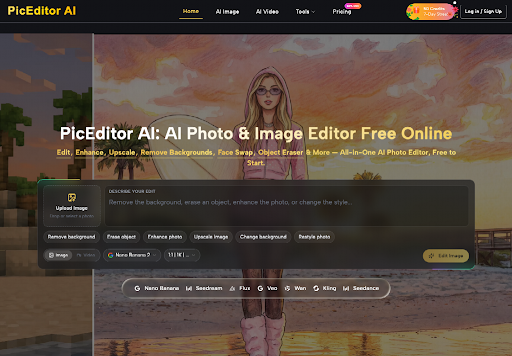
Erase object takes one thing and leaves the rest of the frame. On the page the still is uploaded, Erase object is the tool that gets picked, and the description uses ordinary words: the phone in the window, or the cable across the sill. The AI Photo Editor box already invites that kind of sentence. Its placeholder lists the jobs in plain language: remove the background, erase an object, enhance the photo, or change the style. For this cover the job is the second one, and the sentence should stay plain enough to check.
A line that says to remove the phone in the window and keep the person, the letter, and the table can be held up against the source. A line that only says to make the kitchen more dramatic cannot be checked, because dramatic is not an object, and it invites the edit to change the sitter, the light, and the hour. PicEditor AI is built around the first kind of line. The page is free to start: upload an image, select a modification tool, and describe the edit. Change background and Restyle photo sit on the same bar as separate buttons. Change background would replace the kitchen the prose named. Restyle photo would restyle the person along with the room if the line stays vague. Erase object is the button that matches a single leftover.
Upload The Still And Choose Erase Object
Upload image comes first. Stay on Image rather than Video, since this cover is a still. The model control on that bar shows Nano Banana 2, and the size control beside it reads 1:1 and 1K. Edit Image is the control that runs the pass once a file is in. The description does not need a biography of the person in the chair.
Write the description as three clauses, and stop there.
Name the object that leaves, and only that object.
Say where it sits, such as the phone on the left of the window.
Name what must stay: the person, the letter, and the table.
Two objects in one sentence give the pass two repairs to invent. Do the phone first. If the cable still bothers a later look, that is a second description on a copy. Each pass stays comparable to the source because only one thing was supposed to change. After it returns, look at the edges. A phone that overlapped the sill should leave wood, not a flat smear. A cable that crossed a sleeve should leave the fold. If the edge is mush, or a hand has gained a finger, the pass is wrong and it is discarded.
Set A Square Cover Before The Sharper File
When the cover needs to be square, the size control already shows 1:1, with 1K beside it. Set the square before you ask for a larger file. A wide frame that gets cropped later can repeat the damage of the tight crop: the person slides toward the edge and the hands fall off. PicEditor AI shows Nano Banana 2 selected on that bar. That model can output up to 4K, so the square can be chosen while the subject is still in the frame, and the sharper file can stay the same picture.
Ask Nano Banana 2 For Up To 4K
Up to 4K is the ceiling on Nano Banana 2, not a claim that every pass arrives at that size. The control a writer sees first reads 1K next to the 1:1 mark. Use that view to check that the phone is gone and the face still matches the source. When the check holds, the same model is the one that can go up to 4K. Nano Banana 2 also accepts reference images for guided editing. A second photograph of the same person, uploaded as a reference, gives the edit a face to stay with. That is the point of a cover that has to remain the sitter from the story.
Edited images include full commercial usage rights, so the cover can sit on a published story. Starter, Pro, and Unlimited each list No Watermark and a Commercial License. Unused credits roll over, and a plan can be canceled at any time. A clean file of the wrong sitter is still a file to discard. The rights let you publish the picture you checked.
Hand The Cover Over When The Person Remains
Hand the cover over when the named object is gone and the person, the letter, and the table still match the source. The check is a compare. Is the phone gone? Did the face, the hands, and the crease stay? Would a reader accept the repaired sill as part of the same photograph? If that answer is no, a removal that leaves a plastic patch is a failed cover. PicEditor AI produces the pass. You decide whether it may leave the folder by laying the source next to the result.
When the piece wants a drawn cover instead of a cleaned photograph, Photo to Illustration is the other named tool, and the description still has to say which person remains. A drawn tile fails in the same place as a photograph if the sitter changes. If the edge is soft, run one new description on a copy, or keep the original and let the title carry the scene. The story already named its person, so the cover only has to stop showing the phone.
About the Creator
Enjoyed the story? Support the Creator.
Subscribe for free to receive all their stories in your feed.
Comments
There are no comments for this story
Be the first to respond and start the conversation.