
Build a Cleaner DTF Maintenance Station: Separate Wet Cleaning From Production
DTF printer maintenance often starts with a simple task. An operator grabs cleaning fluid, swabs, gloves, and a few tools.

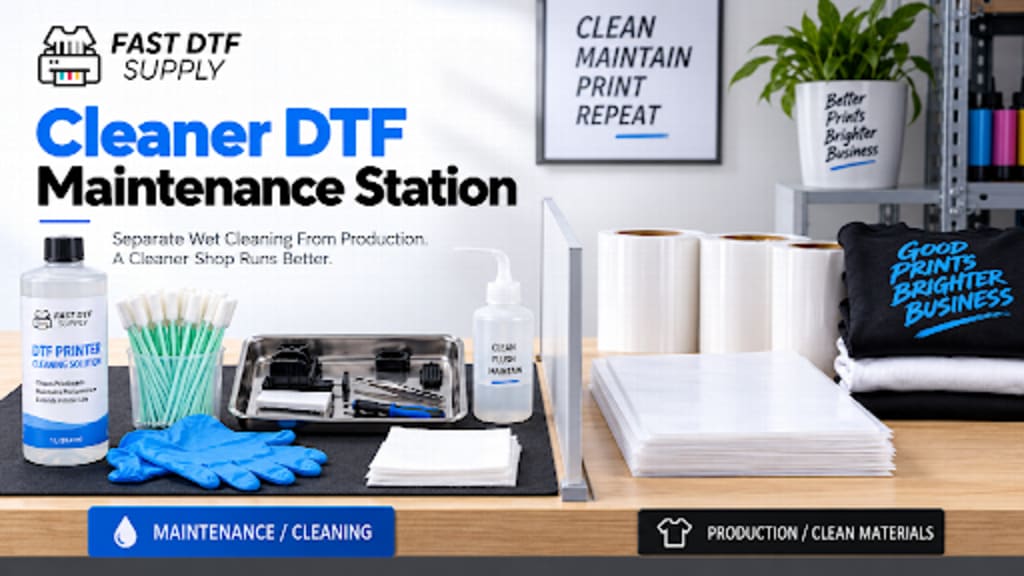
DTF printer maintenance often starts with a simple task. An operator grabs cleaning fluid, swabs, gloves, and a few tools. The problem begins when that work happens on the same table used for film, garments, paperwork, or finished transfers.
A dedicated maintenance station creates a cleaner process. It also makes routine printer care easier to repeat. The goal is not to build a large repair department. A small, organized space can be enough when every item has a clear purpose.
Why Wet Maintenance Needs Its Own Zone
Cleaning work is different from normal production. It may involve used swabs, ink residue, cleaning fluid, small printer components, and disposable materials. These items should not compete with clean film or finished apparel for the same surface.
Start by choosing one bench, cart, or section of a counter for printer care. Keep it close enough to the printer for practical maintenance. Do not place it directly in the normal film or garment path.
If your routine includes a DTF printer cleaning solution, store it in this maintenance zone. Follow the product instructions and the printer manufacturer's procedure. Do not treat one cleaning method as universal for every machine.
Separate Clean Tools From Used Tools
A maintenance station works better when clean and used items are easy to distinguish. Avoid throwing every swab, wipe, screwdriver, and small container into one drawer.
Create two simple areas. One holds unused maintenance materials. The other receives items that have already been used and need disposal, cleaning, or inspection.
Unused swabs and wipes
Approved cleaning materials
Machine-specific maintenance tools
Disposable gloves when required
Small trays for removed components
A clearly marked waste container
This reduces confusion during maintenance. It also helps the next operator understand what is ready to use.
Keep Film, Powder, and Garments Away
Production materials do not belong on the maintenance bench. That includes open film, powder containers, blank shirts, completed transfers, and packaging materials.
This separation is useful even when the shop is small. A rolling cart can work well if there is no room for a permanent bench. The important point is consistency. Maintenance should always happen in the same controlled area.
After the work is complete, return production materials only after the maintenance area is closed and the printer is ready for normal operation.
Use Small Trays During Printer Maintenance
Small components are easy to misplace. A screw, cap, connector, or cover can disappear quickly on a crowded table.
Use shallow trays or labeled containers when removing anything from the machine. Keep components grouped by the area they came from. This is much better than placing parts directly on the counter.
If an inspection shows that a component may need replacement, compare it against compatible DTF printer parts. Confirm the printer model, component specifications, connection type, and product information before ordering.
Do Not Turn the Maintenance Bench Into Storage
A clean maintenance station can slowly become a general storage shelf. That defeats its purpose.
Keep only frequently used printer-care materials at the station. Bulk inventory can stay elsewhere. Spare ink, unopened film, powder, boxes, and unrelated tools should have separate storage.
The work surface should remain mostly open. An operator should be able to start a maintenance task without first moving several unrelated items.
Create a Simple Start-and-Finish Routine
A maintenance station becomes more useful when every operator follows the same basic sequence.
Confirm the printer symptom or scheduled maintenance task.
Gather only the tools and materials needed.
Protect nearby clean production materials.
Follow the machine-specific maintenance procedure.
Place used materials in the correct waste area.
Return reusable tools to their assigned location.
Check the work area before restarting production.
This routine does not replace technical diagnosis. It simply keeps maintenance organized.
Record Unusual Maintenance Events
Routine cleaning may not need a long report. Unusual events should still be documented.
If an operator notices a repeated leak, damaged component, abnormal buildup, or another recurring condition, record it. Include the date, machine, area inspected, and action taken. Avoid relying only on memory.
This helps the shop distinguish a one-time cleanup from a problem that keeps returning. It can also make future technical support conversations clearer.
Keep the Station Ready for the Next Operator
The final step is a reset. Replace low supplies. Remove waste. Wipe the approved work surface when appropriate. Return tools to their labeled locations.
A maintenance station should look ready before the next job begins. That simple standard makes routine care faster and more predictable.
DTF production depends on more than printing speed. Clean maintenance habits also matter. By separating wet cleaning from production surfaces, shops can reduce clutter and make printer care easier to manage. The result is a workspace where maintenance feels like part of the workflow instead of an emergency interruption.
About the Creator
Enjoyed the story? Support the Creator.
Subscribe for free to receive all their stories in your feed.
Comments
There are no comments for this story
Be the first to respond and start the conversation.