
Best Practices for Developing Secure Legal Tech Apps: A 10‑Point Checklist for Lawyers and Technologists
Learn 10 essential best practices for developing secure legal tech apps, including encryption, MFA, compliance, secure coding, API security, and access control.

As a result of the increasing use of digital tools by lawyers to do their jobs, communicate with their clients, and protect sensitive data, Security is no longer something to add but rather a necessity. Legal technology solutions access personal information about clients, allow for safe communication between legal counsel and their clients, and contain records that must be protected under specific guidelines. Because of this, if you are part of an in-house counsel, a law firm technologist, a legal operations leader, or a software developer it's essential to understand how to create secure legal technology solutions so you can keep your relationships with your clients built on trust and within the limits of applicable federal and state law; as well as minimize risk to your firm as well as your client's firm(s).
This article provides a step-by-step 10-point checklist for legal and technology teams working together to build secure legal software from initial planning through to implementation and continued monitoring.
Why Secure Legal Tech Apps Matter
Before we begin the checklist, it is very important to understand that security should be an integral part of every phase of developing an app for the legal profession. Legal apps typically process highly sensitive (and often confidential and regulated) information. If a data breach occurs, there may be significant financial loss as well as ethical and reputational implications, risk of malpractice claims, and risk of regulatory penalties. In addition, it is common for clients today to expect their law firms and legal departments to have appropriate security safeguards implemented.
Security controls extend beyond simply encrypting data and implementing firewalls, and should cover all phases of app development and use. In the checklist provided in this article, you will find a combination of technical methods, collaborative ways to work together, and compliance issues that will help ensure you have produced a secure legal app.
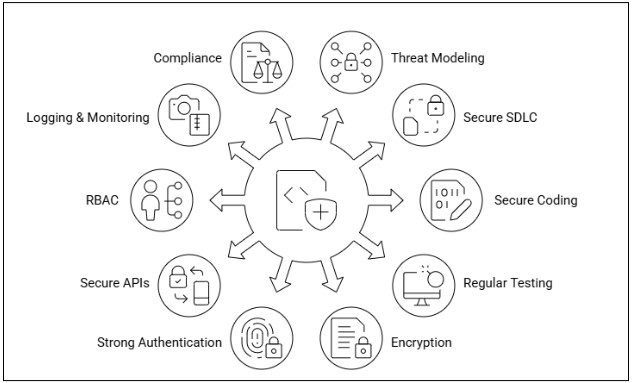
1. Conduct Threat Modeling Before Design
Before designing safe legal applications, you should think about what it is you are protecting and why. A structured process to identify possible security threats, the potential vulnerabilities of how your data will be accessed/used, and the points at which there is risk created for the app based on its intended use.
To accomplish this, start with:
- Mapping how data will flow in and/or out of the application. This includes how the data is ingested into the application, as well as the manner in which it is stored and transmitted through the backend/access via the application's database.
- Assessing Assets (identifying what types of assets (customer info, case history, documents, tokens for authentication, etc.) that you are protecting and any point where a user can access that asset)
- Identifying who will potentially attack your application and the way they will exploit it.
When legal and technical teams work together on threat modeling early in the project lifecycle, they can identify and plan for risks. Use the foundation of the Threat Model to assist in the decision-making process for items such as technology selection and logging policies. Threat modeling at the beginning of a project is much more effective than doing so after the project's development is complete.
2. Adopt a Secure Software Development Lifecycle (SDLC)
Every stage of development should include the integration of security into all areas of the development process (i.e., from requirements definition through to post-development). The Secure Software Development Lifecycle (SDLC) introduces security checkpoints, reviews, and validation processes as part of the standard development process.
Some examples of this include:
- Clearly defined security requirements included within the project kickoff process;
- Security risk assessments conducted throughout the development life cycle; and
- Adding some sort of verification tools into your development pipeline, such as coding scanners or dependency checkers, is part of the continuous Integration (CI) process.
These coding verification tools will help developers create secure technology by embedding security practices into their normal development activities, thereby eliminating the need for developers to take separate actions to ensure they are secure; security will become a natural part of the development process.
3. Apply Secure Coding Standards
Coding with security is more than creating efficient programs; it also includes coding in an effort to decrease the chance of having your code compromised. In order for developers to create secure applications, they will have to follow accepted secure coding standards as defined by groups such as OWASP. Following OWASP standards will help the developer avoid writing vulnerable code that allows for vulnerabilities to occur, such as SQL injection attacks, cross-site scripting (XSS), and insecure object serialization.
Some examples of how developers can reduce potential exposure include:
- Sanitizing the user input
- Using parameterized queries
- Avoiding insecure libraries
- Consistently validating output
If your company implements some type of application protection, then you will have reduced the chance for unauthorized access/changes to protected content and/or protected identifiers that are stored within either unprotected (unencrypted) or protected documents.
4. Conducting Regular Static & Dynamic Testing
Security testing should be conducted continuously and taken a proactive approach. Security testing is broken into two major categories:
- SAST (static application security testing) performed before actually executing the application - looks at the source code for vulnerabilities concerning security.
- DAST (dynamic application security testing) is an application security-testing method that finds security vulnerabilities in web applications while these web applications are running.
In addition to using both types of testing and automated testing tools on a regular basis (especially after code changes), heuristic approaches to finding any potential vulnerabilities will improve your chances of detecting vulnerabilities before they can be exploited. Using automated testing tools is also encouraged as part of the testing process; periodic manual assessments should be conducted to provide additional assurance for deeper assurance levels.
5. Use Encryption for Data In Transit and At Rest
Comprehensive implementation of data encryption, as one of the main security controls, is necessary for any legal application.
This includes:
- Use of TLS and/or HTTPS for all network communications
- Configuration of encrypted locally stored data, along with maintaining a strong key management process
- Utilization of the appropriate cryptographic standards in respect of data encryption.
Many legal applications could use/store PII and healthcare data (in some cases governed by HIPAA regulations depending on jurisdiction) as well as privileged information (attorney-client) that could be at risk of being accessed if a device and/or the database is compromised. Therefore, by encrypting specific types of information, you will reduce the amount of risk associated with having unauthorized access to such information.
6. Utilizing Multifactor Authentication (MFA) and/or Strong Authenticators
Authentication is often the first point of defense to restrict unauthorized access. When an organization utilizes multiple factors of authentication (MFA), it provides an extra layer of protection against unauthorized access by requiring a user to authenticate using multiple methods (i.e., authentication via password and a one-time PASScode).
Some of the best practices for using MFA include:
- Use strong password complexity requirements
- Use token-based authentication
- Implement session timeout policies
For remote access, attorneys may utilize MFA to limit their risks in the event of a data breach.
7. Secure APIs and Third‑Party Integrations
Numerous modern legal technology applications use API(s), as well as external services such as cloud storage or calendaring services, where every external integration widens the attack surface.
To alleviate that issue, companies should:
- Review third-party vendor's security practices.
- Use API Rate Limiting and Authentication Techniques.
- Monitor for vulnerabilities in dependencies.
- Regularly update libraries/plugins.
- Agencies/companies will connect via APIs to court systems, document repositories, and client portals, making API Security critical to the overall confidence and trustworthiness of any service in those agencies' interactions with agencies.
8. Enforce Role‑Based Access Control (RBAC)
Users of your application need to be granted different levels of access based on their role. The use of RBAC (Role-Based Access Control) enables you to define permissions by creating roles (attorney, paralegal, admin, client), which can be enforced using the principle of least privilege.
To accomplish this:
- Only show users what they need to perform their job
- Log and audit elevation of privileges
- Review access periodically
RBAC is used within legal environments to help protect confidential case file information or billing information from unauthorized access.
9. Maintain Logging, Monitoring & Incident Response Preparedness
Securing your assets is more than just ensuring they are safe from harm; it is also about the ability to quickly detect that something has gone wrong so that you are able to act swiftly. One way of doing this is by keeping track of what happens in your environment (through logging) and being able to monitor it for abnormalities (monitoring).
Some examples of best practices for detecting and responding to security incidents:
- Centralized storage of logs for analysis
- Alerts for suspicious activity
- Documented incident response procedures
Legal personnel must work with IT personnel/IT experts to define acceptable risk tolerances, an escalation protocol, and how to communicate the needed remediation actions should an incident occur against their company's assets.
10. Ensure Ongoing Legal & Regulatory Compliance
Security is frequently associated with legal/regulatory responsibilities. Applications may be subject to compliance depending on the country of origin and use case, such as:
- GDPR: General Data Protection Regulation (European geographical area)
- HIPAA: Health Insurance Portability and Accountability Act (U.S. health-related data)
- CCPA: California Consumer Privacy Act
In addition, each province and state has a defined set of rules for the conduct of the legal profession (Law Society/Bar).
Your organization’s legal and compliance teams should work closely with development teams to regularly review and update criteria for required compliance, as well as address all continuing obligations regarding secure data retention, consent management, and limits on the transfer of information across borders.
Practical Implementation Roadmap
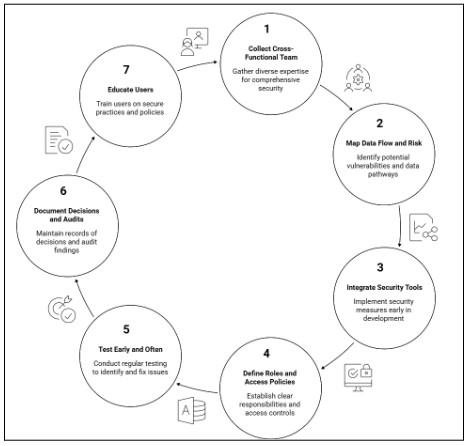
To develop secure legal technology applications, you should use a structured approach, not just checklists, but rather create policies for utilizing best practices; these policies should be utilized in combination with people, processes, and technology to create a roadmap for how to translate best practices into concrete action items that protect sensitive information while also furthering legal/business goals.
To use the 10-point security checklist effectively:
Collect a Cross-Functional Team
Ensure that legal, security, and development entities are included in all phases of your planning so that all aspects have been considered before the development phase begins. Technologists and attorneys must work together to provide compliant solutions in a secure manner.
Map Data Flow and Risk Up Front
Identify how data travels through your system; identify where vulnerabilities may exist, providing you with early visibility into these risks; which allows for an opportunity for risk mitigation and better design decisions.
Integrate Security Tools Early
Use tools available for development security from the initial phase of a project, such as static application security testing (SAST) tools, dynamic application security testing (DAST) tools, dependency analysis tools, and vulnerability assessment tools; use continuous testing throughout the application security life cycle to build security into the software development life cycle, not wait until the end.
Define Roles and Access Policies
Create clearly defined roles and least-privileged access for users of a system so that only authorized persons have access to perform actions. The establishment of proper governance removes the risk of unauthorized activities or inadvertent exposure of data that is sensitive.
Test Early and Often
Perform complete security testing throughout the design/development process, versus performing them only during the production process; Performing constant security testing can identify potential vulnerabilities before they can turn into major security breaches.
Document Decisions and Audits
Documenting all security decisions, configurations, and audits and maintaining standardized compliance records through structured document preparation processes will create a historical record for regulatory purposes and ultimately allow for a continuous path of improvement via auditing.
Educating Users on Secure Behaviors
Provide education for all users of a system (including participants in the legal process) on how to use the system securely and on possible threats to security. Enhancing system protection requires two ways of protecting users from becoming victims of cybercrime and malware. Creating end-user awareness increases the effectiveness of technical security controls and creates a reduction in human errors, which often cause the greatest percentage of security risks.
Completing each of these documented steps creates a consistent and defensible governance process that aligns the use of technology with potential liability exposure and the organization’s defined risk tolerance. By adopting a preventive and structured approach, your team can deploy legal technology in a manner that strengthens security posture while supporting ongoing legal and regulatory compliance.
Conclusion:
Creating secure legal tech applications is not a consideration; it is a necessity for protecting clients, being compliant with the profession’s standards, and maintaining their trust in their lawyer. Your firm, especially when working with a trusted software development company, will develop reliable, compliant, and resilient applications against current threats by utilizing the 10-Point Checklist referenced above.
Security is a joint responsibility between the lawyers who use technology-based applications, the experts who develop them, and the management team that operates them. They must all work together throughout all stages of the development process, from concept through delivery to ongoing maintenance.
About the Creator
iQlance Solutions - Python App Development Company
iQlance Solutions is a leading Python app development company delivering robust, scalable, and high-performance solutions tailored to meet diverse business needs. https://www.iqlance.com/python-development
Enjoyed the story? Support the Creator.
Subscribe for free to receive all their stories in your feed.
Comments
There are no comments for this story
Be the first to respond and start the conversation.