
Best Laptops for Student
A range of the best laptops tailored for students
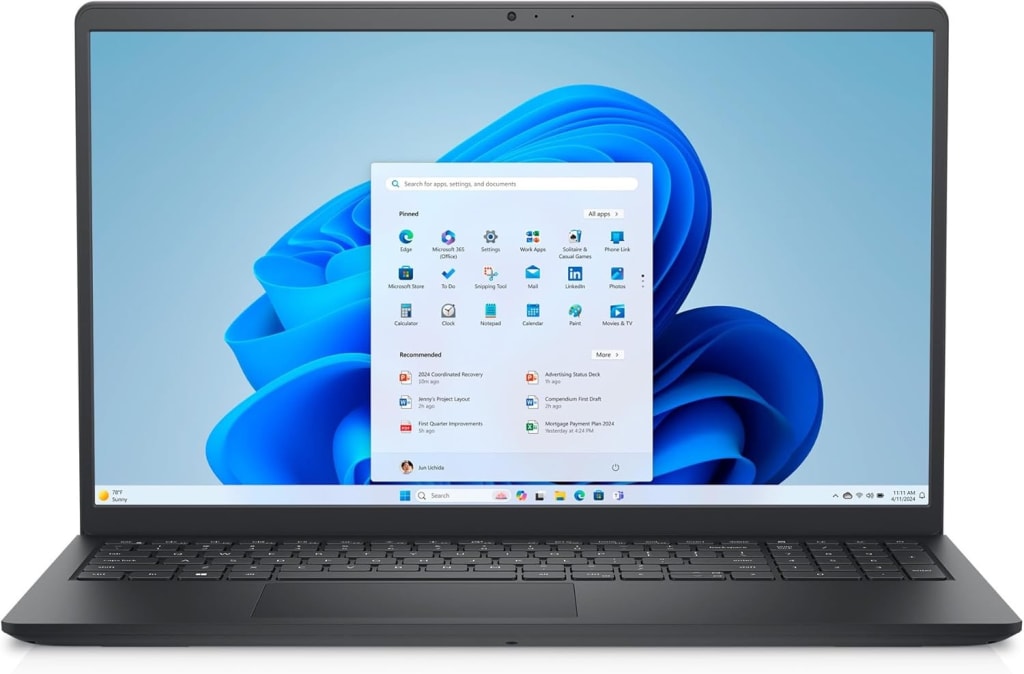
When it comes to choosing a laptop for university or school, students need a device that combines performance, portability, and affordability to meet the demands of both academic tasks and personal use. The Dell Inspiron 15 3535 offers a large 15.6-inch Full HD display and solid performance with its AMD Ryzen 5 processor, making it a great option for those who need a versatile, budget-friendly laptop for everyday tasks. For students who prefer a premium, sleek experience, the Apple 2024 MacBook Air with the new M3 chip delivers incredible power in a lightweight 13-inch design, boasting a stunning Liquid Retina Display, 24GB of unified memory, and a long-lasting battery for all-day use. Meanwhile, the ASUS Chromebook Plus CX3402CBA provides an affordable, cloud-focused option with its Intel i3 processor, Full HD display, and a reliable 10-hour battery, ideal for those who primarily use Google apps and online tools. Each of these laptops caters to different needs, whether it's power, portability, or cost-effectiveness, offering something for every student at any level of study.
The Dell Inspiron 15 3535 is a versatile and affordable laptop designed for students, professionals, and everyday users who need reliable performance for daily tasks, schoolwork, and light entertainment. With a 15.6-inch Full HD+ (1920 x 1080) display, the laptop offers a spacious and crisp viewing experience for everything from watching videos to working on documents or browsing the web. Its sleek Carbon Black design gives it a modern and professional look that will blend seamlessly into any environment.
1. AMD Ryzen 5 7520U Processor: Powered by the AMD Ryzen 5 7520U processor, the Inspiron 15 3535 delivers solid multi-tasking performance that can handle typical school tasks, office productivity, and light multimedia work. The quad-core processor with up to 4.3 GHz turbo speed ensures smooth performance when running multiple applications or working on more demanding tasks like video conferencing or light editing.
2. AMD Radeon Graphics: The AMD Radeon integrated graphics provide enhanced visuals for everyday tasks and some light gaming or multimedia activities. While not designed for high-end gaming or professional video editing, the Radeon graphics are sufficient for general use, streaming, and working with productivity software like Microsoft Office, Google Workspace, and web browsing.
3. 8GB RAM: With 8GB of RAM, this laptop offers solid memory for multitasking. Whether you're running several browser tabs, working on documents, or using productivity apps, the Inspiron 15 3535 ensures smooth performance without noticeable lag. This makes it ideal for students or professionals who need to juggle various applications at once.
4. 512GB SSD: The 512GB SSD provides a generous amount of storage space, allowing users to store documents, media files, and other data while benefiting from the speed and reliability of solid-state storage. An SSD ensures faster boot times, quicker file access, and an overall smoother user experience compared to traditional hard drives, making this laptop more responsive and efficient.
5. 15.6-inch Full HD+ Display: The 15.6-inch Full HD+ display (1920 x 1080) offers a spacious and clear viewing experience, making it perfect for both work and entertainment. The larger screen size is especially helpful for multitasking, allowing you to keep multiple windows open side by side, and is ideal for presentations, watching videos, or video calls. While it may not have the sharpness of higher-end displays, the clarity is more than sufficient for daily use.
6. Windows 11 Home: Pre-installed with Windows 11 Home, the Inspiron 15 3535 provides the latest in operating system features, including a streamlined interface, improved virtual desktop management, and better integration with productivity apps. Windows 11 also offers enhanced security features and support for the latest software, making it a great option for students and professionals alike.
7. Long Battery Life: The Inspiron 15 3535 offers decent battery life, allowing students to get through long hours of classwork, research, or online meetings without needing to constantly recharge. While exact battery performance will depend on usage patterns, it can typically last through a full day of moderate use.
8. Modern Connectivity: With a selection of USB ports, HDMI output, Wi-Fi 6, and Bluetooth 5.0, the Dell Inspiron 15 3535 ensures quick and reliable connectivity for your devices and peripherals. Whether you're connecting to a projector for presentations, using wireless peripherals, or streaming content, the laptop provides a range of options for seamless connections.
9. Keyboard and Build: The English keyboard is comfortable for typing out assignments, emails, or essays, and the laptop’s overall build is solid and durable, offering good long-term reliability. The Carbon Black finish adds a professional touch, making this laptop suitable for both home and school environments.
The Dell Inspiron 15 3535 15.6-inch laptop is an excellent choice for students, professionals, and anyone in need of a reliable, affordable laptop for daily computing tasks. Its AMD Ryzen 5 processor, 8GB of RAM, and 512GB SSD provide a solid balance of performance and storage, while the Full HD+ display ensures an enjoyable viewing experience. Whether you’re working on assignments, streaming media, or browsing the web, the Inspiron 15 3535 offers the reliability and features you need without breaking the bank. This laptop is a well-rounded, budget-friendly option for anyone seeking dependable performance for everyday tasks.
The 2024 Apple MacBook Air 13-inch with the M3 chip is a stunning combination of sleek design, powerful performance, and cutting-edge technology, making it one of the top choices for students, professionals, and creative individuals. Apple’s iconic MacBook Air continues to push boundaries, delivering a laptop that is not only ultra-portable but also incredibly powerful. Whether you're writing essays, editing photos, attending online classes, or simply enjoying media, this MacBook Air is designed to handle it all with ease. With the new M3 chip at its heart, a stunning 13.6-inch Liquid Retina display, and 24GB of unified memory, this laptop promises a smooth, efficient, and responsive experience for a variety of users.
1. M3 Chip: The M3 chip is Apple’s latest leap in performance, bringing enhanced processing power and energy efficiency to the MacBook Air. With its advanced architecture, the M3 chip provides incredible performance for demanding tasks, such as video editing, coding, and running complex applications, all while maintaining the ultra-portability Apple laptops are known for. The chip's 8-core CPU and 10-core GPU allow for smooth multitasking, high-speed rendering, and efficient performance across applications.
2. 13.6-inch Liquid Retina Display: The 13.6-inch Liquid Retina display is one of the highlights of the MacBook Air, offering vibrant colors, deep contrasts, and sharp detail. With True Tone technology and a wide P3 color gamut, this display ensures a visually stunning experience for photo and video editing, as well as everyday browsing. The thin bezels create an immersive viewing area while maintaining the compact form factor of the MacBook Air.
3. 24GB Unified Memory: One of the standout features of this MacBook Air is the 24GB of unified memory. Unlike traditional systems that have separate RAM and VRAM, Apple’s unified memory architecture allows all resources to be shared across the entire system, improving efficiency and performance. This means that even with multiple apps running simultaneously, the MacBook Air can easily handle complex tasks like editing large images, compiling code, or running virtual machines without slowing down.
4. 256GB SSD Storage: The 256GB SSD provides fast, reliable storage for all your files, apps, and media. Booting up the MacBook Air is near-instantaneous, and loading files or applications happens quickly, thanks to the fast read/write speeds of the solid-state drive. For those needing more space, the MacBook Air also supports configurations with higher storage capacities.
5. Backlit Keyboard & Touch ID: The backlit Magic Keyboard is perfect for working in low-light environments, providing comfortable and precise typing for long study sessions or work hours. Touch ID is another welcome addition, offering a quick and secure way to unlock the laptop, make purchases, and sign in to apps—all with the touch of a finger. It’s a great feature for those who value security and convenience.
6. 1080p FaceTime HD Camera: The 1080p FaceTime HD camera provides crystal-clear video calls, making it perfect for remote learning, virtual meetings, or staying in touch with family and friends. Apple has significantly improved webcam quality in recent years, and the 2024 MacBook Air ensures that you look your best even in low-light conditions, with better image processing thanks to the M3 chip.
7. Ultra-Portable Design: Weighing just 2.7 pounds (1.24 kg), the 2024 MacBook Air is incredibly lightweight and slim, making it easy to carry around campus or between meetings. Despite its slim profile, it packs impressive power, offering up to 18 hours of battery life, allowing you to get through a full day of work or study on a single charge.
8. macOS and Ecosystem Integration: Running macOS, this MacBook Air offers seamless integration with other Apple devices, including iPhones, iPads, and Apple Watches. Features like Handoff, AirDrop, and iCloud allow for a smooth, interconnected experience that enhances productivity and convenience. The macOS ecosystem is also known for its security features, ensuring that your data stays protected.
9. Color and Design: The Midnight color of this MacBook Air is a fresh and sophisticated addition to the Apple lineup, offering a sleek, dark aesthetic that’s both modern and elegant. The unibody aluminum construction gives the MacBook Air a premium feel and ensures durability without adding excess weight.
The 2024 Apple MacBook Air 13-inch with M3 chip is a powerhouse in a slim, ultra-portable form. Whether you’re a student, a creative professional, or someone who simply values exceptional performance and a premium design, this MacBook Air is built to deliver. With its powerful M3 chip, 24GB of unified memory, Liquid Retina display, and impressive battery life, it excels in both everyday tasks and more demanding applications. Coupled with the backlit keyboard, Touch ID, and 1080p FaceTime camera, the MacBook Air provides an all-encompassing experience that’s hard to beat. If you're looking for a laptop that blends portability, power, and style, the 2024 MacBook Air is an excellent choice.
The ASUS Chromebook Plus CX3402CBA is a sleek and affordable laptop designed to meet the needs of students, professionals, and anyone looking for a reliable, everyday device with a focus on cloud computing and efficiency. Featuring a 14.0-inch Full HD display, the Chromebook Plus offers a spacious, crisp screen for multitasking, research, and content consumption. Powered by the Intel i3-1215U processor, coupled with 8GB of LPDDR5 RAM and 128GB UFS storage, this laptop provides a smooth and responsive experience, particularly for users who rely heavily on web-based applications and productivity tools like Google Workspace.
1. Intel i3-1215U Processor: The Intel i3-1215U processor is a low-power chip designed for efficient, everyday computing. With its dual cores and quad-thread architecture, the i3-1215U can handle tasks like web browsing, document editing, streaming, and light multitasking without significant slowdowns. For users who need a reliable device for productivity-focused tasks and media consumption, this processor strikes the right balance between performance and energy efficiency.
2. 8GB LPDDR5 RAM: With 8GB of LPDDR5 RAM, the Chromebook Plus provides ample memory for basic multitasking. Whether you’re running several browser tabs, using cloud-based applications, or streaming videos, this amount of memory ensures smooth performance and reduces lag, even during extended work sessions. The use of LPDDR5 RAM (Low Power Double Data Rate) enhances energy efficiency, contributing to the overall battery life of the device.
3. 128GB UFS Storage: The 128GB UFS storage offers solid speed and capacity for storing essential files, apps, and media. While not as large as SSDs found in higher-end devices, UFS storage (Universal Flash Storage) delivers fast read and write speeds, resulting in faster boot times, quicker file access, and a more responsive user experience compared to traditional hard drives or eMMC storage.
4. 14.0-inch Full HD Display: The 14.0-inch Full HD (1920 x 1080) display offers a clear, vibrant viewing experience, making it perfect for tasks such as browsing the web, working on documents, video conferencing, and streaming content. The larger screen size compared to typical 13-inch Chromebooks gives users more real estate for multitasking, while the IPS technology ensures wide viewing angles and color accuracy.
5. Chrome OS: Running on Google’s Chrome OS, this Chromebook is designed for seamless integration with Google’s ecosystem of apps, including Google Drive, Docs, Sheets, and more. Chrome OS is lightweight, secure, and optimized for web-based tasks, making it perfect for users who rely on cloud storage and services. The operating system also offers fast updates and robust security features, ensuring that your device stays up-to-date and protected from threats.
6. Backlit Keyboard: The backlit keyboard is a valuable feature for students and professionals who often work in low-light environments. It ensures that typing remains comfortable and efficient, even when you're working late at night or in dimly lit spaces. The keyboard is also well-spaced, providing a satisfying typing experience for longer writing sessions.
7. Battery Life: One of the standout features of the ASUS Chromebook Plus CX3402CBA is its 10-hour battery life. Whether you're attending classes, working on assignments, or simply browsing the web, the Chromebook can last throughout the day without needing a recharge. This long-lasting battery life makes it an ideal companion for students and professionals who need a portable, reliable device to get through their workday.
8. Design and Portability: The ASUS Chromebook Plus CX3402CBA has a lightweight and slim design, weighing just around 3.2 pounds (1.45 kg), making it easy to carry around campus, to meetings, or between locations. Its compact size also ensures that it doesn’t take up too much space in a bag or backpack, providing the perfect balance between screen real estate and portability.
9. Connectivity: The Chromebook offers Wi-Fi 6 for fast, reliable internet speeds and supports a variety of ports for enhanced connectivity, including USB-C, USB-A, microSD card reader, and audio jack. This ensures compatibility with various peripherals, such as external hard drives, headphones, and displays, while the Bluetooth 5.0 support allows for wireless connection to devices like headphones, mice, and keyboards.
The ASUS Chromebook Plus CX3402CBA 14.0" Full HD laptop offers a compact, budget-friendly solution for students, professionals, or anyone who needs an efficient, cloud-centric device for everyday tasks. Powered by an Intel i3 processor, 8GB of LPDDR5 RAM, and 128GB UFS storage, it delivers excellent performance for web browsing, productivity, media consumption, and light multitasking. With its long-lasting 10-hour battery, backlit keyboard, and Full HD display, this Chromebook is a solid choice for users who value portability, ease of use, and reliable performance at an affordable price. Whether you’re working on assignments, attending online classes, or just enjoying some downtime, the ASUS Chromebook Plus is an excellent, no-fuss companion for modern life.
In conclusion, whether you're a student, professional, or casual user, each of these three laptops—Dell Inspiron 15 3535, Apple 2024 MacBook Air with M3 chip, and ASUS Chromebook Plus CX3402CBA—offers unique advantages tailored to different needs and budgets. The Dell Inspiron 15 3535 provides a well-rounded and budget-friendly option for those who require reliable performance for everyday tasks. The Apple MacBook Air with M3 chip delivers unmatched performance, portability, and premium design, making it perfect for users seeking a powerful, all-day laptop for productivity and creative work. Meanwhile, the ASUS Chromebook Plus offers a lightweight, cloud-based solution with excellent battery life and an efficient user experience, ideal for students or those who primarily rely on web-based applications. Each of these laptops stands out in its category, making it easier than ever to find the perfect device to match your specific needs and lifestyle.
About the Creator
Enjoyed the story? Support the Creator.
Subscribe for free to receive all their stories in your feed.
Comments
There are no comments for this story
Be the first to respond and start the conversation.