
AI Reverse Image Search: I Tested What AI Can Actually Find From One Photo
AI Reverse Image Search

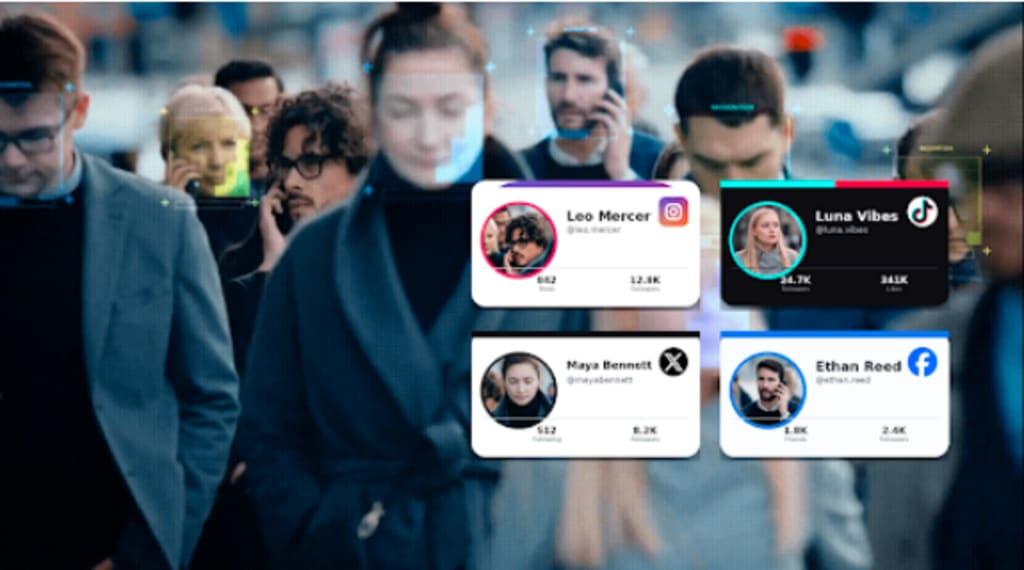
I uploaded the same photograph to several image-search tools with one simple question in mind: how much can AI actually learn from a picture?
The photo was deliberately ordinary. One person in the foreground, a building behind them, a few objects in the background, and no obvious username or caption to make the search easy.
What I got back depended almost entirely on the tool.
One search recognized objects in the scene. Another found photographs with similar compositions. Facial search approached the image differently and looked for potential social profiles where the same face might appear.
That experiment made one thing clear: AI reverse image search isn't really one technology doing one job.
Different tools can look at the same photograph and answer completely different questions.
I Started by Asking What Was Actually in the Photo
Before trying to find where the photograph came from, I wanted to see what an AI-powered visual search could understand about it.
The obvious details were easy: a person, outdoor setting, building, clothing, and a few background objects.
But some of the smaller details were more useful.
A visual search tool could recognize or suggest objects that might become separate search terms. Text inside an image can sometimes be extracted. A landmark or product may provide another route to the source.
If the goal were to identify a location, the building might matter most. If I wanted a product, an object in the foreground could be the useful part.
But my test had another question waiting.
What happens when the important part of the photograph is the person?
Similar Images Weren't Necessarily Useful Images
Next, I used conventional visual matching.
The results looked impressive at first.
I got images with similar framing, people photographed in comparable settings, and pages containing visually related content.
But visual similarity isn't the same as relevance.
Two photographs can contain a person standing in front of a building and still have absolutely nothing to do with each other.
If I wanted inspiration, similar objects, or another copy of the photograph, those results could be useful.
If I wanted to know whether the person in the picture had a public social profile, they weren't.
So I changed the question again.
I Asked AI Reverse Image Search to Focus on the Face
For the next test, I stopped treating the whole photograph as equally important.
I cropped the person more closely and used Face2social.
Face2social approaches visual search through facial characteristics. Rather than requiring the exact uploaded photograph to appear elsewhere, it can surface potential social profiles where a similar face appears in different images.
That's a significant difference for AI reverse image search.
Imagine that the photograph you have shows someone at a conference. Their Instagram profile might use a beach photo. Their Facebook account could use a studio portrait. Their TikTok profile might show a frame from a video.
Those pictures aren't visually similar as complete images.
The face is the common element.
The results gave me potential social-profile matches to review rather than a collection of photographs that merely resembled the original composition.
For this particular question, that was much more relevant.
One Photo Produced Three Different Kinds of Answers
At this point, I could divide my results into three categories.
The first was image understanding: identifying objects, text, places, or other visible elements.
The second was image matching: finding the same photograph or visually similar images.
The third was face matching: looking for potential appearances of the same face across different photographs.
None of those is automatically “better.”
They answer different questions.
But if I had a clear portrait and wanted to locate potential social profiles connected to the person shown, Face2social's approach was much closer to the task.
That is probably the most useful way to think about AI reverse image search: start with the answer you need, then choose the type of visual search that can realistically produce it.
AI Could Describe More Than It Could Prove
Another thing became clear during the test.
AI is very good at producing plausible interpretations of visual information.
That doesn't mean every interpretation should be treated as fact.
A system might suggest that a building resembles a particular architectural style. It might recognize an object incorrectly. Facial search might return someone who simply looks similar.
The more specific the conclusion, the more verification matters.
This is particularly important with faces.
A potential Face2social result is a lead, not confirmation that two photographs show the same individual. I still needed to compare public information, additional photographs, names, locations, and other details before deciding whether a result was relevant.
The same principle applies to visual AI more broadly.
A confident-looking answer isn't the same thing as verified information.
AI Search Is Also Changing How We Search Normally
One reason this experiment felt different from traditional reverse image search is that visual search is becoming less dependent on exact matching.
Google, for example, has increasingly combined images with additional queries through Lens and multisearch. Its documentation describes using a photo together with words to refine what you're looking for - such as changing the color of an object or finding related information about something visible in an image.
That matters because a photograph rarely contains only one possible search question.
You might want to know what an object is, where a scene is located, where else the picture appears, or who the face may be connected to publicly.
The image stays the same.
The query changes.
This is where the “AI” part of visual search becomes more interesting than simply uploading a file and receiving copies of it for advertising.
The Hardest Part Was Choosing the Right Question
My least useful searches weren't necessarily caused by weak technology.
Usually, I was asking the wrong tool to solve the wrong problem.
When I wanted to know more about an object, searching the face added nothing.
When I wanted another copy of the photograph, image understanding wasn't enough.
And when I wanted potential public profiles associated with the person, searching for similar full images created mostly noise.
Once I separated those goals, the results improved.
For AI reverse image search, I'd now define the question before uploading anything:
Do I want to understand what's visible?
Do I want to find this exact image?
Or do I want to search based on the face?
That decision can save more time than repeatedly uploading the same photograph to different tools and hoping one of them produces the right answer.
The Input Matters More Than I Expected
I also tested different crops of the same photograph.
The full image preserved context. That was useful when objects and surroundings mattered.
A tighter crop made the person more prominent.
For facial search, I got more useful results when the face was clear rather than a small part of a busy scene.
I wouldn't automatically crop every photograph before searching it.
I'd create the version that fits the question.
Keep the environment when you're investigating context.
Keep visible text when it may identify a place or event.
Focus on the face when facial similarity is the search signal you actually need.
One photograph can become several different queries without changing the underlying information.
Where Face2social Fit Best in the Experiment
Face2social was most useful at a very specific point: when I stopped asking where the original photograph appeared and started asking whether the face might appear in other social-profile images.
That is where conventional visual matching had reached its limit.
Using Face2social meant I didn't need the same portrait to have been reposted elsewhere. Different photographs could still become potential matches because the search was based on facial characteristics.
For me, that's the clearest practical difference between facial search and conventional reverse image search.
One follows the photograph.
The other can follow the face.
Neither removes the need to verify what you find.
What AI Reverse Image Search Is Actually Good At
After running the same photograph through different approaches, I stopped thinking of reverse image search as a single feature.
It's closer to a toolbox.
One tool can help identify what's in a photograph.
Another can locate copies or visually related images.
Facial search can narrow a search toward potential public profiles even when those profiles use different photographs.
That's what I'd do differently next time.
Before uploading a photo, I'd ask what I actually want back: an object, a source, context, or a potential profile.
Then I'd choose the search method around that goal.
Because the biggest lesson from testing AI reverse image search wasn't that AI can find everything from one photograph.
It was almost the opposite.
AI search becomes much more useful once you know exactly what you're asking it to find.
About the Creator
Gulshan
SEO Services, Guest Post & Content Writter.
Enjoyed the story? Support the Creator.
Subscribe for free to receive all their stories in your feed.
Comments
There are no comments for this story
Be the first to respond and start the conversation.