
A Small Business Workflow for Script-Based Product Videos
Script-Based Product Videos

Introduction
Video has become an important part of how small businesses introduce products, explain their benefits, and communicate with potential customers. From online stores and independent retailers to service providers and emerging brands, businesses increasingly use short videos to demonstrate what they offer. However, producing effective product videos can be challenging for companies with limited budgets, small teams, and demanding schedules.
One practical approach is to build videos around written scripts. Rather than beginning with a camera and deciding what to say during filming, businesses can plan the message first and then turn it into a visual presentation. This method makes production more organized, helps maintain consistent messaging, and reduces the time spent correcting unclear or incomplete content.
A script-based workflow does not necessarily require professional filming equipment or a dedicated production department. With clear planning, suitable visual assets, and accessible editing tools, small businesses can create useful product videos that support marketing, customer education, and online sales.
Understanding how to organize this process can help business owners produce content more efficiently without sacrificing clarity or quality.
1. Start With a Clear Purpose for Each Video
Before writing a script, a business should identify what the video needs to accomplish. Product videos can serve several purposes, and each requires a slightly different approach.
For example, an introductory video might explain what a product does and who it is designed for. A demonstration video may focus on showing how particular features work. A promotional video could highlight a seasonal offer, while an educational video might answer questions customers frequently ask before making a purchase.
Trying to communicate every possible detail in one video can make the content difficult to follow. A better approach is to establish one primary objective and build the script around it.
Small businesses can begin by considering three questions:
Who is the intended audience?
What information does that audience need?
What should viewers understand after watching?
A company selling kitchen equipment, for instance, might create separate videos explaining product features, demonstrating everyday use, and providing cleaning instructions. Each video addresses a specific customer need rather than combining several unrelated topics.
This planning stage also helps determine the appropriate video length, visual style, and distribution platform.
2. Choose a Product Feature Worth Highlighting
Once the objective is established, the next step is selecting the product information that deserves attention.
Customers are generally more interested in understanding how a product helps them than in hearing a long list of technical specifications. Although specifications can be important, they become more meaningful when connected to practical benefits.
Consider a small business selling reusable water bottles. Its product may have double-wall insulation, a leak-resistant lid, and a stainless-steel construction. Instead of presenting these details without explanation, the script could show how insulation helps maintain beverage temperature, how the lid reduces accidental spills, and why the material is suitable for regular use.
This creates a clearer relationship between product characteristics and customer expectations.
Businesses should prioritize information according to its relevance. A useful structure includes:
The main problem: Introduce a situation that potential customers recognize.
The product solution: Explain how the product addresses that situation.
Important features: Highlight two or three features that support the main message.
Practical application: Show how customers might use the product in everyday situations.
Next step: Encourage viewers to explore the product, visit the website, or learn more.
This structure keeps the video focused while giving viewers enough information to understand its value.
3. Write a Short, Conversational Script
A good product video script should sound natural when spoken aloud. Writing in a formal, brochure-like style can make narration feel artificial and reduce audience engagement.
Small business owners should use straightforward language, short sentences, and familiar expressions. The objective is to explain the product as clearly as possible rather than impress viewers with complicated terminology.
A basic script can be divided into five sections.
Opening Hook
The first few seconds should establish why someone should continue watching. This might involve introducing a common problem, asking a relevant question, or presenting an interesting product feature.
For example:
"Looking for a practical way to keep your workspace organized?"
This opening identifies a familiar need and creates a natural introduction to the product.
Product Introduction
The next section introduces the product and briefly explains its purpose.
Avoid including unnecessary background information. Viewers should quickly understand what the business is offering.
Main Features and Benefits
This is the central part of the script. Select the most relevant product characteristics and explain their practical importance.
Instead of listing ten features, focus on the details that influence customer understanding and purchasing decisions.
Demonstration or Application
Where possible, explain how the product works or how someone might use it.
A visual demonstration can communicate information more effectively than narration alone, particularly for products with physical components, assembly requirements, or specific operating instructions.
Closing Message
Finish with a simple next step. Depending on the video's purpose, this could direct viewers to a product page, invite them to explore available options, or encourage them to contact the business.
The closing should feel connected to the rest of the presentation rather than becoming an aggressive sales pitch.
4. Organize the Script Into Visual Scenes
A written script provides the message, but a product video also needs a visual plan. This is where scene organization becomes important.
Rather than treating the entire script as one continuous narration, divide it into smaller sections. Each section should have a corresponding visual that helps explain the spoken information.
This scene-by-scene approach makes production easier because everyone involved understands what needs to appear on screen.
It also identifies missing visual materials before editing begins. If the script mentions a particular feature but no suitable image or video exists, the business can arrange a simple product shoot or find an appropriate alternative.
5. Prepare Visual Assets Before Production
Visual preparation is an important part of an efficient workflow. Small businesses do not always need expensive cameras or professional studios, but they should organize their available materials carefully.
Useful assets may include:
Product photographs from different angles.
Short demonstration clips.
Brand logos and visual elements.
Screenshots of product interfaces, where relevant.
Background images or supporting footage.
Text labels highlighting important features.
Customer-approved product images or testimonials.
The visual materials should match the information presented in the script. If narration describes a particular product feature, the corresponding scene should make that feature easy to understand.
For physical products, natural lighting and a clean background can improve the appearance of simple smartphone recordings. For digital products, screen recordings and interface demonstrations may be more appropriate.
Businesses should also pay attention to image resolution, orientation, and consistency. Mixing low-quality photographs with sharp, professionally prepared graphics can create an uneven viewing experience.
Another consideration is asset ownership. Companies should use original materials, properly licensed stock footage, or images they have permission to publish. Customer photographs and testimonials should only be included with appropriate consent.
6. Turn the Script Into a Video Using Suitable Tools
Once the script and visual materials are ready, businesses can move into video production. Traditional editing software provides considerable control, but it may require time and technical experience.
For smaller teams, script-based production tools can offer a more straightforward starting point. These platforms can help transform written content into video sequences using selected visuals, text, narration, and editing features.
A business exploring a script to video maker for business can use this type of workflow to simplify the transition from written ideas to visual content. Instead of organizing every production element independently, users can work from an existing script and develop a video around its main sections.
The exact features and level of automation vary between platforms, so businesses should evaluate tools according to their actual requirements.
Important considerations include:
Ease of use: The interface should be understandable without extensive editing experience.
Script flexibility: Users should be able to revise wording, reorganize scenes, and adjust the presentation.
Visual customization: The tool should provide reasonable control over images, clips, text, and transitions.
Narration options: Businesses may need recorded voiceovers, text-to-speech functionality, or the ability to upload their own audio.
Export quality: The finished video should meet the resolution and format requirements of the intended platform.
Brand consistency: The editing process should allow businesses to maintain recognizable colors, logos, and visual elements.
It is also important to review the generated video rather than assuming that automated scene selection will always produce the correct result. Product details, visual accuracy, and narration timing still require human attention.
7. Create Consistent Branding Across Videos
Consistency helps audiences recognize a business across different marketing channels. When product videos share a recognizable visual identity, they can contribute to a more organized brand presentation.
Small businesses should establish a few basic visual guidelines before producing multiple videos.
These might include a consistent logo placement, a limited color palette, readable typography, and similar approaches to opening and closing scenes.
For example, an online clothing retailer might use the same introductory title style across videos while allowing product photography and background visuals to change according to each collection.
Branding should support the content rather than compete with it. Large logos, excessive animations, and multiple decorative elements can distract viewers from the product itself.
The same principle applies to narration. A business that communicates in a friendly and informative manner should maintain that tone across its product demonstrations, tutorials, and promotional videos.
Creating a reusable template can make this process easier. Once the basic structure is established, the team can replace the script, product images, and relevant details without designing every video from the beginning.
8. Review Narration, Timing, and Editing
A completed draft should always be reviewed before publication. Even a well-written script can produce an awkward video if the narration is too fast, visuals appear at the wrong time, or important details are difficult to read.
Start by checking the narration.
Read the script aloud and listen for sentences that sound unnatural. Technical terms, unfamiliar product names, and lengthy explanations may require adjustments.
Next, review synchronization between the audio and visuals. When narration introduces a feature, the relevant image or demonstration should appear at the appropriate moment.
Text overlays also deserve attention. They should reinforce important information rather than repeat every sentence spoken by the narrator.
Subtitles can improve accessibility and make videos easier to follow in environments where viewers cannot use sound. However, captions should be checked carefully for spelling, punctuation, and synchronization.
Background music should remain secondary to the narration. If the music makes spoken information difficult to understand, its volume should be reduced or the soundtrack replaced.
Finally, watch the video from beginning to end without stopping. This provides a better understanding of the overall viewing experience and helps identify unnecessary transitions, repeated information, and sections that feel too slow.
9. Adapt Videos for Different Marketing Channels
A product video may be suitable for several platforms, but its presentation may need to change according to the viewing environment.
For example, a detailed product demonstration on a company website may benefit from a wider format and additional explanation. A short social media video may need a faster opening and more compact narration.
Businesses should consider the following factors when preparing platform-specific versions:
Website product pages: Focus on product functionality, specifications, practical benefits, and demonstrations.
Social media: Prioritize an engaging opening, clear visuals, and concise messaging.
Email marketing: Use a short preview or video thumbnail that encourages recipients to visit the relevant product page.
Online marketplaces: Follow the platform's content guidelines and focus on accurate product representation.
Business presentations: Use a more explanatory approach that helps potential partners or customers understand the product.
Rather than creating entirely different videos for every platform, businesses can produce one main version and adapt selected scenes for other formats.
This approach helps reduce production time while keeping the central message consistent.
10. Establish a Repeatable Production Workflow
One of the biggest advantages of script-based product videos is the ability to repeat the process. Once a business understands how to move from an idea to a published video, it can create a standard workflow for future projects.
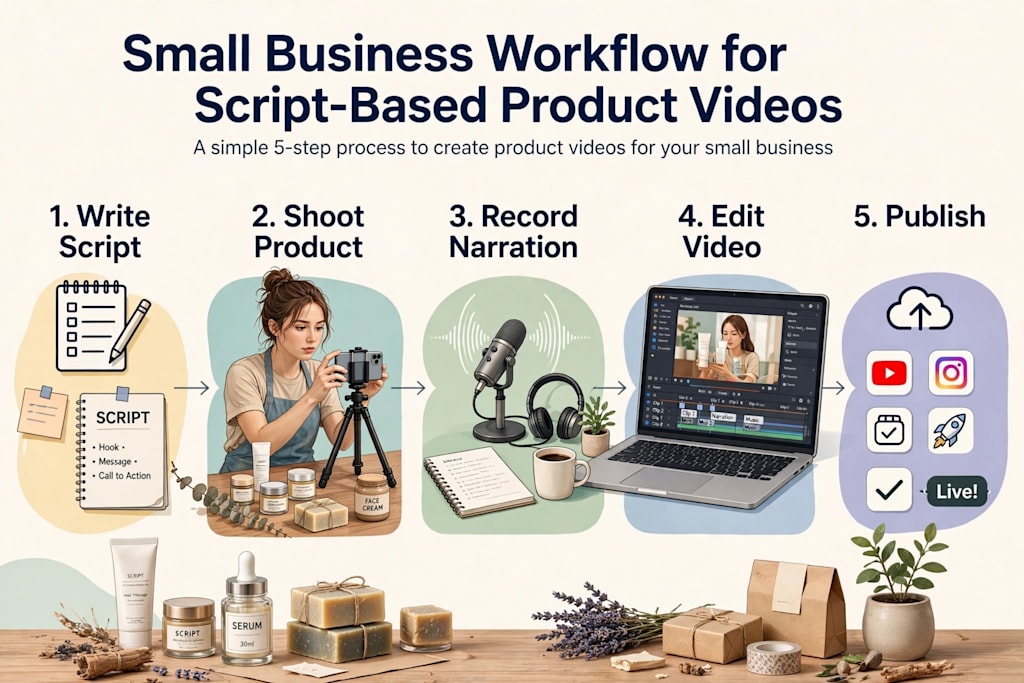
A simple production system can include the following stages:
Planning: Identify the product, target audience, video objective, and key message.
Writing: Prepare a concise script with an opening, product introduction, features, demonstration, and closing.
Scene planning: Match each script section with a visual requirement.
Asset collection: Gather product photographs, recordings, logos, and supporting graphics.
Video creation: Assemble the content using suitable editing or script-to-video software.
Quality review: Check narration, visual accuracy, timing, captions, and branding.
Publishing: Export the finished video and upload it to the appropriate marketing channels.
Performance evaluation: Review audience engagement and identify opportunities for improvement.
A shared project folder can help keep these stages organized. Businesses can maintain separate folders for scripts, original footage, approved graphics, audio files, exported videos, and final versions.
A simple tracking spreadsheet can also record production dates, product names, video formats, publication channels, and revision status.
This organization becomes increasingly useful when a company produces videos for several products or manages multiple marketing campaigns simultaneously.
11. Measure Performance and Improve Future Videos
Publishing a video is not the final stage of the process. Businesses should evaluate how audiences respond and use those observations to improve future content.
Different performance indicators provide different types of information.
Views and reach indicate how many people have encountered the content.
Average watch time helps show whether viewers remain interested.
Completion rate provides insight into how many viewers watch the video through to the end.
Click-through rate can help measure whether the video encourages viewers to visit a product page or another destination.
Conversions may indicate whether the content contributes to meaningful business actions, such as purchases, inquiries, or sign-ups.
These metrics should be interpreted in context. A short instructional video may be successful because it answers a customer question, even if it does not generate immediate sales. Similarly, a detailed product demonstration may receive fewer views but attract viewers who are more interested in purchasing.
Businesses can experiment with different openings, narration styles, video lengths, and visual arrangements. Making one or two changes at a time can help identify which adjustments have a meaningful effect.
Customer questions and feedback are also valuable sources of future video ideas. If several customers ask how to install, operate, or maintain a product, those questions may provide the foundation for another useful video.
12. Avoid Common Mistakes in Script-Based Product Videos
Although a structured workflow makes production easier, several mistakes can reduce the effectiveness of the finished content.
One common problem is trying to include too much information. Product videos should provide a clear explanation, not reproduce an entire product description or technical manual.
Another issue is relying too heavily on generic stock footage. Supporting visuals can be useful, but they should not misrepresent the actual product. Whenever possible, use original photographs and demonstrations.
Poor narration is another challenge. Unnatural wording, inconsistent volume, and excessive speaking speed can make otherwise useful content difficult to follow.
Businesses should also avoid unnecessary visual effects. Transitions and animations should help organize the presentation rather than distract from its message.
Finally, product claims must remain accurate. Videos should not exaggerate performance, imply unsupported benefits, or present features that are not included with the actual product. Clear and honest communication helps establish realistic customer expectations.
Conclusion
Script-based product videos provide small businesses with a practical way to organize video production and communicate product information more effectively. By starting with a clear objective, preparing concise scripts, planning scenes, and collecting suitable visual assets, even small teams can develop a repeatable content creation process.
The use of appropriate video production tools can further simplify the transition from written material to finished presentations. However, technology should support the creative process rather than replace careful planning, accurate product information, and human review.
Ultimately, an effective workflow is not necessarily the most complicated or expensive one. It is a process that allows businesses to produce clear, consistent, and useful videos within their available resources. With regular evaluation and thoughtful improvements, script-based video production can become a sustainable part of a small business's broader marketing strategy.
About the Creator
Gulshan
SEO Services, Guest Post & Content Writter.
Enjoyed the story? Support the Creator.
Subscribe for free to receive all their stories in your feed.
Comments
There are no comments for this story
Be the first to respond and start the conversation.