
A Practical Guide to Creating Faceless Videos With ChatGPT and AI Tools
ChatGPT and AI Tools

Producing a faceless YouTube video is not simply a matter of combining stock footage with an AI-generated voice. The real challenge lies in maintaining a clear narrative while making every visual serve a purpose. A ChatGPT video generator for faceless videos can support this process when creators combine AI-assisted planning with CapCut's editing environment. However, getting a professional result requires more than entering a prompt. It involves editorial judgment, a structured production workflow and a clear understanding of where automation helps—and where it can create problems.
The Production Mistake Most Faceless Channels Make
Many new creators approach faceless content as a volume game. They select a trending topic, generate a script, add unrelated stock clips, apply background music and publish. The process may produce a finished file, but it rarely creates a memorable viewing experience.
The problem is a lack of editorial direction.
A video about cybersecurity, for instance, should not rely on random footage of people typing on laptops. It needs visuals that explain actual risks, demonstrate security practices, or illustrate the consequences of weak protection. Similarly, a personal finance video needs meaningful figures, comparison, and examples rather than decorative footage of cash.
Professional production begins with a central argument. Decide what the video should explain, what evidence supports the explanation and which visuals make the information easier to understand. Once those decisions are made, AI tools become considerably more useful.
Use ChatGPT as an Editorial Assistant, Not a Replacement for Research
ChatGPT can help creators develop topics, organize research, prepare outlines and improve scripts. Its strongest role is assisting with the thinking and preparation that happen before editing.
Start with a specific subject rather than a broad category. For example, instead of requesting a script about artificial intelligence, narrow the subject to how small businesses can evaluate AI customer-support tools. This creates room for practical examples and meaningful comparisons.
A useful script should contain three elements:
A clear premise: Give viewers a reason to spend time on the subject.
Supporting information: Use examples, verified figures, demonstrations, or expert commentary.
A logical progression: Make each section contribute to the main argument.
Do not publish generated research without checking it. Statistics need reliable sources, product claims require verification and technical explanations should be reviewed by someone who understands the subject.
There is another important consideration: scripts written entirely in a polished AI style can sound strangely uniform. Rewrite generic openings, remove repeated explanations and introduce examples that reflect the actual audience. A natural voice is more valuable than an unnecessarily complicated vocabulary.
Design the Visual Sequence Before Opening the Editor
A strong script does not automatically translate into a strong video. The creator must decide how each section will appear on screen.
This is where a visual treatment becomes valuable. It connects individual lines of narration with specific footage, graphics, demonstrations, or screen recordings.
Consider a video explaining how online shopping scams operate. The opening might show a suspicious advertisement. The next section could demonstrate warning signs on a product page. A later sequence might use a simple graphic to explain payment risks. Each visual supports a different part of the explanation.
A practical production sheet can include the following:
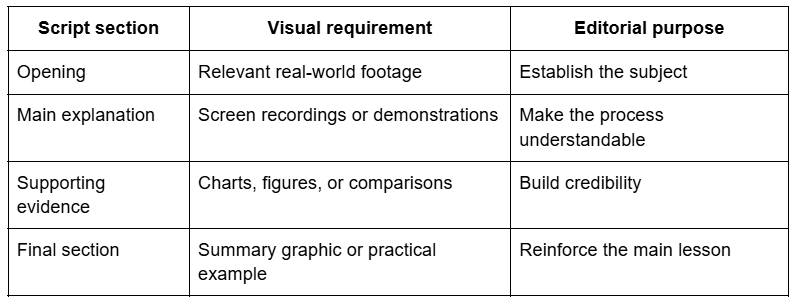
This planning stage prevents a common editing problem: reaching the middle of a project and discovering that the available footage cannot support the script.
Where CapCut × Codex Fits Into the Workflow
Once source footage is ready, the next challenge is reviewing clips and assembling an initial sequence. This can become time-consuming, especially when a creator records several takes or collects footage from multiple sources.
CapCut × Codex offers an AI-assisted approach to this stage. Its documented workflow allows creators to upload existing clips and describe the intended edit through natural-language instructions. It can review the supplied footage, identify useful moments, remove unnecessary sections, arrange selected clips and prepare an editable rough cut in CapCut.
The important distinction is that this is a first-cut workflow, not a promise of a finished YouTube video from a single prompt. Creators still need to assess the story, replace unsuitable shots, refine pacing and make final editing decisions.
For better results, give the workflow a proper production brief. Specify the target format, intended duration, preferred sequence and the role of each clip. If the opening needs to establish a problem before introducing the solution, explain that relationship instead of simply asking for an engaging edit.
CapCut's official product information describes this process as an editable workflow, allowing creators to continue adjusting structure, timing, pacing and creative direction. <Cite refs={["turn133902search0"]}/>
CapCut × Codex: Practical Pros and Cons
The workflow has genuine advantages, but it is not equally useful for every production situation. Understanding its strengths and limitations helps creators decide when to use it.
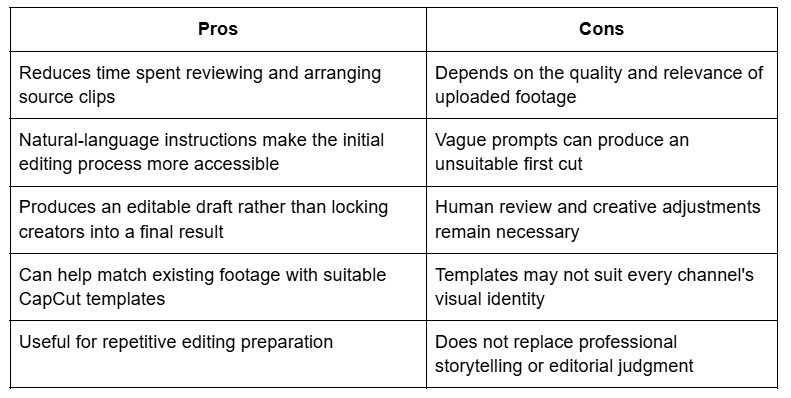
The greatest benefit is time saved during preparation. However, the value of that time depends on how effectively creators use it. Saving twenty minutes on clip arrangement means little if the final sequence still lacks a coherent story.
Build a Consistent Editing Style Without Making Every Video Look Identical
Consistency is important for channel recognition. Yet consistency does not mean using the same transition, background music and text animation in every upload.
A professional channel develops a visual language. This might include a restrained colour palette, readable typography, consistent caption placement and a recognizable approach to diagrams. These elements create familiarity without making every video feel copied from the previous one.
CapCut can help refine these details through its editing tools and templates. However, templates should be treated as starting points. Adjust their colours, timing, typography and transitions to match the subject.
Pay particular attention to the first thirty seconds. The opening should establish the video's promise and begin delivering on it quickly. Avoid lengthy logo animations or introductions that delay the actual subject.
Audio deserves the same attention. Narration should remain clear, background music should not compete with speech and sound effects should have a reason to exist. A clean audio mix often makes a video feel more professional than a large collection of visual effects.
The Pros and Cons of an AI-Assisted Faceless Video Workflow
Using ChatGPT and CapCut together can make production more manageable, but the overall method still requires planning and quality control.
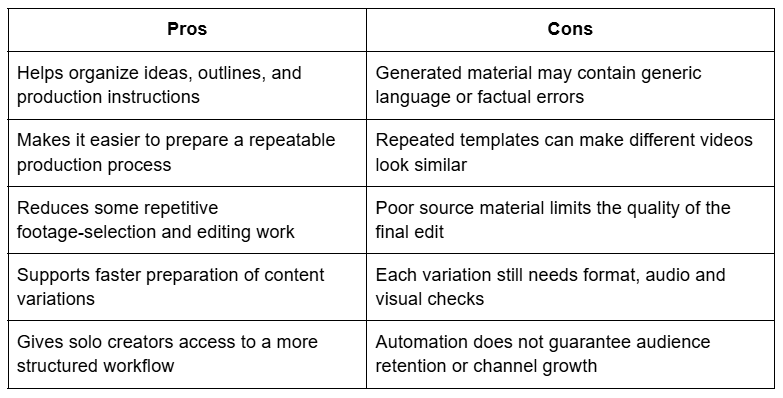
For creators publishing regularly, the biggest advantage is a more organized process. They can spend less time on repetitive setup and more time improving the subject matter, examples and presentation.
However, efficiency should never become the only production target. Publishing five weak videos is not necessarily better than publishing two well-researched ones. Audience trust develops through useful information and consistent quality.
Quality Control: What to Check Before Publishing
The final review should be treated as a separate production stage, not something squeezed into the last few minutes.
Watch the exported video from beginning to end. Check whether the visuals match the narration, whether captions appear at the correct moments, and whether transitions interrupt the flow. Listen for uneven volume, awkward pauses and background music that becomes distracting.
Also review the factual content. Verify figures, dates, names, product specifications and statements about other companies. If the video uses third-party footage or music, confirm that the licensing terms permit the intended use.
Finally, assess the video from a viewer's perspective. Does the opening create a clear expectation? Does the middle maintain momentum? Does the ending provide a useful conclusion rather than simply stopping?
These questions separate a technically completed video from a professionally produced one.
A Smarter Way to Produce Faceless YouTube Content
The most effective approach is to assign each tool a specific responsibility. Use ChatGPT to develop and refine the editorial plan. Prepare the script and visual requirements before collecting footage. Use CapCut × Codex to help organize existing clips into an editable first cut, then finish the project with deliberate editing decisions in CapCut.
This approach avoids expecting automation to solve problems that actually require creative judgment. More importantly, it creates a production process that can improve with every upload.
Faceless YouTube channels succeed when their content gives viewers a reason to stay. Better research, relevant visuals, controlled pacing and reliable information matter far more than the number of AI tools involved. Technology can make the production process more efficient, but professional judgment is what makes the finished video worth watching.
About the Creator
Mohammad Akhtar
Mohammad Akhtar is an SEO and SEM Expert with over 10 years of experience in digital marketing and search engine optimization. A 2013 graduate of The Islamia University of Bahawalpur, he has worked with various IT companies.
Enjoyed the story? Support the Creator.
Subscribe for free to receive all their stories in your feed. You could also become a paid subscriber, letting them know you appreciate their work.
Comments
There are no comments for this story
Be the first to respond and start the conversation.