
A Look at AI-Powered Background Removal Tools
The Evolution of Image Editing


https://digitalmagicwand.com/remove-background-from-image
In today’s visually driven world, the demand for polished, professional imagery spans industries. From e-commerce product listings to social media content, the ability to isolate subjects from their backgrounds has become a cornerstone of digital design. Among the tools emerging in this space is DigitalMagicWand, an AI-driven platform designed to streamline the process of background removal. While not the first tool of its kind, it offers features that align with broader trends in automated image editing. Here’s an exploration of what it brings to the table—and how it fits into the evolving landscape of creative software.
The Mechanics of Modern Background Removal
At its core, DigitalMagicWand relies on machine learning algorithms to distinguish between a subject and its background. This technology, often referred to as semantic segmentation, analyzes pixels to identify edges, textures, and patterns. The tool claims to prioritize precision, particularly in challenging scenarios like fine hair, translucent fabrics, or intricate shadows.
Precision Edge Detection
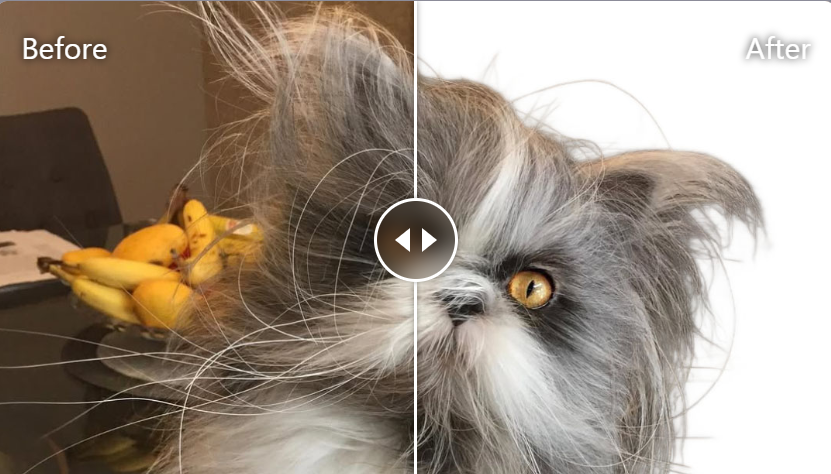
One of the standout features highlighted by the platform is its edge detection capability. Traditional background removal tools often struggle with complex edges, leaving jagged lines or “halo” effects. DigitalMagicWand’s algorithm aims to mitigate this by refining details at a granular level. For example, a user editing a portrait might notice that individual strands of hair remain intact rather than being cropped or blurred. Similarly, product photos with curved edges or reflective surfaces could retain sharper outlines.
This level of precision is not unique to the tool—similar advancements have been seen across competing software—but it reflects a growing industry standard for accuracy in automated editing.
Practical Applications Across Industries
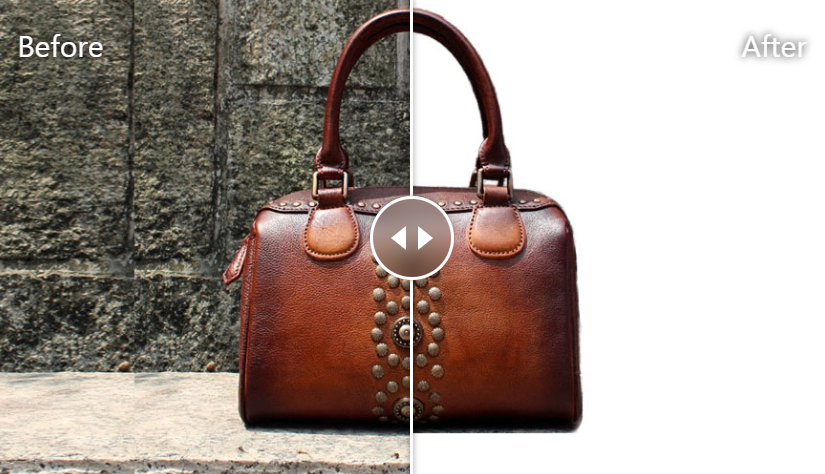
While the tool’s technical specs are noteworthy, its real-world utility lies in how different users might apply it. Below are hypothetical scenarios that illustrate its potential use cases:
E-Commerce Sellers: Small businesses or independent artisans often lack the resources for professional photo editing. A candle maker, for instance, could use the tool to remove cluttered backgrounds from product shots, ensuring their items appear uniform on marketplace listings. The preserved color accuracy and detail might help products stand out in crowded digital storefronts.
Content Creators: Social media managers or influencers frequently need to adapt visuals for different platforms. A food blogger might isolate a dish from a busy kitchen backdrop to create a minimalist aesthetic for Instagram, while a travel vlogger could swap out a dull sky in a landscape photo.
Graphic Designers and Illustrators: For those merging multiple elements into a composite image, clean cutouts are essential. An illustrator working on a digital poster, for example, might extract characters or objects to layer into a scene without manual masking.
Photographers: Event photographers under tight deadlines could use automated background removal to quickly prepare client previews, especially for headshots or studio-style portraits.
User Experience: Balancing Speed and Control
A key selling point for tools like DigitalMagicWand is their promise of efficiency. The platform advertises a one-click process: upload an image, let the AI process it, and receive a transparent-background PNG within seconds. For users with high-volume needs—such as an online retailer uploading hundreds of product images—this speed could significantly reduce workflow bottlenecks.
However, automation often comes with trade-offs. While the tool may handle straightforward images well, complex compositions (e.g., subjects overlapping with backgrounds, low-resolution files, or uneven lighting) might require manual touch-ups afterward. Some users might find themselves needing to adjust edges or refine details in secondary software like Photoshop, suggesting that the tool is best suited for quick drafts rather than final, publication-ready assets in certain cases.
Ethical and Practical Considerations
As with any AI tool, questions about data privacy and ownership arise. DigitalMagicWand’s privacy policy states that uploaded images are processed temporarily and not stored long-term, a critical assurance for professionals handling sensitive or proprietary visuals. Additionally, the platform’s credit-based pricing model (2 credits per image) positions it as a pay-as-you-go service, which could be cost-effective for sporadic users but less ideal for those with heavy editing demands.
Another consideration is accessibility. While the tool offers a free demo, users seeking consistent results may need to invest time in learning its limitations. For instance, images with high contrast between subject and background tend to perform better, while those with subtle tonal differences may yield less accurate results.
The Broader Context of AI in Design
DigitalMagicWand enters a market saturated with both standalone apps and integrated software solutions. Established platforms like Adobe Photoshop (with its “Select Subject” feature) and free alternatives like Remove.bg have set high expectations for speed and quality. What distinguishes newer tools often comes down to niche optimizations—whether for specific industries, file types, or pricing structures.
In this case, the platform’s emphasis on e-commerce-ready outputs suggests a deliberate focus on entrepreneurs and small businesses. The ability to quickly generate clean product cutouts could complement other tools in a seller’s toolkit, such as mockup generators or inventory management systems.
Final Thoughts: A Tool in a Growing Ecosystem
DigitalMagicWand exemplifies the ongoing shift toward democratizing design capabilities. By automating a task that once required specialized skills, it lowers the barrier to entry for individuals and businesses needing professional-grade visuals. However, its effectiveness depends largely on the user’s specific needs and the complexity of their projects.
For casual users or those with straightforward editing requirements, the tool could save time and reduce reliance on external freelancers. Professionals, on the other hand, might view it as a supplementary resource rather than a complete replacement for manual editing.
As AI continues to evolve, the line between automated and human-driven design will blur further. Tools like this one serve as a reminder that while technology can enhance efficiency, the creative vision behind the images—what to highlight, how to frame a subject, and why certain visuals resonate—remains inherently human.
DigitalMagicWand offers a free demo for users to test its capabilities, with image processing priced at 2 credits per use. For those exploring AI-driven editing, it’s one of many options worth trialing to gauge its fit within individual or organizational workflows.
About the Creator
George Thompson
George Thompson decodes AI apps with razor-sharp insight and everyday language. Once a UX designer, he now tests AI tools through both technical and human lenses, spotlighting what actually works versus what's just marketing hype.
Enjoyed the story? Support the Creator.
Subscribe for free to receive all their stories in your feed.
Comments
There are no comments for this story
Be the first to respond and start the conversation.