
How to Optimize Your Gaming Space with a Corner Desk
Gaming Space with a Corner Desk
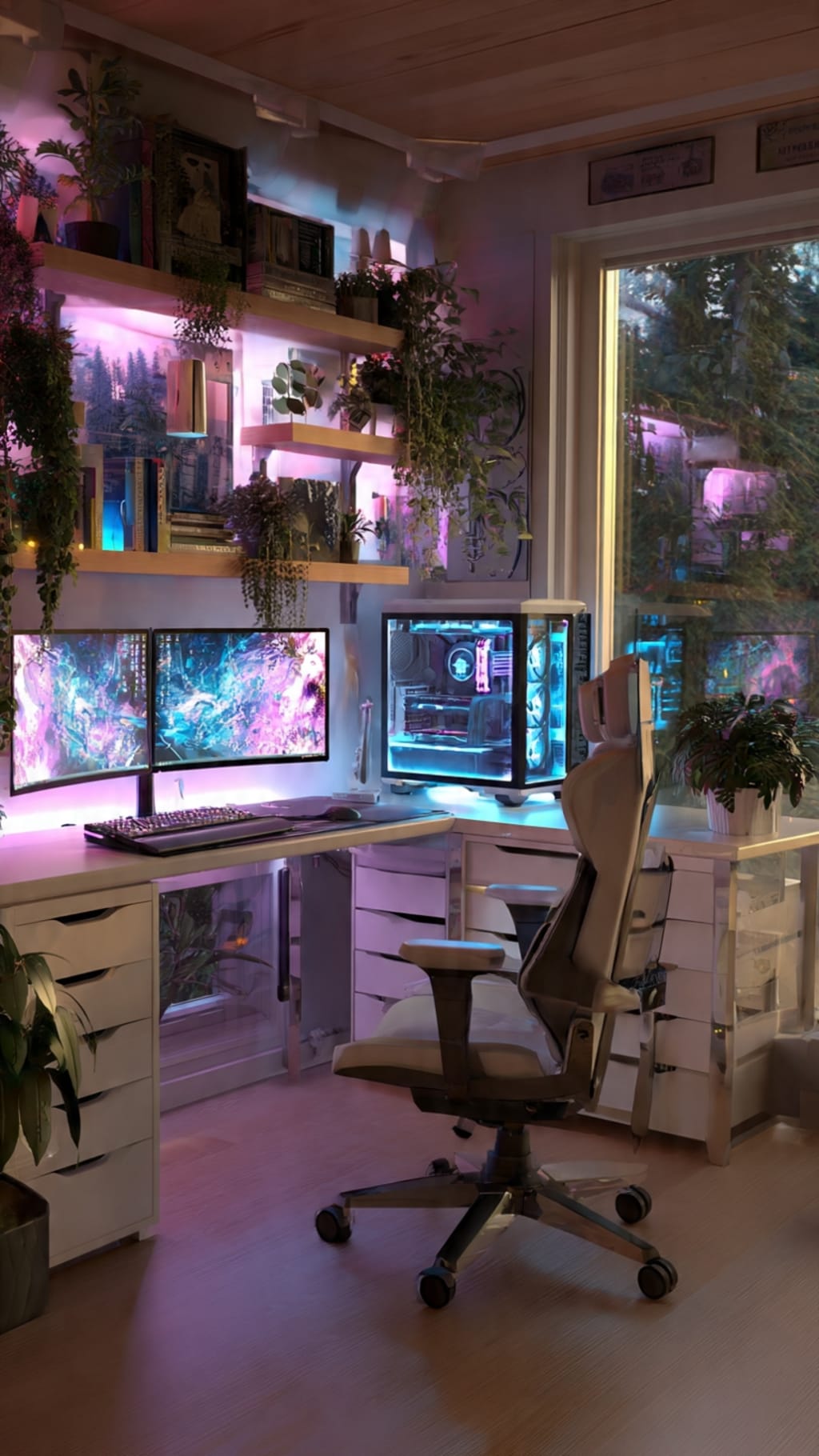
Every gamer knows the frustration of tangled cables, cramped desk space, and the nagging back pain that creeps in after hours of intense gameplay. A cluttered, poorly arranged gaming area doesn't just look chaotic—it actively undermines your performance and enjoyment. When your mouse runs out of room mid-fight or your monitors sit at awkward angles, immersion breaks and discomfort takes over. Corner desks offer a strategic solution that many gamers overlook. By tucking neatly into unused room corners, these desks transform dead space into a commanding gaming station while freeing up the rest of your room for movement and comfort. Beyond spatial advantages, the right corner desk supports ergonomic positioning that protects your wrists, neck, and spine during marathon sessions. This guide walks you through everything you need to know about choosing the ideal corner desk for your gaming needs, setting it up for peak efficiency, and accessorizing your station for total immersion. From space planning and ergonomic principles to gear arrangement and ambient lighting, you'll find actionable steps to build a gaming environment that looks professional and feels effortless to use.
Why Corner Desks Are Ideal for Gaming Setups
Most bedrooms and home offices have corners that collect dust or hold a forgotten plant. Corner desks for space-saving transform these neglected areas into powerful command centers without eating into your room's walking paths or living space. Instead of a traditional rectangular desk jutting out from a wall and dominating the room, an L-shaped or triangular corner desk hugs two walls simultaneously, anchoring your setup while leaving the center of the room open for a gaming chair's full range of motion or even VR play.
From a gaming setup enhancement perspective, the angular design naturally segments your workspace. One wing can host your primary monitor and keyboard for active gameplay, while the other holds secondary screens, streaming equipment, or a dedicated space for your tower PC. This separation keeps heat-generating components away from your hands and reduces visual clutter in your primary field of view. The wraparound surface also means every piece of gear—headset stand, controller dock, stream deck—has a designated home within arm's reach rather than stacked precariously on top of each other.
Space Efficiency and Organization
Corner desks typically offer 40 to 60 percent more usable surface area than standard desks of comparable footprint because they exploit depth in two directions. That extra real estate accommodates dual or even triple monitor setups without forcing screens to overlap your keyboard zone. Underneath, the open corner cavity provides natural room for a full-tower PC or a set of drawers without blocking legroom on either side. To maximize organization, mount a small pegboard on the wall directly above the desk's corner joint—this vertical space is perfect for hanging headphones, controllers, and USB hubs. Pair this with a desk-mounted shelf riser to create a second tier for speakers or webcam placement, keeping your primary surface clear for mouse movement and note-taking during strategy sessions.
Enhanced Immersion and Aesthetics
A corner placement naturally creates a cockpit-like feel that wraps your peripheral vision in screens and gear, pulling you deeper into game worlds. The two walls flanking your setup act as a canvas for themed décor—mounted shelves displaying collectibles, acoustic foam panels that double as visual accents, or framed artwork from your favorite titles. Adding LED strip lighting along the desk's rear edges and under shelves produces a soft backglow that reduces harsh contrast between bright monitors and dark walls, easing eye fatigue while setting an atmospheric mood. Smart RGB lights synced to in-game audio or visuals push immersion further, making explosions ripple across your room in real time. Because the corner setup concentrates your entire visual and auditory environment into a focused arc, even modest lighting and décor investments create a cohesive, professional-looking gaming zone that feels intentionally designed rather than thrown together.
Ergonomic Gaming Desks: Key to Comfort and Performance
Gaming sessions that stretch beyond an hour expose your body to repetitive stress that accumulates silently until pain becomes impossible to ignore. Wrist strain, lower back compression, and neck tension are not inevitable consequences of gaming—they're symptoms of a poorly configured workspace. Ergonomic gaming desks address these issues at their source by providing adjustable surfaces and thoughtful design features that align your body into neutral, low-stress positions. When your desk height matches the natural resting position of your forearms, your shoulders drop away from your ears, your wrists float parallel to the keyboard, and your spine maintains its natural curve rather than hunching forward. Comfort enhancement isn't just about feeling good in the moment; it directly influences reaction time, focus duration, and decision-making clarity during competitive play. A fatigued body produces a fatigued mind, and no amount of skill can fully compensate for the cognitive drag that physical discomfort creates. Investing in ergonomic principles transforms your corner desk from a simple surface into a performance tool that sustains you through tournaments, late-night raids, and creative streaming sessions alike.
Adjustable Height and Positioning
The ideal desk height places your elbows at roughly 90 degrees when your feet sit flat on the floor and your back rests against your chair's lumbar support. For most adults, this falls between 28 and 32 inches, but individual proportions vary enough that a fixed-height desk rarely hits the mark perfectly. Standing desk converters or motorized corner desks with programmable presets let you shift between sitting and standing throughout a session, promoting circulation and reducing spinal compression. When setting monitor height, position the top edge of your primary screen at or slightly below eye level so your gaze angles gently downward—this keeps your neck in a neutral position rather than craning upward or tilting down excessively. Pull your keyboard and mouse close enough that your elbows stay beside your torso rather than reaching forward, which loads the shoulders unnecessarily. A wrist rest with memory foam provides a landing pad during pauses but should not be pressed against during active typing or mouse movement, as sustained pressure on the carpal tunnel area increases injury risk. If your chair armrests don't align with desk height, adjust them independently or remove them to prevent your shoulders from shrugging upward.
Cable Management Solutions
Tangled cables beneath a gaming desk create more than visual chaos—they trap dust, restrict airflow around your PC, and pose a genuine tripping hazard when you push your chair back. Start by routing all cables along the desk's rear edge using adhesive-backed cable clips spaced every 12 inches to prevent sagging. A metal or mesh cable tray mounted beneath the desk surface catches excess cable length and power strips, keeping everything suspended off the floor where it's easier to vacuum and less likely to snag on chair wheels. For corner desks specifically, run cables through the joint where the two wings meet, using a single vertical channel to bring everything down one desk leg to a floor-level power strip. Label each cable at both ends with small colored tags so future upgrades or troubleshooting don't require tracing lines through a nest of identical black cords. Velcro straps work better than zip ties for gaming setups because you'll inevitably swap peripherals or add new devices, and reusable straps let you adjust without cutting and replacing. Finally, consider wireless peripherals for your mouse and headset to eliminate two of the most movement-intensive cables entirely, giving your desk surface a cleaner look and your arms unrestricted freedom during gameplay.
Step-by-Step Guide to Setting Up Your Gaming Corner Desk
Transforming a bare corner into a fully optimized gaming station requires more than just buying a desk and dropping your gear on it. A methodical gaming setup process ensures every component earns its place, nothing blocks airflow or sightlines, and your body stays comfortable whether you're grinding ranked matches or streaming for hours. The following steps walk you through the entire journey—from measuring your room to powering on your completed station—so you avoid costly mistakes like buying a desk that doesn't fit or positioning your PC where it overheats against a wall vent.
Assessing Your Room and Gaming Requirements
Before browsing any gaming desks selection, grab a tape measure and document your corner's exact dimensions. Measure both walls from the corner outward to the nearest obstruction—door frame, closet, window, or radiator—and note the ceiling height if you plan to mount shelves or overhead lighting. Check where your electrical outlets and ethernet ports sit relative to the corner, since running extension cords across walkways defeats the purpose of a tidy setup. Next, evaluate natural lighting: a window directly behind your monitors creates glare on screen, while a window to your side can be managed with a simple blind adjustment. List every piece of equipment you need on or near the desk—primary monitor, secondary display, PC tower, console, microphone, webcam, speakers, and any controllers or peripherals you use regularly. Rank them by how frequently you interact with each during a session, because high-touch items need prime real estate within arm's reach while rarely touched gear can sit on secondary surfaces or shelves. Finally, consider your gaming habits. Competitive FPS players need maximum mouse pad space and low-latency wired connections, while sim racers may need mounting points for wheels and pedals, and streamers require camera angles that capture their face without showing a messy background.
Selecting the Perfect Corner Desk
With your measurements and requirements documented, you can narrow down desk options with confidence. L-shaped desks remain the most popular choice for gamers because they offer two distinct work zones connected at a comfortable angle, typically 90 degrees. Retailers like Costway-AU offer a range of L-shaped and corner desk office desks options suited to various room sizes and budgets, making it easier to find a model that matches your specific dimensions. If you frequently alternate between sitting and standing, motorized corner desks with dual-motor lift systems handle the uneven weight distribution of multi-monitor setups better than single-motor alternatives. Material matters for both durability and feel—solid wood or bamboo surfaces resist sagging under heavy monitors and feel premium under your wrists, while high-density particleboard with a laminate finish offers a budget-friendly alternative that still handles moderate loads. Look for desks with built-in cable routing holes, preferably one on each wing and one at the corner joint, so you don't need to drill your own. Surface texture plays a role too: a slightly textured matte finish prevents mouse pads from sliding and hides minor scratches better than glossy surfaces. Verify that the desk's leg configuration won't interfere with your chair's base—some corner desks use a center support leg right where your knees need clearance. Prioritize models with adjustable leveling feet, since few room corners sit perfectly square, and an uneven desk creates wobble that disrupts precise mouse aim.
Arranging Your Gaming Gear for Maximum Efficiency
Once assembled, position your primary monitor directly in front of your seated eye line on the desk wing you'll face most often. If you use a second monitor, angle it 20 to 30 degrees inward on the adjacent wing so you can glance at it with a slight head turn rather than a full neck rotation. Place your PC tower on the opposite wing or beneath it on a small rolling stand—keep at least four inches of clearance between the rear exhaust and the wall to maintain healthy airflow. Your keyboard and mouse should occupy the flattest, most central area of your primary wing with enough depth behind them for a full-size mouse pad that allows low-sensitivity sweeping motions. Position your microphone on a boom arm clamped to the desk edge rather than on a desktop stand, freeing surface space and letting you swing it away when not streaming. Store controllers, charging cables, and spare peripherals in a shallow desk drawer or a mounted organizer on the wall above the secondary wing. Personalize the space with one or two meaningful items—a figurine, a small plant, a team pennant—but resist overloading the surface, since every decorative object competes with functional gear for the space your hands and eyes need during gameplay.
Essential Accessories for an Ultimate Gaming Setup
A corner desk provides the foundation, but the right gaming setup accessories elevate your station from functional to exceptional. Monitor arms, lighting systems, and audio equipment work together to enhance both comfort and performance, turning your corner into a space that adapts to your needs rather than forcing you to adapt to it. The key is selecting ergonomic additions that solve specific problems—neck strain, eye fatigue, poor audio positioning—rather than buying gadgets that look impressive but collect dust. Each accessory should either improve your physical comfort during long sessions or remove a friction point that interrupts your focus during gameplay.
Monitor Arms and Stands
Desk-mounted monitor arms free up significant surface area by lifting your screens off their bulky factory stands and suspending them on adjustable articulating brackets. A gas-spring arm lets you reposition your monitor with one hand—pulling it closer during detail-heavy strategy games or pushing it back for wide-angle immersion in racing titles. For dual-monitor setups on a corner desk, use independent arms rather than a fixed dual bracket so you can angle each screen precisely toward your seated position without compromise. Mount the arm's clamp near the back edge of your primary wing where the desk material is thickest for maximum stability. Set your main screen so its top bezel sits at eye level, then tilt it back approximately five degrees to reduce glare and align with your natural downward gaze. The secondary monitor should match the primary's height and angle inward enough that you read its content without twisting your torso. This arrangement eliminates the neck craning that causes tension headaches during extended streaming or multitasking sessions.
Lighting and Ambiance Tools
Proper lighting serves a dual purpose in your gaming corner: it reduces the contrast between bright monitors and dark surroundings that causes eye strain, and it establishes a visual atmosphere that deepens immersion. Place a bias lighting strip—a neutral white LED strip—along the rear edge of your monitors to cast a soft glow on the wall behind them. This simple addition reduces perceived eye fatigue by up to 40 percent during nighttime sessions. For ambient mood lighting, install RGB LED strips along the underside of your desk and behind any wall-mounted shelves, controlling them through software that syncs colors to your game's on-screen action or audio cues. A desk lamp with adjustable color temperature handles practical tasks like reading game manuals or adjusting hardware settings without flooding your entire setup with harsh overhead light. Avoid placing any light source directly in your field of view or where it reflects off your screen surface—position everything behind or beside your monitors to maintain clean sightlines and consistent visual comfort throughout every session.
Building Your Ultimate Corner Desk Gaming Station
Building an optimized gaming space around a corner desk is one of the most impactful upgrades you can make for both your performance and your well-being. By reclaiming unused corner space, you gain an expansive command center that keeps every piece of gear organized and accessible without sacrificing room for movement or comfort. Ergonomic principles—proper desk height, neutral wrist positioning, and thoughtful monitor placement—protect your body from the cumulative strain that derails long sessions and shortens gaming careers. The step-by-step approach outlined here, from measuring your room and selecting the right desk to arranging gear for airflow and efficiency, removes guesswork and prevents expensive mistakes. Accessories like monitor arms, bias lighting, and cable management systems refine the experience further, turning a good setup into one that feels effortless to use night after night. Take the time to implement these changes incrementally if needed—even small adjustments to monitor height or cable routing yield noticeable improvements in comfort and focus. Once your station is complete, share your setup with the gaming community for feedback and inspiration, and continue iterating as your gear and habits evolve. Your corner desk isn't just furniture; it's the foundation of every victory, every stream, and every hour of enjoyment you'll spend gaming.
About the Creator
Enjoyed the story? Support the Creator.
Subscribe for free to receive all their stories in your feed.
Comments
There are no comments for this story
Be the first to respond and start the conversation.