
Why choose a WiFi time clock for secure attendance tracking?
Tech
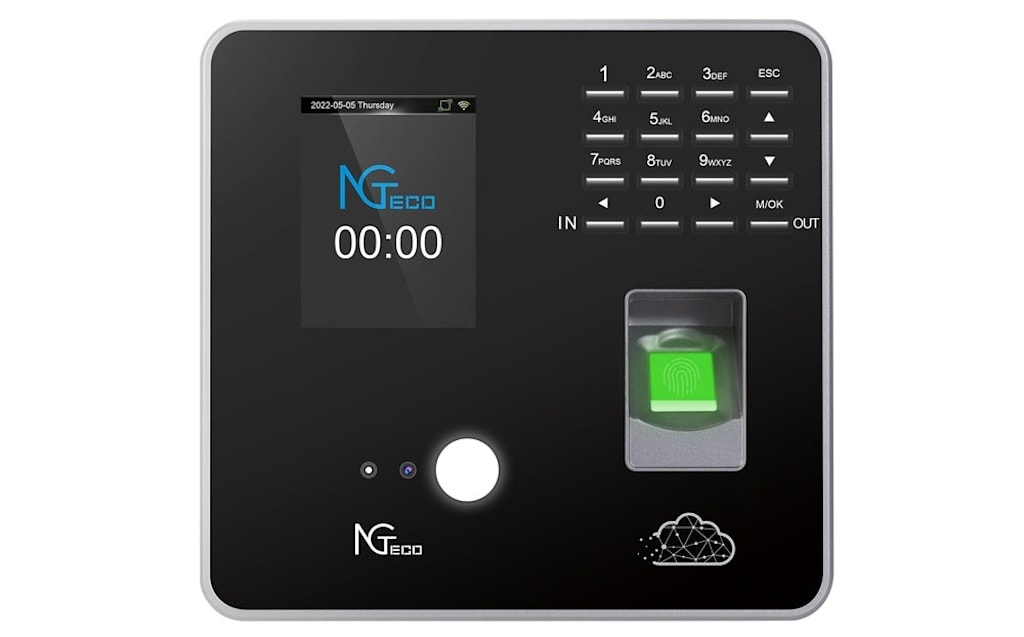
Tracking employee hours sounds simple, but for most businesses, it is a persistent source of errors, disputes, and wasted time. Manual methods, paper timesheets, handwritten logs, punch cards, leave obvious gaps: records get lost, numbers get fudged, and managers spend hours every pay period sorting through inconsistencies. Cloud-connected time clocks have changed this picture considerably, and this article walks through how they work and what to consider before adopting one.
From punch cards to the cloud: a brief history
For decades, paper timesheets and mechanical punch cards were the default. They were straightforward but easy to game. "Buddy punching"—where one employee clocks in on behalf of an absent colleague was common and difficult to prevent. Handwritten entries invited both accidental errors and deliberate falsification, and there was rarely a reliable audit trail when disputes arose.
Electronic clocks improved accuracy somewhat, but many stored data locally on the device itself, which created new risks: hardware failures, manual exports, and limited visibility for managers working off-site. The shift to cloud connectivity addressed most of those limitations. Today, a modern WiFi time clock functions as a secure entry point to a cloud-based attendance system, capturing clock events through the device and syncing them instantly to a centralized platform that managers can access from anywhere.
Core security features
Biometric verification
Facial recognition works by mapping unique facial geometry, such as the distance between eyes, jawline contours, and other landmarks, into a digital template stored in the system. When an employee clocks in, the device captures a live image and compares it against the enrolled template in milliseconds. Because the comparison is biometric, it cannot be shared or transferred the way a PIN or swipe card can. This effectively closes the door on buddy punching. Modern hardware uses high-resolution infrared cameras that perform reliably across different lighting conditions, which makes the technology practical in real-world environments rather than just controlled settings.
Encrypted data syncing
Each clock event is encrypted before it leaves the device and is transmitted to cloud servers over the wireless network. On the server side, enterprise-grade infrastructure, such as Amazon Web Services, stores records redundantly across multiple data centers. This means records are protected against localized hardware failures and tampering. Because syncing happens in real time, there is no window during which data exists only on a vulnerable local device. Even if the physical clock is damaged or stolen, every punch already lives in the cloud with a timestamped audit trail.
Network and access controls
Devices connect over WPA2- or WPA3-encrypted WiFi protocols. On the software side, administrators log in using multi-factor authentication, and role-based permissions limit who can view, edit, or export sensitive data. A frontline supervisor might see only their team's records, while payroll staff access company-wide summaries. These layered controls reduce the risk of internal misuse and create accountability for every action taken within the system.
Practical benefits for businesses
Reduced administrative overhead
Automated attendance tracking removes the need for manual reconciliation. Hours worked, overtime, and break durations are calculated as events are recorded. The system flags anomalies missed punches, unapproved overtime, and early departures, so managers only need to address exceptions rather than auditing every entry. Over the course of a pay period, this reclaims meaningful time that would otherwise be spent on paperwork.
Cost considerations
Time theft, inflated hours from buddy punching or early clock-ins, has a real cost that compounds over time. Biometric verification removes that avenue. On the infrastructure side, most cloud-based attendance platforms operate on a subscription model, spreading costs to predictable monthly fees rather than large upfront expenditures. Smaller teams pay proportionally less, and scaling up means adjusting a subscription rather than replacing hardware. That said, it is worth evaluating actual ROI for your specific workforce size and payroll complexity before committing.
Compliance and record-keeping
Labor regulations around overtime, meal breaks, and record retention vary by jurisdiction, but they share a common requirement: accurate, verifiable documentation. Cloud-stored attendance records with precise timestamps and biometric verification hold up well under audits and during disputes. Generating compliance reports is straightforward: filter by date range, department, or employee, then export directly into payroll software. This reduces transcription errors between systems and provides a defensible paper trail if questions arise.
Getting started: a practical overview
Assessing your needs
Before choosing a system, audit your workforce structure. Count employees across all locations, identify shift patterns, and determine which features matter most: facial recognition, GPS geofencing, or multi-site management. Check whether the platform integrates with your existing payroll software, since seamless data flow eliminates duplicate entry. Look for scalable plans that grow with your team without requiring hardware overhauls each time.
Installation and onboarding
Physical setup is minimal: mount the device at a convenient entry point, confirm strong WiFi coverage at that location, and power on the unit. From the cloud portal, configure departments, shift rules, and overtime thresholds. Employee enrollment involves each person briefly facing the camera while it captures their facial template. Most systems complete this in under thirty seconds. It helps to communicate the change to staff clearly before rollout, explaining how the system protects their recorded hours as much as it protects the business.
Ongoing management
Once live, connect the cloud platform to your payroll system via built-in integrations or API links. Managers can monitor real-time dashboards, review flagged exceptions, and address discrepancies promptly to maintain accurate records. Periodically review access permissions, update rosters as staff turn over, and use the platform's reporting tools to identify attendance patterns that can inform smarter scheduling.
Final thoughts
Cloud-connected attendance tracking is no longer a niche solution for large enterprises. Biometric verification, encrypted syncing, and cloud storage have become accessible to businesses of most sizes. Whether the investment makes sense depends on your specific payroll complexity, workforce size, and the time currently spent on manual reconciliation. The technology is mature enough to warrant a serious evaluation for any business that pays employees for hourly or shift-based work.
About the Creator
Enjoyed the story? Support the Creator.
Subscribe for free to receive all their stories in your feed.
Comments
There are no comments for this story
Be the first to respond and start the conversation.