
What Is Happy Wan? Four Video Engines in One Workspace
How Wan 3.0 and HappyHorse 1.1 handle text prompts, 10-image continuity, and optional sound inside one workflow.

Happy Wan is a web-based AI video and image creation workspace that brings Wan 3.0, Wan 3.0 Prime, HappyHorse 1.1, and HappyHorse 1.1 Reference together inside one browser interface. Built around Alibaba's Wan and HappyHorse video lineages, the platform lets creators route text prompts, single images, or up to ten reference frames into clips up to 30 seconds long. It operates live online with 50 sign-in credits and weekly check-in bonuses.
Key Takeaways
Multi-engine routing replaces guesswork: Creators switch between Wan 3.0, Wan 3.0 Prime, HappyHorse 1.1, and HappyHorse 1.1 Reference inside one workspace depending on shot length and reference count.
Clip lengths span 2 to 30 seconds: Wan 3.0 accepts text or image inputs for 2 to 30 second clips at 480P, 720P, or 1080P, while HappyHorse 1.1 focuses on 3 to 15 second scenes at 720P or 1080P.
Audio control is built into the video workflow: An optional sound toggle lets creators generate synced audio with the shot or leave sound off during early visual tests.
Wan 3.0 leads public text-to-video preference rankings: On Artificial Analysis' AA-Video-T2V v2.1 leaderboard as of November 23, 2026, Wan 3.0 holds rank 1 at 1175 Elo across 8,691 samples.
Independent benchmarks evaluate each engine separately: Happy Wan does not publish a combined model card, so third-party scores apply to Wan 3.0 and HappyHorse 1.1 individually.
What Happy Wan Can Do
Happy Wan separates quick single-image animation from longer multi-reference sequences instead of forcing every creative brief through one fixed model.
For longer structural shots, the Wan 3.0 workflow accepts text, up to ten image ingredients, or an opening frame paired with an optional ending frame. That means a creator can establish a product reveal, a camera push-in, and an ending pose inside one 2 to 30 second pass rather than stitching three disconnected clips.
For character-centered scenes, HappyHorse 1.1 starts from text or one defining image over 3 to 15 seconds, while HappyHorse 1.1 Reference helps keep a recurring subject consistent across cuts. An integrated image workspace supports reference prep before video rendering begins.
How It Compares
Inside the same multi-model pool, Wan 3.0 provides higher text-to-video preference scores and longer maximum duration, whereas HappyHorse 1.1 trades clip length for focused 720P and 1080P character framing.
According to the Artificial Analysis AA-Video-T2V v2.1 leaderboard captured on November 23, 2026, Wan 3.0 sits at rank 1 overall with 1175 Elo, ahead of Utopai X at 1171 Elo and MiniMax H3 768p at 1163 Elo. On the separate image-to-video board, Wan 3.0 ranks 12th at 1110 Elo while HappyHorse-1.1 ranks 21st at 1036 Elo, behind rank-1 Dreamina Seedance 2.5 at 1162 Elo. Those figures reflect standalone model evaluations rather than a single composite score for the workspace.
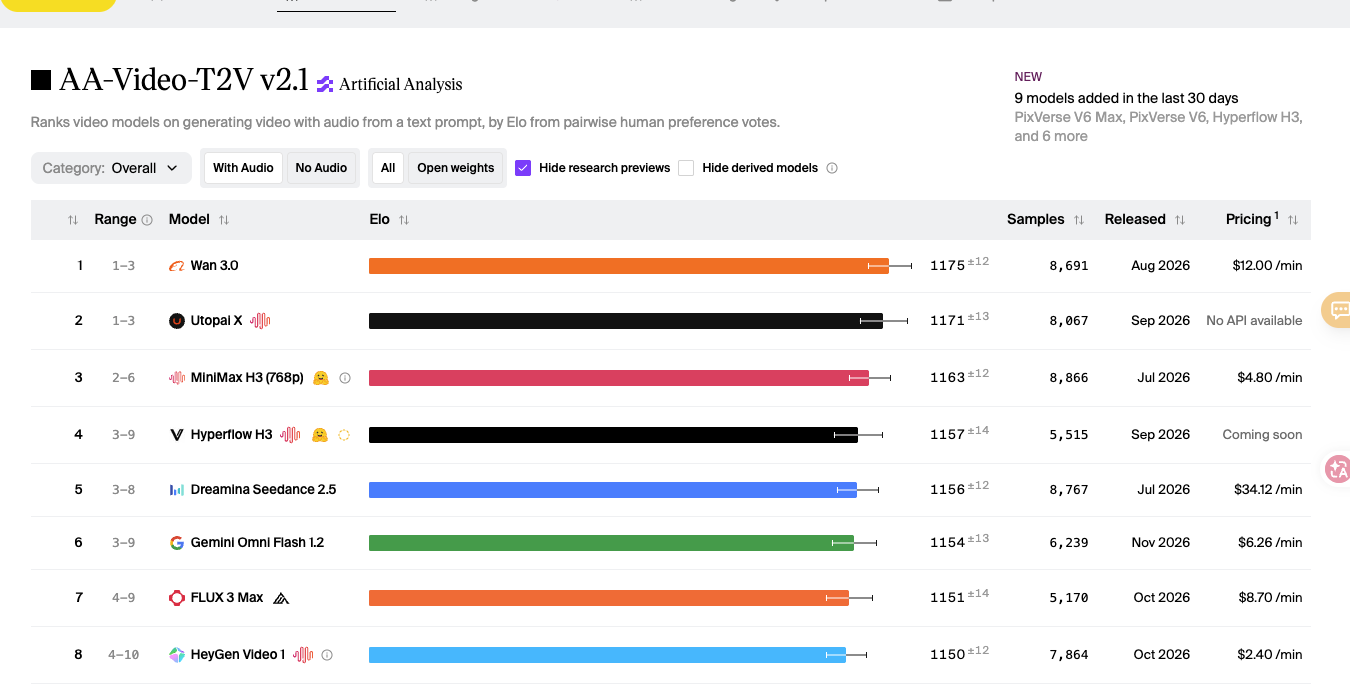
Artificial Analysis AA-Video-T2V v2.1 leaderboard showing Wan 3.0 at rank 1 with 1175 Elo. Source: Artificial Analysis, captured 2026-11-23.
How to Use It
You start by testing a short prompt or reference frame at low resolution before spending credits on a full 1080P render.
First, choose an engine inside the Happy Wan workspace based on whether the shot requires up to ten image ingredients in Wan 3.0 or a single-subject beat in HappyHorse 1.1. New accounts receive 50 first sign-in credits and can collect up to 100 weekly check-in credits for draft trials.
Second, run a three to five second test clip at 480P or 720P to check subject pose and framing. Third, enable the sound control only after the visual action holds steady across the clip.
What's Still Unclear
No unified merged model card is public yet: Documentation on the site describes Wan 3.0 and HappyHorse 1.1 separately, and no combined weight specification has been released.
Per-second credit quotes live inside the job panel: Exact credit costs vary by selected engine, duration, and resolution and appear before generation rather than in a static public table.
Developer API access is not documented: Public site pages cover browser-based image and video creation without REST endpoint or SDK documentation.
About the Creator
Kling4 AI
Kling4 AI production notes, practical video editing workflows and visual references. https://kling4ai.io/
Enjoyed the story? Support the Creator.
Subscribe for free to receive all their stories in your feed.
Comments
There are no comments for this story
Be the first to respond and start the conversation.