
The Right Way to Remove Duplicates from Thunderbird in 2024-2025
Learn the right way to remove duplicate emails from Thunderbird in 2024-2025. Follow simple steps and use the best tools to clean up your mailbox efficiently.

Are you tired of receiving the same old messages in a disorganized Thunderbird inbox? Don't worry, we have an easy and right answer for you. You only need to take a few easy steps to eliminate those annoying duplicate emails. After reading this short guide, you can organize your Thunderbird folder like a pro in no time!
What does Thunderbird do?
Thunderbird is a free email app for your computer that Mozilla made. It lets you manage all of your email accounts from one place and has simple tools like sorting and finding. You can add more tools as needed.
Why does Thunderbird Make Copies Of Things?
There are different reasons why duplicates happen in Thunderbird. These are some common reasons why emails get sent twice:
Problems with synchronization: If there are issues with syncing between Thunderbird and the email server, you may download or see duplicate emails.
Problems with the server: Sometimes, problems on the email server's end can cause duplicates. Thunderbird might show them as doubles if the server sends more than one copy of an email.
Message Forwarding or Replying: Sometimes, when people forward or reply to emails, especially in group chats, they might make two copies of the same message by accident.
Actions by Hand: If you're not careful, you could also create duplicates by hitting the send or receive button more than once by accident or by copying or moving emails by hand.
Message Blocks: If you set up Thunderbird message filters to move or copy certain emails to different files automatically, these filters may make copies of the emails.
Problems with Backup or Restore: The process of restoring emails from a backup or loading emails from another email client might make some emails appear more than once.
Problems with an add-on or extension: In very rare cases, some Thunderbird add-ons or plugins may mess up the way emails are handled and cause duplicates to show up.
For What Reason Do You Need To Remove Duplicates from Thunderbird?
Getting rid of Thunderbird's duplicate files is important for several reasons:
Making the Most of Storage Space: Having duplicate emails on your computer takes up room that you don't need. You can free up room on your hard drive by getting rid of duplicate emails. This is especially helpful if your email archive has grown over time.
Getting Better Results: It can slow down Thunderbird's application, especially during syncing processes, if your inbox is full of duplicate emails. Getting rid of duplicates can help Thunderbird run faster and better generally.
Making Organization Better: It can be hard to find important emails when your inbox is full of duplicates. Getting rid of duplicate emails will help you keep your email handling more organized and make it easier to find the emails you need.
How to Avoid Synchronization Mistakes: Sometimes, Thunderbird and the email service can't keep up with new emails because of duplicates. This can cause problems in your mailbox. Getting rid of copies lowers the chance of sync problems and makes sure that all of your devices always have correct and up-to-date email data.
How do you Remove Duplicates from Thunderbird?
Here are the steps you can take to get rid of duplicate files in Thunderbird:
- First, back up: It's a good idea to back up your Thunderbird profile before you try to get rid of copies. This will make sure you have a copy of your emails in case something goes wrong while they are being deleted.
- Sort emails by date or subject: Sort your emails by theme or date before you get rid of the duplicates. You'll be able to find similar emails more easily this way.
- Use an Add-on: You can get several add-ons for Thunderbird that can help you get rid of duplicate emails. This add-on is very common. It's called “Remove Duplicate Messages.”
Use it like this:
- In Thunderbird, go to the settings menu and choose “Add-ons.”
- Find "Remove Duplicate Messages" and put it on your computer.
- After setting it up, restart Thunderbird.
- After restarting, go to the area that has the emails you want to get rid of.
- Go to the folder, right-click it, and choose “Remove Duplicate Messages.”
Follow the steps to get rid of the copies.
- If you use Thunderbird and find duplicate files, you need to get rid of them.
- After that, you can choose the manual mode and follow these steps:
- Manual Method to Remove Duplicates from Thunderbird
- If you don't want to use an add-on, here are the steps you can take to get rid of duplicate emails by hand:
- Find the area that has the emails you want to get rid of duplicates.
- To find copies, sort the emails by date.
- Pick out and delete similar emails by hand.
However, if you have 10,000 email files, you won't be able to get rid of them by hand because it's hard to find repeated files and delete them one by one. It takes a long time to get rid of duplicate emails this way. You can't get rid of several duplicate files at the same time.
Remove Duplicates from Thunderbird with the Duplicate Remover Tool
The manual method is very inefficient for removing duplicate files. That is why we recommend the use of the TrustVare MBOX Duplicate Remover Tool. It is highly recommended as a sure way to remove duplicate emails from MBOX files effectively. Our system identifies and removes unnecessary emails very fast. Our tool will provide you with a flawless and trusted method to deal with your email records and maintain their integrity during the whole process. It also provides accurate technical support and makes sure that the customers receive quick help and support to resolve any queries or problems. It allows users to import MBOX files from different emailing services that provide this format, including Thunderbird, Apple Mail, Spicebird, Eudora, and Postbox. This software is independent of any dependence on Thunderbird or other email clients. This application can be downloaded freely by users of the Windows operating system without any restrictions.
The following are the steps:
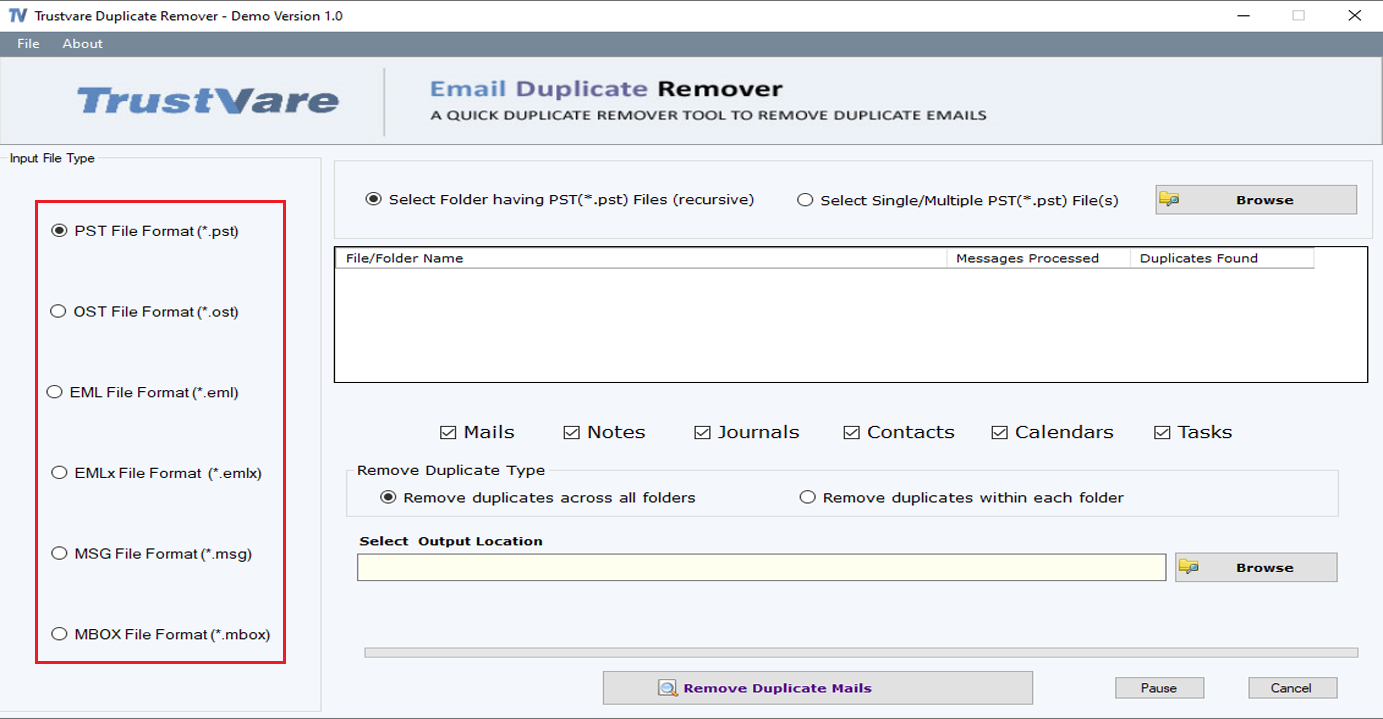
- Download the MBOX Duplicate Remover software.
- Upload the Thunderbird files or directory using the browser option.
- Select the filter as per your requirements.
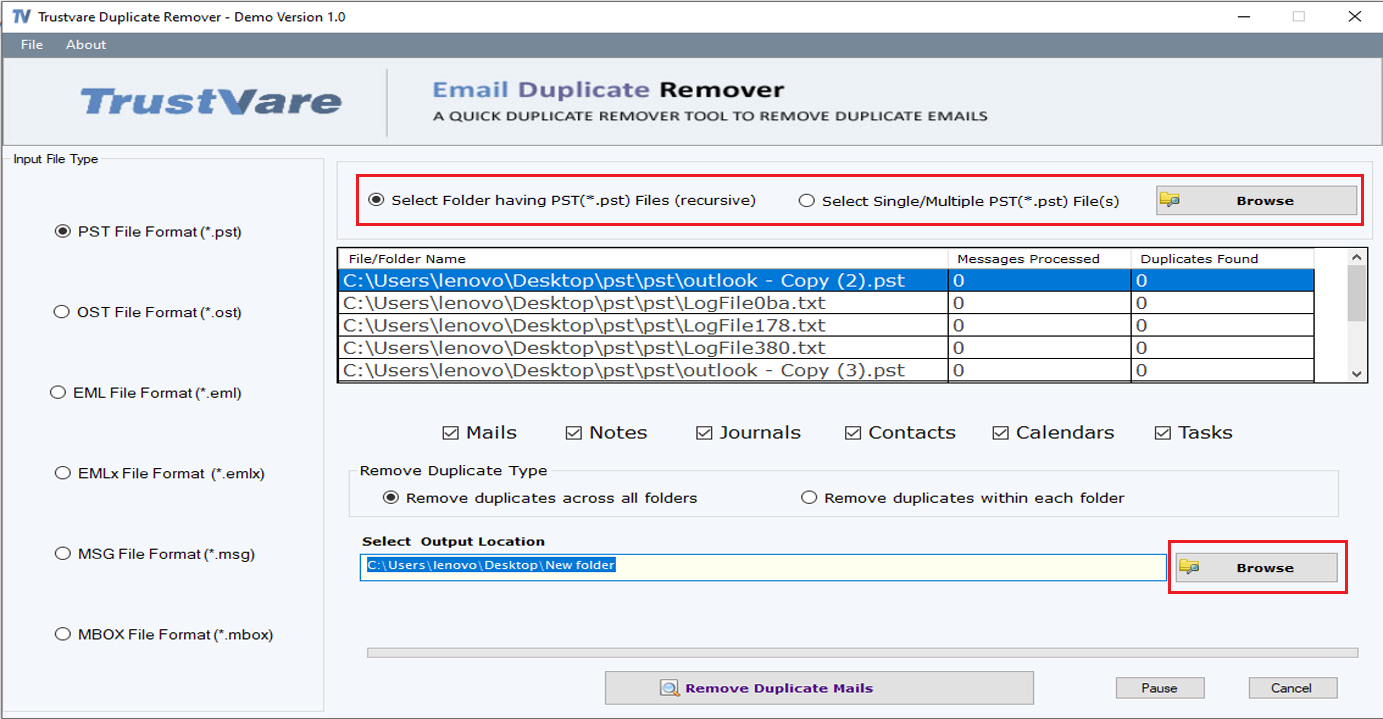
- Decide the destination where you want to save the final file.
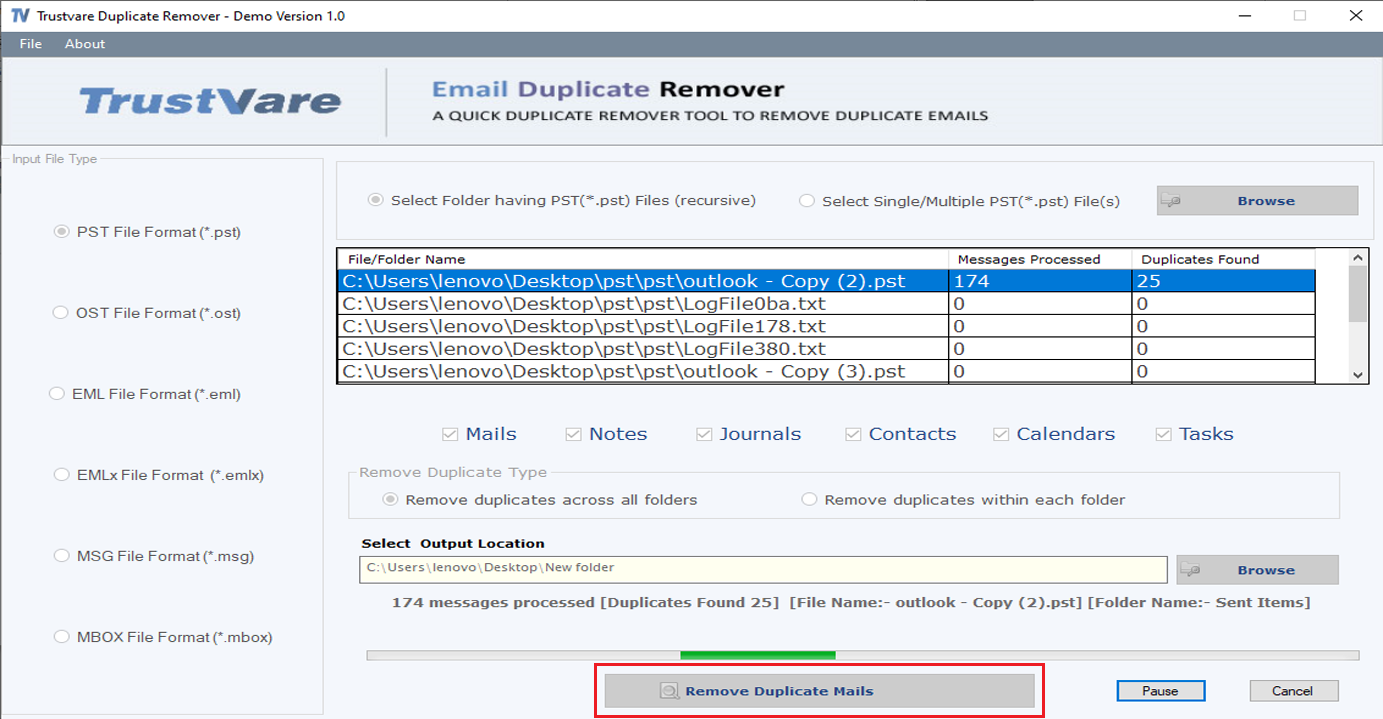
- Click on the Remove Duplicate Mails option.
Essential Aspects of This Software
- Users have the option to remove duplicate files either within a specific folder or across multiple folders as needed.
- This software offers advanced filtering options to remove duplicate files according to date range, sender, recipient, subject, and root folder.
- Keep the original structure intact throughout the process
- Before the process, it displays the previews.
- Effortlessly find and eliminate duplicate MBOX files.
- Comprehensive support for all healthy MBOX files
- It operates all versions of the Windows operating system.
- Software that is free of bugs.
- You won't need to install any additional software, including the Thunderbird application, to finish this process.
- Round-the-clock technical assistance.
- Provide a complimentary trial version.
Summary
In conclusion, deleting duplicate emails in Thunderbird is the key to using maximum storage, increasing performance, and keeping everything well-organized. There are manual ways to do it, but it's rather a long process when handling many emails. MBOX Duplicate Remover, on the other hand, makes it very easy with the guarantee of smooth email experiences without the hassles of manually sorting them. Implementing the above plans enables one to declutter his inbox and improve his productivity.
About the Creator
Kevein Mark
I am a content writer. I like write blogs/ content related to technology.
Enjoyed the story? Support the Creator.
Subscribe for free to receive all their stories in your feed.
Comments
There are no comments for this story
Be the first to respond and start the conversation.