
Google Launches Gemini Intelligence on Android to Shift OS From System Software to Proactive Agent
New features automate multi step tasks across apps integrate Gemini in Chrome and introduce generative UI with privacy preserving on device processing rolling out on Galaxy S26 and Pixel 10 this summer

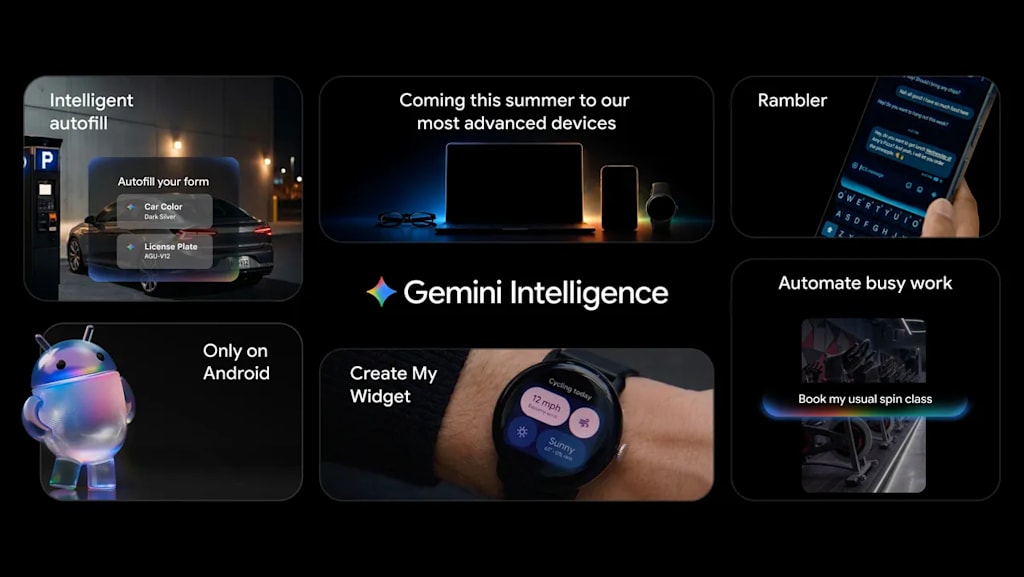
Read Time 6 minutes Tags Android Gemini AI Agent Automation Chrome OS Intelligence Mobile AI Today Google is introducing Gemini Intelligence on Android which brings the best of Gemini to our most advanced devices It integrates premium hardware and innovative software to help you stay a step ahead by working proactively to get things done throughout your day all while keeping your data private and keeping you in control Gemini Intelligence features will roll out in waves starting with the latest Samsung Galaxy and Google Pixel phones this summer and will become available across your Android devices including your watch car glasses and laptops later this year Core capabilities and technical approach One Multi step task automation Gemini Intelligence helps you automate tedious tasks so you can focus on what matters Google spent months fine tuning multi step automation capabilities on the Galaxy S26 and Pixel 10 on popular food and rideshare apps to ensure every interaction feels seamless Soon devices with Gemini Intelligence will do all that and more Gemini will navigate tasks for you whether it is snagging a front row bike for your spin class or finding your class syllabus in Gmail then putting the books you need in your cart Gemini handles the logistics while you stay in the moment App automation is even more powerful when you add screen or image context Instead of manually switching between apps and copying data Gemini can turn visual context into instant action Imagine you have a long grocery list on your notes app Just long press the power button over the list and ask Gemini to build a shopping cart with all of the items for delivery Or if you see a travel brochure in a hotel lobby that piques your interest you can simply snap a photo of it and say Find a tour like this on Expedia for a group of six You can track the progress live via notifications as Gemini works in the background Most importantly you remain in control Gemini only acts on your command and stops the moment the task is complete Two Gemini in Chrome and intelligent autofill Starting in late June Android devices will be getting a smarter browsing assistant for the web Gemini in Chrome can help you research summarize and compare content across the web Chrome auto browse can take care of more mundane tasks on your behalf whether it is appointment booking or reserving a parking spot Autofill with Google is evolving from a basic convenience into something more intelligent and intuitive By using Gemini Personal Intelligence Android will automatically fill in even more of those tiny text fields across your apps including Chrome Connecting Gemini to Autofill with Google is strictly opt in meaning you choose if and when you want to connect to Gemini and you can always turn this connection on or off in your settings This addresses privacy concerns by keeping sensitive form data under user control Three Generative UI and voice to text Gboard on Android already lets you convert speech to text quickly and accurately but there is a catch the way we talk is not always the way we want to write To bridge that gap Google is introducing Rambler a new Gemini Intelligence feature designed for the way people actually speak With Rambler you can speak naturally and it will take the important parts then fit them all together into a concise message Rambler will clearly show you when you have enabled it to help convert your voice to text and audio is only used to transcribe in real time and is not stored or saved Rambler is built for the way our global community communicates in multiple languages at once Using Gemini advanced multi lingual model Rambler can seamlessly switch between languages in a single message With Create My Widget Google is taking the first step in generative UI with a hallmark of Android widgets You can build entirely custom widgets just by describing what you want using natural language For example if you are a meal prepper just ask Create My Widget to Suggest three high protein meal prep recipes every week and watch as it builds a custom dashboard you can add and resize right on your home screen Product and ecosystem implications One Shift from OS to intelligence system Google is framing Android as transitioning from an operating system into an intelligence system Your devices are becoming even more helpful with upgrades that will save you time This is a fundamental change in product strategy where the OS acts as an orchestrator of agents rather than a passive platform for apps The focus on device processing and opt in data connection aims to address privacy concerns that have limited adoption of similar features in the past Two Device and partner rollout Gemini Intelligence features will roll out in waves starting with the latest Samsung Galaxy and Google Pixel phones this summer and will become available across your Android devices including your watch car glasses and laptops later this year The partnership with Samsung is critical for scale since Galaxy devices represent the largest share of Android premium devices The phased rollout allows Google to refine reliability before expanding to wearables automotive and XR devices Three Competitive positioning Apple introduced similar proactive features with Apple Intelligence in 2024 but Google has an advantage in cross app automation due to Android open architecture and deeper integration with Google services Gemini in Chrome auto browse and Create My Widget are examples of features that are harder to replicate on closed platforms The risk is fragmentation if OEMs implement subsets of the feature set inconsistently Technical and privacy considerations One On device processing and data control Google emphasizes that Gemini Intelligence keeps your data private and keeping you in control The use of opt in connections for Autofill and real time transcription without storage for Rambler suggests a hybrid approach where sensitive tasks run locally and cloud processing is used for complex reasoning This hybrid model is necessary to balance latency cost and privacy Two Reliability and user control The product design stresses that Gemini only acts on your command and stops the moment the task is complete This is critical for trust since autonomous agents can cause errors or unintended actions if they operate without clear boundaries The live progress notifications provide transparency into what the agent is doing Three Developer ecosystem impact If Create My Widget and multi step automation APIs are opened to third party developers Android could see a wave of agent enabled apps that reduce the need to switch between apps directly This could shift app store dynamics from app downloads to agent skill downloads What to watch First reliability of multi step automation across popular apps If Gemini fails frequently on real world tasks user trust will erode Second developer adoption of generative UI APIs Third competitive response from Samsung One UI and other OEMs on how they implement Gemini Intelligence For users the promise is less time spent on digital busywork and more time on decisions that require judgment For developers the opportunity is to build agents that operate across the Android ecosystem rather than inside single apps Do you think on device AI agents will replace manual app navigation for most users in the next two years Share your view in the comments
About the Creator
Enjoyed the story? Support the Creator.
Subscribe for free to receive all their stories in your feed.
Comments
There are no comments for this story
Be the first to respond and start the conversation.