
Free & Paid Method for Thunderbird Mailbox to Office 365 Migration
Discover free and paid methods to seamlessly migrate Thunderbird mailbox to Office 365.


Intro
It takes a lot of time to migrate from a desktop email client like Thunderbird to a cloud-based work suite like Office 365. Most of us are aware that Thunderbird is an open-source email tool used in many businesses. Though it lacks advanced communication and collaborative options, Microsoft Office 365's low cost and wide feature set are fast, making it the most used email application. Changing from Thunderbird to Office 365 presents several challenges for many users, which makes managing the process on their own tough.
Since they demand better, many people are consequently looking for an alternative. We want everyone to realize their search is complete utilizing this blog. Some great tips on how to make sure a transfer goes right and correctly are presented in this blog post.
Information regarding Thunderbird Mail & Office 365
Originally initially presented in 2003 by the Mozilla Foundation, Thunderbird is an open-source email client. MBOX files, its main database file, save all the data including contacts, emails, etc. Thunderbird users can set up their email accounts (including Gmail, Yahoo, Rediff, etc.), and Mozilla offers fresh versions featuring improved security updates and safety measures.
On the other hand, Office 365 is a productivity toolkit including many tools aimed at enhancing working conditions. From MS Word to Teams, Microsoft Office 365 offers a tool suitable for a personal level user as well as a working professional.
Users of Thunderbird to handle their emails are thus seeking more and more than Thunderbird to Office 365 for these reasons. Since Office 365 provides multiple technologies that simplify users' capacity to complete different tasks such as data sharing, group chat management, meetings, etc., it has an edge.
Why should you switch from Thunderbird to Office 365?
Here are some things you might want to think about if you decide to switch from Mozilla Thunderbird Mail to Office 365.
- Thunderbird doesn't have as many tools and apps as Office 365. Word, Excel, PowerPoint, OneDrive, and Teams are just a few. This means that email, documents, and lines of communication can all work together without any issues, which could make work go faster.
- All Office 365 users' emails and other files are saved in the cloud, so they can access them from any device with internet access. Thunderbird, on the other hand, usually stores information locally.
- Companies that use Office 365 can easily handle user accounts and security thanks to features that allow for centralized control. Businesses or groups that use
- Office 365 for more than one service might find this useful.
- Office 365 gets security fixes and updates on its own, so you don't need to do anything. This might be useful for people who want to make upkeep simple.
It's important to remember, though, that moving isn't always required. Thunderbird is still a strong email client that has a faithful following of users who like how it protects privacy, is open source, and can be changed to meet their needs. In the end, each person's wants and priorities determine whether they should move or not. Before making the move, you should think about whether the possible benefits of Office 365 are greater than the ease of use and familiarity of Thunderbird.
There are Several Ways to Switch from Thunderbird to Office 365.
Users can either set up their Office 365 account by hand in Thunderbird or drag and drop emails from Thunderbird into the Office 365 folder in Outlook. You can also set up your Thunderbird mail to go straight into your Office 365 Exchange Online account.
01 Method: Simple Steps for Thunderbird to Office 365 Migration
Designed to streamline your email migration from Thunderbird to Exchange Online, TrustVare MBOX for Office 365 Converter Software. Users wishing to take advantage of cloud-based email services often follow this popular route of migration.
Benefits
- MBOX files migrated into Office 365 format with perfect smoothness.
- Turn on to export multiple MBOX mailboxes concurrently.
- Give exact results free from mistakes.
- Show the preview and offer pick data selection.
- Keep the data structure all during the migrating procedure.
- A lightweight application downloads and installs into the system quite quickly without compromising system speed.
- A virus and bug-free application.
- Support both recent and previous Windows OS and MS Outlook.
- Help to convert Thunderbird, Entourage, Eudora, OperaMail, and any MBOX-supported tools.
- An appropriate program for all kinds of users, personal and corporate.
How it works
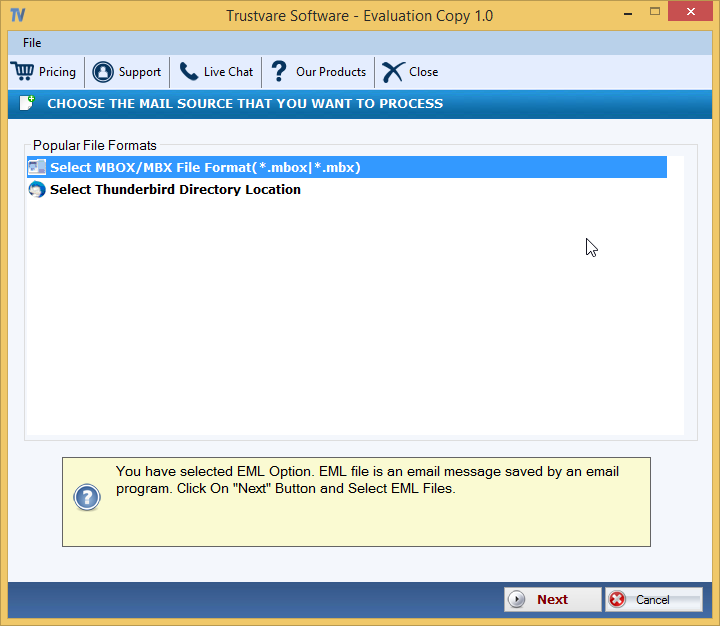
- Download the TrustVare MBOX Converter Software.
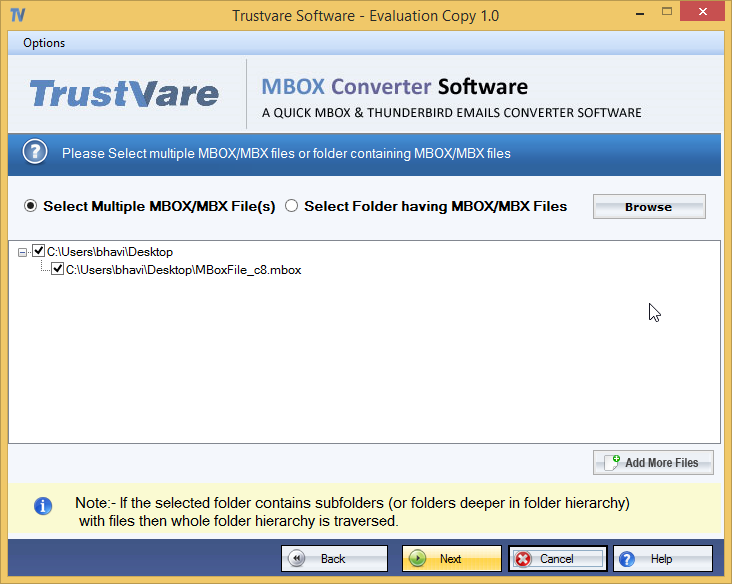
- Add MBOX files or directories with the browser option.
- Evaluate the preview then choose the files you wish to convert.
- As the output type, choose Office 365.
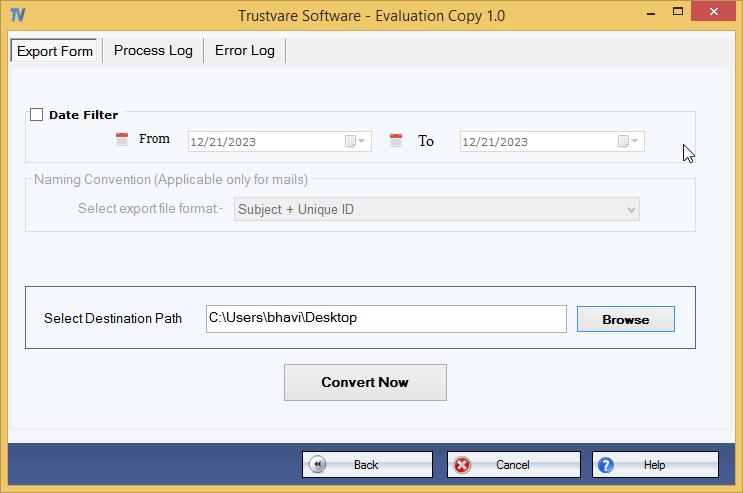
- Then look at certain destination places to save output data.
- Press the Convert Now button.
02 Method: Set Thunderbird Mail's Office 365 account.
Your emails from Thunderbird can be migrated to Outlook and Office 365 as follows:
Required conditions:
- Installed on your machine is Thunderbird.
Procedures:
- Start Thunderbird, then head to Tools → Account Settings.
- Add Mail Account → Click Account Actions.
- Click Continue once you enter your Office 365 credentials.
- Choose Manual Config to minimize mistakes.
- Now enter the following specifics:
- Incoming: IMAP outlook via office365.com 993 auto-detect
- Outlook: SMTP for outgoing from office365.com 587 Auto-detect
- Done after Click Re-test.
- Wait for emails and files to sync with Thunderbird and Office 365.
- Email drag & drop from Thunderbird into Office 365 folders.
- Continue step 8 till every email has been sent.
- From Thunderbird, delete the Office 365 account.
Advantages:
- Independent solution.
Conventions:
- Only effective if Thunderbird is installed.
- It takes time and calls for technical knowledge.
The Final Say
The many advantages of Microsoft Office 365 are the main reason why many businesses are planning to switch. There are indirect ways and migration tools in this piece that show you how to move from Thunderbird to Office 365. Picking the right transfer tool can make the process easier, especially for people who have never done it before. People who want an easier way to quickly move their Thunderbird data to Office 365 should be able to use this article to solve their problems.
About the Creator
Kevein Mark
I am a content writer. I like write blogs/ content related to technology.
Enjoyed the story? Support the Creator.
Subscribe for free to receive all their stories in your feed.
Comments
There are no comments for this story
Be the first to respond and start the conversation.