
5 Best AI Photo Editing Tools for Creators in 2024
Let's talk


Editing photos used to take hours of clicking and dragging. You had to learn complex software just to remove a person from the background or fix the lighting. Now, smart software handles the heavy lifting for you. This shift allows creators to focus on their vision instead of getting stuck in technical details.
Small businesses often struggle to keep up with the demand for fresh social media content. Using a dedicated ai photo editor can save you a lot of time on these daily tasks. These tools help you clean up product shots or create professional portraits without needing a big budget. You can get professional results in just a few clicks.
Creating visuals from scratch is also easier than it used to be. You can use a free ai image generator to turn text into high quality pictures. This helps you build unique graphics for your blog or website when you do not have a photographer on hand. It is a great way to stay consistent with your branding.
1. PhotoEditorAI
PhotoEditorAI is a web based tool designed for speed and simplicity. It focuses on solving the most common problems creators face every day. If you need to fix a photo quickly, this is often the best place to start. It does not require you to download heavy software or have a powerful computer.
The tool excels at removing unwanted objects from your images. If a stray power line or a person ruins your perfect shot, you can just paint over it. The software looks at the surrounding pixels and fills in the gap perfectly. It also offers tools to expand your images or enhance the overall quality of a blurry photo.
Key Features
- Object removal with a simple brush tool.
- Image expansion to change the aspect ratio.
- Quality enhancement for low resolution files.
- Background removal and replacement.
Pros
- No registration required for basic edits.
- Very fast processing times.
- Simple interface that anyone can use.
- Works directly in your web browser.
Cons
- Fewer manual color grading tools.
- Limited batch processing options.
Best For
Social media managers and small business owners who need quick, clean edits for their daily posts.
2. Adobe Photoshop
Adobe Photoshop is the most famous name in the industry for a reason. It has been around for decades, but it recently added powerful new features. These features use the Adobe Firefly engine to help you edit photos using simple text prompts. It combines classic professional tools with modern automation.
The most popular feature is Generative Fill. This allows you to select an area of a photo and type what you want to see there. You can add a hat to a person or change the entire background of a portrait. It also has a feature called Generative Expand. This tool lets you pull the edges of a photo to make it larger, and the software creates new details that match the original image.
Key Features
- Generative Fill for adding or removing content.
- Generative Expand for changing image size.
- Neural Filters for smoothing skin or changing facial expressions.
- Advanced layer management for complex projects.
Pros
- Most powerful tool on the market.
- Works with other Adobe apps like Illustrator.
- Massive library of tutorials online.
- High precision for professional work.
Cons
- Monthly subscription can be expensive.
- Steep learning curve for new users.
Best For
Professional photographers and designers who need total control over every pixel in their work.
3. Canva
Canva started as a simple design tool for non-designers. It has grown into a full platform that includes many smart editing features. It is perfect for people who need to create graphics, presentations, and social media posts in one place. You do not need any previous design experience to get great results here.
The Magic Studio in Canva includes several helpful tools. Magic Edit lets you swap objects in a photo by describing what you want. Magic Grab allows you to pick up a person or object in a photo and move them around as if they were a separate sticker. This makes it very easy to create dynamic layouts for advertisements or flyers.
Key Features
- Magic Edit for swapping objects.
- Magic Grab for moving subjects within a photo.
- Background Remover that works with one click.
- Text to image generation for custom graphics.
Pros
- Thousands of templates for every platform.
- Very easy to use drag and drop system.
- Great for team collaboration.
- Free version is very capable.
Cons
- Not as good for deep photo retouching.
- Some of the best features require a Pro subscription.
Best For
Small business owners and marketing teams who need to create a lot of content quickly.
4. Pixelmator Pro
Pixelmator Pro is a powerful editor built specifically for the Mac. It takes full advantage of Apple hardware to make editing feel fast and smooth. It is a great middle ground between the simplicity of web tools and the complexity of Photoshop. It offers a clean interface that hides its power until you need it.
One of its best features is ML Super Resolution. This tool uses machine learning to make small photos larger without making them look blurry. It is perfect for when you find an old photo or a small web image that you want to print. It also has an ML Enhance button that automatically adjusts the colors, contrast, and white balance to make any photo look better instantly.
Key Features
- ML Super Resolution for upscaling images.
- ML Enhance for automatic color correction.
- Smart masking for easy background selection.
- Support for RAW photos from professional cameras.
Pros
- One time purchase price instead of a subscription.
- Beautiful and modern interface.
- Very fast performance on Mac computers.
- Easy to learn if you use other Mac apps.
Cons
- Only available for macOS users.
- No mobile version for iPad or iPhone.
Best For
Mac users who want professional features without paying for a monthly subscription.
5. Luminar Neo
Luminar Neo is designed for people who want to make artistic changes to their photos without spending hours on manual masks. It uses AI to understand the depth and structure of your images. This allows it to do things that other editors find difficult, like changing the lighting or the sky.
The Sky AI feature is one of the most famous in the industry. If you have a photo with a boring gray sky, you can replace it with a beautiful sunset in seconds. The software even changes the reflection in water and the light on the ground to match the new sky. It also has great tools for portraits, such as the ability to add a bokeh effect to the background or brighten a person's eyes.
Key Features
- Sky AI for realistic sky replacement.
- Relight AI for changing the lighting in a scene.
- Portrait Bokeh AI for creating soft backgrounds.
- Structure AI for adding detail without making the photo look grainy.
Pros
- Incredible results for landscape and portrait photos.
- Very creative filters that you cannot find elsewhere.
- Can be used as a standalone app or a plugin.
- Frequent updates with new features.
Cons
- Can be slow on older computers.
- The interface can feel a bit cluttered.
Best For
Portrait and landscape photographers who want to add a creative touch to their images.
Comparison SummaryFinal Recommendation
Product Key Strength Platform
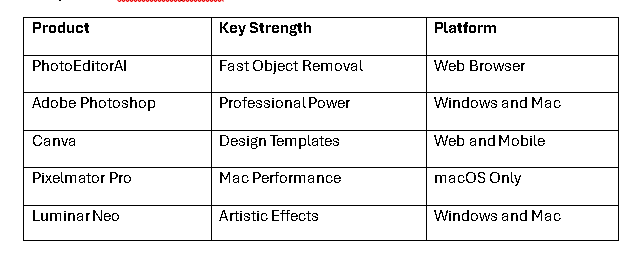
Choosing the right tool depends on your specific goals and the hardware you own. If you are a Mac user who wants a permanent license, Pixelmator Pro is a fantastic choice. It gives you professional power without the monthly bill. For those who need to create marketing materials and social media posts every day, Canva is the most efficient option.
If you are a professional who needs the most advanced features, Adobe Photoshop remains the king. Its new generative tools make it faster than ever to complete complex tasks. For photographers who specialize in portraits or landscapes, Luminar Neo offers unique artistic tools that are hard to beat.
Finally, if you just need to fix a photo quickly without learning a new program, PhotoEditorAI is the best solution. It is perfect for removing distractions and making your images look clean for the web. Most creators will find that using a combination of these tools gives them the best results for their business.
About the Creator
Enjoyed the story? Support the Creator.
Subscribe for free to receive all their stories in your feed.
Comments
There are no comments for this story
Be the first to respond and start the conversation.