
I Smashed My Hard Drives for Years. Then I Learned I Was Hitting the Wrong Part.
A dorm-room story about hackers, rivers, dirty water, and the tiny chips that make a hammer useless if you miss.
In the top bunk of our college dorm, Lao Zhou rolled over, and the bed frame creaked. He said his cousin worked in the cyber police unit, and a while back they caught a hacker. The guy had pulled a job, formatted his hard drive overnight, pulled it out, driven dozens of kilometers, and thrown it into the river. The four of us lay there in the dark, the fan humming, the smell of instant noodles still hanging in the air. A decent hard drive cost over a thousand yuan back then. Lao Zhou said, “This guy really had money to burn.” Pangzi, on the lower bunk, said, “Is throwing it in the river even reliable? Doesn’t water ruin it?” Lao Zhou said, “You idiot. Water doesn’t erase data. The point is to make the disk disappear.” I said, “Then why not just smash it with a hammer?” Lao Zhou thought for a moment and said, “Yeah. That works too.”
We didn’t settle anything that night, but the word “hammer” stayed in my head.
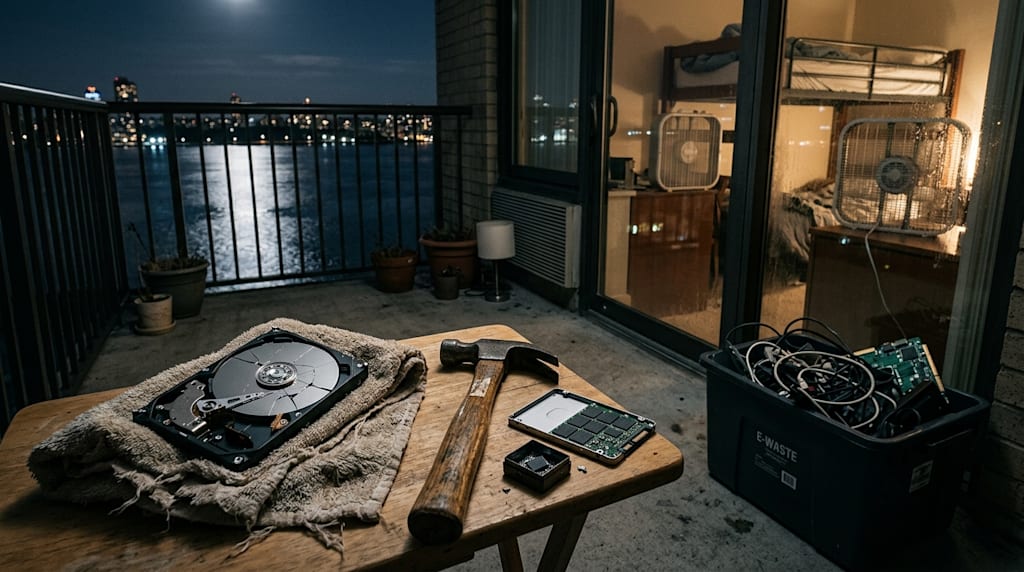
Later, when I dealt with old hard drives myself, I followed that logic. Format twice, then smash with a hammer. The first one I smashed was a 500GB Seagate I’d used for six years. It had held my thesis, photos of an ex-girlfriend, and a pile of half-downloaded movies. I put it on the balcony floor, wrapped it in an old towel, and swung the hammer seven or eight times. When I pulled the towel back, the platters had cracked into several pieces, shiny fragments scattered on the ground like a broken mirror. I swept them into a dustpan, dumped them in the trash, and felt settled.
At the time I thought I’d done a thorough job. Formatted twice, physically destroyed. I thought there was nothing else to do. It wasn’t until I took apart an old SSD that I learned the hammer trick, applied in the wrong place, is just wasted effort.
That SSD was a 120GB Kingston I’d pulled from a laptop after an upgrade. I got ready to smash it as usual. The moment I pried off the casing with a screwdriver, I saw several small black squares stuck to the board, each smaller than a fingernail, packed tightly together. I stopped with the hammer half-raised. Where was I supposed to hit? The casing? It was aluminum. One blow and the board would bend, the controller would crack, but those little black squares would still be sitting there perfectly intact. I poked one with the tip of the screwdriver. Hard. It didn’t budge. The data wasn’t on a platter. It was inside those chips, a few millimeters square. If the hammer doesn’t hit the chips, ten blows just smash the shell.
I looked it up afterward. A single NAND chip like that can hold as much as several CDs. The controller can be shattered while the chips sit there untouched. With the right equipment, someone can pull the chips off and read the data. So when you smash an SSD, you have to go after those little squares, crush them one by one, or just use a drill and bore straight through the chip itself. Smashing only the casing is like tearing open the envelope and leaving the letter inside.
Then there’s the dirty-water trick. I believed in that one when I was younger too. I thought water could soak through anything. Later I read a report about the Japanese tsunami. Hard drives that had been submerged in seawater for over fifty days were recovered, sent to a lab, washed, and their platters read. The data came back. Mechanical drives are not completely sealed. There’s a breathing hole on the body to equalize pressure. Water can get in, but the magnetic layer doesn’t fear water. It fears magnetic fields, high heat, and physical scraping. Long soaking will corrode the platters, but that’s a matter of “long enough,” not “a quick dip.” SSDs are even more straightforward: the data is electric charge in the chips. It stays there after power loss. Water can’t wash it away. Soaking might short the circuit board and burn the controller, but the NAND chips themselves don’t fear water. Chip-level extraction can still read them.
Think of a hard drive as a ledger filled with writing. Soaking it in dirty water is like throwing the ledger into a sewer. The writing doesn’t disappear. The book just rots. Fish it out, dry it, and you can still make out the words. Smashing it with a hammer is like tearing the ledger to pieces and burning them. Only when it is ground to dust does it become unreadable. When that hacker threw his disk into the river, the water wasn’t what did the work. What did the work was making the disk disappear. The river was big enough. It couldn’t be found. That was enough.
Formatting also needs to be clear. Quick format only touches the file table, marks the space as available, and doesn’t move a single byte of data. Recovery software can pull it back. From Windows Vista onward, full format in many configurations will write zeros across the whole disk, a full overwrite. Windows XP and earlier were different. Back then, full format only scanned for bad sectors and didn’t write zeros. On old machines, one format and the data could still be recovered. As for “low-level format,” that’s more psychological comfort than anything. Modern drives are low-level formatted at the factory in a cleanroom. The tools in a user’s hands can’t touch the physical tracks. So for a mechanical drive, overwriting with zeros plus physical destruction, or just physical destruction, is enough. Shatter the platters and you’re done. A software overwrite with zeros is already sufficient. Once the magnetic layer is overwritten, the residual signal is weak enough that even a lab would struggle.
For SSDs, the first thing to check is encryption. BitLocker, FileVault, LUKS, plus TCG Opal self-encrypting drives: the disk is encrypted end to end. Destroy the key, and the ciphertext is mathematically unrecoverable in milliseconds. Many modern SSDs support hardware encryption. Turn on encryption in the system, and if you destroy the controller or wipe the key, the data is void on the spot. A key is just a long string of numbers. Destroying it is faster than grinding the disk into powder. The precondition is that it was encrypted from the start and that the key is destroyed, not just a password deleted. My own laptop has BitLocker on. When I swapped the drive, I cleared the key first. The disk hadn’t been smashed yet, but the data was already gone. But I know most people buy an SSD, plug it in, and never turn on encryption. For them, smashing the chips is the only way.
Last year, while moving, I dug out another old SSD, 240GB. I’d forgotten what was on it. I squatted on the balcony with the hammer, thought about it, and didn’t smash it. I took it apart, pried off the four NAND chips one by one with a screwdriver, put them in a small iron box, and hit the box with the hammer. When I opened it, the chips were powdered, mixed with fragments of the board. I threw the box into the e-waste recycling bin, washed my hands, and went back to packing boxes.
The fragments of that disk are still in some recycling station, mixed in with other circuit boards. I don’t know where they’ll end up, but I know those chips are crushed beyond reading. The hammer is still the same hammer. I just know now where to hit. The little squares on an SSD, the shiny platters on a mechanical drive: hit the right place, and one blow is worth ten. Hit the wrong place, and a hundred blows are useless.
There’s still an unopened portable hard drive in my drawer, full of footage I’ve shot over the past few years. I don’t plan to smash it yet, but I know that when it’s time for it to retire, I’ll overwrite it with zeros first, then take it apart and shatter the platters. Grind them to fragments, sweep them into a dustpan, dump them in the trash. Then go back inside and get on with my day.
About the Creator
Jin
Writer of reamstories
https://reamstories.com/jin
Enjoyed the story? Support the Creator.
Subscribe for free to receive all their stories in your feed. You could also become a paid subscriber, letting them know you appreciate their work.
Comments
There are no comments for this story
Be the first to respond and start the conversation.