


Introduction
.SCA (SAP Component Archive) files are vital in the SAP ecosystem for handling and distributing Java-based applications. These files combine several development elements into one archive, thereby, supporting uniform and effective distribution throughout several SAP system environments. .SCA files, often used in SAP NetWeaver and NWDI (NetWeaver Development Infrastructure), help lifecycle management, modularity, and version control. Refer to the SAP Training in Mumbai for more information on .SCA Files in SAP. This systematic method ensures seamless changes from development to production, which makes .SCA files essential in SAP application delivery at enterprise scale.
All About .SCA Files In SAP
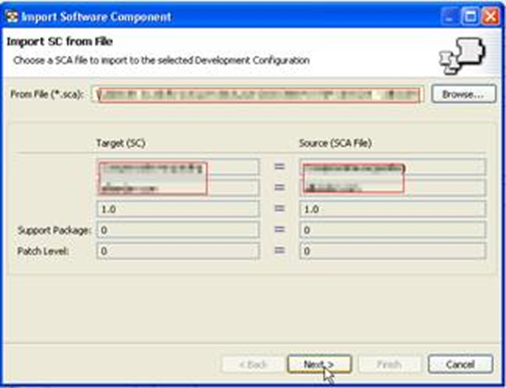
Particularly on the SAP NetWeaver platform, .SCA files serve to bundle and distribute Java-based components and apps. These files simplify management of sophisticated enterprise applications by combining several development components (DCs) into one archive.
Usually an .SCA file has:
- EAR, WAR, or JAR files
- Metadata for deployment
- Dependency information and versioning
Primarily utilized in SAP NetWeaver Development Infrastructure (NWDI), SCAs are implemented using tools such as the Software Deployment Manager (SDM) or SAP NetWeaver Administrator (NWA). SCAs facilitate lifecycle management by enabling rollbacks and upgrades.
They help to preserve the integrity of software components and guarantee regular implementation across systems. Using SAP development tools like NWDS (NetWeaver Developer Studio), developers create SCAs.
Java developers working on custom development or integration projects in the SAP environment must have knowledge of .SCA files.
Features of .SCA Files
The main features of .SCA (SAP Component Archive) files in SAP are:
1. Component Packaging
Containers made from .SCA files combine several Development Components (DCs). These might consist in Java EE components such EAR, WAR, or JAR files. By bundling enterprise applications into sets, SCAs offer a systematic approach to control and distribute them in SAP contexts.
2. Standardized Deployment
Using instruments like Software Deployment Manager (SDM) or SAP NetWeaver Administrator (NWA), .SCA files facilitate systematic deployment across several SAP systems. This ensures uniformity in setup and installation.
3. Version Control
Every .SCA consists of metadata including versioning details. This improves general system stability by letting administrators monitor several versions of parts, control upgrades, and execute rollbacks if required.
4. Integration with NWDI
The SAP NetWeaver Development Infrastructure (NWDI) relies heavily on .SCA files. They support the Change and Transport System (CTS+), which allows regulated movement of applications from development to production settings.
5. Lifecycle Management
.SCA files help to streamline application lifecycle management. From development and testing to deployment and decommissioning, they support a simplified and consistent process.
6. Reusability and Modularity
Encapsulating reusable components helps .SCA files advance modular design. This decreases development effort for future projects and improves maintainability.
Why Are .SCA Files Used?
Below are the reasons .SCA (SAP Component Archive) files are employed in SAP. Check the SAP Course Training in Chennai to learn how to use .SCA Files effectively.
1. Efficient Software Deployment
.SCA files combine JARs, WARs, and EARs among other things into one archive. This reduces the risk of missing files or setups during deployment by simplifying the distribution of full applications or upgrades in one go.
2. Centralized Lifecycle Management
.SCA files in SAP NetWeaver Development Infrastructure (NWDI)-based settings help a centralized method of handling development, testing, and deployment. Including version tracking, dependencies management, and rollback features, this helps to guarantee application stability all through the lifecycle.
3. Consistency Across Systems
.SCA files help to maintain consistency and lower environment-specific problems by making sure that across several systems (development, QA, production) the same software version is applied. They are especially helpful in settings with several SAP systems.
4. Support for Transport Mechanisms
Like conventional ABAP transports, .SCA files fit perfectly with CTS+ (Change and Transport System Plus), thus, facilitating simple and traceable movement of Java-based apps across the system environment.
5. Modular and Reusable Architecture
Encapsulating reusable elements helps them to encourage modular development. This promotes quick development, testing, and updating across major SAP projects. The Best SAP Course in Bangalore helps developers and administrators operating inside the SAP NetWeaver environment to know how these tools are used and what characteristics they have.
Conclusion
.SCA files are fundamental to the Java-based development and deployment processes of SAP. They provide a methodical, dependable, and version-controlled approach for delivering and packaging programs across SAP system terrains. Moreover, .SCA files promote modular development, lifecycle management, and smooth integration with NWDI and CTS+ to help ensure reliability, efficiency, and scalability in corporate application deployment.
About the Creator
Croma Campus
Croma Campus is specialized in providing best Digital Marketing Online training available globally. We offer several innovative learning methods and delivery models to cater to the unique requirements of a global customer base.
Enjoyed the story? Support the Creator.
Subscribe for free to receive all their stories in your feed.
Comments
There are no comments for this story
Be the first to respond and start the conversation.