
website and landing page UI UX design in figma, xd format
Figma/XD source file format? Then I am here to help you!!
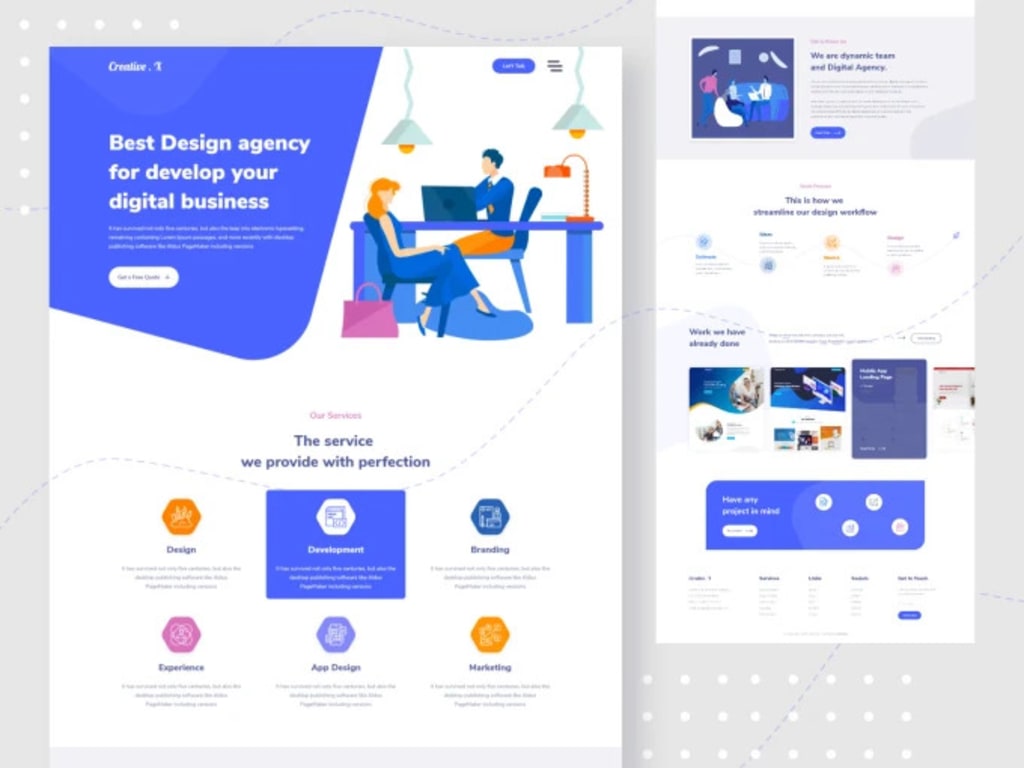
# Website and Landing Page UI/UX Design in Figma and XD Format
In today's digital age, creating an engaging and user-friendly website or landing page is essential for any business or individual looking to establish a strong online presence. User Interface (UI) and User Experience (UX) design play a crucial role in captivating visitors and converting them into loyal customers. Two popular design tools that aid in crafting remarkable UI/UX designs are Figma and Adobe XD. In this article, we will delve into the world of website and landing page UI/UX design, exploring the benefits, best practices, and how to leverage Figma and XD to create stunning interfaces.
## Table of Contents
1. Introduction
2. Understanding UI/UX Design
3. The Importance of Website and Landing Page Design
4. Best Practices for UI/UX Design
1. Responsive Design
2. Intuitive Navigation
3. Consistency in Design Elements
4. Utilizing Visual Hierarchy
5. Optimizing Page Load Speed
5. Introduction to Figma and Adobe XD
1. Figma: A Collaborative Design Tool
2. Adobe XD: The Experience Design Solution
6. Getting Started with Figma
1. Creating a New Project
2. Designing Artboards and Frames
3. Working with Components and Styles
4. Collaborating with Team Members
7. Mastering Adobe XD
1. Setting Up a New Project
2. Artboard Creation and Editing
3. Using Repeat Grids for Efficiency
4. Sharing Prototypes for Feedback
8. Tips for an Effective UI/UX Design Workflow
1. Understanding the Target Audience
2. Wireframing and Prototyping
3. Iterative Design and User Testing
4. Staying Updated with Design Trends
9. Enhancing UI/UX Design with Plugins and Integrations
1. Figma Plugins for Enhanced Functionality
2. Integrating Adobe XD with Other Creative Cloud Apps
10. Collaborative Design: Figma vs. Adobe XD
1. Real-time Collaboration in Figma
2. Collaborative Features in Adobe XD
11. Pros and Cons of Figma and Adobe XD
1. Figma: Advantages and Limitations
2. Adobe XD: Strengths and Weaknesses
12. Transitioning from Figma to Adobe XD and Vice Versa
13. UI/UX Design Trends to Watch Out For
1. Dark Mode Design
2. 3D and Immersive Visuals
3. Voice User Interface (VUI)
4. Microinteractions
14. The Future of UI/UX Design
15. Conclusion
## Introduction
In the fast-paced digital world, having an aesthetically pleasing and functional website or landing page is vital for businesses and individuals alike. UI/UX design focuses on creating an intuitive and delightful user experience, which can significantly impact the success of a website. This article will explore the world of UI/UX design for websites and landing pages, shedding light on best practices and the use of design tools such as Figma and Adobe XD.
## Understanding UI/UX Design
User Interface (UI) design refers to the visual elements and layout of a website, while User Experience (UX) design is concerned with the overall interaction and feel of the site. A successful UI/UX design ensures that users can easily navigate the site, find relevant information, and perform desired actions effortlessly.
## The Importance of Website and Landing Page Design
A well-crafted UI/UX design can make a significant difference in how visitors perceive a website. A visually appealing and user-friendly interface can keep users engaged and encourage them to explore further, leading to higher conversion rates and increased user retention.
## Best Practices for UI/UX Design
To create an outstanding UI/UX design, certain best practices should be followed:
### 1. Responsive Design
With the increasing use of mobile devices, designing for responsiveness is crucial. Ensuring that the website adapts seamlessly to various screen sizes enhances user experience and accessibility.
### 2. Intuitive Navigation
Intuitive navigation helps users find what they are looking for quickly. Clear and well-organized menus and navigation bars contribute to a positive user experience.
### 3. Consistency in Design Elements
Maintaining consistency in colors, fonts, and visual elements throughout the website creates a cohesive and professional appearance.
### 4. Utilizing Visual Hierarchy
Using visual hierarchy guides users through the content and highlights essential elements, improving the overall user experience.
### 5. Optimizing Page Load Speed
Fast-loading pages are crucial for retaining users and reducing bounce rates. Optimizing images and minimizing code can significantly improve page load speed.
## Introduction to Figma and Adobe XD
Figma and Adobe XD are powerful design tools that facilitate the UI/UX design process. They offer various features to streamline collaboration and enhance creativity.
### 1. Figma: A Collaborative Design Tool
Figma is a cloud-based design tool that enables real-time collaboration among team members. Its versatility and ability to work on multiple platforms make it a favorite among designers and developers.
### 2. Adobe XD: The Experience Design Solution
Adobe XD offers a range of tools for designing and prototyping UI/UX experiences. Its integration with other Adobe Creative Cloud apps allows seamless workflow for designers.
## Getting Started with Figma
Creating stunning UI/UX designs with Figma is a straightforward process:
### 1. Creating a New Project
To start a new project, simply create a new file and set the canvas size according to your design requirements.
### 2. Designing Artboards and Frames
Artboards and frames help structure the design and create a flow for user interactions. Define these elements to organize your design.
### 3. Working with Components and Styles
Figma allows you to create reusable components and styles, ensuring consistency throughout the design.
### 4. Collaborating with Team Members
Figma's collaborative features enable team members to work together in real-time, making it easy to gather feedback and make necessary adjustments.
## Mastering Adobe XD
Adobe XD provides a comprehensive platform for creating UI/UX designs:
### 1. Setting Up a New Project
Begin by creating a new project and selecting the appropriate artboard size for your design.
### 2. Artboard Creation and Editing
Design each screen or page of your website within separate artboards. Edit and refine the design elements as needed.
### 3. Using Repeat Grids for Efficiency
Adobe XD's repeat grid feature allows designers to duplicate elements quickly, streamlining the design process.
### 4. Sharing Prototypes for Feedback
Create interactive prototypes of your designs and share them with stakeholders for valuable feedback.
## Tips for an Effective UI/UX Design Workflow
To enhance your UI/UX design process, consider the following tips:
### 1. Understanding the Target Audience
Knowing your target audience's preferences and pain points helps tailor the design to meet their needs effectively.
### 2. Wireframing and Prototyping
Creating wireframes and prototypes allows you
to visualize the design flow and identify potential usability issues.
### 3. Iterative Design and User Testing
Iterate on your design based on feedback and conduct user testing to validate the usability of your website.
### 4. Staying Updated with Design Trends
Keeping up with the latest UI/UX design trends can inspire creativity and ensure your design remains relevant.
## Enhancing UI/UX Design with Plugins and Integrations
Both Figma and Adobe XD offer plugins and integrations that can elevate your design process:
### 1. Figma Plugins for Enhanced Functionality
Explore the wide range of Figma plugins available to add advanced features and boost productivity.
### 2. Integrating Adobe XD with Other Creative Cloud Apps
Seamlessly integrate Adobe XD with other Creative Cloud apps to create an efficient design workflow.
## Collaborative Design: Figma vs. Adobe XD
Both Figma and Adobe XD offer collaborative features for team-based design projects:
### 1. Real-time Collaboration in Figma
Figma's cloud-based platform enables designers to work simultaneously, making collaboration seamless.
### 2. Collaborative Features in Adobe XD
Adobe XD's collaboration tools allow team members to review and contribute to the design process.
## Pros and Cons of Figma and Adobe XD
Both Figma and Adobe XD have their strengths and limitations:
### 1. Figma: Advantages and Limitations
Figma's real-time collaboration and cross-platform capabilities are remarkable, but it may have limited offline access.
### 2. Adobe XD: Strengths and Weaknesses
Adobe XD's integration with the Creative Cloud ecosystem is a plus, but some users may find the learning curve steep.
## Transitioning from Figma to Adobe XD and Vice Versa
Designers may need to switch between Figma and Adobe XD based on project requirements:
Transitioning from Figma to Adobe XD and vice versa may require a brief adjustment period, but both tools offer seamless importing and exporting options.
## UI/UX Design Trends to Watch Out For
Staying updated with emerging design trends can give your UI/UX designs a competitive edge:
### 1. Dark Mode Design
Dark mode is gaining popularity due to its visual appeal and reduced eye strain during nighttime browsing.
### 2. 3D and Immersive Visuals
The use of 3D elements and immersive visuals can create a captivating and engaging user experience.
### 3. Voice User Interface (VUI)
Voice-controlled interfaces are becoming more prevalent, providing users with a hands-free and convenient experience.
### 4. Microinteractions
Microinteractions, such as animated button responses, add delightful interactions that enhance user engagement.
## The Future of UI/UX Design
As technology evolves, UI/UX design will continue to play a critical role in shaping digital experiences. Advancements in AI and VR are expected to further revolutionize the field.
## Conclusion
In conclusion, crafting an exceptional UI/UX design is fundamental to a website's success. Emphasizing intuitive navigation, consistency, and responsiveness ensures an enjoyable user experience. By harnessing the power of design tools like Figma and Adobe XD, designers can create visually stunning interfaces that captivate users and drive business growth.
## FAQs
### 1. What is UI/UX design?
UI/UX design focuses on creating a visually appealing and user-friendly interface and ensuring a delightful overall user experience.
### 2. Which design tool is better: Figma or Adobe XD?
Both Figma and Adobe XD are powerful design tools, each with its unique strengths. The choice depends on individual preferences and project requirements.
### 3. How can I improve the UI/UX design of my website?
To improve UI/UX design, consider responsive design, intuitive navigation, visual hierarchy, and fast page load speed, among other best practices.
### 4. What are some UI/UX design trends to watch out for?
Some emerging trends include dark mode design, 3D visuals, voice user interfaces (VUI), and microinteractions.
### 5. How will AI and VR impact the future of UI/UX design?
Advancements in AI and VR are expected to revolutionize UI/UX design by providing more personalized and immersive experiences for users.
About the Creator
Enjoyed the story? Support the Creator.
Subscribe for free to receive all their stories in your feed.
Comments
There are no comments for this story
Be the first to respond and start the conversation.