
How Do You Configure Automatic Payment Programs In SAP S/4 HANA?
SAP S4 Hana

Introduction
Used to simplify and automate the payment system for vendors and consumers, the Automatic Payment Program (APP) in SAP S/4HANA is a potent tool Setting APP helps companies to guarantee timely and correct financial transactions, so lowering manual effort and assuring banking compliance. This system lets one manage payment media, bank accounts, and payment methods effectively. Refer to the SAP S4 HANA Course to learn more about APP in SAP. This guide explains the key phases requires to properly set the Automatic Payment Program in SAP S/4HANA.
Configuring Automatic Payment Programs In SAP S/4 HANA
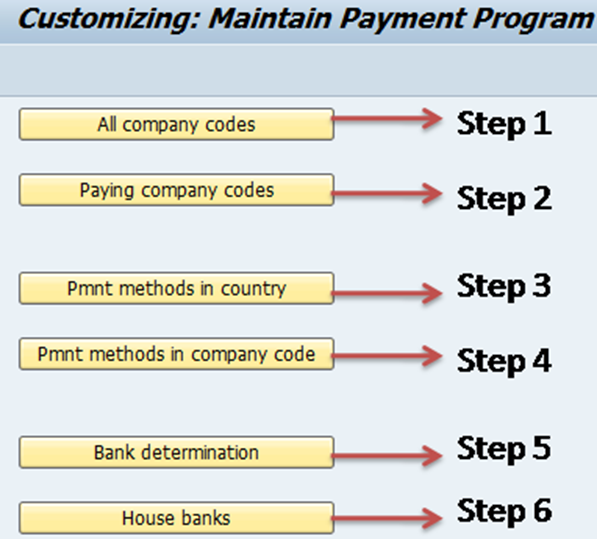
Automating vendor and customer payments entirely depend on configuring the Automatic Payment Program (APP) in SAP S/4 HANA. APP lets businesses manage outgoing payments based on the set criteria. Usually accomplished by means of transaction FBZP, this setup has several steps. Each step focuses on different parts of the payment process such as bank determination, payment methods, and house banks.
Let us look at the important steps in details:
The setup starts with establishing the country-specific payment methods. This is accessed under through FBZP under "Payment Methods in Country". You must define a code for every payment method (like 'T' for bank transfer or 'C' for cheque) and specify settings including postal payments, requisite house bank details, and payment medium format (e.g., XML, IDOC). These arrangements guarantee that the payment method satisfies organizational as well as legal criteria.
Next, you need to set the payment method in the company code. Here you designate a certain company code the earlier established payment method. Other setups let you control settings like minimum and maximum amounts, payment blocks, bank selection control, and whether a different payment is made as per the invoice or according to the vendor. This is an important step since it helps a business code's internal operations match the country-specific payment methods.
Next, set the bank decision. This part describes the criteria the system will use to choose a specific house bank and payment account. Defining ranking orders, allocating accessible amounts, and designating the bank accounts for several currencies and payment choices are part of the process. Based on priorities and balances, bank determination helps to guarantee that payments run through the appropriate bank accounts. Aspiring professionals planning to get the S4 HANA Certification can check the courses to learn more about the different processes involved.
House bank configuration must be finished before bank identification. In SAP, a house bank represents the bank of the company. It involves specifying the house bank ID, bank key, and the related bank accounts with their account IDs and G/L accounts. House bank information is crucial because it ensures correct financial postings and links payment transactions to actual financial institutions.
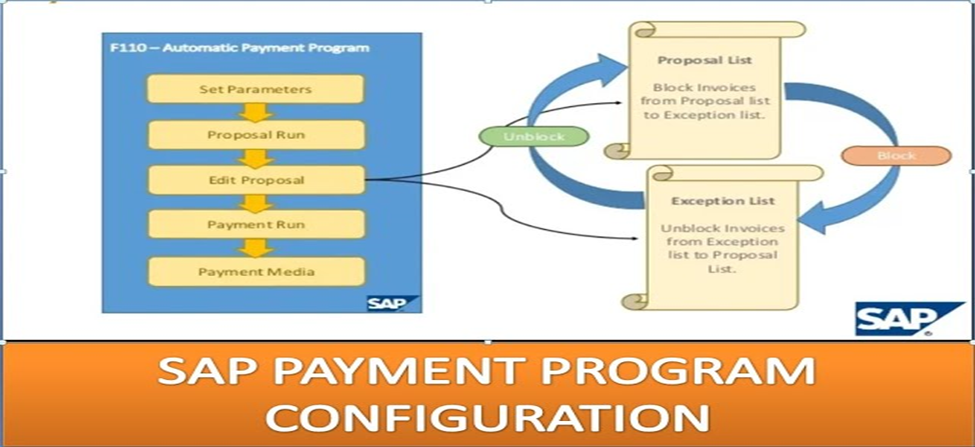
Next, you specify the payment run settings using transaction F110 once these configuration components have been established. You enter the run date, identification code, posting date, papers to be reviewed, and the company codes included in this screen. Then the system will produce payment proposals, review payment blocks, analyse open items, and check due dates. You can review the proposal, make any needed changes, and then move on to create payment media and payment documents.
Lastly, combine payment medium workbench (PMW) for creating payment documents in desired formats. SAP S/4HANA provides modern formats such ISO20022 for international transactions. This supports alignment with worldwide banking standards. PMW configuration guarantees seamless integration with banks for electronic payments. Check the SAP Course Details to know more about SAP Automatic Payment Program.
Conclusion
Setting the Automatic Payment Program in SAP S/4HANA is a repetitive process. This process involves setting payment methods, bank identification, and house banks, followed by executing payment runs. Every setup action ensures that the system processes payments correctly, quickly, and according to the outside rules and internal controls. Good APP setup lowers manual intervention and the payment processing error risk, therefore simplifying financial operations.
About the Creator
Croma Campus
Croma Campus is specialized in providing best Digital Marketing Online training available globally. We offer several innovative learning methods and delivery models to cater to the unique requirements of a global customer base.
Enjoyed the story? Support the Creator.
Subscribe for free to receive all their stories in your feed.
Comments
There are no comments for this story
Be the first to respond and start the conversation.