
Giant AI Brain Called Groq (Using LangChain!)
Bob's journey with LangChain and Groq
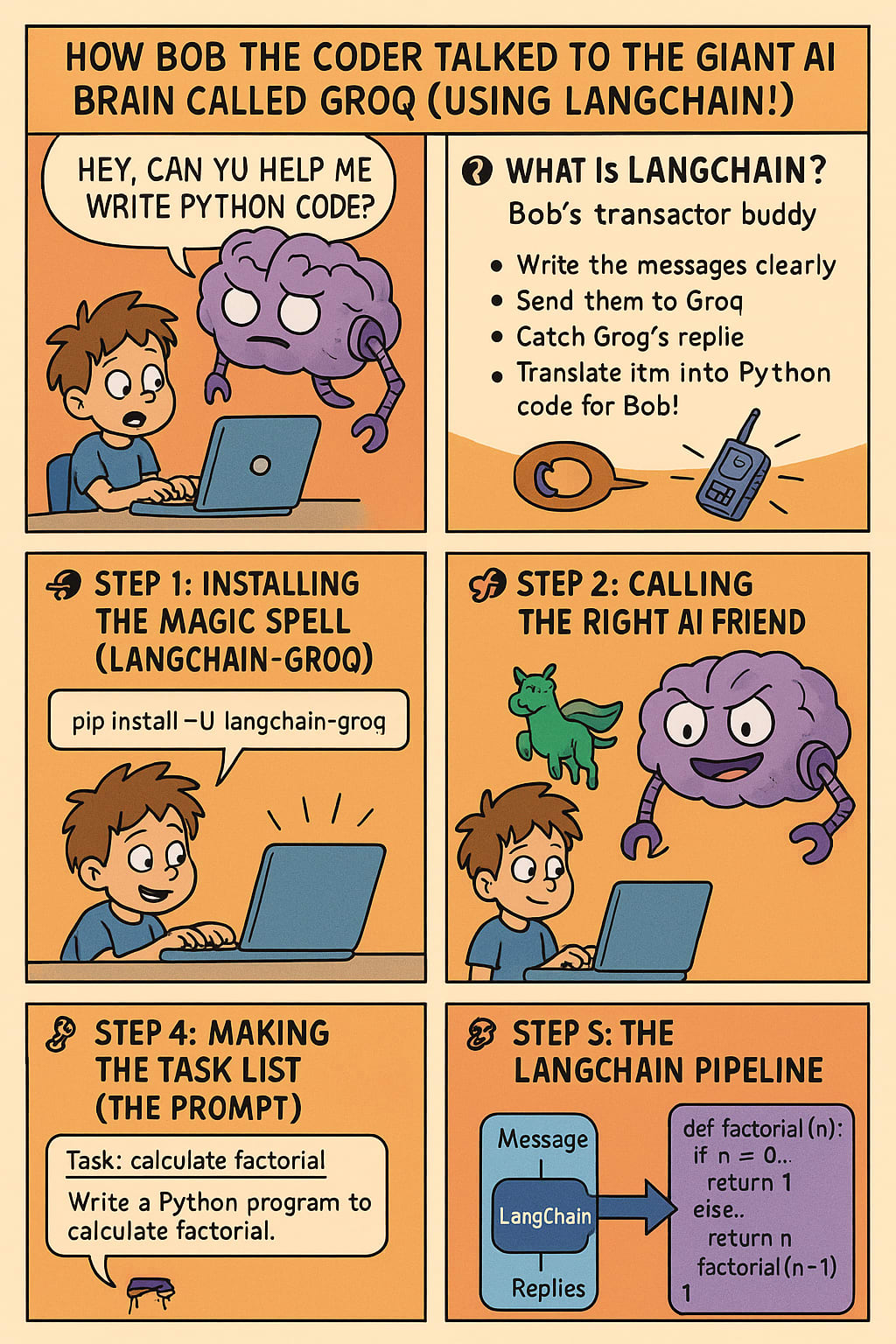
Welcome to AI Land, Young Explorer!
Once upon a computer screen, there was a curious little coder named Bob.
Bob was 10 years old, had a laptop that ran on snacks (okay, not really), and a dream:
To build a machine that could write code for him.
Sounds wild?
Well, one day, Bob met a super-duper smart creature named Groq — a Giant Robot of Questions.
Groq was powerful. It lived in the cloud. And it knew... EVERYTHING.
But there was a problem...
Problem: Bob Didn’t Know the Secret Way to Talk to Groq
Bob asked Groq, “Hey, can you help me write Python code?”
Groq replied... nothing. Silence. Awkward.
That’s because Groq didn’t understand Bob’s squeaky voice or keyboard taps.
Groq only talked in a secret code language!
So Bob called in help...
From LangChain!
What Is LangChain? (Bob’s Translator Buddy)
Think of LangChain as Bob’s magical walkie-talkie.
It helps Bob send messages to Groq, understand replies, and even organize tasks.
LangChain’s job is to:
- Write the messages clearly.
- Send them to Groq.
- Catch Groq’s replies.
- Translate them into Python code for Bob!
Now, let’s see how Bob built this whole magical system step by step...
Step 1: Installing the Magic Spell (LangChain-Groq)
Bob ran this on his magical command scroll (aka his terminal):
pip install -U langchain-groq
That’s like saying, “Download my talking powers!”
It installed the bridge between Bob’s world and Groq’s brain.
Step 2: Calling the Right AI Friend
Groq has many minds! Bob picked the LLaMA-3 model (sounds like a superhero llama).
In code, he wrote:
from langchain_groq import ChatGroq
This is like saying, “LLaMA-3, come out and play!”
Step 3: Secret Password Time!
Groq doesn’t talk to just anyone. It needs a secret passcode (API key).
Bob whispered the key like this:
import os
os.environ["GROQ_API_KEY"] = "your-secret-key-here"
That’s Bob slipping the key under Groq’s door. Now they’re best buddies.
Step 4: Making the Task List (The Prompt)
Bob wanted Groq to help him with Python tasks like:
- "Write a calculator!"
- "Make a game!"
- "Solve math with factorials!"
- So he used a prompt template — basically a sentence with a blank space!
from langchain.prompts import PromptTemplate
prompt = PromptTemplate(
input_variables=["task"],
template="Write a Python program to {task}."
)
If Bob says:
task = "calculate factorial"
The message becomes:
“Write a Python program to calculate factorial.”
Step 5: The LangChain Pipeline
Now Bob connected all the pipes, wires, and circuits.
from langchain.chains import LLMChain
chain = LLMChain(llm=ai, prompt=prompt)
This was Bob’s pipeline machine:
- One end talks to Groq.
- The other grabs the Python code Groq sends back.
Step 6: Sending a Real Task!
Time to test it! Bob gave Groq his first real mission:
response = chain.run(task="calculate factorial")
Groq rumbled, sparked, buzzed... and replied with:
def factorial(n):
if n == 0:
return 1
else:
return n * factorial(n-1)
num = int(input("Enter a number: "))
print("The factorial of", num, "is", factorial(num))
And boom! Bob had working code!
He ran it, typed 5, and got The factorial of 5 is 120.
Bob did a victory dance. His laptop blinked in applause.
What’s Really Happening? (The Fun Breakdown)
Here’s how Bob explains it to his friends at school:
- LangChain = the magic telephone between you and the robot brain.
- Groq = the giant cloud monster that’s really good at thinking and writing.
- API Key = your secret handshake to enter Groq’s club.
- PromptTemplate = your fill-in-the-blank notebook for telling Groq what to do.
- LLMChain = the tunnel that connects the notebook to the robot’s brain.
- Response = Groq’s answer, full of shiny new Python code.
Bonus Tips From Bob
- Don’t forget to feed Groq the right API key or he’ll go silent.
- If Groq says “Module Not Found,” double-check your pip install.
- Use a virtual room (a virtual environment) to keep your code clean.
- The temperature setting tells Groq how wacky or serious it should be:
- 0.0 = Serious Robot
- 0.7 = Friendly Helper
- 1.0 = Funny Poet
- 2.0 = Banana Pants Nonsense Mode!
The Moral of the Story
With the right tools and a little code magic, even a kid can command an AI beast.
Bob didn’t need a castle, a treasure chest, or a rocket ship.
All he needed was:
- A laptop,
- Some Python,
- LangChain,
- And a Groq passcode.
- Now he builds apps, solves math, and writes stories — all by talking to his AI buddy!
Final Rhyme to Remember It All
LangChain is your magic thread,
To wake Groq up from his cloud-bed.
Give it a task, feed it a line,
And boom — Python code that works just fine!
About the Creator
Priyanka Neogi
AI Data Enthusist.
Enjoyed the story? Support the Creator.
Subscribe for free to receive all their stories in your feed.
Comments
There are no comments for this story
Be the first to respond and start the conversation.