
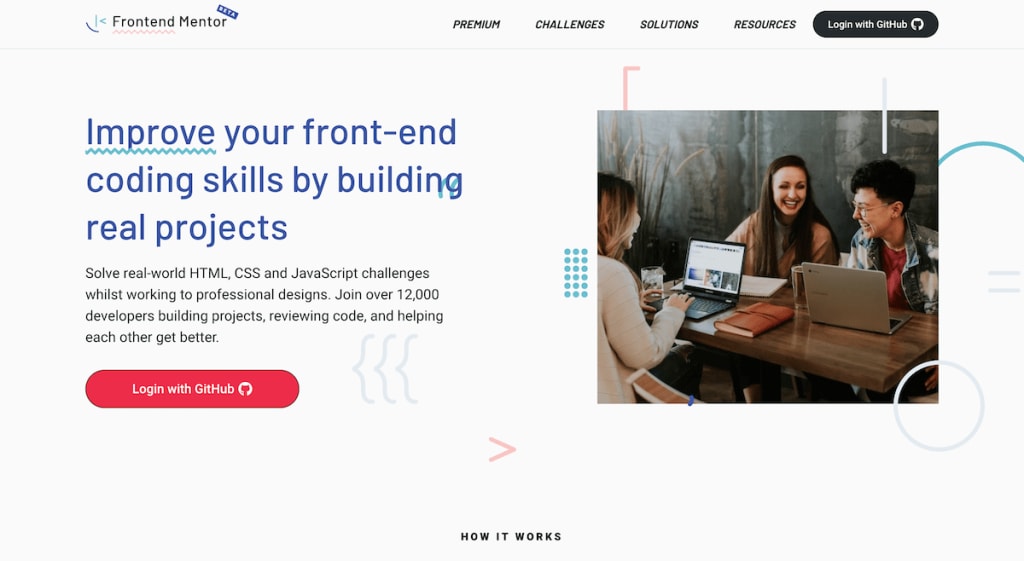
Aspiring front-end developers can participate in coding challenges and projects on the website Frontend Mentor. Users are given project briefs, design files, and assets by the platform, allowing them to practise constructing practical web applications and advancing their coding abilities. By working on projects that mimic real-world scenarios, Frontend Mentor aims to assist developers in gaining real-world experience and strengthening their portfolios. There are many different challenges available on Frontend Mentor, ranging from easy to difficult. In addition to HTML, CSS, JavaScript, and well-known front-end frameworks like React, Vue, and Angular, these challenges address a variety of front-end development topics. To aid users in understanding the project's needs, each challenge is accompanied by a set of specs and design files. In addition, the platform promotes cooperation and exchange of solutions, allowing users to collaborate on learning. 1. Challenge Overview and Selection Users can first browse the Frontend Mentor website and choose a challenge based on their interests and skill level. To assist users in making judgements, each challenge features a preview image, a brief description, and a difficulty rating. Details about the project requirements, such as the design files, assets, and instructions, are detailed on the challenge summary page. Challenge Selection may be found at https://res.cloudinary.com/practicaldev/image/fetch/s--v1UgQ9wE--/c_limit%2Cf_auto%2Cfl_progressive%2Cq_auto%2Cw_880/.https://dev-to-uploads.s3.amazonaws.com/uploads/articles/0q1z7cqrk3l8k3c7y2h6.png) 2.Design Assets & Files Each assignment includes design files in a variety of formats, such as Adobe XD, Figma, or Sketch. These files provide thorough visual layouts and design guidelines, such as colour schemes, font choices, and line spacing. Users can inspect the projects by opening these files in their favourite design programme in depth, extract assets, and when necessary, measure dimensions. For usage in the project, Frontend Mentor also offers downloadable assets, such as pictures and icons. (https://miro.medium.com/max/1400/1*Z3YwnfI0vUj0vdX62UQJ7w.png) Design Files 3. Execution of the Project Users can begin developing the web application using their choice code editor and development environment once they get the design files and assets. They can use the design guidelines as a guide while writing HTML, CSS, and JavaScript code to make sure their implementation complies with the project specifications. Users can choose to speed up their development process and get familiarity with these technologies by using front-end frameworks or libraries like React or Bootstrap. (https://miro.medium.com/max/1400/1*6kjgq3vHnLzLFSaC5-X8HQ.png)![Code Editor] 4. Testing and Reactivity It is essential to make sure the web application functions properly on a variety of devices and screen sizes. Users ought to Check the responsiveness of their initiatives and address any problems that are found. This procedure could entail modifying CSS rules, utilising media queries, testing the application across numerous devices, or simulating various viewport widths using browser developer tools. (https://www.webfx.com/blog/images/assets/cdn.sixrevisions.com/0535-01-responsive-web-design-testing-tool-screenshot_large.png)![Responsiveness Testing] 5. Presenting the Solution and Receiving Comments Once
ఔత్సాహిక ఫ్రంట్-ఎండ్ డెవలపర్లు ఫ్రంటెండ్ మెంటార్ వెబ్సైట్లో కోడింగ్ సవాళ్లు మరియు ప్రాజెక్ట్లలో పాల్గొనవచ్చు. ప్లాట్ఫారమ్ ద్వారా వినియోగదారులకు ప్రాజెక్ట్ బ్రీఫ్లు, డిజైన్ ఫైల్లు మరియు ఆస్తులు అందించబడతాయి, ఇది ప్రాక్టికల్ వెబ్ అప్లికేషన్లను రూపొందించడం మరియు వారి కోడింగ్ సామర్థ్యాలను అభివృద్ధి చేయడంలో ప్రాక్టీస్ చేయడానికి వీలు కల్పిస్తుంది. వాస్తవ-ప్రపంచ దృశ్యాలను అనుకరించే ప్రాజెక్ట్లపై పని చేయడం ద్వారా, వాస్తవ ప్రపంచ అనుభవాన్ని పొందడంలో మరియు వారి పోర్ట్ఫోలియోలను బలోపేతం చేయడంలో డెవలపర్లకు సహాయం చేయడం Frontend మెంటర్ లక్ష్యం. ఫ్రంటెండ్ మెంటర్లో సులభమైన నుండి కష్టమైన వరకు అనేక విభిన్న సవాళ్లు అందుబాటులో ఉన్నాయి. HTML, CSS, JavaScript మరియు రియాక్ట్, Vue మరియు కోణీయ వంటి ప్రసిద్ధ ఫ్రంట్-ఎండ్ ఫ్రేమ్వర్క్లతో పాటు, ఈ సవాళ్లు వివిధ ఫ్రంట్-ఎండ్ డెవలప్మెంట్ టాపిక్లను పరిష్కరిస్తాయి. ప్రాజెక్ట్ యొక్క అవసరాలను అర్థం చేసుకోవడంలో వినియోగదారులకు సహాయం చేయడానికి, ప్రతి సవాలుకు స్పెక్స్ మరియు డిజైన్ ఫైల్ల సెట్ ఉంటుంది. అదనంగా, ప్లాట్ఫారమ్ సహకారాన్ని మరియు పరిష్కారాల మార్పిడిని ప్రోత్సహిస్తుంది, వినియోగదారులను నేర్చుకోవడంలో సహకరించడానికి అనుమతిస్తుంది. 1. ఛాలెంజ్ అవలోకనం మరియు ఎంపిక వినియోగదారులు ముందుగా ఫ్రంటెండ్ మెంటర్ వెబ్సైట్ను బ్రౌజ్ చేయవచ్చు మరియు వారి ఆసక్తులు మరియు నైపుణ్యం స్థాయి ఆధారంగా సవాలును ఎంచుకోవచ్చు. తీర్పులు చేయడంలో వినియోగదారులకు సహాయం చేయడానికి, ప్రతి ఛాలెంజ్లో ప్రివ్యూ ఇమేజ్, క్లుప్త వివరణ మరియు కష్టాల రేటింగ్ ఉంటాయి. డిజైన్ ఫైల్లు, ఆస్తులు మరియు సూచనల వంటి ప్రాజెక్ట్ అవసరాల గురించిన వివరాలు సవాలు సారాంశం పేజీలో వివరించబడ్డాయి. ఛాలెంజ్ ఎంపికను https://res.cloudinary.com/practicaldev/image/fetch/s--v1UgQ9wE--/c_limit%2Cf_auto%2Cfl_progressive%2Cq_auto%2Cw_880/.https://dev-to-uploadsలో కనుగొనవచ్చు. s3.amazonaws.com/uploads/articles/0q1z7cqrk3l8k3c7y2h6.png) 2.డిజైన్ ఆస్తులు & ఫైల్స్ ప్రతి అసైన్మెంట్లో అడోబ్ ఎక్స్డి, ఫిగ్మా లేదా స్కెచ్ వంటి వివిధ ఫార్మాట్లలో డిజైన్ ఫైల్లు ఉంటాయి. ఈ ఫైల్లు రంగు పథకాలు, ఫాంట్ ఎంపికలు మరియు పంక్తి అంతరం వంటి సమగ్ర దృశ్య లేఅవుట్లు మరియు డిజైన్ మార్గదర్శకాలను అందిస్తాయి. వినియోగదారులు తమకు ఇష్టమైన డిజైన్ ప్రోగ్రామ్లో ఈ ఫైల్లను లోతుగా తెరవడం ద్వారా ప్రాజెక్ట్లను తనిఖీ చేయవచ్చు, ఆస్తులను సేకరించవచ్చు మరియు అవసరమైనప్పుడు కొలతలు కొలవవచ్చు. ప్రాజెక్ట్లో ఉపయోగం కోసం, ఫ్రంటెండ్ మెంటర్ చిత్రాలు మరియు చిహ్నాలు వంటి డౌన్లోడ్ చేయదగిన ఆస్తులను కూడా అందిస్తుంది. (https://miro.medium.com/max/1400/1*Z3YwnfI0vUj0vdX62UQJ7w.png) డిజైన్ ఫైల్లు
3. ప్రాజెక్ట్ అమలు వినియోగదారులు డిజైన్ ఫైల్లు మరియు ఆస్తులను పొందిన తర్వాత వారి ఎంపిక కోడ్ ఎడిటర్ మరియు అభివృద్ధి వాతావరణాన్ని ఉపయోగించి వెబ్ అప్లికేషన్ను అభివృద్ధి చేయడం ప్రారంభించవచ్చు. వారు HTML, CSS మరియు JavaScript కోడ్లను వ్రాసేటప్పుడు డిజైన్ మార్గదర్శకాలను గైడ్గా ఉపయోగించవచ్చు, వాటి అమలు ప్రాజెక్ట్ స్పెసిఫికేషన్లకు అనుగుణంగా ఉందని నిర్ధారించుకోవచ్చు. ఫ్రంట్-ఎండ్ ఫ్రేమ్వర్క్లు లేదా రియాక్ట్ లేదా బూట్స్ట్రాప్ వంటి లైబ్రరీలను ఉపయోగించడం ద్వారా వినియోగదారులు తమ అభివృద్ధి ప్రక్రియను వేగవంతం చేయడానికి ఎంచుకోవచ్చు మరియు ఈ సాంకేతికతలతో పరిచయాన్ని పొందవచ్చు. (https://miro.medium.com/max/1400/1*6kjgq3vHnLzLFSaC5-X8HQ.png)![కోడ్ ఎడిటర్] 4. టెస్టింగ్ మరియు రియాక్టివిటీ వెబ్ అప్లికేషన్ వివిధ పరికరాలు మరియు స్క్రీన్ పరిమాణాలలో సరిగ్గా పనిచేస్తుందని నిర్ధారించుకోవడం చాలా అవసరం. వినియోగదారులు వారి చొరవల ప్రతిస్పందనను తనిఖీ చేయాలి మరియు కనుగొనబడిన ఏవైనా సమస్యలను పరిష్కరించాలి. ఈ విధానం CSS నియమాలను సవరించడం, మీడియా ప్రశ్నలను ఉపయోగించడం, అనేక పరికరాలలో అప్లికేషన్ను పరీక్షించడం లేదా బ్రౌజర్ డెవలపర్ సాధనాలను ఉపయోగించి వివిధ వీక్షణపోర్ట్ వెడల్పులను అనుకరించడం వంటివి చేయవచ్చు. (https://www.webfx.com/blog/images/assets/cdn.sixrevisions.com/0535-01-responsive-web-design-testing-tool-screenshot_large.png)![ప్రతిస్పందన పరీక్ష] 5. పరిష్కారాన్ని ప్రదర్శించడం మరియు వ్యాఖ్యలను స్వీకరించడం ఒకసారి
[( Indonesia )]
Pengembang front-end yang bercita-cita tinggi dapat berpartisipasi dalam tantangan dan proyek pengkodean di situs web Frontend Mentor. Pengguna diberikan rangkuman proyek, file desain, dan aset oleh platform, yang memungkinkan mereka berlatih membangun aplikasi web praktis dan meningkatkan kemampuan pengkodean mereka. Dengan mengerjakan proyek yang meniru skenario dunia nyata, Frontend Mentor bertujuan untuk membantu pengembang mendapatkan pengalaman dunia nyata dan memperkuat portofolio mereka. Ada banyak tantangan berbeda yang tersedia di Frontend Mentor, mulai dari yang mudah hingga yang sulit. Selain HTML, CSS, JavaScript, dan framework front-end terkenal seperti React, Vue, dan Angular, tantangan ini membahas berbagai topik pengembangan front-end. Untuk membantu pengguna memahami kebutuhan proyek, setiap tantangan disertai dengan sekumpulan spesifikasi dan file desain. Selain itu, platform ini mempromosikan kerja sama dan pertukaran solusi, memungkinkan pengguna untuk berkolaborasi dalam pembelajaran. 1. Ikhtisar dan Seleksi Tantangan Pengguna dapat menelusuri situs web Mentor Frontend terlebih dahulu dan memilih tantangan berdasarkan minat dan tingkat keahlian mereka. Untuk membantu pengguna membuat penilaian, setiap tantangan menampilkan gambar pratinjau, deskripsi singkat, dan peringkat kesulitan. Detail tentang persyaratan proyek, seperti file desain, aset, dan instruksi, dirinci di halaman ringkasan tantangan. Pilihan Tantangan dapat ditemukan di https://res.cloudinary.com/practicaldev/image/fetch/s--v1UgQ9wE--/c_limit%2Cf_auto%2Cfl_progressive%2Cq_auto%2Cw_880/.https://dev-to-uploads. s3.amazonaws.com/uploads/articles/0q1z7cqrk3l8k3c7y2h6.png) Desain Aset & File Setiap tugas menyertakan file desain dalam berbagai format, seperti Adobe XD, Figma, atau Sketch. File-file ini menyediakan tata letak visual dan panduan desain menyeluruh, seperti skema warna, pilihan font, dan spasi baris. Pengguna dapat memeriksa proyek dengan membuka file-file ini dalam program desain favorit mereka secara mendalam, mengekstrak aset, dan bila perlu, mengukur dimensi. Untuk penggunaan dalam proyek, Mentor Frontend juga menawarkan aset yang dapat diunduh, seperti gambar dan ikon. (https://miro.medium.com/max/1400/1*Z3YwnfI0vUj0vdX62UQJ7w.png) File Desain 3. Pelaksanaan Proyek Pengguna dapat mulai mengembangkan aplikasi web menggunakan editor kode dan lingkungan pengembangan pilihan mereka setelah mereka mendapatkan file dan aset desain. Mereka dapat menggunakan pedoman desain sebagai panduan saat menulis kode HTML, CSS, dan JavaScript untuk memastikan penerapannya sesuai dengan spesifikasi proyek. Pengguna dapat memilih untuk mempercepat proses pengembangan mereka dan membiasakan diri dengan teknologi ini dengan menggunakan kerangka kerja front-end atau pustaka seperti React atau Bootstrap. (https://miro.medium.com/max/1400/1*6kjgq3vHnLzLFSaC5-X8HQ.png)![Editor Kode]
4. Pengujian dan Reaktivitas Sangat penting untuk memastikan aplikasi web berfungsi dengan baik pada berbagai perangkat dan ukuran layar. Pengguna harus memeriksa daya tanggap inisiatif mereka dan mengatasi setiap masalah yang ditemukan. Prosedur ini dapat memerlukan modifikasi aturan CSS, memanfaatkan kueri media, menguji aplikasi di banyak perangkat, atau mensimulasikan berbagai lebar viewport menggunakan alat pengembang browser. (https://www.webfx.com/blog/images/assets/cdn.sixrevisions.com/0535-01-responsive-web-design-testing-tool-screenshot_large.png)![Pengujian Responsif] 5. Mempresentasikan Solusi dan Menerima Komentar Sekali
[( Hindi)]
फ्रंटेंड मेंटर पर कई अलग-अलग चुनौतियाँ उपलब्ध हैं, जिनमें आसान से लेकर कठिन तक शामिल हैं। एचटीएमएल, सीएसएस, जावास्क्रिप्ट, और प्रसिद्ध फ्रंट-एंड फ्रेमवर्क जैसे रिएक्ट, वीयू और एंगुलर के अलावा, ये चुनौतियाँ विभिन्न प्रकार के फ्रंट-एंड डेवलपमेंट विषयों को संबोधित करती हैं। उपयोगकर्ताओं को प्रोजेक्ट की ज़रूरतों को समझने में मदद करने के लिए, हर चुनौती के साथ विशिष्टताओं और डिज़ाइन फ़ाइलों का एक सेट होता है। इसके अलावा, मंच सहयोग और समाधानों के आदान-प्रदान को बढ़ावा देता है, जिससे उपयोगकर्ता सीखने में सहयोग कर सकते हैं। 1. चुनौती अवलोकन और चयन उपयोगकर्ता पहले फ्रंटेंड मेंटर वेबसाइट ब्राउज़ कर सकते हैं और अपनी रुचियों और कौशल स्तर के आधार पर एक चुनौती चुन सकते हैं। उपयोगकर्ताओं को निर्णय लेने में सहायता करने के लिए, प्रत्येक चुनौती में एक पूर्वावलोकन छवि, एक संक्षिप्त विवरण और एक कठिनाई रेटिंग होती है। परियोजना की आवश्यकताओं के बारे में विवरण, जैसे डिज़ाइन फ़ाइलें, संपत्तियां और निर्देश, चुनौती सारांश पृष्ठ पर विस्तृत हैं। चुनौती चयन https://res.cloudinary.com/practicaldev/image/fetch/s--v1UgQ9wE--/c_limit%2Cf_auto%2Cfl_progressive%2Cq_auto%2Cw_880/.https://dev-to-uploads पर पाया जा सकता है। s3.amazonaws.com/uploads/articles/0q1z7cqrk3l8k3c7y2h6.png) डिजाइन संपत्ति और फ़ाइलें प्रत्येक असाइनमेंट में विभिन्न स्वरूपों में डिज़ाइन फ़ाइलें शामिल होती हैं, जैसे Adobe XD, Figma, या Sketch। ये फ़ाइलें पूरी तरह से दृश्य लेआउट और डिज़ाइन दिशानिर्देश प्रदान करती हैं, जैसे कि रंग योजनाएँ, फ़ॉन्ट विकल्प और पंक्ति रिक्ति। उपयोगकर्ता इन फ़ाइलों को अपने पसंदीदा डिज़ाइन प्रोग्राम में गहराई से खोलकर, संपत्ति निकालकर, और जब आवश्यक हो, आयामों को मापकर परियोजनाओं का निरीक्षण कर सकते हैं। प्रोजेक्ट में उपयोग के लिए, फ्रंटेंड मेंटर डाउनलोड करने योग्य संपत्तियां भी प्रदान करता है, जैसे चित्र और आइकन। (https://miro.medium.com/max/1400/1*Z3YwnfI0vUj0vdX62UQJ7w.png) डिज़ाइन फ़ाइलें 3. परियोजना का निष्पादन डिज़ाइन फ़ाइलें और संपत्तियां प्राप्त करने के बाद उपयोगकर्ता अपनी पसंद के कोड संपादक और विकास पर्यावरण का उपयोग करके वेब एप्लिकेशन को विकसित करना शुरू कर सकते हैं। वे एचटीएमएल, सीएसएस और जावास्क्रिप्ट कोड लिखते समय एक गाइड के रूप में डिजाइन दिशानिर्देशों का उपयोग यह सुनिश्चित करने के लिए कर सकते हैं कि उनका कार्यान्वयन परियोजना विनिर्देशों का अनुपालन करता है। उपयोगकर्ता अपनी विकास प्रक्रिया को तेज करने का विकल्प चुन सकते हैं और रिएक्ट या बूटस्ट्रैप जैसे फ्रंट-एंड फ्रेमवर्क या लाइब्रेरी का उपयोग करके इन तकनीकों से परिचित हो सकते हैं। (https://miro.medium.com/max/1400/1*6kjgq3vHnLzLFSaC5-X8HQ.png)![कोड संपादक] 4. परीक्षण और प्रतिक्रियाशीलता यह सुनिश्चित करना आवश्यक है कि विभिन्न प्रकार के उपकरणों और स्क्रीन आकारों पर वेब एप्लिकेशन ठीक से काम करता है। उपयोगकर्ताओं को अपनी पहल की प्रतिक्रिया की जांच करनी चाहिए और जो भी समस्याएं मिलती हैं उन्हें दूर करना चाहिए। इस प्रक्रिया में CSS नियमों को संशोधित करना, मीडिया प्रश्नों का उपयोग करना, कई उपकरणों में एप्लिकेशन का परीक्षण करना, या ब्राउज़र डेवलपर टूल का उपयोग करके विभिन्न व्यूपोर्ट चौड़ाई का अनुकरण करना शामिल हो सकता है। (https://www.webfx.com/blog/images/assets/cdn.sixrevisions.com/0535-01-responsive-web-design-testing-tool-screenshot_large.png)![प्रतिक्रिया परीक्षण] 5. समाधान प्रस्तुत करना और टिप्पणियाँ प्राप्त करना
Written by
M.kushwanth
About the Creator
Enjoyed the story? Support the Creator.
Subscribe for free to receive all their stories in your feed.
Comments
There are no comments for this story
Be the first to respond and start the conversation.