
Cybersecurity in the Age of Remote Work: A Practical Guide for Individuals and Companies
Stay Secure: A Practical Cybersecurity Guide for Remote Work


The COVID-19 pandemic has quickly transformed the global landscape toward remote work. How we work together, communicate, and conduct business is fast changing. There are various advantages of working remotely; however, there are certain cybersecurity challenges that accompany working remotely. When the line between personal and professional goes blurry, it demands much more stringent implementation of the cybersecurity measures.
In this article, We will discuss real threats to cybersecurity in particular to remote work and how to be safe practically at the individual and at a company level.
Understanding the Cybersecurity Landscape of Remote Work
Remote work has spread the attack surface all over cyberspace as sensitive company data is accessed from personal devices and a home network that typically doesn’t have stringent security protocols than those in a corporate environment. This weakness exposed it to include a wide variety of malwares such as:
- Phishing Attacks: This will include the increase in using emails and messaging in working from home since criminals are using malicious emails or messages similar to genuine ones or forcing the employees to click on malicious links.
- Data Breaches: Weak home Wi-Fi networks, unsecured personal devices, and inadequate data backup practices can lead to data breaches, whereby hackers steal confidential information for financial or malicious purposes.
- Malware and Ransomware: Employees may bring malware and ransomware by downloading files and browsing websites on their personal devices. These malicious programs(malware) could encrypt data, disrupt operations, and demand ransome money.
- Social Engineering: Several cyber criminals utilize the isolation and trust that remote workers have through social engineering mechanisms. They make other people divulge confidential information or perform acts that compromise security.
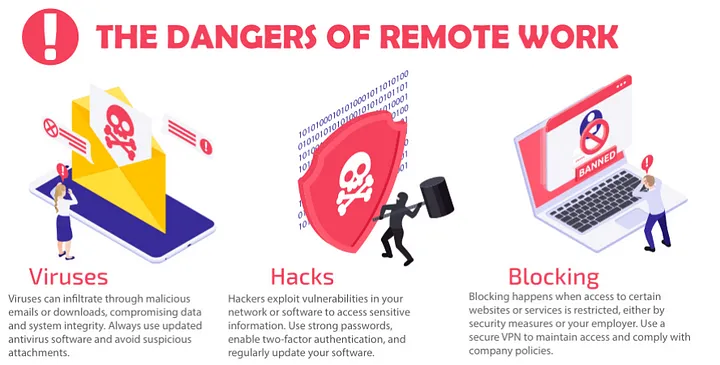
Remote work is a flexible and risk-prone method. The following infographic provides some dangers and how to avoid them.
Practical Tips for Individuals
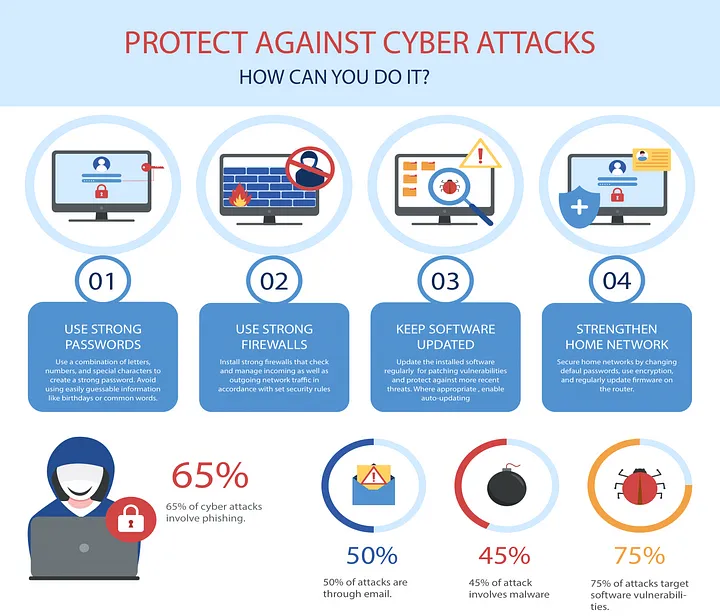
- Secure Your Home Network: Use a strong, unique password on your Wi-Fi network; make sure network encryption is enabled on the connection, and firmware is up-to-date on the router. Consider creating a separate guest network for visitors.
- Use Strong Passwords: Create strong, unique passwords for all accounts, and wherever possible, implement two-factor authentication (2FA). A password manager will help you store a long, complex password securely, which should be different for each and every account.
- Be Cautious of Phishing Attempts: Be alert to phishing. Be watchful for suspicious emails or messages. Don’t click on unknown links or attachments and verify the sender’s identity before responding to information requests as this is a very major concern in current time.
- Keep Software Updated: Regularly update the operating system, antivirus, and other applications to avoid exploitation of known vulnerabilities.
- Use a VPN: When accessing public Wi-Fi, use a virtual private network, or VPN, to encrypt your internet traffic and make your data less accessible.
- Back Up Your Data: You should regularly backup all your important files to a secure cloud storage service or an external hard drive so that you can recover it in case of a ransomware attack or other incidents of data loss.
Practical Tips for Companies
- Provide Cybersecurity Training: Educate your employees and the staff about the specific risks associated with remote work and make sure that they are equipped with knowledge and tools to recognize and mitigate threats. These can be achieved through proper recurring training sessions and reminders in building a security-aware culture.
- Implement Strong Access Controls: Only allow employees access to data and systems when absolutely necessary for them to do their job. Use strong passwords, multi-factor authentication, and role-based access controls to limit unauthorized access.
- Secure Remote Access: Provide employees with secure remote access solutions like the VPNs or remote desktop protocols. Regularly monitor and audit their activities for unexpected behavior.
- Endpoint Security: The company must secure all the issued devices with strong endpoint security solutions, including antivirus software, firewalls, and intrusion detection systems. This also encourages employees to install these tools on their personal devices.
- Data Loss Prevention (DLP): Implement DLP solutions to ensure that sensitive data does not leak out of the company network through accidental or intentional means.
- Incident Response Plan: Determine an incident response plan, which will help identify a range of steps that would have to be followed in response to a cyber incident. Train the team through regular drills and simulations with practical examples of threats.
Conclusion
In the age of remote work, cybersecurity is no longer just an IT issue; it has become a collective responsibility in which every employee in the organization has an active role to play to ensure data and systems safety. Proactive measures and a culture of cybersecurity awareness can be instrumental in effectively safeguarding against evolving threats.
The new mode of working thus has thrown up a number of opportunities and, equally, new challenges. That the new mode of work will be productive, secured, and resilient against changing threats in the cyber world occurs when right strategies for ensuring cybersecurity are adopted.
If you enjoyed this article, Please do like it and leave a comment if you found my insights helpful, happy reading! 👋
About the Creator
EmmadTech Info
EmmadTech Info is your guide to the latest information in science and tech, exploring discoveries and the minds shaping our future. Join us on this journey!
Enjoyed the story? Support the Creator.
Subscribe for free to receive all their stories in your feed.
Comments
There are no comments for this story
Be the first to respond and start the conversation.