


CapCut is a versatile video editing application developed by ByteDance, designed to cater to both amateur and experienced video editors. With its user-friendly interface and a range of powerful tools, CapCut enables users to create professional-quality videos right from their mobile devices. This article delves into the core features that make CapCut a popular choice among video enthusiasts.
Video Editing Tools
CapCut provides essential video editing tools that allow users to trim, cut, and split video clips with ease. Whether you need to remove unwanted sections or adjust the length of your clips, CapCut’s basic editing features ensure a smooth and efficient workflow. For more intricate edits, CapCut offers advanced features such as keyframe animations. Users can set keyframes to animate various elements of their videos, including movement, scaling, and rotation. This level of control enables the creation of dynamic and engaging video content.
Effects and Filters
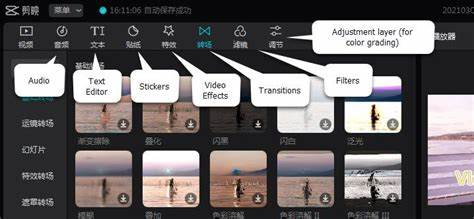
CapCut Features includes a diverse range of video effects that can enhance the visual appeal of your videos. From color adjustments to special effects like glitch and blur, these tools help add a creative touch to your footage. The app offers a variety of filters that can instantly transform the look and feel of your videos. Users can choose from different filter presets and adjust their intensity to achieve the desired aesthetic
Sound Effects
In addition to music, CapCut provides a range of sound effects that can be added to enhance the overall viewing experience. These effects can be used to emphasize key moments or add an extra layer of engagement.
Text and Stickers
Users can easily add text to their videos using CapCut’s text tool. The app offers various fonts, styles, and animations, allowing users to customize their text and ensure it complements their video’s theme. CapCut’s sticker and emoji library offers a wide selection of graphics that can be incorporated into videos. These elements add personality and visual interest, making videos more engaging and fun.
Standard Transitions
CapCut provides a range of standard transitions that can be used to create smooth and professional-looking transitions between video clips. Options include fades, wipes, and slides, which can be customized to fit the video’s flow. For a more polished finish, CapCut offers advanced transition effects that can be applied to enhance the visual continuity between clips. These transitions help in creating a cohesive and well-structured video narrative.
Background Removal
For users looking to isolate subjects or create unique visual effects, CapCut’s background removal tool provides a straightforward solution. This feature helps in removing or replacing backgrounds with ease, though results may vary based on the video’s complexity.
Direct Sharing
Once a video is edited and finalized, CapCut allows users to share their content directly to social media platforms like TikTok, Instagram, and YouTube. This integration streamlines the process of publishing videos online and reaching a wider audience.
Conclusion
CapCut’s array of features, from basic editing tools to advanced effects and audio options, makes it a powerful video editing app for both casual and professional users. Its intuitive interface and extensive functionality provide a comprehensive solution for creating high-quality videos on mobile devices. Whether you’re editing a short clip or crafting a full-length project, CapCut offers the tools and flexibility needed to bring your creative vision to life.
FAQs
What basic editing tools does CapCut offer?
CapCut provides essential video editing tools such as trimming, cutting, and splitting clips. Users can easily remove unwanted sections, adjust clip lengths, and divide footage into segments for more detailed editing. These tools are fundamental for creating polished and well-structured videos.
How can I enhance my video with effects and filters in CapCut?
CapCut offers a variety of video effects and filters to enhance the visual appeal of your footage. Users can apply effects like color adjustments, blurs, and glitch effects, and choose from a range of filters to alter the video's overall aesthetic. These features help in achieving creative and artistic results.
Can I add and customize text in my CapCut videos?
Yes, CapCut allows users to add and customize text within their videos. The text tool offers various fonts, styles, and animations, as well as options to adjust the size, color, and position of the text. This feature is useful for adding titles, captions, and other text elements to enhance video content.
What audio features are available in CapCut?
CapCut provides options for integrating music and sound effects into your videos. Users can access a built-in library of music tracks, import their own, and adjust audio settings such as volume and synchronization. Additionally, CapCut offers a selection of sound effects that can be added to emphasize key moments in the video.
How does CapCut handle exporting and sharing videos?
CapCut supports exporting videos in various resolutions, including high-definition and 4K. Users can select the desired export settings to ensure video quality. The app also facilitates direct sharing to social media platforms like TikTok, Instagram, and YouTube, making it easy to publish content and reach a wider audience.
About the Creator
prevideos
PreVideos is a convenient platform for downloading videos from various websites.It supports multiple formats and resolutions, ensuring high-quality downloads for offline viewing and content creation. Simple and reliable
https://prevideos.com
Enjoyed the story? Support the Creator.
Subscribe for free to receive all their stories in your feed.
Comments
There are no comments for this story
Be the first to respond and start the conversation.