
Your CPU Isn’t Bad at Video. It’s Just Doing the Wrong Job.
How video decoding moved from software to dedicated silicon, from VCD cards to AV1.
1. What hardware and software decoding mean
Many people pause when they hear “GPU hardware decoding, CPU software decoding.” CPU and GPU are both chips. Both are circuits on silicon. Why is one hardware and the other software? Is the CPU software?
The phrase feels awkward because it compresses a longer question into shorthand: which hardware runs the decode, and how?
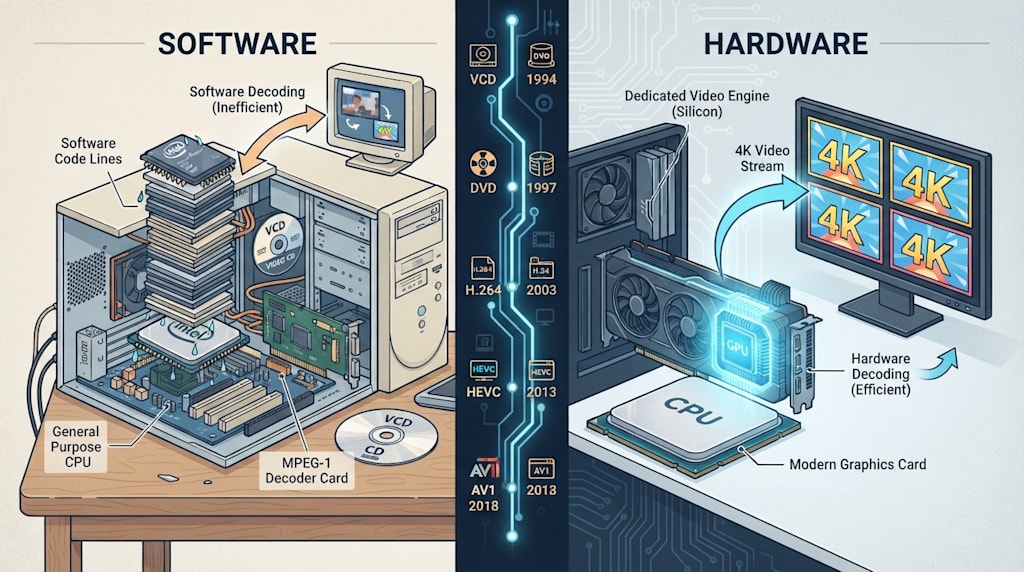
Hardware and software decoding are not divided by CPU versus GPU. They are divided by whether decoding runs on dedicated circuitry or on a general-purpose processor executing a programmable program.
CPU software decoding does not mean the CPU is software. The CPU is a general-purpose processor. It follows code in a player, FFmpeg, or a decoder. It executes instructions one by one. It does not know it is decoding H.264. It is running general instructions. GPU hardware decoding does not mean the GPU has no software. Drivers, firmware, players, and APIs are software. Hardware decoding means the GPU or SoC contains a block of circuitry built for video decoding: NVIDIA NVDEC, AMD VCN, Intel Quick Sync, Apple VideoToolbox hardware, the VPU in a phone. The bitstream goes in. Pictures come out. That pipeline is fixed or semi-fixed.
Hardware decoding is dedicated circuitry doing the heavy work. Software decoding is a general-purpose processor running a program.
2. Hardware decoding was born from saving resources
To understand this, go back to early PC multimedia.
In the early 1990s, 386 and 486 CPUs were limited. VCD used MPEG-1 compression. Discs were cheap. Piracy was easy. VCD spread fast. Pure CPU software decoding of MPEG-1 could not play smoothly on many machines. MPEG-1 decoder cards appeared. They were cards dedicated to MPEG-1 decoding. Bitstream in, video out, CPU freed to do other things.
After Windows 95 launched in 1995, graphics cards began to integrate MPEG-1 decoding or acceleration. The S3 ViRGE series is often mentioned. “Integrated decoding” here does not mean the graphics card became an all-purpose computer. It means the card gained a block of circuitry dedicated to MPEG-1. The old decoder card was gradually integrated into the graphics card.
By the DVD era, MPEG-2 had higher bitrates and resolution. Pure CPU software decoding of DVD demanded a lot, roughly Pentium II or III class. DVD decoder cards appeared again, such as Creative’s card paired with its DVD drives. But the late 1990s was a period of intense graphics card competition. Cards soon began integrating MPEG-2 decoding circuitry. The SIS 6326, though often nicknamed a “3D decelerator,” was cheap, had decent 2D, and could accelerate DVD. It sold well.
Later came H.264, VC-1, Blu-ray, and HD video. NVIDIA called it PureVideo and PureVideo HD. AMD called it Avivo and UVD. Intel called it Clear Video and QSV. They gradually built hardware decoding for MPEG-2, WMV9, H.264, HEVC, VP9, and AV1 into GPUs. Phone SoCs usually call it a VPU. Today, 4K, 8K, multi-stream video, video conferencing, live streaming, and cloud gaming rely on these dedicated decoding circuits.
Some early models and dates differ across sources. The technical line is consistent: CPUs were too weak, dedicated circuits came to the rescue, and those circuits grew smaller until they were integrated into GPUs and SoCs. That is what we now call GPU hardware decoding.
3. Where hardware decoding is “hard”
Video decoding is not “unzipping a compressed file into pictures.” Take H.264. Decoding goes through entropy decoding, inverse quantization, inverse transform, intra prediction, inter prediction, motion compensation, and deblocking filter. HEVC adds SAO. AV1 adds loop restoration. Each step involves many fixed operations.
Hardware decoding fixes these steps into an ASIC or dedicated media engine. The CPU still handles demuxing, feeding the stream, audio-video sync, subtitles, filters, rendering, and UI. The heaviest decoding pipeline goes to the dedicated module in the GPU. Drivers and APIs feed the bitstream in: DXVA2 and D3D11VA on Windows, VAAPI and VDPAU on Linux, VideoToolbox on Apple, MediaCodec on Android. Users see “the graphics card is decoding,” and the industry calls it “GPU hardware decoding.”
Software decoding is the other path. FFmpeg, libavcodec, and other decoders run on the CPU, accelerated with MMX, SSE, AVX, and NEON SIMD instructions. It is still software decoding because the algorithm is controlled by a program. It can be modified, updated, and extended to new formats. The CPU does not know it is decoding H.264. It is executing general-purpose instructions. Because it is general, software decoding has the widest format support. New codecs, odd profiles, and obscure containers often get software decoding first.
Hardware decoding does not mean “no software.” It means the decoding core is offloaded to dedicated circuitry. Software decoding does not mean “no hardware.” The CPU is hardware. It uses general-purpose hardware to execute a programmable decoding program.
4. Why the industry says “GPU hardware decoding”
Because modern video decoding engines are usually integrated into the GPU or SoC. For an ordinary user, Task Manager shows the GPU’s Video Decode engine working. The driver is a graphics driver. The API is a graphics or media API. So people say “GPU hardware decoding.”
If you write a general-purpose decoder on the GPU with CUDA or OpenCL, that is closer to “GPU software decoding” or hybrid decoding. It is not hardware decoding in the usual sense. The key to hardware decoding is not “using the GPU.” It is “using the block of circuitry in the GPU or SoC designed specifically for video decoding.”
Hardware encoding follows the same logic. NVIDIA NVENC, AMD VCE and VCN, and Intel QSV are dedicated encoding circuits. Live streaming, screen recording, and video conferencing often use hardware encoding because it is real-time, saves CPU, and saves power. At the same bitrate, hardware encoding usually compresses less efficiently than slow presets of x264, x265, or AV1 software encoding. The CPU still prepares frames, controls bitrate, and muxes the stream. The heaviest encoding pipeline goes to dedicated circuitry.
5. Software and hardware decoding each have costs
Hardware decoding saves CPU, saves power, cuts latency, supports multiple streams, and keeps high-resolution playback smooth. Mobile devices depend on it. Without it, battery life and heat would be problems. Hardware decoding has limits: supported formats, profiles, bit depths, and color formats depend on the hardware. New codecs like AV1 and VVC often require a new GPU. Driver compatibility, bugs, and color conversion limits can cause problems.
Software decoding is general: full format support, updatable, adjustable, high precision. It does not depend on a specific graphics card. When a new format appears, a software update can often decode it. The cost is CPU load, power draw, heat, and strain with high-resolution multi-stream playback.
With compliant bitstreams, hardware and software decoding should theoretically produce the same result. Differences usually come from chroma upsampling, color space conversion, dithering, error concealment, post-processing, and driver implementation. Early hardware decoding might simplify to save power or cost. Software decoding can use high precision and filters. Some circles still prefer software decoding. “Software decoding always has the best picture” is not true. Hardware decoding is not necessarily worse.
6. A few common misunderstandings
First, hardware decoding does not mean there is no software. Drivers, firmware, players, APIs, demuxing, and post-processing are software. Hardware decoding only offloads the decoding core to dedicated circuitry.
Second, software decoding is not always best in picture quality, and hardware decoding is not always worse. With compliant bitstreams, decoding results should theoretically match. Differences mostly come from chroma upsampling, color space conversion, dithering, error concealment, post-processing, and driver limits.
Third, hardware decoding’s advantages are low CPU, low power, low latency, multi-stream support, and smooth high-resolution playback. Its disadvantages are format, profile, bit depth, and color format limits. New formats often need new GPUs. Driver compatibility can be messy.
Fourth, hardware encoding follows the same logic. NVENC, AMD VCE and VCN, and Intel QSV are dedicated encoding circuits. Live streaming, screen recording, and video conferencing use them. They are fast and power-efficient. At the same bitrate, their compression efficiency usually trails slow presets of x264, x265, or AV1 software encoding.
7. Who does the heavy lifting
From VCD decoder cards to S3 ViRGE and SIS 6326, to PureVideo HD, QSV, NVDEC, and VCN, the history of video decoding is a history of offloading heavy work from general-purpose CPUs to dedicated circuitry.
Today we watch 4K on phones, livestream on computers, and scroll through videos in browsers. Those tasks run through dedicated decoding circuits in the device.
The words “hardware decoding” and “software decoding” are industry names for a division of labor: dedicated hardware executing a fixed pipeline is hardware decoding, and general-purpose hardware executing a programmable program is software decoding.
The CPU is still the CPU. The GPU is still the GPU. The difference is who does the heavy lifting.
About the Creator
Jin
Writer of reamstories
https://reamstories.com/jin
Enjoyed the story? Support the Creator.
Subscribe for free to receive all their stories in your feed. You could also become a paid subscriber, letting them know you appreciate their work.
Comments
There are no comments for this story
Be the first to respond and start the conversation.