
Your 3D Printer Fails Loudly. Your Laser Engraver Fails Quietly.
The difference is not the file. It is the coordinate system, the material, and what the machine must know before it starts.
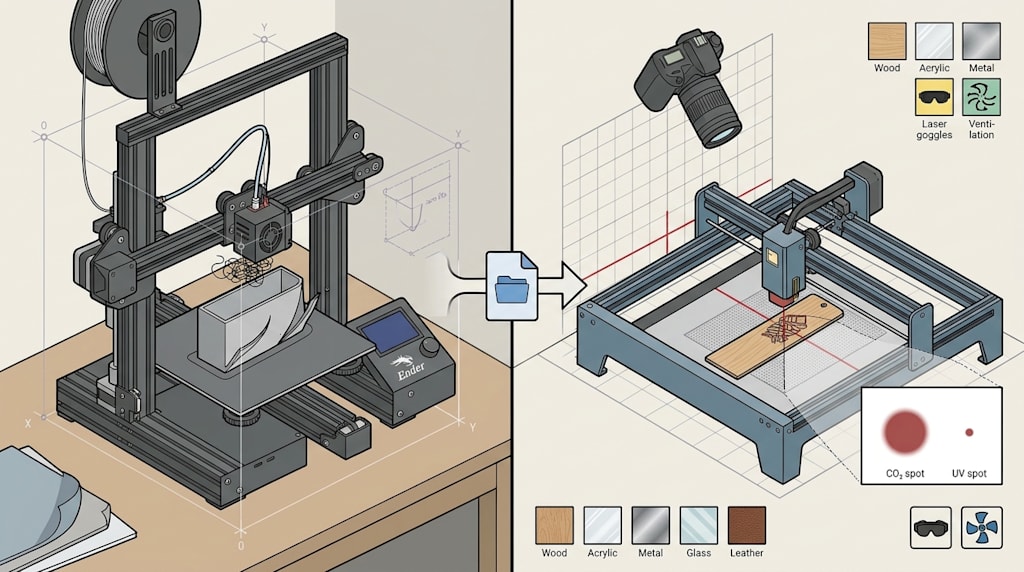
If you have run an FDM printer, you know the scene. A print is halfway done when the corners lift. The nozzle sweeps back across the part, catches the curled edge, and pushes the whole piece off the bed. The extruder keeps feeding plastic into a growing tangle that the community calls "spaghetti." The failure is visible while it happens. You can stop it, trace it, and usually find a cause: bed adhesion, cooling, temperature, part orientation, or a draft in the room.
Now picture a first laser engraving job. You want a name centered on a wooden bookmark. In the software, the text sits inside the grid with even margins. You close the lid, focus the laser, press start, and wait. When the job finishes, the name is off-center, tilted, or the thin strokes have blurred into a dark smear. Nothing crashed. No spaghetti. The machine followed the file. The result is still wrong.
Those two failure scenes sit on opposite sides of a line inside desktop digital fabrication. FDM printing builds an object from nothing inside a workspace the machine defines. Laser engraving directs light onto an object that already exists and modifies its surface. The first asks, "How do I construct this part?" The second asks, "How do I hit this existing part accurately?"
So the difference between 3D printing and laser engraving comes from both technical logic and user threshold. Technical logic decides which problems cannot be avoided. User threshold depends on how much of those problems the machine and software have packaged. The two are not alternatives. They are layered.
Two kinds of coordinate systems
An FDM printer owns its workspace. The bed origin, nozzle height, layer thickness, and model position are known to the machine and the slicer before the first layer goes down. The slicer accounts for supports, path planning, layer height, and infill. The printer does not need to align itself to an external object. It only needs to move its nozzle through a coordinate system it already knows.
Laser engraving starts from a different condition. The workpiece is a physical object that already exists: a bookmark, a plywood panel, a tumbler, a metal tag, a piece of leather. The machine does not know where its edges are, whether its surface is flat, how thick it is, or where it sits on the bed. Before it can engrave, it has to relate the workpiece's own coordinate system to the laser's working coordinate system. That step is registration.
Registration sounds like a convenience feature. It is a core problem. The camera's view and the laser's focal point do not naturally coincide. To keep the optical path clear, the camera often sits above and to the side of the work area, so the image has perspective distortion. The workpiece has thickness. The pattern lands on its top surface, while the system may have been calibrated on the bed. Image capture, perspective correction, height compensation, and regional mapping all have to work together before "what you see" becomes "where the laser hits."
FDM does not need this layer because its object is not an external part. It is the part the machine is about to create. The printer does not ask where the object is. It asks where the nozzle is. That is the first structural split: 3D printing is additive construction inside a self-defined coordinate system. Laser engraving is coordinate alignment onto an external physical object.
3D printing's threshold: packaged, not removed
FDM reached ordinary users because manufacturers packaged many hard problems: auto bed leveling, standardized filament, slicer-generated supports, path optimization, heated beds, and enclosures. A new user does not need to understand polymer shrinkage stress to print a recognizable model.
Packaging does not erase the problems. FDM's core difficulties sit in geometry and thermal behavior.
Shrinkage and warping remain the classic failure. Molten filament cools and contracts after extrusion. Each layer's contraction is restrained by the layer below. Stress accumulates and releases at the weakest point. Flat, wide parts tend to curl at the corners. Tall, narrow parts often fare better.
Supports and overhangs add another constraint. Angles beyond a threshold, commonly around 45 degrees, need supports. The support must also leave a gap from the part, or it will fuse and become difficult to remove.
Layer adhesion limits strength. Layers bond through polymer chain diffusion. Z-direction strength often runs lower than XY strength. A load-bearing part needs its print orientation chosen with the force direction in mind.
These problems happen inside the machine, during the build. The user can intervene through slicer preview, temperature, cooling, part placement, and support settings. Failures tend to be process failures. You can see them happen and work backward from the process.
Laser engraving's threshold: the variables sit between light and material
Laser engraving is not a material-deposition problem. It is a light-material interaction problem. The result depends on wavelength, power, scan speed, spot size, and the material's molecular bonds, crystal structure, coating, moisture content, and grain direction. Change the light source or the material, and the outcome can shift completely.
Glass is highly transparent in visible light but strongly absorbing in the ultraviolet. A CO2 laser cuts wood mainly through ablation. A fiber laser marks stainless steel through melting and oxidation. A UV laser may break chemical bonds with less thermal load. On the same wood, a 60 W source can cut faster than a 40 W source, but the higher power can widen the heat-affected zone and reduce detail. Power is not a monotonic good. There is no universal parameter set.
That creates several problems FDM users do not meet in the same form.
One problem is that the meaning of error changes with spot size. An FDM nozzle may have tens of microns of mechanical error, but the extruded bead is 0.2 to 0.4 mm wide and semi-molten. Surface tension spreads the edge, and the next layer presses it flatter. A small mechanical error may barely show on the surface. Laser engraving gives you a different ratio. A CO2 spot may be around 0.175 mm. A UV spot may be around 0.017 mm. The same 0.05 mm deviation is less than one-third of a CO2 spot but roughly three UV spot widths. A fine line can blur out. You cannot carry over FDM's tolerance intuition.
Registration is the first lesson, not an optional accessory. Every laser job implies an alignment step. Modern desktop machines use cameras, distance measurement, and calibration models to automate it. The user still needs to understand that the camera's view and the laser's landing point are not identical by nature. Material thickness input, workpiece fixturing, and bed cleanliness all affect the result. When registration drifts, editing the design file is usually not the first troubleshooting step. Check the camera calibration, the thickness value, and whether the workpiece moved.
Material is not a standardized consumable. It is an open variable. PLA and PETG have reasonably predictable print windows. Laser engraving faces wood, acrylic, leather, metal, glass, and coated materials. Two pieces of "wood" can behave differently because of moisture and grain. Safety boundaries matter more. PVC and other chlorine-containing materials release corrosive gas. That damages the machine and creates a health hazard. Build the habit of material first, parameters second, not file first, settings later.
Large format and high speed pull against each other. A gantry system can cover a large bed, but it moves a heavy frame, so its speed ceiling is often a few hundred millimeters per second. A galvo system steers small, light mirrors and scans at meters per second, but its field is limited by the lens aperture, often to a couple hundred millimeters square. Industrial systems combine gantry and galvo: the gantry moves the galvo head between zones, and the galvo does fast local marking. Two coordinate systems and two dynamic behaviors must work as one, with pattern zoning, timing alignment, and stacked error compensation. Desktop machines have started to integrate this kind of four-axis coordination, but the engineering difficulty remains high.
Workpiece geometry adds another dimension. FDM rarely deals with an external object's shape. Laser engraving may cut a flat panel today, engrave a cylindrical tumbler tomorrow, and mark a conical surface the day after. Rotary attachments, focus control, and pattern mapping onto curved surfaces are separate problems. Flat work and cylindrical work are not the same job with a different image.
What transfers from 3D printing, and what does not
FDM experience helps, but the transfer is mostly operational discipline, not process intuition.
What transfers well: basic CNC concepts such as origin, feed rate, travel moves, and limit switches. Familiarity with vector and raster files also helps, including closed paths for cutting and fill scanning for engraving. So does the habit of building a parameter-to-result map. In FDM you learned that too much temperature strings, too little causes layer separation. In laser work, the variables become power, speed, focus, and pass count.
What does not transfer: the center of modeling shifts from solids to surfaces. Laser work lives heavily in 2D vectors. Cuts need closed paths. Engraving needs the right fill mode. Error intuition must be rebuilt. A deviation that FDM absorbs may not be absorbed by a laser. The meaning of a first article changes too. A slicer preview can predict much of an FDM print's success. A laser preview shows where the light will travel, not what will happen on that specific piece of material.
The most valuable thing FDM gives you is not a set of settings. It is respect for machine motion, patience for a first-article test, and discipline in parameter tuning. Those carry over. Material windows and tolerance assumptions have to be rebuilt.
If you want to start now, prepare these capabilities
Put safety before output. This is the practical dividing line in laser engraving. Use eyewear rated for the wavelength, provide forced ventilation, never run the machine unattended, and keep a written list of prohibited materials. Treat these as a startup checklist, not a reminder.
Choose material first, then parameters. Decide what material and what effect you want. Look up the recommended power and speed range for that material and wavelength. Then run a small power and speed test grid on scrap. A built-in material library is a useful starting point. It reduces blind trial and error. It does not remove trial and error.
Treat focus as part of accuracy. Defocus enlarges the spot and lowers energy density. That leads to incomplete cuts or scorching. Auto-focus helps, but learn the manual measurement, the thickness input, bed cleaning, and the Z-reference check. These are the first things to inspect when a job comes out weak or blurry.
Learn vector logic before deep 3D modeling. In LightBurn-class software, layers, line mode, fill mode, cut order, and layer parameters matter more at the start than another round of 3D modeling. Your 3D skills become an advantage for relief work, custom fixtures, and odd-shaped jigs. For the first projects, get comfortable with lines and fills.
Reset your failure expectations. FDM failures are often process failures. You can stop them mid-job. Laser failures are often result failures. Everything looks ready before the job, and the problem appears after you take the part out: offset, scorched, shallow, or blurred. Make "scrap test first" and "check fixturing and registration before start" stronger habits than they were on your printer.
Closing note: same input file, different variable structure
Both machines read a digital file and produce a physical result. Their variable structures differ. FDM places the user inside a cleaned-up build space. The hard problems concentrate in geometry and thermal behavior. Laser engraving pushes the machine into an open physical world. The hard problems concentrate in registration, light-material matching, and workpiece geometry.
Technical logic sets the problems that must be solved. User threshold depends on how much of those problems the machine packages. For a maker moving from one tool to the other, the useful question is not which machine is simpler. The useful question is which skills transfer and which intuitions must be rebuilt. Bring your FDM discipline into laser work. Leave behind the FDM tolerance assumptions and parameter habits. Start with a scrap test grid, confirm focus and registration, and keep the first job small. That path is faster than treating the laser as a printer with a different tool head.
About the Creator
Jin
Writer of reamstories
https://reamstories.com/jin
Enjoyed the story? Support the Creator.
Subscribe for free to receive all their stories in your feed. You could also become a paid subscriber, letting them know you appreciate their work.
Comments
There are no comments for this story
Be the first to respond and start the conversation.