
Why Your 5GHz Computer Still Spins the Wait Cursor
The hidden physics of DRAM, the unstoppable rise of software bloat, and why “faster” doesn’t mean “feels faster."
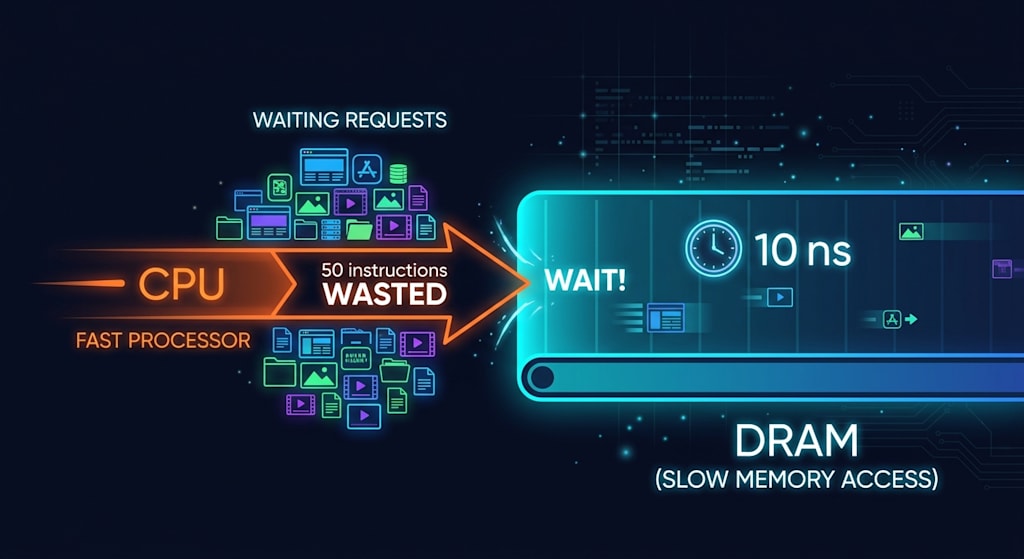
1985. A Commodore 64 runs at 1 MHz, with a clock cycle of 1000 nanoseconds. When it fetches data from memory, it takes about 200 nanoseconds. In that 200‑nanosecond wait, the CPU could have executed 0.2 instructions. So each wait costs it one‑fifth of an instruction.
2026. A mainstream CPU runs at 5 GHz, with a clock cycle of 0.2 nanoseconds. When it fetches from DDR5 memory, the nominal CAS latency is 10 nanoseconds. Add in the memory controller, bus, motherboard traces, register refresh — the total random access latency clocks in at … still around 10 nanoseconds. Not a typo; it's just that the extra overhead pushes the total to roughly the same order of magnitude, and it has barely budged over the decades.
So the math becomes: in that 10‑nanosecond wait, the CPU could have executed 50 instructions. One wait, fifty instructions thrown away.
No matter how fast your car is, that pit stop takes exactly as long as it takes.
I. Why Can't DRAM Just Get Faster?
DDR frequencies have soared from 400 MT/s to 6000 MT/s, a 15‑fold increase in effective data rate. But CAS latency has only dropped from 15 ns to 10 ns.
That's because frequency improves "shipping speed," while latency is about "loading time." And DRAM's "loading" involves an unavoidable sequence:
Row activate → sense amplifier detecting a minuscule voltage difference → row buffer → column select → precharge → restore.
Every step takes time. And every step is pinned down by physics: charging and discharging a capacitor, and waiting for that tiny voltage swing to be "read" by the sense amplifier. How tiny? So tiny that the amplifier has to fish the signal out of the electronic thermal noise. That "fishing" action hasn't sped up in any meaningful way for decades.
DRAM is a capacitor plus a transistor (1T1C). Charge means 1, discharge means 0. One capacitor, one bitline, charge sharing, sense amplification. The physical timing of this whole dance, from DDR1 to DDR5, has barely moved.
While CPU clocks went from hundreds of megahertz to several gigahertz – a tenfold jump – DRAM's "loading speed" inched from 15 ns to 10 ns. That 5‑nanosecond difference is enough for a modern CPU to waste 25 instructions.
II. Why Not Use SRAM Instead?
Sure, you can. The CPU's L1 cache is SRAM, with access latencies of 0.3–1 ns.
Why is SRAM so fast? It doesn't rely on charging a single capacitor. It uses six transistors (6T) in a latch configuration, plus differential bitlines – it doesn't measure absolute voltage, only the voltage difference between two lines. It's like having two buckets side by side: you don't need to fill either one; you just need to see which bucket has a higher water level. That skips the charge/discharge delays, the refresh recovery, and the noise‑fishing of sense amplifiers.
But what's the price?
Six transistors for one bit. If you tried to make your 32 GB memory module out of SRAM, it would take up more than an entire motherboard, with plenty of room to spare. And the price? Don't ask.
The moment you have a cache miss, your CPU is sitting at 5 GHz, waiting for that 10‑ns DRAM to respond. SRAM is fast, but it's small. DRAM is slow, but it's cheap and dense. This trade‑off hasn't changed in thirty years, and it probably won't change for the next ten.
III. "Faster" and "Feels Faster" Are Two Different Things
Sure, opening Word took five seconds in the DDR1 era and takes half a second now. That is faster. But your perception doesn't work that way.
The human reaction threshold is about 100 milliseconds. Anything below that, your brain smooths over as "instant." Anything above it, you actually feel the wait.
In 1998, opening a program took 10 seconds. You felt a 10‑second wait. In 2026, it takes 0.8 seconds. You feel a 0.8‑second wait.
From 10 seconds to 1 second – a 90% improvement. You call it a "quantum leap." From 1 second to 0.8 seconds – a 20% improvement, but your brain doesn't even register that 200‑millisecond difference. All it remembers is: "I'm still waiting."
Computing power has multiplied by dozens, but your total daily "waiting time" hasn't been compressed to near zero. Because perception has a floor – that 100‑millisecond threshold. Any improvement below that floor is, to your brain, standing still.
IV. Software: Whatever Andy Gives, Bill Takes Away
There's another uncomfortable truth: a large chunk of that extra horsepower gets eaten by software.
Open a blank Electron app (like modern versions of WeChat, VS Code, Slack), and it first loads a 100‑MB V8 JavaScript engine. You just wanted to see an empty window. That empty window runs more code behind the scenes than the entire operating system plus all applications on a 1995 PC.
Andy‑Bill's law hasn't died – it just works in a subtler way. It's not necessarily Microsoft anymore; it's the whole modern software engineering paradigm: trading abstraction for development speed, redundancy for compatibility, and performance for cross‑platform support. Your CPU clock tripled, but that line of JavaScript running through the interpreter may be only one‑tenth as efficient as compiled C++.
The net result: a large portion of your multi‑decade performance gains is consumed by "we don't need to optimise" practices. Only the leftover scraps actually reach your perception.
V. Two New Debt Collectors
SSD 4K random reads.
NVMe SSDs boast sequential reads of 7000 MB/s – that number is real. But opening an application, loading a game, or booting a system is about thousands of tiny 4K files. A top‑tier SSD's 4K random read latency is in the tens of microseconds, and 1 microsecond equals 1000 nanoseconds – enough for the CPU to wait 100 times for memory. By the time the drive finds that dozens‑of‑KB DLL in its queue, the CPU has already burned through 100 memory waits, and it's still waiting.
The speed‑of‑light limit of networks.
The web page you just clicked – its data is probably not on your machine. It's in Beijing, Shanghai, or a data centre half a world away.
Light in fibre travels about 200 km per millisecond. If you're in Shanghai and the server is in Beijing, the round‑trip physically takes at least 5 milliseconds – that's 5,000,000 nanoseconds. Enough for your CPU to wait half a million times for memory.
No matter how fast your computer is, it can't outrun the round‑trip latency of a network packet. Most of the wait when you open a web page isn't your computer's fault – it's that the Earth is too big.
VI. So What Are You Actually Waiting For?
You sit in front of your computer and click another icon.
The cursor turns into a spinning wheel, pauses for a moment, and then starts moving.
That moment. Maybe the CPU is waiting for DRAM to feed it data. Maybe the SSD is rummaging through fragmented files. Perhaps the request you just sent is travelling at the speed of light across the physical distance of a city.
You know it will eventually move. You also know that even if you double the CPU speed, double the memory speed, double the SSD speed, you'll still find yourself, at some point, staring at that spinning wheel that pauses.
And then it moves. And you keep clicking.
About the Creator
Jin
Writer of reamstories
https://reamstories.com/jin
Enjoyed the story? Support the Creator.
Subscribe for free to receive all their stories in your feed. You could also become a paid subscriber, letting them know you appreciate their work.
Comments
There are no comments for this story
Be the first to respond and start the conversation.