
Why Every AI Tool Wants Your Notes in Markdown
The plain-text format became the default because it gives machines clean structure, saves tokens, and keeps your knowledge portable.
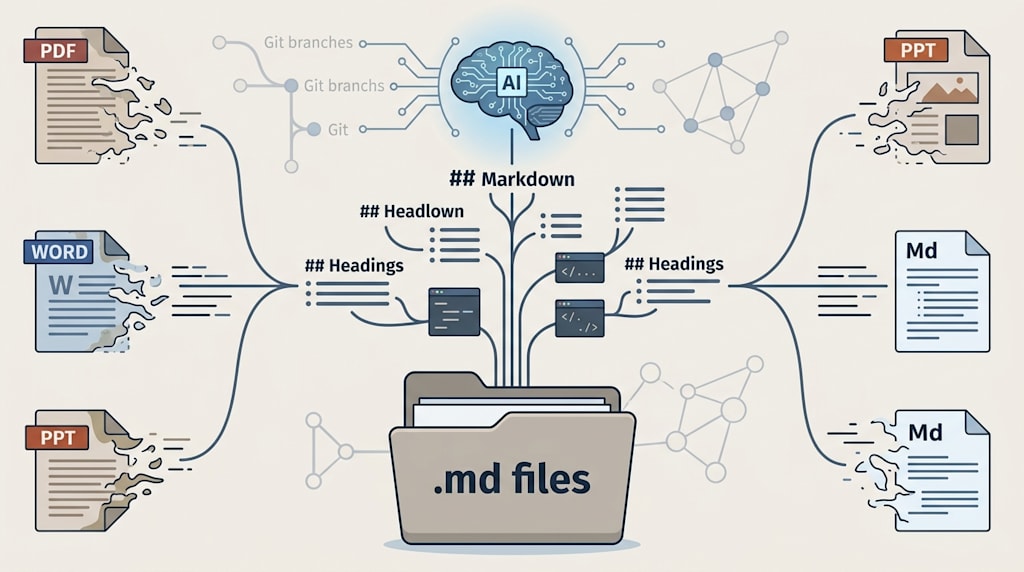
Open ChatGPT, and it outputs .md.
Open Claude, and it reads .md.
Open Obsidian, and your notes are .md.
Open Logseq, and the underlying format is .md.
MCP exposes tools and knowledge sources as Markdown. OKF treats Markdown plus YAML frontmatter as its basic unit. Microsoft open-sourced markitdown, which turns PDF, PPT, Word, Excel, images, audio, and video into Markdown.
The pattern is deliberate.
Markdown is turning from a lightweight markup language into the default interface for knowledge management in the AI era. It is convenient for humans. It is also cheap for models to parse, reason over, and version-control.
The question is why Markdown won, what it got right, and whether you should put all your energy into the Markdown world.
1. Markdown Is Not Simple. It Is Clean.
Many people’s first impression of Markdown is that it is simple: # is a heading, - is a list, ** is bold, [text](link) is a hyperlink. It looks like a shortcut for lazy writing.
In the eyes of AI, Markdown’s core advantage is cleanliness.
Word, PPT, and PDF are formats built for layout and presentation. They contain visual information: fonts, font sizes, colors, columns, headers, footers, text boxes, floating objects, nested tables, image positioning. To humans, these things are aesthetics. To AI, they are noise.
When you ask a model to read a PDF directly, it often faces fragments cut apart by coordinates, layers, and reading order. OCR makes mistakes. Layout analysis gets the order wrong. Tables get scrambled. Footnotes get mixed into the body. The model is not reading an article. It is guessing at a layout.
Markdown has no rendering, no hidden styles, and no binary packaging. It uses plain-text symbols to mark structure:
markdown
# Heading 1
## Heading 2

- Item one
- Item two

**Important content**

[Link text](https://example.com)
These symbols are semantic anchors. When the model sees #, it knows this is the topic. When it sees ##, it knows this is a subtopic. When it sees -, it knows this is a parallel relationship. When it sees a code block, it knows this is code, not body text.
So when you ask AI to analyze a PDF and a Markdown file with the same content, Markdown gives more accurate answers. Part of this is less OCR error. The larger part is that structural signals reduce the model’s cost of understanding. PDF makes the model first do layout reconstruction. Markdown lets the model go straight into semantic understanding.
PDF is the language of printers. Markdown is the language of inference engines.
2. Why Large Models Prefer Markdown
Three technical reasons explain the preference.
2.1 The Native Language of Large Models Is Markdown
Current mainstream large models absorb massive amounts of internet text during pretraining. The highest-quality and most clearly structured corpus comes in large part from GitHub READMEs, technical documentation, Stack Overflow, open-source communities, blogs, and forums. Most of this content is written in Markdown.
The model has not only seen Markdown. It has internalized Markdown’s structural patterns as part of its language ability. It knows that # is usually followed by a topic, that lists usually indicate parallel items or steps, and that code blocks usually indicate executable content.
So when the model outputs text, it also naturally uses Markdown: headings, lists, bold text, code blocks. Product managers did not force this. It is the natural result of the training distribution.
2.2 Structural Symbols Are Anchors for Attention
The core of the Transformer is the attention mechanism. It looks for dependencies in a sequence and judges which words relate to which other words. Attention is not infinite. The context window is limited, and compute is limited.
If a document is a flat blob of plain text, the model has to guess: Which sentence is a heading? Which paragraph is a parallel item? Where is the quote? Where is the code? This guessing process is a source of hallucination.
Markdown explicitly marks structure with symbols. The model can parse the document into a tree: topic, subtopic, paragraph, list, quote, code. A tree structure makes it easier for the model to locate concepts, trace relationships, and extract sources.
Your practical experience, where PDFs hallucinate easily and Markdown feels precise, comes from this shift. Markdown moves structural understanding out of model reasoning and into the input itself.
2.3 Token Efficiency Is a Hard Truth
Large models are billed by token, and context windows are counted in tokens. To express the same structure, Markdown costs far fewer tokens than HTML or nested JSON.
For example, one heading plus a line of bold text:
HTML:
html
<h2>Heading</h2>
<p>This is <b>bold</b> text.</p>
Markdown:
markdown
## Heading
This is **bold** text.
Over a long document, the gap becomes huge. The fewer tokens you use, the more knowledge you can fit into the same context window, and the lower the inference cost.
Markdown is human-readable. It is also model-readable and economically readable.
3. Markdown Is the Source of Truth for AI Knowledge Bases
The thing personal knowledge management fears most is lock-in.
If you store your notes in Notion, Evernote, or Word, the format belongs to them. Exports may lose structure. APIs may change. Services may shut down. Your knowledge looks like it is in the cloud, but it is actually in someone else’s database.
Markdown is plain text. Plain text means any editor can open it. Git can version-control it, and diffs are clear. It can be packaged, migrated, and backed up. It does not depend on one company. Models can read it directly without extra parsing.
So Markdown is naturally suited to be the source of truth for a knowledge base.
Markdown also has shortcomings. It is not good at expressing complex metadata. Timelines, version history, document relationships, sources, authors, and status are awkward to express with pure Markdown syntax.
So YAML frontmatter emerged:
markdown
---
title: Markdown and AI Knowledge Management
tags: [AI, Knowledge Management, Markdown]
created: 2026-10-14
source: Personal notes
status: draft
---
The file header uses YAML to record structured metadata, while the body uses Markdown to stay human-readable. Each file becomes a document, a data node, and a queryable knowledge unit.
Open knowledge formats like OKF fill this gap. They use a small set of agreed-upon fields to upgrade Markdown from a note format into an interoperable knowledge package format. OKF does not replace Markdown. It makes Markdown more suitable for machine queries.
Notion is moving in this direction too. It abstracts complex block structures into a Markdown API, letting AI agents read and write pages in Markdown. Everyone is converging on Markdown as the common denominator.
4. How to Put Hundreds of Notes to Work with AI
If you already have hundreds of Markdown notes and want AI to help you discover hidden connections, or to pull relevant background from old notes based on what you input today, there are three mature paths.
Path 1: The Obsidian Plugin Scene, Fastest to Start
The Obsidian community already has several RAG plugins. For example, ObsidianRAG uses SQLite FTS5 for full-text search and LanceDB for vector search, all running locally. obsidian-ollama-rag connects directly to local Ollama models for conversational Q&A over your notes.
The advantage is that it works out of the box without building your own pipeline. The disadvantage is that different plugins vary in maturity and configuration experience. It suits people who are willing to tinker but do not want to write code.
Path 2: MCP Protocol + Local LLM, Most Flexible
MCP is the Model Context Protocol introduced by Anthropic. It connects AI clients to external tools and data sources. You can install @sunub/obsidian-mcp-server, which exposes an Obsidian Vault as a set of MCP tools: keyword search, semantic search, reading notes, and generating frontmatter properties.
Then, in Claude Desktop, Cursor, or another MCP-compatible client, enter the Vault’s absolute path and the local LLM address. Combined with locally running llama.cpp for embeddings and reranking, you can achieve a fully offline Vault RAG without consuming API tokens.
This path is the most flexible. It also best matches the idea of AI as interface and Markdown as source of truth.
Path 3: Build Your Own RAG Pipeline, Most Controllable
If you are willing to write a bit of code, you can clone a project like obsidian-ollama-rag, adjust the note path, chunk size, and overlap parameters, and then start interactive Q&A. It will automatically turn your notes into a vector index. After that, you can ask: “What connections exist among my past notes about X?” or “Based on what I input today, which old notes could serve as background?”
The advantage of building it yourself is control. Chunking strategy, embedding model, retrieval weights, and reranking can all be tuned to your knowledge base.
Key Advice: Convert Formats First, Then Feed AI
If your note library still contains PDF, Word, or PPT files, use Microsoft’s open-source markitdown to batch-convert them into Markdown first.
Install:
bash
pip install markitdownSingle-file conversion:
bash
markitdown path-to-file.pdf > document.mdIt runs locally, requires no tokens, and supports batch processing. The headings, lists, tables, links, and other structural information it extracts significantly improve RAG quality. There is also an OCR plugin, markitdown-ocr, which supports scanned PDFs and can connect to LLM APIs to read images.
Do not throw a pile of PDFs directly at AI. That forces the model to do OCR and layout analysis before knowledge understanding. Clean them into Markdown with markitdown, then build the index. The results will be much better.
5. Will Markdown Unify Everything, or Is It Just a Transition?
In the short term, Markdown will not unify all formats. In the long term, it will not be easily replaced either. A more accurate judgment is that Markdown will become the source of truth, and the query layer will diversify.
Some writers now describe future knowledge management as “one folder plus a pile of .md files plus one AI interface.” That is close to reality, but incomplete.
Markdown is not good at complex relationships. Timelines, graphs, version trees, permissions, and collaboration states require databases. Vector databases, graph databases, and relational databases each have their uses.
The trend is changing. The PageIndex framework that appeared in 2025 abandons vector databases entirely, letting the LLM directly perform reasoning navigation over a document’s tree structure. Claude Code and Cursor have also removed vector search from their pipelines, switching to simpler grep-style retrieval. The industry is rethinking whether structure itself can be a more reliable signal than semantic similarity for well-structured documents.
A more pragmatic future is a hybrid architecture. Markdown serves as the human-readable, version-controllable source of truth. Vector indexes speed up queries. Graph databases handle relationship reasoning. LLMs provide the natural-language interface.
The LLM Wiki pattern proposed by Karpathy follows this approach. Raw source material is immutably stored in raw/, and the LLM compiles it into cross-linked Markdown pages. Later reasoning is based on the compiled output, rather than retrieving raw material from scratch every time.
Markdown is the foundation. The query layer will change, and tools will change, but the direction of clean structured text will not.
6. Advice for Writers and Knowledge Managers
If you are agonizing over whether to put all your energy into the Markdown world, the answer is yes, but do not treat Markdown as the endpoint.
Treat Markdown as your knowledge foundation. Keep all notes as .md, manage them with Git, and back them up as plain text. No matter how AI tools change, your knowledge will not be locked in.
Establish metadata conventions with YAML frontmatter. Title, tags, source, time, status, and relationships matter. The earlier these fields are standardized, the better. They are the foundation for future retrieval, filtering, and graphs.
Be local-first, with a replaceable AI interface. Do not lock your knowledge base into a single AI product. Use MCP, RAG, and local LLMs as the interface layer, and Markdown as the source of truth. Then you can switch models, tools, and query methods at any time.
Writing is knowledge management. For writers, Markdown is not just a format. It is a way of thinking. Heading hierarchy is your argument structure. Lists are your parallel relationships. Citations are your awareness of sources. The more structured you write, the more AI can help you reuse it.
Convert first, then index. When facing thousands of PDFs, Excel files, and PPTs, first use markitdown to batch-convert them into Markdown, then feed them to AI. This step greatly reduces hallucination and improves retrieval quality.
Conclusion
Markdown became the default knowledge format of the AI era not because it is perfect, but because it balances the needs of humans and machines.
Humans get a format they can read, edit, and version. Machines get structure without noise, at low token cost. Systems get plain text that is portable and not tied to one company.
AI reasoning will keep improving. Query layers will keep changing. But Markdown as a human-readable source of truth will remain hard to replace.
One folder, a pile of .md files, one AI interface. That is currently the most stable foundation.
About the Creator
Jin
Writer of reamstories
https://reamstories.com/jin
Enjoyed the story? Support the Creator.
Subscribe for free to receive all their stories in your feed. You could also become a paid subscriber, letting them know you appreciate their work.
Comments
There are no comments for this story
Be the first to respond and start the conversation.