
Video-Based Learning Platform Development
Find out how to build a learning platform with video courses: necessary steps, potential challenges, approximate costs, etc.

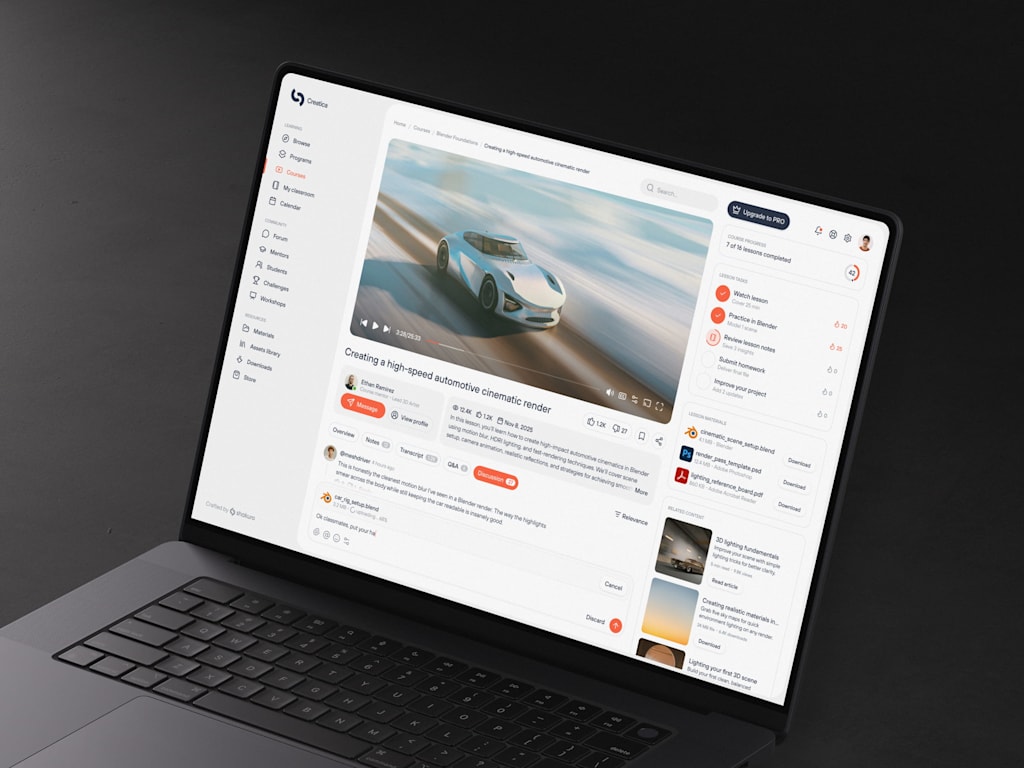
At first glance, video-learning systems appear deceptively straightforward: you upload a file, press play, and you’re done. But that assumption is misleading.
For technical leaders and product strategists, the real challenge lies in the underlying infrastructure. The pressing questions aren’t about content creation but rather engineering resilience. How do you guarantee stability when thousands of users join a live session simultaneously? Furthermore, how do you minimize lag so that real-time interaction feels immediate and natural, rather than disjointed and delayed?
So, why invest in building a dedicated video education platform? The answer is scalability. Traditional instruction is limited by an instructor’s physical presence and available hours. In contrast, digital platforms allow you to record material once, refine it, and distribute it to an unlimited audience. This approach decouples high-quality education from the constraints of human schedules.
You don’t need to build every component from scratch; instead, the key is selecting the right existing tools and frameworks.
This guide explores the practical engineering behind edtech video solutions. We will start by examining the fundamental mechanics, then move on to essential features and streaming architecture. We will also cover the development lifecycle, including technology stacks, and finally address scaling strategies—managing traffic surges, controlling expenses, and maintaining robust security.
Defining Video-Based Learning Platforms
Stripping away the buzzwords, these platforms are essentially specialized content delivery networks designed for structured education rather than entertainment. Unlike general-purpose sites like YouTube or Netflix, this software ecosystem is built specifically to help educators upload, process, and stream lessons to learners across various devices.
These systems typically rely on adaptive streaming protocols such as HTTP Live Streaming (HLS) or Dynamic Adaptive Streaming over HTTP (DASH). These technologies split video files into small segments, allowing the player to dynamically adjust resolution based on the viewer’s bandwidth. If connectivity worsens, the quality dips temporarily to prevent buffering, ensuring continuous playback.
This architecture supports three critical pillars of modern e-learning:
- Structured Delivery: It replaces chaotic file sharing (like emailing large videos) with organized modules, lessons, and assessments housed in a single interface.
- Engagement: Features like clickable chapters, embedded quizzes, and timestamped discussion forums keep learners actively involved rather than passively watching.
- Scalability: This is the business driver. You produce the educational asset once and can sell it indefinitely. Whether serving fifty students or fifty thousand, the core content remains static while the infrastructure automatically manages the increased load.
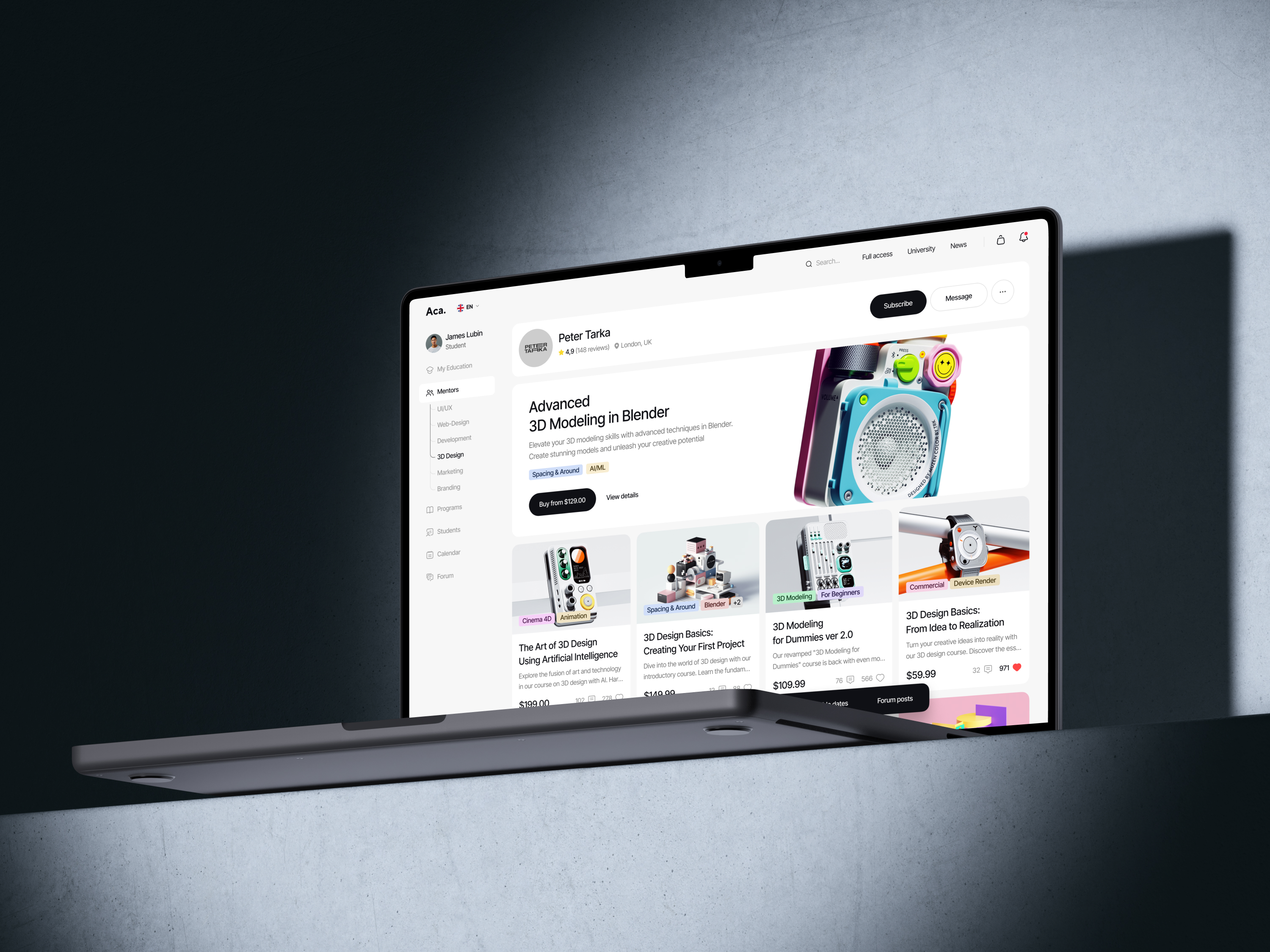
Categories of Educational Video Software
Your choice of platform architecture depends largely on your strategic objectives. While hybrid models exist, most solutions prioritize one of three primary structures.
1. Structured Course Platforms
Think of this model as a digital university. It features a defined curriculum with a clear beginning and end, guiding learners through a linear path. From an engineering perspective, these are often the most complex to develop due to the intricate logic required for progress tracking. For example, the system must enforce prerequisites, such as blocking access to Module 3 until Module 2 is completed. Market leaders like Teachable are ideal for selling comprehensive programs such as coding bootcamps or professional certifications.
2. Live Interaction Platforms
This category focuses on real-time engagement, including webinars, virtual classrooms, and live coaching. The technical requirements here differ significantly from pre-recorded content, prioritizing ultra-low latency. When a student asks a question, the instructor’s response must be nearly instantaneous. Functionally, this resembles a Zoom meeting but integrated into an educational context with tools like digital whiteboards, breakout sessions, and live polling. While highly effective for community building, this model is costly to scale. It requires synchronous instructor presence and poses significant technical challenges in managing thousands of concurrent two-way video streams without compromising performance.
3. On-Demand Libraries
Often described as the "Netflix for education," this model offers a vast repository of content that users can consume at their own pace. There is no mandatory sequence; a learner might watch a brief Python tutorial before switching to a marketing module. This flexibility comes with a specific challenge: discoverability. To prevent users from feeling overwhelmed, the platform requires sophisticated search functions, metadata tagging, and recommendation algorithms. LinkedIn Learning is a prime example of this SaaS model, offering a searchable, always-available library of professional skills.
Essential Architectural Components
Once you have selected your platform type, you must identify the core infrastructure components required for development.
- Video Ingestion and Transcoding: Simply storing raw video files is inefficient. You need an automated pipeline that accepts uploads and transcodes them into multiple resolutions (e.g., 360p to 4K) to accommodate various devices and bandwidths. Cloud services like AWS MediaConvert or Azure Media Services typically handle this computationally intensive process.
- Content Delivery Network (CDN): This acts as the distribution layer. By caching video segments on servers globally, a CDN ensures that a user in London streams data from a local server rather than pulling it from a central database in Virginia. This proximity drastically reduces latency and prevents buffering, which is critical for maintaining user engagement.
- Content Management System (CMS): Serving as the administrative backbone, the CMS allows staff to upload media, write descriptions, attach assessments, and structure courses. Usability is paramount; if the interface is cumbersome, instructors will resist creating content.
- Identity and Access Management (IAM): This component handles user authentication and authorization. It must distinguish between free trial users, paid subscribers, and enterprise clients, enforcing strict role-based access controls. Robust permission logic is essential to prevent unauthorized access to premium materials.
- Analytics and Insights: Data drives improvement. You need detailed metrics on viewer behavior, including watch time, drop-off points, and engagement levels. For instance, if half your audience stops watching at the three-minute mark, granular data helps determine whether the issue was technical (poor audio) or pedagogical (confusing concepts). Features like engagement heatmaps provide the visibility needed to refine content effectively.
Essential Features of Video Learning Platforms
1. Streaming and Delivery Infrastructure
Reliable playback is the foundation of any educational platform. Even the most compelling instructional content fails if the video stutters or buffers frequently, as this friction drives users away.
To ensure smooth delivery, you must implement adaptive bitrate streaming protocols such as HLS (HTTP Live Streaming) or DASH. Rather than transmitting a single, massive file, these protocols break video into small segments (typically 2–10 seconds) and encode each segment at multiple quality levels. This approach accommodates fluctuating network conditions; for instance, if a user switches from stable Wi-Fi to a congested mobile network, the player automatically downshifts to a lower resolution (e.g., 480p) in real time. This prevents buffering interruptions, offering a seamless experience with only a minor, often unnoticed, reduction in visual fidelity.
Furthermore, relying on a single origin server for global distribution is inefficient and costly. Integrating a Content Delivery Network (CDN) is essential. A CDN caches video segments on servers located strategically around the world. Consequently, a student in Tokyo retrieves data from a local edge server rather than waiting for transmission from a central hub in New York. This geographic proximity significantly reduces latency, making CDNs indispensable for platforms targeting an international audience.
2. Content Management System (CMS)
Once playback is secured, the challenge shifts to organizing vast libraries of media. A robust CMS is required to streamline the upload, categorization, and management of content. The interface must be intuitive, allowing instructors to drag-and-drop files, add metadata, and create thumbnails without technical assistance. A cumbersome upload process discourages content creation, so ease of use is critical for maintaining a steady flow of new material.
Beyond simple storage, the CMS must support structured learning paths. Videos are rarely standalone; they belong to modules, which form courses. The system should allow administrators to nest content logically (e.g., Module 1 > Lesson 1.1 > Quiz 1) and enforce dependencies, such as locking subsequent modules until previous ones are completed. This hierarchical structure transforms a disjointed video archive into a coherent educational curriculum.
3. Engagement and Interaction Tools
Passive viewing often leads to disengagement. To maintain learner focus, the platform must incorporate interactive elements that require active participation.
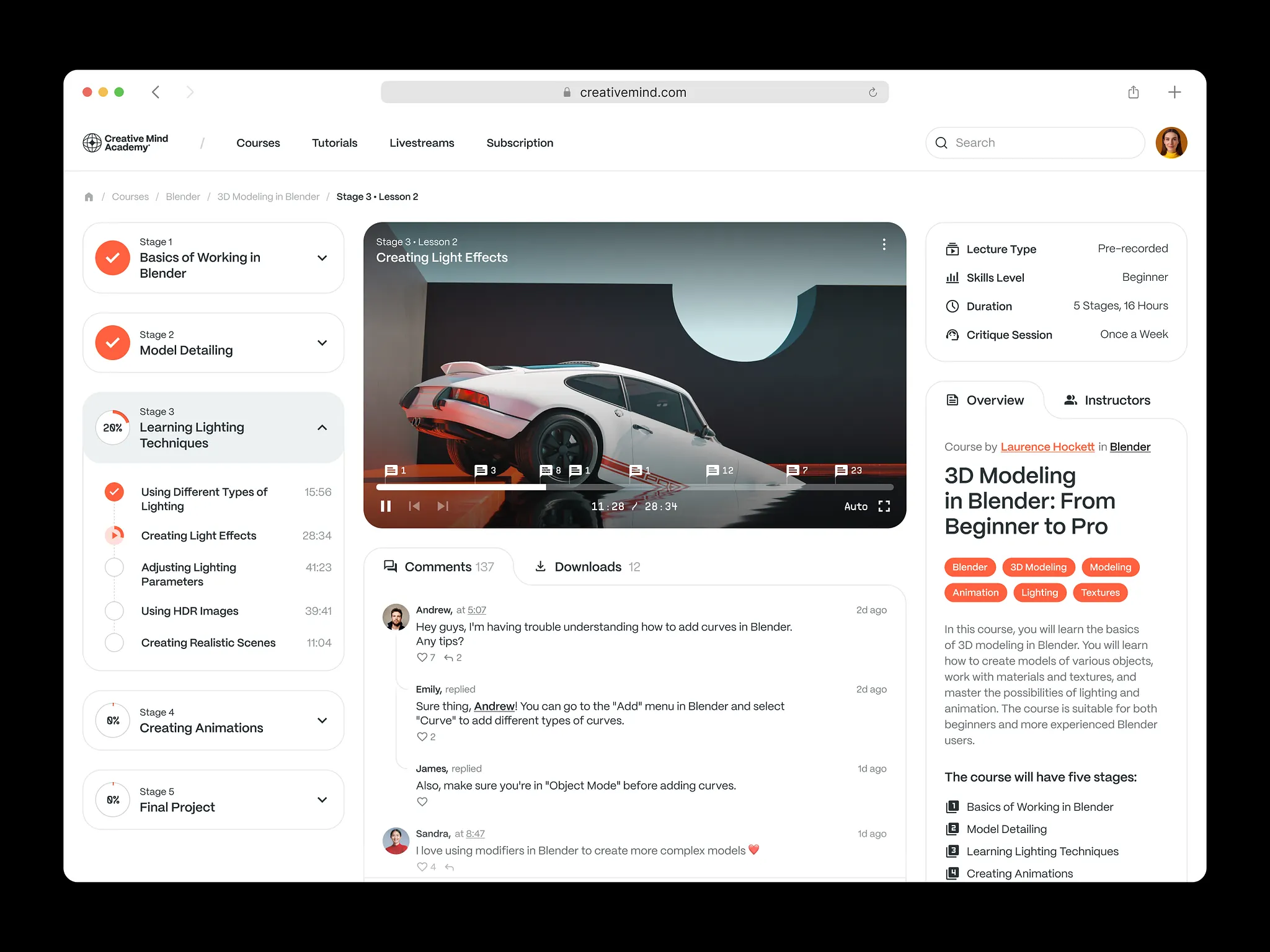
- Progress Tracking: Visual indicators, such as progress bars, provide psychological satisfaction and help users monitor their advancement. For administrators, this data highlights completion rates and identifies where students may be struggling.
- In-Video Interactivity: Embedding quizzes directly into the video stream forces active recall. For example, pausing playback at key moments to ask comprehension questions ensures learners remain attentive.
- Navigation Controls: Features like clickable chapters and timestamped sections respect the user’s time by allowing them jump directly to relevant topics (e.g., “Advanced Python Decorators”) rather than scrubbing through hours of footage.
- AI-Driven Discovery: Intelligent search and recommendation engines can further enhance engagement by suggesting relevant content based on user behavior and preferences.
4. Analytics and Performance Monitoring
Data is vital for iterative improvement. Comprehensive analytics allow you to measure both pedagogical effectiveness and technical performance.
- Learning Analytics: Detailed tracking reveals how users interact with content. High rewind rates on specific clips may indicate confusing explanations or poor audio quality, signaling areas for content refinement. Conversely, frequent skipping might suggest material is too basic.
- Technical Metrics: Monitoring playback performance across different regions and devices helps identify infrastructure issues. For example, if users in Brazil experience high buffer rates or if 4K streams crash on older devices, your dashboard should alert you to these problems proactively, allowing you to resolve them before they result in customer support tickets.
5. Cross-Platform Accessibility
Learners access content from diverse environments—commuting, at home, or in the office. Your platform must deliver a consistent, high-quality experience across all devices.
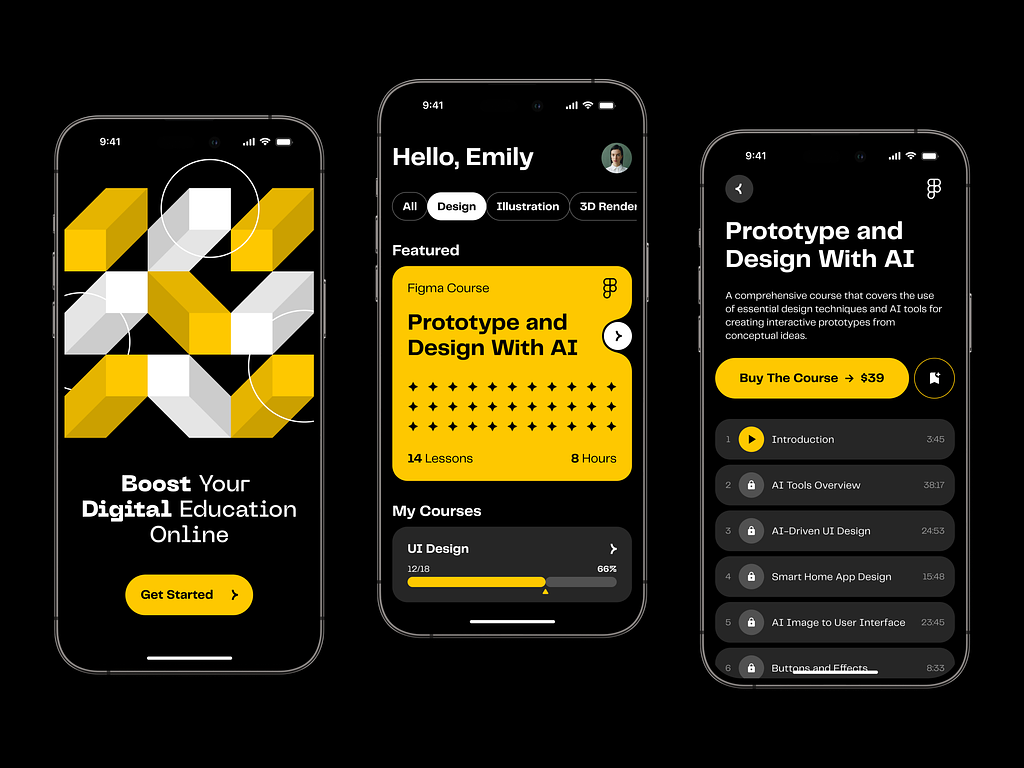
- Native Mobile Experience: Web and mobile playback are non-negotiable. The mobile interface should be optimized for touch interactions, featuring intuitive gestures for seeking and pausing. Simply shrinking the web player for mobile screens results in a poor user experience; instead, the design should feel native to the device.
- Offline Capability: Given inconsistent internet access and limited data plans, offline viewing is a crucial feature. Allowing users to download lessons over Wi-Fi for later consumption expands your reach to commuters and those in low-connectivity areas.
While implementing offline mode adds complexity regarding digital rights management (DRM), secure storage, and synchronization, it significantly enhances user loyalty by accommodating real-world constraints.
The Development Lifecycle of a Video Learning Platform
1. Strategic Definition and Content Modeling
Before writing code, you must define the core identity of your product. A common pitfall for startups is attempting to replicate the functionality of Netflix, Zoom, and Coursera simultaneously. Instead, choose a primary focus:
- On-Demand (Library Model): This approach prioritizes pre-recorded, polished content. The technical emphasis here is on efficient storage, search optimization, and content organization.
- Live Interaction: This model focuses on real-time engagement, such as webinars or coaching. The critical engineering challenges are minimizing latency and managing high concurrency (e.g., ensuring stability for thousands of simultaneous viewers with sub-second delay).
- Hybrid Approach: Increasingly popular, this combines live community sessions with an on-demand library. While it offers the best user experience, it is technically the most demanding, requiring the maintenance of two distinct streaming pipelines.
For smaller teams, it is advisable to master one model before expanding into the other to avoid resource dilution.
2. UX/UI Design Principles for Video Education
In this context, design is functional, not just aesthetic. The interface, particularly the video player, must be intuitive and uncluttered, especially on mobile devices with limited screen real estate.
Designers should distinguish between "lean-back" experiences (casual viewing on mobile during commutes) and "lean-forward" experiences (focused study on desktop). The UI should adapt to these contexts. To maximize retention, use visual cues such as progress bars and clear calls-to-action (e.g., "Take Quiz" or "Next Lesson") immediately after video completion. Minimizing friction is key; every additional click increases the risk of user distraction or abandonment. The goal is to maintain a seamless learning flow.
3. Selecting the Technology Stack
While no single stack is universally perfect, certain combinations offer proven reliability:
- Backend: Node.js is ideal for real-time features like chat or notifications due to its strong concurrency handling. For data-heavy applications involving AI or transcription services, Python with FastAPI is a robust choice.
- Video Infrastructure: AWS Media Services (MediaConvert for transcoding, MediaPackage for packaging) provides a managed, scalable solution, though costs can escalate. Alternatively, FFmpeg offers an open-source, cost-effective option but requires significant DevOps expertise for self-hosted management.
- Content Delivery: Reliable CDNs like Cloudflare, Akamai, or AWS CloudFront are essential for caching content globally and reducing latency.
- Frontend: React and Flutter are industry standards due to their component-based architectures, which facilitate the creation of reusable video players and course modules. Libraries like Video.js or Plyr can accelerate development.
- Database: A polyglot persistence strategy is often effective. Use PostgreSQL for structured data requiring ACID compliance (user profiles, payments, course structures) and MongoDB for unstructured data (logs, flexible metadata).
- Orchestration: Docker and Kubernetes enable containerization and auto-scaling. While complex to initialize, Kubernetes efficiently manages resource allocation based on demand, ensuring stability during traffic spikes.
4. Video Processing and Streaming Architecture
The backend workflow for video ingestion involves several critical steps:
- Ingestion and Transcoding: Raw uploads are too large for direct streaming. They must be transcoded into multiple resolutions and formats. This CPU-intensive process should be offloaded to a message queue (e.g., RabbitMQ or AWS SQS) to prevent blocking the main application.
- Adaptive Bitrate Packaging: The transcoded files are segmented (typically into .ts chunks) and accompanied by a manifest file (.m3u8). This allows the client player to dynamically select the appropriate quality based on current bandwidth.
- Distribution and Optimization: Segments are pushed to the CDN. Advanced optimizations, such as pre-fetching the next lesson while the current one plays (if on Wi-Fi), can significantly enhance the perceived performance and smoothness of the experience.
5. Third-Party Integrations and APIs
A modern edtech platform relies on seamless integration with external services:
- Payments: Secure webhooks from providers like Stripe or PayPal are necessary to manage subscriptions, handle refunds, and automatically grant or revoke access based on payment status.
- Analytics: Tools like Mixpanel, Amplitude, or Google Analytics should track key events (e.g., "Video Started," "Quiz Completed"). This data informs product improvements and content strategy.
- Communication: APIs enable automated notifications, such as sending emails via SendGrid or Slack alerts to instructors when students post questions, fostering a responsive learning environment.
6. Testing and Performance Optimization
Rigorous testing is non-negotiable. Do not rely solely on high-speed office networks. You must simulate real-world conditions, including:
- Playback on slower connections (3G/4G).
- Performance on older hardware and various browsers (noting Safari’s specific quirks with HLS).
- Monitoring key metrics like Time to First Byte (TTFB) and rebuffering ratios. If rebuffering exceeds 1%, immediate optimization of CDN settings and chunk sizes is required.
7. Deployment and Scaling Strategy
Launch readiness involves more than just code completion:
- Automated Deployment: Implement CI/CD pipelines to automate releases, eliminating the need for manual server intervention and reducing human error.
- Scalability Planning: Prepare for viral growth by configuring auto-scaling groups for compute resources and read replicas for databases.
- Load Testing: Before going live, simulate traffic volumes significantly higher than expected (e.g., 10x). Identifying and fixing bottlenecks under stress ensures that the platform remains stable when real users begin paying for the service.
Major Hurdles in Building Video Education Platforms
While video learning platforms may appear straightforward from the outside—simply hosting videos on a website—the reality is far more complex. Developers must navigate a trifecta of challenges involving physics (bandwidth and latency), economics (infrastructure costs), and psychology (user attention).
Here are the four most significant obstacles that keep technical leaders awake at night.
1. Spiraling Infrastructure Costs
For many startups, infrastructure expenses are the silent budget killer. After launching a Minimum Viable Product (MVP) and gaining initial traction, the cloud billing statement often arrives as a shock.
Video data is heavy. Every stream incurs egress fees (costs for data leaving your servers). Additionally, managed transcoding services charge per minute of processed video, and storing high-resolution originals consumes expensive storage space. Without careful optimization, CDN costs alone can deplete seed funding. For instance, serving 1080p streams to users on small mobile screens is an inefficient use of resources.
Furthermore, video processing is CPU-intensive. Self-hosting requires powerful, costly hardware, while cloud-based solutions command a premium for speed.
Mitigation Strategies:
- Advanced Codecs: Adopt efficient compression standards like H.265 (HEVC) or AV1. These reduce file sizes and bandwidth usage, provided the target audience’s devices support them.
- Smart Caching & Monitoring: Implement rigorous caching strategies and closely monitor usage patterns to identify and eliminate waste.
2. The Latency Challenge in Live Learning
Latency is the enemy of real-time interaction. In a live session, a delay of even ten seconds can destroy the flow of conversation. If an instructor asks a question and waits ten seconds for responses, then another ten seconds for students to hear the reply, the experience feels disjointed and unnatural.
Standard streaming protocols like HLS typically introduce a 10–30 second delay, which is acceptable for pre-recorded content but unacceptable for live webinars.
Technical Trade-offs:
- WebRTC: Offers ultra-low latency ideal for two-way communication but is expensive and difficult to scale to thousands of concurrent viewers.
- Low-Latency HLS (LL-HLS): Better suited for one-to-many broadcasting, reducing delay to under 2–3 seconds. However, implementation is complex, and browser compatibility varies.
- The Cost of Speed: Reducing latency often requires smaller video chunks, which increases the number of HTTP requests and server load. Developers must balance the need for real-time interaction against broad device compatibility and cost.
3. Scalability and Architecture Resilience
Viral growth is a double-edged sword. If your architecture isn’t robust, a surge in traffic can cause systemic failure.
- Database Bottlenecks: If the database cannot handle thousands of concurrent writes (e.g., quiz submissions or progress updates), it will become a bottleneck.
- Processing Backlogs: A spike in uploads can clog the video processing queue, delaying content availability for hours.
- The "Thundering Herd": When a popular course launches, thousands of users may attempt to log in simultaneously. Without proper caching and rate limiting, this can overwhelm authentication services and origin servers.
Best Practices:
Design for failure by assuming components will break. Implement circuit breakers to prevent cascading failures, use rate limiting to manage traffic spikes, and employ chaos engineering tools to test system resilience under stress.
4. Driving Engagement and Retention
Technical perfection means little if users disengage. Online course completion rates are notoriously low, often hovering around 12%, primarily because passive video watching makes it easy for learners to lose focus.
The Product Solution:
To combat passivity, platforms must integrate interactive features such as:
- Active Learning Tools: In-video quizzes, polls, and gamification elements (badges, leaderboards).
- Community Features: Discussion forums and peer review systems.
- Personalization: AI-driven recommendations and timely, non-intrusive notifications to encourage habit formation.
Technical Complexity:
These features add significant development overhead. The system must sync state between the video player and the backend in real time. For example, when a user answers a quiz, the video must pause, validate the input, and resume seamlessly. Any friction in this flow can lead to drop-offs.
The Strategic Advantage of Partnering with a Specialized Development Agency
The allure of building a video learning platform in-house is strong. Many organizations possess talented engineering teams and desire full ownership over their codebase. For certain enterprises, this internal approach is viable. However, developing a robust edtech platform involves complex media handling and streaming infrastructure—a domain with a notoriously steep learning curve. Without prior experience, companies often face unexpected hurdles, such as exorbitant cloud computing bills or performance bottlenecks that only appear at scale.
Partnering with a specialized development firm offers a strategic shortcut, transforming potential technical debt into a competitive advantage.
1. Mastery of Streaming Architecture
Video streaming is a niche specialization within software engineering. While many developers are proficient in standard web protocols, few possess deep expertise in HLS manifests, adaptive bitrate ladders, or Digital Rights Management (DRM) encryption.
Attempting to master these technologies from scratch results in months of costly research and trial-and-error. A specialized agency brings pre-existing knowledge, allowing you to bypass the experimental phase. Instead of spending half a year solving fundamental streaming challenges, your team can focus on building unique, differentiating features. You effectively leverage established best practices rather than reinventing the wheel.
2. Infrastructure Built for Scale
In-house teams often architect solutions based on current needs rather than future growth. This "build for today" mindset can lead to significant refactoring costs when user numbers surge.
Specialized agencies design systems with scalability as a core principle from day one. They implement containerization (using tools like Docker and Kubernetes) to enable automatic scaling during traffic spikes. They also configure databases with read replicas and advanced caching layers to ensure query performance remains stable under load. While the initial investment in expert consultancy may be higher, it prevents the far greater costs associated with fixing a broken architecture post-launch, including lost revenue from downtime.
3. User Experience (UX) as a Priority
Technical teams often prioritize functionality and code cleanliness, sometimes at the expense of usability. However, in the edtech sector, user experience is the primary driver of retention. A clunky video player, confusing progress tracking, or labyrinthine navigation will drive users away, regardless of content quality.
Specialized agencies adopt a UX-first mindset. They design the entire learner journey, focusing on frictionless interactions—from content discovery to seamless resume functionality. Understanding that every extra click increases the risk of distraction, they optimize interfaces to keep learners engaged. Furthermore, an external partner provides objective insights, helping to identify blind spots that internal teams, too close to the product, might miss.
Conclusion: A Holistic View of EdTech Development
We have explored the intricate details of building a video learning platform. To avoid getting lost in technical specifics, it is helpful to view the project as an interconnected ecosystem where every component relies on the others. If one element fails, the entire user experience suffers.
The development lifecycle follows a logical progression:
- Content Structuring: Raw media is organized into coherent courses via a robust CMS.
- Reliable Delivery: Streaming infrastructure ensures seamless playback across diverse devices and network conditions.
- Scalable Growth: The architecture must be resilient enough to handle increasing user loads without performance degradation.
Each stage is foundational to the next. As you move forward, keep these three core principles in mind:
- Clarity Over Resolution: While 4K quality is not mandatory, audio-visual clarity is non-negotiable. Poor audio quality, in particular, is a primary driver of user churn; if learners cannot hear the instructor clearly, they will disengage immediately.
- Performance as a Feature: Speed defines user perception. Slow load times or delayed video startup are often interpreted as system failures. Aggressive caching, optimized delivery, and continuous monitoring are essential to maintain a responsive experience.
- Active Engagement: The ultimate objective is to foster an active learning environment, not passive consumption. Features such as interactive quizzes, progress tracking, and community forums transform viewers into participants. Higher engagement leads to better completion rates, which directly correlates with educational outcomes.
Building a successful platform is a complex endeavor. Rather than navigating these challenges in isolation, consider partnering with experienced developers who specialize in edtech. Their expertise can help you avoid common pitfalls and build a sustainable, high-quality product that stands the test of time.
About the Creator
Shakuro
We are a web and mobile design and development agency. Making websites and apps, creating brand identities, and launching startups.
Enjoyed the story? Support the Creator.
Subscribe for free to receive all their stories in your feed.
Comments
There are no comments for this story
Be the first to respond and start the conversation.