
The K-Shaped Agent Economy: Why Power Users Are Leaving Everyone Behind
Agents weren't supposed to widen the gap, but they are. Here's the exact mechanism, and what Skills have to do with it.
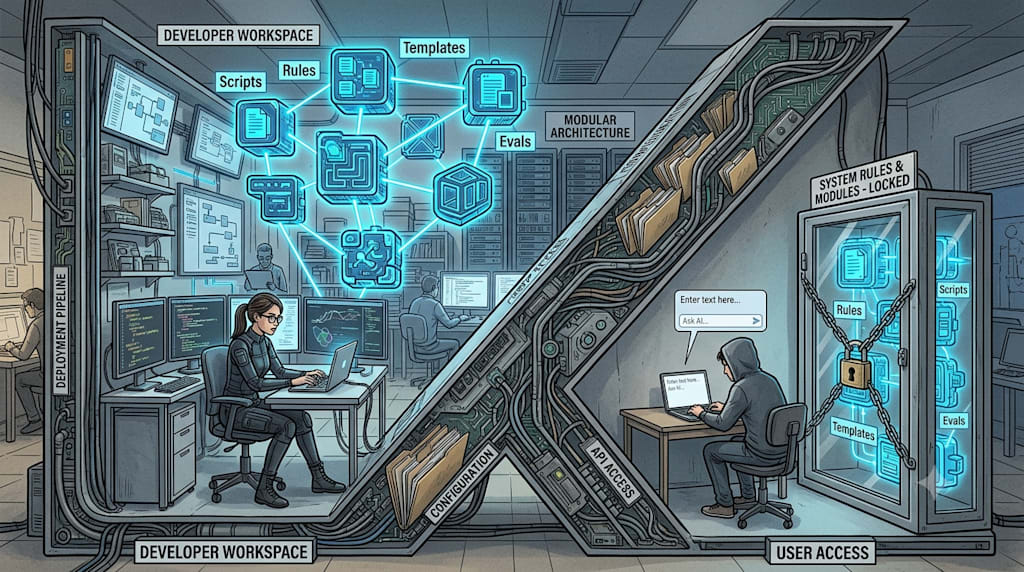
Last year, when people talked about Agents, they saw a chat box. You typed a sentence, and it spat out a paragraph. That image was so strong that it created an illusion: AI would act like water, leveling everyone’s abilities to the same plane. Those who couldn’t code could now code. Those who couldn’t make a PowerPoint could now generate one. As long as the model was powerful enough, everyone stood on the same starting line.
That judgment was wrong. Agents aren’t flattening the capability gap; they’re pulling it into a K shape. One end points up, the other down.
Look at the power users. By default, their Agent is composed of these words: documents, rules, memory, loop, MCP, CLI, tool calls, permissions, security sandbox, context engineering, scheduled tasks, heartbeat, file system, code execution, Skill. They are building systems. Ordinary users are at the other end. They only know that “Agents can write code.” They don’t know where an Agent’s ceiling comes from, nor how to organize goals, materials, and workflows so that it actually works. They are still asking the chat box.
Those with clear goals, documentation, taste, and strong judgment get amplified by Agents. Those with chaotic goals, no documentation, and no judgment get their chaos amplified. Last year, you could still bridge some of the gap through product design and user education. This year, it’s become very difficult. Simple UX can’t patch this cognitive chasm.
Skills are what bridge this gap. A Skill is not a prompt. I’ll put my one-sentence definition here: A Skill is a distributable, reusable, and iterable Agent capability unit that packages expert experience, workflow, taste, and tool calls.
It’s not a prompt, nor an app. It’s the “capability commodity” of the Agent era. Users don’t need to understand the underlying MCP, CLI, workflow, memory, loop, model selection, or code execution. They only need to know: what problem it solves, what result it produces, how to use it, and how well others have used it.
A prompt alone is hard to turn into a product. It’s easy to copy, difficult to distribute, and has no version management. A Skill packages prompts, rules, examples, tool calls, file structures, scripts, dependencies, and usage instructions into a capability pack that can be installed, invoked, iterated, and shared. Many tasks can’t be solved by a single prompt; they are a stable set of processes: read material, analyze requirements, select a template, call tools, generate output, verify results, fix issues, export files. The PPT Skill’s process isn’t “generate a PPT.” It’s reading an outline, asking for page count and images, selecting theme colors and layouts, generating HTML, running post-hoc checks for missing attributes, misalignment, overflow, image cropping, rhythm repetition, then fixing them and outputting the file.
Behind this, a person’s presentation experience has been externalized.
This became clearest to me when making design Skills. The PPT Skill didn’t start out as a Skill; it started because I actually had to give a talk. After the first version took shape, I spent five or six rounds of conversation adjusting spacing, font sizes, typefaces, colors, imagery, repetitive content, and WebGL backgrounds. After the talk, what people cared about most wasn’t the talk itself, but how the PPT was made. That process was then crystallized. The social media card Skill wasn’t abstracted from thin air either; it came from very concrete content distribution needs. The Logo Generator Skill is the same logic: it didn’t let the image model generate a logo in one shot, because image models are unstable with text, structure, and editability. It chose to generate SVG variants first, then create presentation images and WebGL backgrounds. The logo itself, the display scene, and the interactive background were split into different layers, each handled by the most appropriate technology.
Users don’t care about these concepts. For the average user, it doesn’t matter whether something is called a Skill, MCP, CLI, or Plugin. They care about: what problem this function solves, whether they can use it with one click, what materials they need, what the result looks like, and how well others have used it. Codex unifying everything under the term “plugin” is a step in the right direction: weaken the concept, emphasize the function. Under the hood, it can be a Skill, MCP, CLI, or native Plugin; the user just needs to know what it can do.
But a usable Skill isn’t just writing a SKILL.md file. A good Skill is a directory. SKILL.md is only the entry point; alongside it are scripts/, references/, assets/, templates, schemas, and config files. Complex Skills aren’t afraid of containing complexity; what they fear is stuffing all that complexity into the model at once. The file system itself is a form of context engineering. The information architecture should be “short at the center, thick at the radiations.” SKILL.md holds only high-signal processes and judgments; references/ holds heavy documentation and domain materials, read conditionally; scripts/ holds deterministic logic, to be called by the Agent rather than rewritten. A Skill’s description is also not ad copy; it’s a routing trigger. It shouldn’t say “This Skill can generate beautiful PPTs.” It should say “Load when the user needs to convert an article, outline, or speech content into a demonstrable HTML PPT.” The former is advertising; the latter is the Agent’s judgment condition.
This demands that Skills be maintained with the same rigor as code quality. A reliable lifecycle goes like this: first, run a real task with a Skill-less Agent and find where it goes wrong; write evals based on real queries, including positive cases, negative cases, and forbidden loads; adjust the description first to ensure it loads when it should and doesn’t when it shouldn’t; when writing the main body, delete obvious content and keep only the judgments that will change the model’s behavior; append failure cases to gotchas instead of endlessly lengthening the main process. Every Skill is a tax. Once it enters the index, every session, every user, is paying a context cost for its name and description. So every sentence must be interrogated: if I remove this sentence, will the Agent do it wrong? If not, delete it. Gotchas are the highest-value content because they come from real failures. In design Skills, things like “don’t use pure white or pure black,” “three consecutive slides with the same rhythm is a P0 error,” “text must not cover the face,” and “use AI-generated images only when no suitable real image exists” are all gotchas.
This is especially true for design Skills. Models will converge to mediocre patterns by default: Tailwind big color blocks, purple gradients, emoji piles, Inter font, glow effects, excessive border-radius. This isn’t because the model lacks aesthetic material, but because it lacks stable tradeoff principles. So the most valuable things are the subjective yet explicit constraints: do not use pure white or pure black; don’t let users input arbitrary hex codes, only offer verified color palettes; animations should only affect transform and opacity; layout skeletons are verified by humans first, and the AI fills them in. Inside the PPT Skill, 10 page layouts, 5 theme colors, a three-tier font system, 7:5/6:6/8:4 grids, and alternating hero and non-hero rhythms form a stable presentation system. The AI doesn’t need to invent layouts from scratch; it just selects the appropriate page type based on the content and fills it in. This set of rules appears to restrict freedom, but in reality it protects the output floor. The value of design Skills is in breaking down the mystique of “looking good” into codable, checkable common sense.
People outside the AI circle can absolutely use these. Café owners, gadget reviewers, event planners, fitness coaches—all can get good results. Their real sticking point isn’t technology; it’s the interaction mentality. Many are still in the traditional software mindset, believing that one generation should complete the task: they’re not used to iterating through chat, they don’t know they can ask the AI to change colors, tweak text, fix overflow, swap images, and they don’t know how to extract a Skill from their own workflow. Industry-specific Skills will be a very important direction. A fitness coach can use an Agent to maintain a client’s diet, training, reminders, and feedback. Legal practitioners can turn tedious text processing, clause review, and format checks into auxiliary Skills, while core judgments remain human. AI can’t replace offline fulfillment, but it can improve the efficiency of client acquisition, communication, maintenance, and reuse. These users only need a basic initiation: walk them through one needs-analysis and turn it into a Skill, and they’ll understand the boundaries.
The boundaries of Skills are continuing to expand. The AI Desk Card lets an Agent take over the physical information slot at the edge of a screen: firmware flashing, Wi-Fi configuration, information push, scheduled tasks, e-ink refresh, all guided by AI. The user no longer faces an app settings page; the AI is the settings page. The “indie game demo Skill” mentioned in the Night Patrol development notes, which spans from gameplay core theme, prototype, asset gathering, green screen keying, contact sheets, video generation, music, Electron packaging, to GitHub Actions release, packages an entire production pipeline. It won’t be confined to the chat box.
Finally, on the topic of automatically crystallizing Skills. A system can automatically discover repetitive processes, but whether they’re worth crystallizing, how to name them, where the boundaries are, and which failures to write into gotchas still require human judgment. The truly ideal form is neither fully automatic nor entirely hand-written. It’s humans defining the taste and boundaries, while the Agent gathers evidence, proposes changes, supplements evals, and maintains the long-tail experience.
If you want to do this, the complete lifecycle of a Skill looks like this: first, identify a real need, starting from your own repetitive work or that of industry users. Next, produce a high-quality output once—don’t abstract first; use the Agent to solve a real task. Then abstract the process, identifying reusable steps, inputs, outputs, constraints, and tools. After that, engineer the templates, solidifying the aesthetics, layouts, invocation, verification, and repair mechanisms. Then do cross-model testing, checking the ceiling with good models and ensuring the floor with weaker ones. Only then package and release: host on GitHub, with a README, examples, and installation instructions. Then gather feedback, finding real issues from issues, comments, user cases, and platform data. Feedback also needs filtering: only absorb what improves generalization and stability. This path looks long, but its essence is simple: every real task isn’t just about completing the task; it’s about accumulating a capability asset that you can invoke next time.
About the Creator
Jin
Writer of reamstories
https://reamstories.com/jin
Enjoyed the story? Support the Creator.
Subscribe for free to receive all their stories in your feed. You could also become a paid subscriber, letting them know you appreciate their work.
Comments
There are no comments for this story
Be the first to respond and start the conversation.