
The “hardware encryption” on this USB drive was a plaintext SD card and a layer of epoxy
A teardown of a fingerprint drive, a missing AES-256 claim, and the cost structure behind consumer security
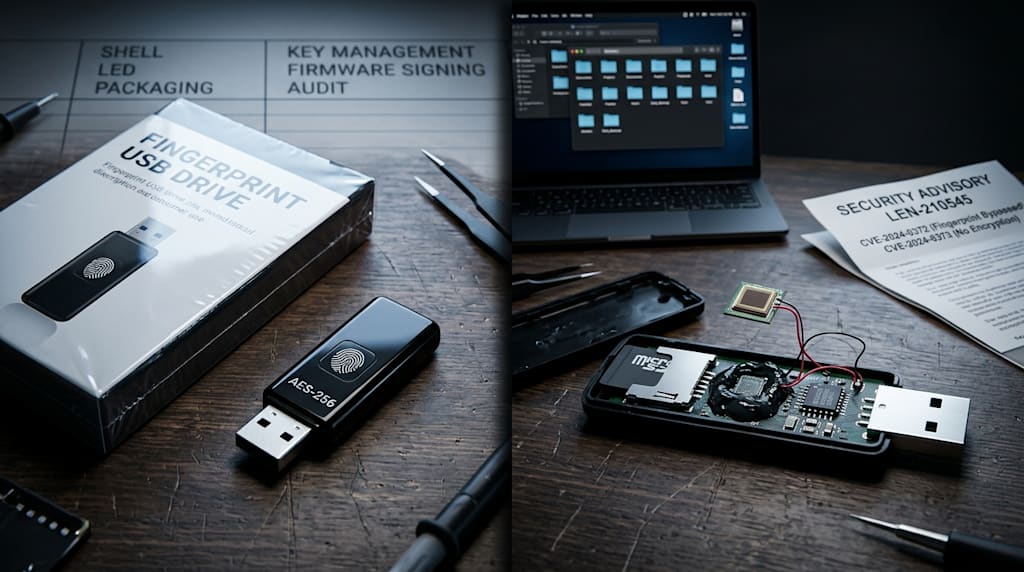
Open the shell of the ThinkPlus FU100 “fingerprint USB drive,” and the circuit board holds an ordinary microSD card. Remove the card, put it in a reader, and the files open. There is no password prompt, no decryption progress bar, no encrypted container. The fingerprint module connects to a small chip that controls the USB link between the drive and the computer. Press the finger, the computer sees the drive. Release, the drive disappears. The data remains plaintext.
That is the reported finding of security researcher Xusheng Li. The product claimed AES-256 hardware encryption. Li found no encryption in the data path. The fingerprint reader did not derive a key, unlock a vault, or decrypt a sector. It switched the USB link on and off.
On August 2, 2025, Li reported the missing encryption to Lenovo. On August 27, 2025, the company offered a temporary “fix”: cover the microSD card with epoxy resin to make disassembly harder. Epoxy curing takes about 24 hours. During those 24 hours, the card remains a plaintext microSD card.
Lenovo published advisory LEN-210545 on January 13, 2026, rating the issue high severity and listing three CVE identifiers. The affected products included the FU100, FU200, TU800, and TSD303 SSD. The formal remedy asked users to contact Lenovo’s China service hotline and either mail the device back for replacement or arrange an on-site firmware upgrade.
The TSD303 external SSD did encrypt data, but it had another problem: when the desktop software asked for the password, the drive returned the correct password over USB in plaintext. That is easy to intercept. A later fix used SM4 encryption with a key derived from a timestamp, but the key could still be derived from the software. A later revision moved password verification onto the drive itself.
In March 2026, Li presented the research at a security conference. From late October to early November 2026, detailed reporting, including AI-assisted investigation results, was widely republished and drew public attention. Li used OpenAI Codex with reverse-engineering tools to find hardcoded AES keys in products from Netac FileLock, KakaSoft, Nexcopy, and SecZure. He also found key-generation logic unrelated to the user’s password and default backdoor accounts.
No advanced AI attack broke these products. The boundary was missing in the code and the circuit.
AES-256 is not a security promise. Key management is.
“AES-256 hardware encryption” names an algorithm. It does not name a security system. The algorithm is one link in a chain. The rest of the chain decides whether the encryption protects anything.
Where does the key come from? Is it generated randomly per device, or hardcoded in firmware? Is it bound to the user’s password? If the user changes the password, does the key change? Where is the key stored? Can it be read from the storage medium, the firmware, or memory? Does the fingerprint authenticate and release a key, or does it only switch the USB connection? Is password verification a local challenge-response, or does the drive return the password in plaintext? Is firmware signed? Can it be updated securely? Are debug interfaces disabled? After physical contact, can an attacker read the storage chip directly?
One wrong answer can turn “encryption” into reassurance. A hardcoded AES key means every device shares the same secret. One device opens many. Key-generation logic unrelated to the user’s password means changing the password changes the label, not the lock. A password returned in plaintext means one interception ends the game. A fingerprint that only controls USB power means the storage medium remains plaintext. Remove the shell and the protection is gone.
AES-256 can be strong and still protect nothing if the key is hardcoded or the data path skips encryption. A product can advertise the strongest algorithm and fail at key management. Another can use a modest algorithm and do the threat model, key lifecycle, and firmware updates properly. The first is marketing. The second is engineering.
The epoxy fix is a metaphor
Covering the microSD card with epoxy is a telling repair. It assumes security means making disassembly harder. It does not make the data unreadable after disassembly.
Physical resistance can raise the cost of one attack path. It is not cryptographic security. A working design assumes the attacker gets the device, opens the shell, and removes the storage chip. The data should still be ciphertext. The attacker may get the firmware. The key should not sit in plaintext. The attacker may intercept communication. The password should not travel in plaintext. One key may leak. The damage should be limited.
Epoxy is also hard to maintain, verify, and audit. A responsible fix would redesign key derivation so the user’s password participates, disable debug interfaces, sign firmware, provide a secure upgrade path, and publish the threat model and repair notes. Mailing the device back or sending a technician to upgrade firmware at least admits the problem needs engineering. If the underlying design remains plaintext storage plus a fingerprint-controlled USB switch, a new shell is still a shell.
Why the layers stack
The problem is not only one vendor’s mistake. It is a cost structure.
A hardware security product that works costs more than a bill of materials. It needs a secure element or trusted execution environment, key lifecycle design, salting and key derivation, failure locking, anti-rollback, firmware signing, secure boot, disabled debug ports, basic side-channel protection, independent audit, penetration testing, certification where required, long-term firmware maintenance, vulnerability response, and supply-chain key injection. Those are research, certification, and maintenance costs. They do not appear in the four words “military-grade encryption” on the box.
A low-priced “secure USB drive” that claims “bank-grade” or “military-grade AES-256” is likely spending on marketing. The shell, fingerprint module, LED, and packaging copy are visible costs. Key management, audit, and firmware maintenance are invisible costs. Invisible costs are the first to be cut because consumers do not see them, channels do not ask, and short-term sales do not suffer.
The result is a stack of layers. A solution provider supplies a reference mainboard and firmware. A contract manufacturer assembles. A brand owns the shell, copy, and channel. An e-commerce platform owns traffic. The consumer pays for reassurance. Each layer handles a small piece. No layer owns the security boundary. When a researcher opens the device, the problem appears. The first response is often to make opening harder, issue an advisory, and run a replacement process.
What AI-assisted reverse engineering changes, and what it does not
AI-assisted reverse-engineering tools lower the cost of discovery. They do not create the flaws.
Hardcoded AES keys, default backdoor accounts, and key-generation logic unrelated to the user’s password are basic engineering defects. Finding them once required reverse-engineering experience, time, and patience. AI can speed up code search, pattern recognition, and firmware analysis. The researcher reaches the problem faster.
The impact is that products protected by “nobody will open it” become harder to defend. Security cannot rest on the attacker being uninformed or the disassembly cost being high. AI is an audit accelerator. It exposes products that never established a security boundary. Vendors face faster exposure of security debt. Consumers face a weaker “secure” label. The industry faces a choice: build security engineering in, or wait for a teardown video and reach for epoxy.
Other consumer security products
One failed category does not condemn every consumer security product. A “secure” label does not certify one either. The question is the threat model: who is the product protecting against? A casual passerby, a temporary access attempt, a lost bag, or an attacker with physical contact, reverse-engineering skill, and supply-chain access?
Encrypted drives and USB sticks. Check whether the password participates in key derivation, whether keys are stored in plaintext, whether full-disk encryption is used, whether firmware is signed, and whether there is independent audit and vulnerability response. Controller self-encryption is not automatically secure. Many failures sit in key management.
Fingerprint locks. The fingerprint is one authentication factor. The boundary includes motor control, emergency key, app and cloud account, resistance to bypass tools, physical opening, and firmware updates. A bypassed fingerprint module, a copied emergency key, or a hijacked cloud account defeats the “fingerprint lock.”
Security cameras. Common problems include default passwords, P2P tunnels, cloud account hijacking, missing firmware updates, and plaintext local storage. A privacy camera needs end-to-end encryption that works and clear cloud permissions, not just a “privacy mode” switch.
Privacy routers. Default credentials, UPnP, remote management, firmware vulnerabilities, and supply-chain backdoors matter more than the “privacy” label. A router is secure when it is updated, minimizes exposure, and has auditable firmware.
Consumer-grade products fit low-value, anti-mistake, temporary-access scenarios. For high-value data or high-adversary scenarios, use professional designs and a clear threat model. Treating a consumer “secure” device as a safe is the dangerous mistake.
A checklist of unreliable signals
Unreliable signals:
“AES-256, military-grade, bank-grade” with no key-management or threat-model explanation.
The fingerprint is treated as the encryption itself.
Default passwords, hardcoded keys, or passwords returned in plaintext.
No firmware updates, no security advisories, no CVE response.
A “fix” made of epoxy, or a replacement process instead of signed firmware upgrades.
A vague white paper and refusal of independent teardown or audit.
More reliable signals:
A published threat model and key-derivation design.
The user’s password participates in key derivation. Keys are not stored in plaintext.
Secure boot, signed firmware, disabled debug ports.
Independent audit, vulnerability disclosure, and long-term updates.
An open-source client or a verifiable implementation.
Clear statements of what the product protects and what it does not.
For ordinary users, the practical rules are simple. Do not keep the only copy of high-value data or secrets on a consumer “secure” device. Use encrypted containers where you hold the keys, offline backups, and auditable tools. Assume physical contact means loss. Plan for remote wipe or key rotation before the device disappears.
The shell and the card
A “secure USB drive” can be a funny category. The cost goes into the shell, the fingerprint module, the LED, and the packaging copy. Engineering is cut where it cannot be seen. The marketing says AES-256. The implementation is a plaintext SD card and a layer of epoxy. The price sells reassurance, not security.
Some consumer security products do build a working boundary. Many sell a label. The reported cases show where the label breaks. The shell, the fingerprint module, the LED, and the copy are costs. Key management, audit, and firmware maintenance are also costs. The second list is the one that gets cut.
Security is a system: threat model, key lifecycle, firmware updates, vulnerability response. An AES label and a layer of epoxy are not that system. A vendor that sells reassurance without building a boundary will be opened. A consumer who pays for the word “secure” without asking what it protects, how, and who holds the key will pay for the misjudgment.
A product worth trusting does not claim to be unbreakable. It says what it protects and what it does not. It puts key management, firmware updates, and vulnerability response in plain view.
Open the shell. Inside is a microSD card. The files open without a password. That is the whole product.
About the Creator
Jin
Writer of reamstories
https://reamstories.com/jin
Enjoyed the story? Support the Creator.
Subscribe for free to receive all their stories in your feed. You could also become a paid subscriber, letting them know you appreciate their work.
Comments
There are no comments for this story
Be the first to respond and start the conversation.