
The Apple Store App Shows Why Foldables Still Feel Half-Finished
Apple can set a 2027 deadline for developers. It cannot make the inner screen worth opening. Its own store app proves the point.
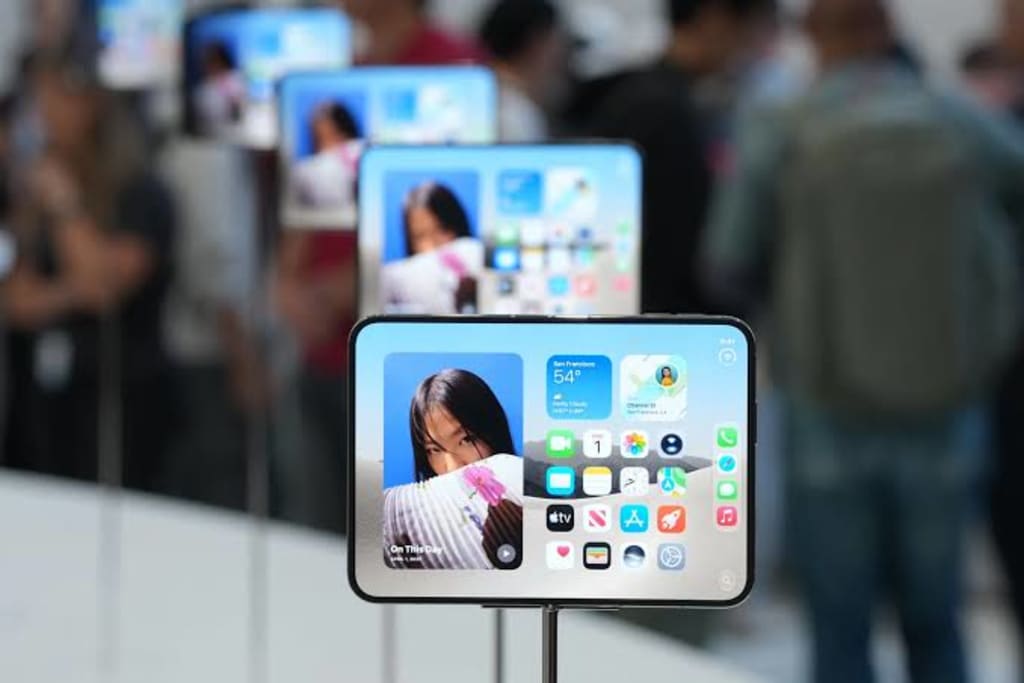
Open the Apple Store app on a foldable inner screen. The product card sits in a narrow column. White space fills the right side. The Buy button waits at the bottom of a layout built for a slab phone. To reach it, the thumb has to travel across the fold.
The app that sells the phone still looks like the phone it is trying to replace. Apple controls this app. If the store app still behaves like a stretched slab interface on the inner screen, the problem sits inside Apple’s own house. Apple can set review rules, open APIs, and ship new hardware. It cannot skip the work of redesigning its own storefront for the screen it asks users to unfold.
The source material puts the delay in plain numbers. Early reports put the API opening around September 19. Later reports moved it to early October. As of 22:00 on October 20, 25 common apps were tracked, and about 80 percent had not completed adaptation. The list includes WeChat, QQ, Alipay, Meituan, Dianping, QQ Music, Douyin, iQIYI, NetEase Cloud Music, Honor of Kings, Peacekeeper Elite, Weibo, and Tonghuashun. These are daily apps: chat, payment, food, video, games, finance.
Apple’s hard rule arrives later. From April 2027, an app without adaptation screenshots cannot pass review or update. That deadline will move the number. It will not settle the experience. A developer can submit a screenshot and still ship a layout that wastes half the inner screen. A review rule sets a floor. It does not set a ceiling.
The store app is the first test
The Apple Store app matters because Apple writes it, Apple reviews it, and Apple sells the device through it. The app can show what the inner screen is for. A product page can place the device image on one side and the configuration options on the other. A comparison view can put two models side by side without a tab switch. A delivery estimate can sit next to the Buy button, so the user sees the cost and the date in one glance.
If the store app still uses a narrow column and a long scroll on the inner screen, the message to developers is plain: the platform owner has not finished the layout. The review rule can arrive in 2027. The example arrives now.
A wide screen can make an app worse
Foldable hardware has a simple promise: unfold the phone and get more room. The promise fails when the extra room becomes empty room.
Take a chat app. On the cover screen, the conversation fills the width. On the inner screen, the same conversation becomes a narrow strip in the middle, with black bars on both sides. The user pinches to zoom. The text grows, and fewer messages fit on screen. The user closes the phone and replies on the cover display. The inner screen was opened, glanced at, and folded away.
Take a map. On the cover screen, the route runs vertically, and the thumb rests near the bottom. On the inner screen, the map stretches sideways. The route sits in the middle, and the zoom controls move to a corner that requires a reach. The user rotates the device. The map rotates. The hand does not.
Take a video app. The inner screen opens to a near-square canvas. The video sits in a letterboxed strip. The comments sit below it, or beside it, or under a tab. The user watches the same video with more empty space around it. The screen is larger. The information is the same.
These scenes explain why a foldable can feel worse than a slab phone even when the spec sheet looks better. A 7.6-inch inner screen with a √2:1 ratio can beat a straight phone when the software uses the space. When the software does not, the user carries a heavier device, opens a larger display, and gets the same amount of information with more reaching.
A ratio can rotate. A habit cannot.
The geometry in the source material is simple and stubborn. The cover screen is √2:1. When the device opens, the inner screen becomes 1:√2. The two ratios look like the same rectangle turned 90 degrees. The screen can turn. The user’s reading habit does not.
A vertical app is built for a tall, narrow window. The thumb sits at the bottom. The eyes move down the page. The primary action stays within reach. On the inner screen, the window becomes wide and short. If the app scales up, the user must rotate the device to keep the same orientation. If the app keeps the orientation, the developer must rebuild the layout, or the content occupies only part of the display.
Splitting the inner screen into two panes looks like an answer. It is not a general answer. A map wants one large canvas. A video wants one large frame. A reading app wants a column of text. A chat app can use two panes: conversation on one side, contact list or media on the other. A payment app may need one clear path. A game may need the full screen and a controller layout. The developer has to choose the scene, the information hierarchy, and the thumb path for each app.
The source material makes this point through a question: why should an app’s content naturally split into left and right halves? The question exposes the limit of template solutions. A foldable inner screen is a new canvas. A new canvas needs a new composition, not a copy of the old one with wider margins.
The animation is smooth. The eye still goes the wrong way.
Apple’s strength is motion. A foldable opening animation can feel like a book cover turning. The hinge moves, the display unfolds, and the interface settles into place. The motion looks right. The information can still land in the wrong spot.
A book opens from right to left. The page that moves reveals new content on the left side of the spread. A foldable opens with a similar physical gesture. If the new content appears on the left side of the inner screen, the physical direction and the information position agree. If the new content appears on the right, the eye goes right first, then back to the left. The animation is smooth. The expectation is not.
This kind of problem does not show up in a spec sheet. It shows up in the first second after the screen opens. The user does not say, “The information architecture conflicts with the physical affordance.” The user pauses, moves the thumb, and finds the content. The pause is small. It repeats every time the phone opens.
A foldable interface has to answer a spatial question: when the screen expands, where does the new information appear, and why does that position match the hand and the eye? The answer cannot come from a single animation curve. It has to come from the layout, the reading order, and the action placement.
Developers do the math
The source material includes a useful detail: a photography app with fifty or sixty thousand users tried to adapt to the foldable through a simulator. The layout was hard to tune. The problem was not one broken screen. The problem was the product shape.
This is the developer’s view. A small team has a calendar. The calendar has a new feature, a bug fix, a compatibility update, and a foldable adaptation. The foldable adaptation touches every screen. It needs new layouts, new tests, new assets, and new interaction rules. The user base is uncertain. The revenue is uncertain. The work lands after the feature and after the bug fix. Three releases pass. The foldable layout stays on the list.
Head apps have the staff and the brand pressure. Apple can push them with review rules and public attention. A long-tail app has neither. It can ship a compatible build that opens on the inner screen and passes review. The build can still be a slab layout with wider margins. The review rule checks for a screenshot. It does not check whether the first screen uses the space.
The adaptation rate can rise while the experience stays flat. The number of adapted apps goes up. The number of apps that feel designed for the inner screen goes up more slowly. The gap sits in the middle of the home screen.
What adaptation should look like
A foldable app is adapted when the inner screen changes what the user can do, not just how large the interface looks. Three tests separate a real layout from a stretched one.
Open the app on the inner screen. Without pinching, rotating, or closing the phone, can the user see more useful information than on the cover screen? A chat app should show the conversation and a second column of context. A map should show the route and the next turn without hiding the street grid. A store app should show the product, the price, the delivery date, and the Buy action in one view.
Hold the phone in two hands. The primary action should sit within reach. A Buy button at the far edge of a wide inner screen fails this test. A zoom control in the top corner fails this test. A send button that moves to the middle of the display fails this test.
After using the inner screen, does the user keep it open? If the next action is to fold the phone and finish on the cover screen, the inner screen did not earn its place. The user paid for the extra display and chose the smaller one.
These tests do not require a design document. They require a phone, an app, and a minute of use.
The store app should be the reference build
Apple’s control over the ecosystem gives it a strong hand. It can open APIs earlier, publish layout guidance, provide test devices, and highlight apps that use the inner screen well. It can also make the store app the reference build. A developer who opens the Apple Store app on a foldable and sees a layout built for the inner screen gets a clear target. A developer who sees a stretched slab layout gets a different message.
The source material ends with a question that applies to Apple and every foldable maker: how do you make developers believe the extra screen is worth a second design? The answer is not a review deadline. The answer is a visible platform, a clear layout pattern, a store app that uses the screen, and a user base that keeps the phone open.
The phone closes with a click. The cover screen lights up. The reply goes out from there.
About the Creator
Jin
Writer of reamstories
https://reamstories.com/jin
Enjoyed the story? Support the Creator.
Subscribe for free to receive all their stories in your feed. You could also become a paid subscriber, letting them know you appreciate their work.
Comments
There are no comments for this story
Be the first to respond and start the conversation.