
Optimize your WordPress speed for a better user experience
WordPress speed optimization is essential for providing a fast and efficient user experience, improving search engine rankings, and maximizing conversions
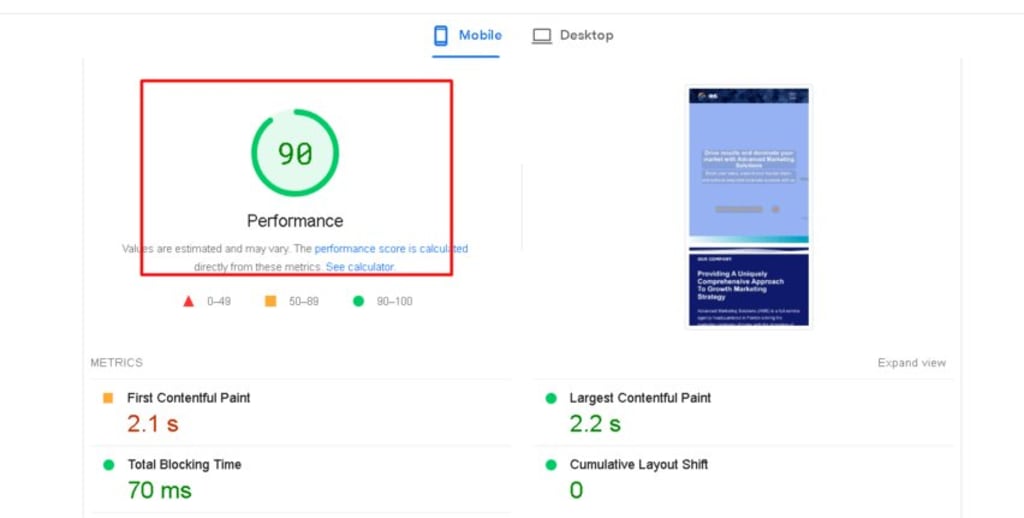
A slow website is a frustrating experience for users. It can take a long time to load, and visitors may give up and leave before they even see your content. This can hurt your website's traffic and SEO rankings.
There are a number of things you can do to optimize your WordPress speed. Here are a few tips:
Choose a reliable hosting provider. Your hosting provider plays a big role in your website's speed. Choose a provider that offers fast servers and a good uptime record.
Use a lightweight theme and plugins. A bloated theme or plugins can slow down your website. Choose lightweight options that won't add unnecessary weight to your pages.
Optimize your images. Images can be a major source of bloat on a WordPress website. Optimize your images to reduce their file size without sacrificing quality.
Minify CSS and JavaScript files. Minifying CSS and JavaScript files will remove unnecessary white space and comments, which can make them load faster.
Use a content delivery network (CDN). A CDN will deliver your website's static content from servers that are located closer to your visitors. This can significantly improve the loading speed of your website for visitors from all over the world.
Caching pages. Caching pages will store copies of your website's pages on the server. This means that visitors who request a page that has already been cached will not have to download the entire page from the server again.
Image Optimization: Compress and optimize images to reduce file sizes without compromising visual quality. Use plugins like Smush or EWWW Image Optimizer to automatically optimize images upon upload.
Caching: Implement a caching plugin, such as W3 Total Cache or WP Super Cache, to store static versions of your WordPress pages. Caching reduces the processing time required for generating dynamic content, resulting in faster page loads.
Minify and Combine Files: Use a caching plugin or optimization plugin like Autoptimize to minify and combine CSS and JavaScript files. Minification removes unnecessary characters and reduces file sizes, while file concatenation reduces the number of HTTP requests.
Enable Gzip Compression: Enable Gzip compression on your WordPress site to reduce the size of files sent to visitors' browsers. Gzip compresses files before transmission, resulting in faster data transfer and reduced bandwidth usage.
Remove Unnecessary Plugins and Themes: Regularly audit your plugins and themes and remove any that are outdated, unused, or unnecessary. Unoptimized or poorly coded plugins can significantly impact your site's speed and performance.
Database Optimization: Use plugins like WP-Optimize or WP-Sweep to optimize and clean up your WordPress database. Removing unnecessary data, optimizing database tables, and performing regular maintenance can improve overall performance.
By following these tips, you can improve the speed of your WordPress website and provide a better user experience for your visitors.
Here are some additional benefits of optimizing your WordPress speed:
Increased conversions: A faster website can lead to increased conversions, as visitors are more likely to complete a desired action (such as making a purchase or signing up for a newsletter) if they don't have to wait for the page to load.
Improved SEO: Google and other search engines take website speed into account when ranking pages in their search results. This means that a faster website will be more likely to appear higher in search results, which can lead to more traffic.
Lower hosting costs: A faster website will use less bandwidth, which can lead to lower hosting costs.
If you're serious about improving your WordPress speed, I recommend following all of the tips listed above. You may also want to consider using a WordPress speed optimization plugin, such as WP Rocket or W3 Total Cache. These plugins can help you optimize your website's settings and further improve its speed.
About the Creator
Enjoyed the story? Support the Creator.
Subscribe for free to receive all their stories in your feed.
Comments
There are no comments for this story
Be the first to respond and start the conversation.