
Learning Management System Development
Discover how to develop learning management systems that are responsive, easy to scale, and assist individuals in acquiring new skills.

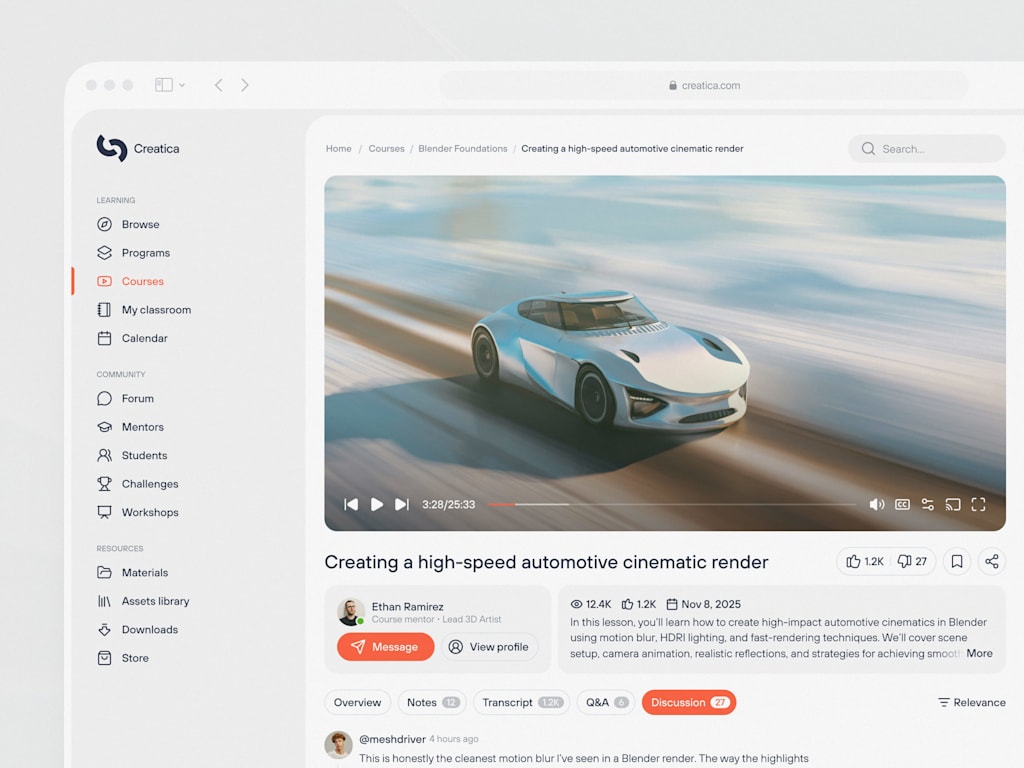
Digital education has evolved from a fleeting trend into the standard operating procedure. The era when remote training was viewed merely as a pandemic-era stopgap is firmly in the past. Today, the necessity for robust online learning infrastructure is surging, driven by everyone from large universities adopting hybrid curricula to enterprises urgently upskilling their workforce.
This raises a critical question for technical leaders and founders: Why invest in building a bespoke Learning Management System (LMS) rather than subscribing to established platforms like Canvas or Moodle? While off-the-shelf solutions offer immediate convenience, they are designed for the lowest common denominator, often failing to address specific organizational needs. Over time, the inefficiencies and rigidities of generic software can become significant financial liabilities.
Developing a custom, scalable edtech SaaS solution provides ownership of data, enhanced security control, and the ability to engineer features that directly address unique business challenges. It is arguably counterproductive to pay for a rigid tool that forces your organization to adapt its workflows to the software’s limitations.
This guide aims to dissect the mechanics of custom LMS development. We will distinguish between essential architectural components and superfluous features that add unnecessary complexity. We will also outline the development lifecycle and address the significant hurdles associated with scaling and customization. The objective is to provide actionable insights to help you make informed decisions, whether you are managing a development team or coding the platform yourself.
Defining the Learning Management System (LMS)
Stripped of industry jargon, an LMS serves as the operational core of digital education. It is a software ecosystem designed to create, distribute, administer, and monitor educational content. Functioning as a central hub, it allows instructors to upload resources, learners to access them, and administrators to track engagement and completion.
While the underlying technology is similar, the application varies significantly across sectors:
- Corporate Training: Here, the LMS acts as the foundation for employee onboarding and compliance. It is used to teach safety protocols, regulatory standards, and sales methodologies.
- Higher Education: In academic settings, the LMS functions as a virtual campus. It facilitates syllabus distribution, assignment submissions, and grade management, serving as the primary interface between faculty and students.
- Commercial EdTech: For online course creators, the LMS combines classroom functionality with e-commerce capabilities. It hosts video content, manages access via paywalls, and issues certifications, focusing heavily on user retention and monetization.
Categories of LMS Platforms
Because requirements differ vastly, a one-size-fits-all approach rarely succeeds. Attempt to use a corporate training tool for university purposes, or vice versa, and the result is often functional failure.
1. Corporate LMS
These systems prioritize efficiency, compliance, and verification. The primary objective is to ensure employees acquire necessary skills rapidly and to document this progress. Key features include structured onboarding paths, mandatory certification tracking, and seamless integration with Human Resources Information Systems (HRIS) such as Workday. The focus is on accountability; for instance, managers must be alerted if a staff member fails to complete required training by a deadline.
2. Academic LMS
Universities and schools require platforms capable of handling complex grading structures, semester-based timelines, and high-volume traffic spikes during examination periods. Collaboration is central, necessitating features like discussion forums, peer review mechanisms, and group workspaces. Furthermore, strict privacy regulations apply due to the handling of sensitive student data. System reliability is paramount, as any downtime during critical periods can cause immediate operational crises.
3. Commercial LMS
For businesses selling educational content, the LMS is a revenue-generating engine. Success depends on integrated marketing tools, including landing pages, promotional codes, upsell opportunities, and secure payment processing via gateways like Stripe. The user experience is critical; friction in video playback or checkout processes directly impacts customer retention and refund rates.
Essential Architectural Components
Regardless of the specific use case, every robust LMS relies on several foundational pillars. When building from scratch, these elements are non-negotiable.
Content Management System (CMS)
This module stores and organizes all learning materials, including videos, documents, quizzes, and SCORM packages. The system must be versatile enough to handle various file formats efficiently. Performance issues, such as latency with high-resolution video, must be anticipated and mitigated during development.
User Management and Access Control
Securely defining user roles—such as student, instructor, or administrator—is crucial. Proper permission settings prevent unauthorized actions, such as accidental deletion of course materials by lower-level users. Identity management ensures that each participant interacts with the platform according to their designated privileges.
Course Delivery Engine
This component dictates how content is presented to learners. It manages the logical flow of education, such as unlocking subsequent modules only after previous ones are completed, scheduling content release over time, or allowing unrestricted access. This logic ensures the learning journey is structured and intentional.
Progress Tracking
Accurate monitoring of learner activity is vital. The system must record metrics such as time spent on pages, content viewed, and assessment scores. Without precise tracking, administrators cannot verify completion or engagement, leaving them unable to assess whether learners have genuinely absorbed the material or simply clicked through it.
Analytics and Reporting Dashboards
Data visualization tools transform raw metrics into actionable insights. Administrators need to monitor completion rates, identify drop-off points, and evaluate return on investment. For example, if a significant portion of users fails a specific quiz, the dashboard highlights this as a potential issue with the content quality or clarity. Such visibility is essential for continuous improvement.
Integrating these components seamlessly is the primary engineering challenge. While the concepts may appear simple in theory, ensuring they interact smoothly at scale requires careful architectural planning and rigorous testing.

Essential Attributes of a Contemporary LMS
If your learning platform feels outdated, user adoption will suffer. Learners will either seek unofficial alternatives or simply disengage. The goal is to create an environment that facilitates rather than hinders education. A modern LMS distinguishes itself from legacy systems through several critical functionalities that prioritize user experience and operational efficiency.
Intuitive Course Administration
Content management is the backbone of any LMS. Historically, uploading materials was a cumbersome, error-prone process akin to bureaucratic paperwork. Modern systems, however, demand fluidity. Instructors should be able to create, upload, and structure modules effortlessly, typically via drag-and-drop interfaces. This ease of use is no longer optional; it is expected.
A robust platform must handle diverse media types without performance issues. Common failures in older systems include crashes during large video uploads or formatting errors with standard documents. A contemporary LMS automatically transcodes videos for optimal streaming, renders documents directly within the browser, and allows for the seamless integration of mixed media within single lessons. If educators spend more time troubleshooting upload errors than preparing content, the platform is failing its primary purpose.
Granular User and Role Control
Defining access permissions is critical for both security and usability. Effective role management goes beyond basic user categories, offering nuanced control over what different personas can see and do.
- Learners require a streamlined interface focused on upcoming tasks and current progress.
- Instructors need tools for grading, providing feedback, and adjusting course materials dynamically.
- Administrators require comprehensive oversight to manage users, configure system settings, and generate reports.
The complexity lies in handling edge cases. For example, a teaching assistant may need grading privileges without the ability to delete courses, while a corporate manager might need visibility into team progress without editing rights. If the system cannot accommodate these specific permission structures without extensive custom coding, it will hinder organizational scalability.
Data-Driven Progress Tracking and Analytics
Without detailed analytics, educational outcomes are merely speculative. Modern tracking systems convert raw user activity into actionable intelligence. It is insufficient to know only that a user has logged in; administrators must understand how they are engaging with the material.
Real-time analytics can reveal whether a learner is progressing smoothly or struggling with specific content. For instance, repeated views of a particular video segment may indicate confusion. For product managers and technical leaders, this data is invaluable for identifying content weaknesses. If a significant number of users abandon a course at a specific module, it signals a need for curriculum revision. Similarly, high failure rates on a specific quiz question may indicate ambiguity in the question itself rather than a lack of student knowledge. Immediate visibility into such metrics allows for rapid improvements, far superior to waiting for end-of-term feedback.
Automated Assessment and Certification
Validation of learning is essential, whether for regulatory compliance or academic achievement. Manual grading is inefficient and unsustainable at scale. Therefore, automated assessment tools are indispensable.
Instant feedback mechanisms keep learners engaged by providing immediate scores and corrections upon quiz completion. Furthermore, upon successful course completion, the system should automatically generate and issue digital certificates or badges. This digital credential often serves as the primary tangible reward for the learner. Any friction in this process, such as requiring manual administrative intervention to release a certificate, disrupts the learning momentum and diminishes user satisfaction.
Omnichannel Accessibility and Offline Capability
Learning rarely occurs exclusively at a desktop computer. Users engage with content during commutes, between meetings, or in casual settings. Consequently, multi-platform accessibility is mandatory. While a responsive web design is fundamental, dedicated mobile applications significantly enhance engagement.
Crucially, modern LMS development must include offline functionality. Users often find themselves in environments with limited connectivity, such as airplanes or remote locations. If the platform fails to load under these conditions, frustration mounts. Allowing users to download content for offline consumption, with automatic synchronization of progress once connectivity is restored, resolves this issue. Although this requires additional engineering effort, the resulting improvement in user experience and completion rates is substantial.

The Roadmap for Custom LMS Development
Creating a Learning Management System from the ground up is a complex undertaking. Without a clear strategic plan, development teams often find themselves overwhelmed by technical debt and misaligned features. Rushing into coding without a defined roadmap is a common pitfall that leads to inefficient outcomes. A structured, methodical approach is essential for building a robust educational platform.
Phase 1: Strategic Definition and Requirements Analysis
Before initiating development, it is crucial to define the specific purpose and target audience of the platform. The requirements vary significantly depending on the sector:
- Corporate LMS: Focuses on compliance tracking, HR system integration, and strict access controls.
- Academic LMS: Prioritizes semester-based structures, complex grading schemas, and collaborative tools.
- Commercial SaaS: Centers on monetization, marketing automation, and user acquisition features.
Identifying the primary user persona—whether a busy professional or a full-time student—is vital. Attempting to satisfy all potential use cases simultaneously often results in "feature bloat," where the platform becomes cluttered with unnecessary functions. Instead, define a clear niche and prioritize features that serve that specific audience.
Phase 2: User Experience (UX) and Interface Design (UI)
The usability of the platform directly impacts learner retention. A confusing interface leads to high dropout rates. Therefore, UX/UI design must focus on minimizing friction and enhancing clarity.
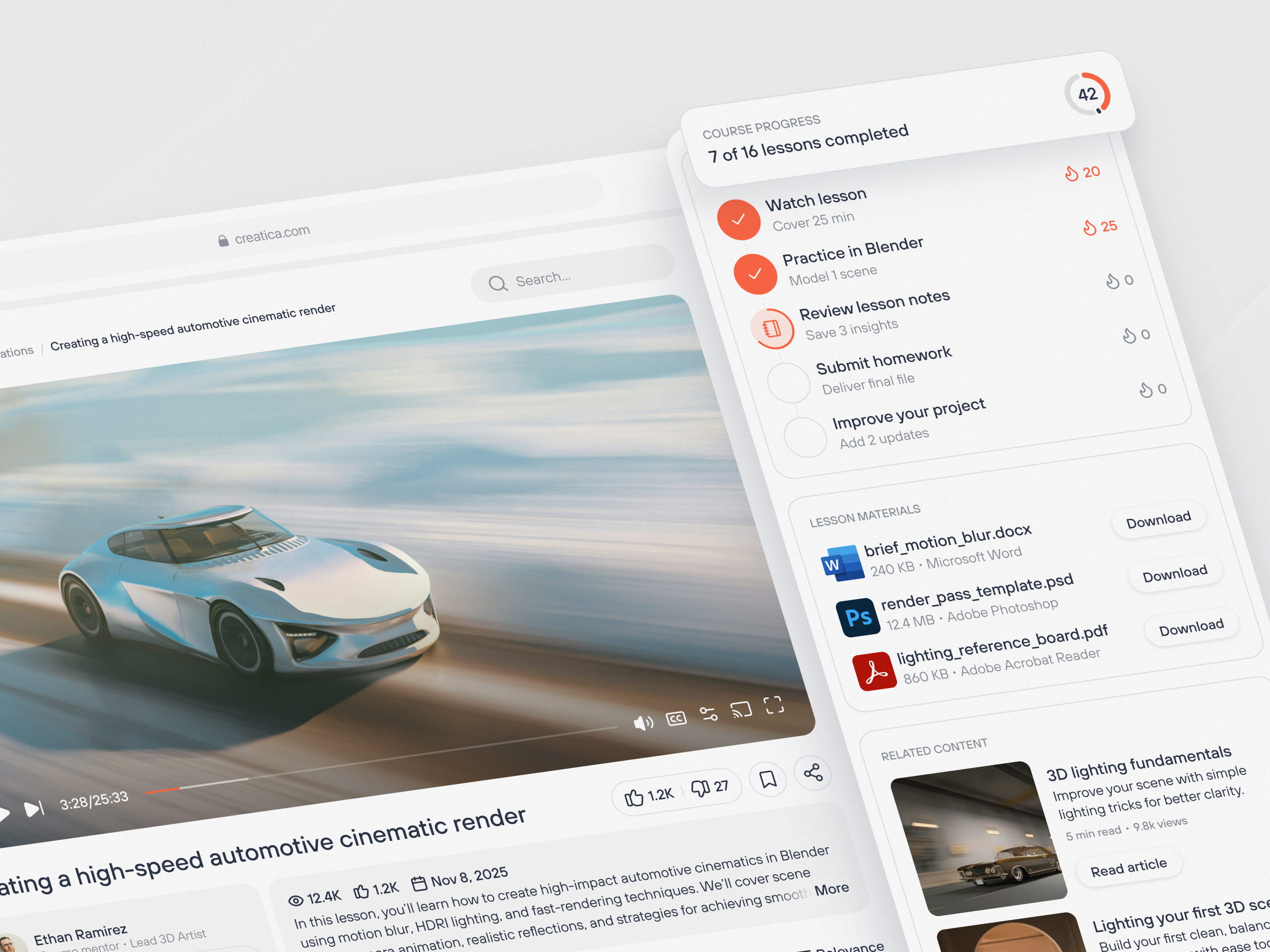
- Learner Interface: Should be intuitive and directive, clearly highlighting next steps and current progress without requiring extensive navigation.
- Instructor Interface: Must provide powerful administrative capabilities without overwhelming complexity. Instructors need immediate visibility into student performance and engagement metrics.
Incorporating visual cues, such as progress indicators and gamification elements, can significantly boost motivation and keep users engaged throughout their learning journey.
Phase 3: Technology Stack Selection
Choosing the appropriate technology stack is a critical decision that affects long maintainability and scalability. While there is no universal solution, certain technologies are well-suited for LMS development:
- Backend: Node.js is effective for real-time interactions, while Python (with frameworks like FastAPI) is ideal for data-intensive tasks and AI integration. Ruby on Rails remains a viable option for rapid prototyping.
- Frontend: React and Vue.js are industry standards for building responsive, interactive single-page applications that enhance the user experience by eliminating page reloads.
- Database: PostgreSQL is recommended for structured data such as user profiles and grades. MongoDB may be preferable for handling unstructured content or flexible schema requirements.
- Infrastructure: Containerization using Docker and orchestration via Kubernetes are standard practices for ensuring scalability and consistent deployment environments.
Phase 4: System Architecture Design
The architectural foundation determines the platform’s ability to scale. For SaaS models, a multi-tenant architecture is typically required to serve multiple clients from a single instance while maintaining strict data isolation. Security is paramount in this setup to prevent data leaks.
To support enterprise-level traffic, the backend should be designed for high concurrency. This involves implementing stateless services, utilizing caching layers (e.g., Redis), and potentially adopting a microservices architecture. While monolithic structures may suffice initially, they often struggle under heavy load. Planning for scalability from the outset ensures the system can grow without requiring a complete rebuild.
Phase 5: Content Delivery and Third-Party Integrations
An LMS must integrate seamlessly with external services to function effectively.
- Video Hosting: Avoid hosting large video files on application servers. Instead, utilize dedicated Content Delivery Networks (CDNs) and streaming services like AWS CloudFront, Vimeo, or Mux to ensure smooth playback and reduce bandwidth costs.
- Integrations: The platform should connect with essential third-party tools, including video conferencing software (e.g., Zoom), payment gateways (e.g., Stripe, PayPal), and analytics platforms (e.g., Google Analytics).
Robust API management and webhook implementation are necessary to ensure these integrations function reliably. Failure in payment processing or automated link generation can lead to significant revenue loss and increased support burdens.
Phase 6: Quality Assurance and Testing
Thorough testing is non-negotiable. Performance testing should simulate high-traffic scenarios to identify bottlenecks in database queries or media streaming.
Equally important is usability testing. Observing real users interacting with the platform reveals friction points that developers may overlook. For example, unclear button states or confusing navigation paths can hinder task completion. Addressing these issues before launch prevents negative user experiences and reduces post-launch support demands.
Phase 7: Deployment and Continuous Scaling
Launch is not the end of the development process but the beginning of an iterative cycle. Deployment should be automated using CI/CD pipelines to ensure reliable and downtime-free updates.
Post-launch, continuous monitoring of key performance indicators (KPIs) such as response times, error rates, and server load is essential. Auto-scaling mechanisms, managed through orchestration tools like Kubernetes, allow the infrastructure to adapt to fluctuating demand. Real-world user data provides valuable insights for ongoing improvements, enabling the platform to evolve based on actual usage patterns rather than theoretical assumptions.

Navigating Key Hurdles in LMS Development
Building a Learning Management System involves overcoming several significant technical and operational challenges. Addressing these issues proactively is essential for creating a stable, engaging, and scalable platform.
1. Managing Scale and Concurrency
Initial launch metrics can be deceptive. A platform may perform flawlessly with a few hundred users, only to collapse under the weight of sudden spikes—such as a corporate onboarding wave of thousands of employees or university finals week traffic.
Scaling is not merely a matter of adding server capacity. If the underlying architecture is inefficient, horizontal scaling will yield diminishing returns. Poorly optimized database queries and a lack of caching mechanisms (e.g., Redis) create bottlenecks that hardware cannot resolve.
To handle high concurrency effectively, developers must prioritize architectural efficiency from the outset. Key strategies include:
- Database Sharding: Distributing data across multiple databases to reduce load.
- Asynchronous Processing: Using message queues for resource-intensive tasks to prevent blocking main processes.
- Optimized I/O Patterns: Refining read/write operations to ensure smooth data flow.
2. Sustaining User Engagement and Retention
Technological robustness does not guarantee user adoption. Mandatory training is often viewed as a burden, and even voluntary learners face competing priorities. Consequently, retaining users is frequently more challenging than acquiring them.
Engagement is both a psychological and design challenge. The platform must make progress feel meaningful. While gamification elements like badges and leaderboards can help, they must be integrated naturally rather than feeling forced. If the interface is unintuitive or the experience feels impersonal, users will disengage.
Continuous monitoring of drop-off rates is critical. Identifying where users abandon courses allows teams to refine content and navigation, turning retention into an ongoing optimization process rather than a one-time setup.
3. Optimizing Content Delivery Performance
Latency is the enemy of learning. Buffering videos or slow-loading resources cause immediate frustration and disrupt the educational flow. This applies not only to video content but also to large documents, interactive simulations, and SCORM packages.
A common architectural error is hosting media files directly on application servers. This approach consumes valuable processing power and bandwidth, degrading overall performance. Instead, developers should:
- Utilize CDNs: Deploy Content Delivery Networks to serve static assets from locations geographically closer to users, reducing latency.
- Implement Adaptive Bitrate Streaming: Adjust video quality in real-time based on the user’s connection speed, ensuring uninterrupted playback even on slower networks.
4. Balancing Customization with Standardization
Different sectors have vastly different requirements. A generic "one-size-fits-all" approach rarely succeeds because the needs of a healthcare provider, a university, and a corporate enterprise are fundamentally distinct.
- Corporate: Requires strict compliance tracking, HRIS integration, and rigid role hierarchies.
- Academic: Needs complex grading algorithms, semester management, and tools for academic integrity.
- Commercial: Focuses on marketing funnels, coupon systems, and affiliate tracking.
Attempting to hardcode all these features into a single monolithic codebase leads to bloated, unmaintainable software. The solution lies in modular architecture. By building a robust core platform and extending functionality through plugins or modules, developers can cater to specific industry needs without compromising system stability.
However, customization requests can spiral out of control. To manage this, teams should establish clear boundaries between configurable settings and custom development. Alternatively, integrating AI-driven personalization can offer tailored experiences—such as personalized course recommendations or adaptive learning paths—without requiring extensive custom coding for each client. This approach allows development teams to focus on enhancing the core product rather than maintaining fragmented, client-specific forks.
The Strategic Advantage of Partnering with an LMS Development Agency
Choosing between assembling an in-house engineering team and partnering with a specialized LMS development firm is a pivotal decision. While building internally offers a sense of direct control, it often comes with significant hidden costs: prolonged recruitment cycles, onboarding delays, and the steep learning curve associated with mastering educational technology architecture. By the time an internal team is fully operational, competitors leveraging established expertise may already have captured market share.
Engaging a seasoned development partner offers several distinct advantages, particularly for organizations prioritizing speed-to-market and technical excellence.
Accelerated Time-to-Market
In software development, velocity is critical. An experienced agency brings pre-existing knowledge and reusable components to the table. Rather than spending weeks researching best practices for video streaming protocols or role-based access control, a specialized team leverages proven solutions. This eliminates the "reinvention of the wheel," allowing your project to move from concept to launch significantly faster than an inexperienced internal team could achieve.
Robust, Scalable Architecture
Designing for fifty users is fundamentally different from designing for fifty thousand. Many startups fail because they build for their current size rather than their potential growth. A specialized LMS developer understands the complexities of high-concurrency environments. They implement industry-standard scalability measures—such as load balancing, database sharding, and efficient caching strategies—from day one. Retrofitting these features into a poorly architected system is not only technically difficult but also exponentially more expensive. Partnering with experts ensures your infrastructure is resilient against traffic spikes from the outset.
Tailored Feature Implementation
Off-the-shelf SaaS products often force businesses to adapt their workflows to the software’s limitations. In contrast, custom development allows the software to adapt to your business model. Whether you require complex certification logic for regulatory compliance, unique gamification mechanics, or specific integrations with internal systems, a custom development partner can engineer these features precisely to your specifications. This flexibility ensures that the platform serves your strategic goals rather than constraining them.
Specialized UX/UI Design
Technical functionality alone does not guarantee user adoption. Learning platforms require intuitive interfaces that minimize cognitive load. Specialized agencies employ UX/UI designers who understand the psychology of online learning. They optimize navigation flows, such as reducing the number of clicks required to submit assignments or strategically placing call-to-action buttons to boost course completion rates. These subtle design choices significantly impact user retention and satisfaction, distinguishing a functional tool from an engaging learning environment.
Conclusion: Building a Lasting Educational Platform
We have traversed the entire lifecycle of LMS creation, from the initial conceptualization and architectural planning to the complexities of development and the pivotal launch phase. The ultimate goal is not merely to deploy software but to cultivate an environment that fosters genuine learning and user satisfaction.
To summarize the key takeaways:
- Purpose-Driven Strategy: Success begins with identifying and solving a specific problem for your target audience.
- Resilient Architecture: The technical foundation must be robust enough to withstand growth and pressure without compromising performance.
- Focused Development: Feature implementation should prioritize utility and simplicity, avoiding unnecessary complexity.
- Launch as a Beginning: Going live is not the finish line; it marks the start of continuous iteration and improvement.
While many factors contribute to success, three pillars are non-negotiable for high-performing platforms:
- Usability: The interface must be intuitive. If users struggle to navigate the system, they will disengage. Simplicity and clarity are paramount.
- Scalability: The infrastructure must be designed for future growth. While immediate capacity may be modest, the architecture should support significant expansion without requiring a complete rebuild.
- Engagement: Technology is merely the enabler; the core objective is effective learning. Features should be designed to motivate users and enhance the educational experience.
Developing a custom LMS is a significant undertaking that demands strategic vision, resource allocation, and technical expertise. However, the returns are substantial. A bespoke platform offers the flexibility to align perfectly with your business model, scales seamlessly with your organization, and delivers tangible value by addressing unique user needs.
Rather than compromising with generic solutions that force you to adapt your workflows, consider building a platform that reflects your distinct approach to education. With the right strategy and expert partnership, the challenges of custom development can be managed effectively, resulting in a durable, impactful learning ecosystem.
About the Creator
Shakuro
We are a web and mobile design and development agency. Making websites and apps, creating brand identities, and launching startups.
Enjoyed the story? Support the Creator.
Subscribe for free to receive all their stories in your feed.
Comments
There are no comments for this story
Be the first to respond and start the conversation.