
I Installed DeepSeek Harness v0.2 So You Don’t Have To
It is a 1GB desktop agent built for Word, Excel, and PPT. It blocks non-mainland IPs, skips Linux, and still feels like a preview. Here is what works, what breaks, and who should wait.
1. A Signal: Harness Moves Toward Ordinary Users
DeepSeek Harness v0.2 preview is out. It ships macOS and Windows desktop installers. Go to deepseek.com/harness, download, install, and follow the setup.
On its own, that sounds like a routine update. Inside Harness’s version history, it marks a shift: the project is moving from a developer-oriented Agent framework toward a desktop tool ordinary people can open with a double-click.
The official note is restrained: “DeepSeek Harness is still in its early stages, and its features and experience still need careful refinement. As a newcomer in the AI product field, we sincerely thank every user for their patience, trust, and companionship, and we will respond to this support with continuous improvement.”
No “milestone” or “revolutionary.” It says it is new and unfinished. For an open-source project, that restraint is easier to trust than a promise.
v0.2 is not the end. Preview, out-of-the-box, public testing, official release: that is the path. The desktop build is step one.
2. What Harness Is
Harness is not a chat client or another wrapper assistant. It is an open-source agent development and runtime framework. Its core rule: everything is a plugin. Think of it as an operating system for AI apps. Models, tools, interfaces, and workflows snap together like blocks.
That design gives developers room to build. It also raises the barrier. Before v0.2, using Harness meant configuring Node.js, starting a web interface from the command line, and installing plugins by hand. For non-developers, that was a wall.
v0.2 removes that wall. An Electron shell packages the web app as a macOS and Windows desktop program. You do not need the command line or an environment setup. Download, install, log in, use.
The shell is not empty. The README says it includes independent Python, Node.js, and pnpm packages. Python carries numpy, pandas, python-docx, python-pptx, openpyxl, Pillow, lxml, XlsxWriter, and their dependencies. Office tasks use those libraries by default. If you or a workspace instruction points elsewhere, it follows that.
So Harness desktop packages both the interface and the runtime. You do not need to know where Python lives, which Node version is installed, or how pnpm works. Open it and work. It is a “QQ Browser bundling an Unreal Engine” approach. Clunky on paper, friendly for ordinary users.
3. Hands-On: Out-of-the-Box, With Rough Edges
First impression: direction right, finish rough.
Installation: Create an Empty Folder First
The install is simple until you choose D drive. It asks for an empty folder. Create one named deepseek, then install.
Not fatal, but not out-of-the-box. A normal user who sees an error may quit. The docs should mention this, or the next build should fix it.
Size: 1 GB, 1,144 Folders, 9,772 Files
The app is about 1 GB, with 1,144 folders and 9,772 files. It packs Electron, Python, Node.js, pnpm, and office libraries.
That sounds large until you compare it with 3D games or professional software that take several GB. For a runtime that needs no setup, 1 GB is fine. For enterprise deployment, a self-contained environment cuts maintenance. No more “it runs on my machine but not yours.”
Network and Platform: Mainland IPs Work, Others Stall
The IP rules are strict. With a mainland China IP, downloads and logins work. With a non-mainland IP, they stall.
The website adds another oddity: on a non-mainland IP, you see particle effects but no download link. Switch to a mainland IP, and the WeChat download link appears.
The website should be the product’s front door. Harness’s site behaves like a personal blog. The visual effects hide the main job: finding docs, downloads, and examples. The faint white tiger shark is fine. The particles are not. For a developer tool, the site should load, show the download, and get out of the way.
Platform support leans hard toward macOS and Windows. The README says:
macOS arm64 requires Apple Silicon;
macOS x64 runs on Intel macOS or Apple Silicon with Rosetta;
Windows x64 requires Windows x64;
Linux is not a supported Desktop release target.
This build caters to macOS and Windows, down to macOS icon details. Linux gets nothing. That fits the office audience: Mac and Windows are the main field. Linux users are often developers, and the web or command-line versions can serve them. Still, “Linux is not a supported Desktop release target” tells Linux users they are on their own. If Harness wants more developers, Linux support will come up again.
Login: CAPTCHA and WeChat QR Code
Login resembles Codex. It supports browser account login. Some users cannot pass the CAPTCHA. They switch to the intranet and use a WeChat QR code. If the bound phone number has no password, browser login is blocked.
For a desktop product aimed at the public, login should be smooth. It should not trap users between verification codes and passwords.
Features: Office Work, Not Code
The desktop build leans toward Office tasks, not Code. You can hand it Word, Excel, PDF, and other files. It organizes material, analyzes data, builds charts, and can make a PPT. Processed files stay in the workspace, with preview and code diff views.
The “Automated Tasks” plugin runs repeat work in the background. Example: every Friday, read the week’s new files in a project folder, compile a weekly report, save it where you want. For office work, that beats writing code.
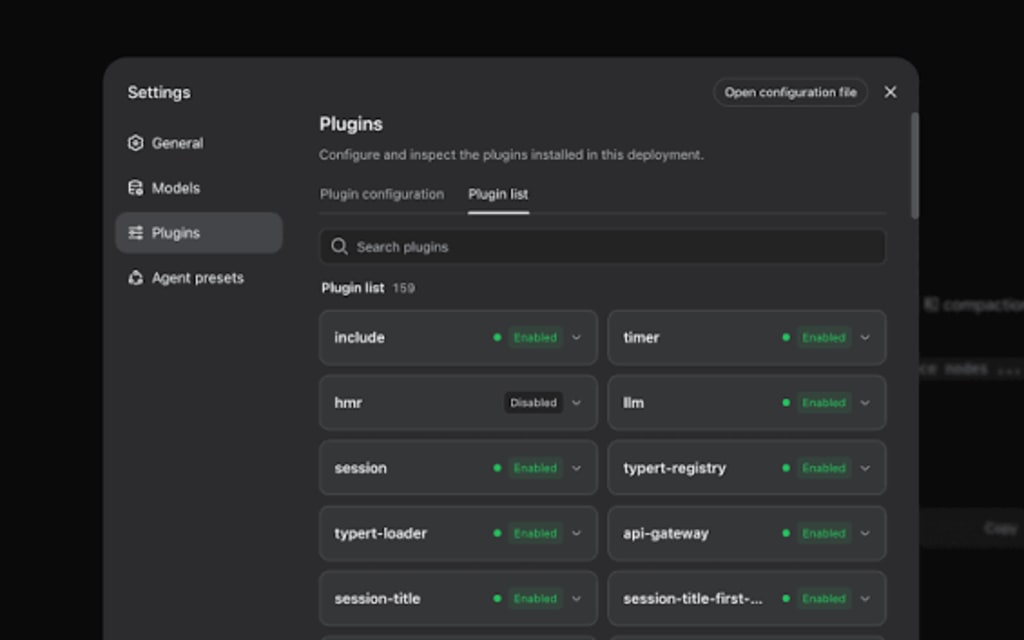
The plugin manager is another highlight. Installing a plugin no longer needs the command line. Enter the package name. You can disable, uninstall, or check the source. That fits the “everything is a plugin” idea and makes extension easier for normal users.
4. Strengths: Why It Is Worth Watching
Lower Barrier
Harness used to be a developer’s toy. Now it can be a normal person’s tool. No environment setup, no command line. That matters for Agent adoption.
AI agents will not enter daily office work through APIs and scripts alone. They need an icon people can double-click. v0.1 required Node.js, a web interface, and manual plugin installs. v0.2 packages those steps. You download, install, log in. The experience gap is bigger than the feature gap.
Office Focus
The desktop build aims at Mac and Windows office users. It bundles Python office libraries, tunes Office tasks, and supports file preview and automation.
Most people do not need an Agent that writes code. They need one that handles documents, spreadsheets, and slides. Harness serves the second group. That is a practical choice.
Plugin Architecture
“Everything is a plugin” is the center of Harness. The new plugin manager makes that visible. Users install what they need and build their own setup. If DeepSeek builds a plugin marketplace, Harness could become a platform, not just a tool.
Size and Self-Contained Runtime
A 1 GB installer with Python, Node.js, pnpm, and office libraries is a fair trade. It avoids the classic “works on my machine” problem. For enterprise and normal users, self-contained means less maintenance.
Performance and Open Source
Community reports put generation speed near 300 tok/s, with cache hit rates up to 99%. That helps in repetitive tasks and long contexts.
Harness is also open source, autonomous, and built from zero. That gives users a reason to trust it, especially when many AI products are closed and data privacy is a concern.
5. Controversies and Shortcomings
Website and IP Restrictions
The particle effects and hidden download links draw complaints. The IP restriction is worse. Mainland IPs work. Non-mainland IPs stall. That limits international growth. If Harness wants a global audience, the network strategy needs another look.
The site should be practical. Show the download, docs, and examples first. Keep the tiger shark if you like. Do not let it block the download.
No Linux
Linux is not a supported Desktop target. Developers lose a convenient option. The web version can fill some gaps, but not all. If DeepSeek wants more developers, Linux support will return to the table.
Stability and Bugs
Preview software has bugs. Users report locked sessions, Agent loops, and wrong runtime displays. These must be fixed before release.
For office users, stability beats feature count. A stuck Agent stops work. A locked session can lose data. Those problems damage trust.
Token Use and Documentation
Reviews split. Fans point to performance, cache hits, and plugin design. Critics point to token use, unclear docs, and a hard start for non-developers.
High token use raises cost. Unclear docs raise the learning curve. Both affect adoption. If every document task burns tokens, users may pick a cheaper tool.
Positioning: Office or Development?
The desktop build leans Office. Harness itself is a developer framework. That creates tension. Developers may find the desktop build too closed. Office users may find it too complex.
DeepSeek could release two builds: a simple office version and a full developer version. Or offer configuration modes inside one app.
6. Industry Coordinates: Agents Move to the Desktop
Harness v0.2 reflects a trend: AI agents are moving from chat windows to the desktop, from answering to doing.
Chatbots have limits. They cannot directly touch files, schedule tasks, or join a workflow. Agent frameworks solve that. They let AI call tools, read and write files, and run code.
Harness desktop packages agent power into an app normal people can use. Browsers brought the internet to the masses. Office brought computers to office workers. Harness is trying something similar for agents.
Competition is strong. Claude Desktop and Codex explore similar ground. Harness has open source, plugins, and DeepSeek model performance. It needs to catch up on user experience, ecosystem, and cross-platform support.
Claude Desktop supports MCP and connects tools and data. Codex keeps adding languages and frameworks. Harness needs a clear edge. Open source and plugins are its two cards. Play them well, and it can attract loyal developers and users.
7. Path Forward: Preview to Release
The official note says Harness will improve sandbox security, long-term memory, and mobile use. That gives a roadmap. Next comes public testing for developers, then official release. The work:
Stability. Fix session lockups and Agent loops. An unstable Agent loses trust.
Cross-platform. Add Linux and mobile. Linux users may not be office workers, but they build plugins.
Website and login. Make the site practical. Make login smooth. Stop the verification-code loop.
Ecosystem. Invest in a plugin marketplace, docs, and examples. A good marketplace turns a tool into a platform.
Positioning. Decide whether the desktop build is an office assistant or a development tool. Or serve both with modes.
Solve these, and Harness can become a serious DeepSeek move in the Agent race. It could be a platform, not just a product. Developers build agents. Ordinary users run them. AI joins daily work.
8. Conclusion: Worth Watching, Not Worth Canonizing
DeepSeek Harness v0.2 desktop is an important attempt. It pushes a powerful Agent framework toward office users with an out-of-the-box build.
Strengths: lower barrier, office focus, plugins, manageable size, strong performance, open source. Weaknesses: flashy site, IP limits, no Linux, stability bugs, token use, unclear docs.
That is normal for a preview. It is not perfect. It is not a gimmick. It is a product learning to walk.
Users can watch it. No need to canonize it. DeepSeek should keep improving. An Agent that starts from scratch, stays autonomous, and remains fully open source is the kind users can trust. Harness is moving that way. The road is long. The first step is done.
About the Creator
Jin
Writer of reamstories
https://reamstories.com/jin
Enjoyed the story? Support the Creator.
Subscribe for free to receive all their stories in your feed. You could also become a paid subscriber, letting them know you appreciate their work.
Comments
There are no comments for this story
Be the first to respond and start the conversation.