
How to Reset Deco Without the App – Simple Method
How to Reset Deco Without the App – Simple Method
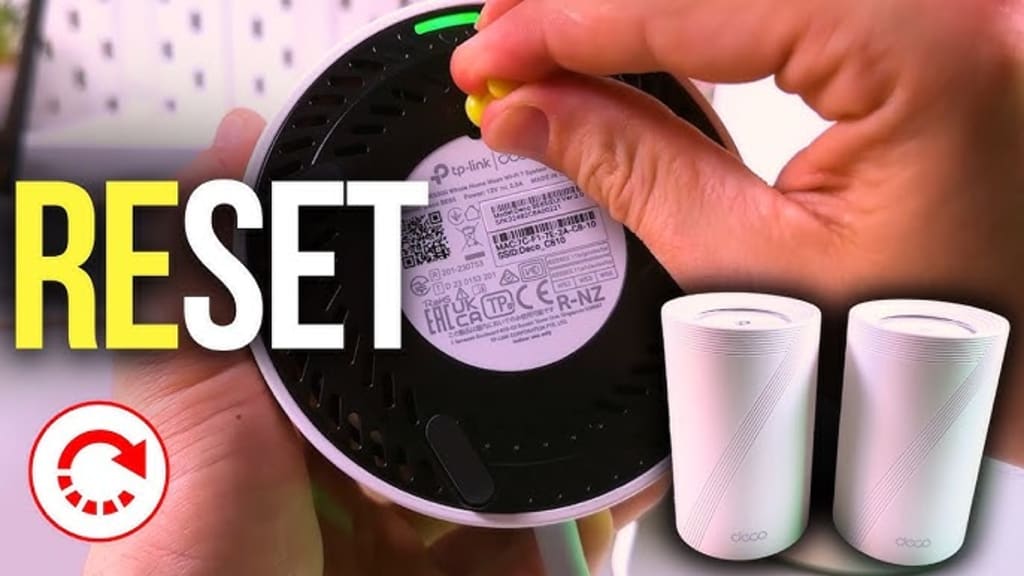
Sometimes the Deco app just isn’t an option. Maybe your phone’s dead, maybe the app’s glitching out, maybe you just don’t want to bother. Doesn’t matter. You can still reset your TP-Link Deco the old-fashioned way, no app needed. It’s stupid simple once you know where to look. It works, and you’ll have your Deco back to factory settings in a minute or two and then you need to re-do the TP-link deco Setup.
Resetting Deco without App
Locate the Reset Button
It’s tiny. Usually on the back or bottom of the unit. You might need a paperclip or something skinny to press it.
Power On
Make sure the Deco is plugged in and fully powered. LED should be on.
Press and Hold
Stick that paperclip in and hold the button down for… yeah, like 10–15 seconds. Watch the LED—most models will flash differently when it starts the reset. Some blink orange, some red. The lights are your only clue here.
Wait for Reboot
Release the button. The Deco will reboot. LED will turn solid or go back to flashing blue depending on the model. That means it’s back to factory settings.
Reconnect
Now it’s like you just pulled it out of the box. Wi-Fi name resets, password resets, all gone. You can set it up again via the app or just leave it blank until you’re ready.
Resetting Deco with App
Open the Deco app
Don’t overthink it. Just launch it on your phone. Make sure you’re logged in and on the same Wi-Fi as the Deco you want to reset.
Pick your Deco
The app shows all your Deco units. Tap the one that’s acting up. Yeah, the little one that keeps dropping your connection or blinking weird.
Go to Settings
Usually a gear icon in the corner. Tap it. Scroll if you have to.
Find “More” or “Advanced”
TP-Link hides the good stuff. Sometimes it’s under “Advanced Settings” or just “More.” Keep your eyes peeled.
Hit “Reset”
There’s usually a “Reset Deco” button somewhere down there. Tap it. Don’t freak out, it’s just software-level reset.
Confirm
App will ask, “Are you sure?” Yup. You are. Hit confirm.
Wait
Deco will blink, do its thing, reboot. Could be 1–2 minutes. Don’t unplug it unless it’s frozen for 5+ minutes.
Reconnect
Once it’s back, open the app again. You’ll probably have to set it up like it’s brand new. Name it, add it to your network, etc.
Test it
Walk around, check signal, speed. Make sure it actually works now.
Other Troubleshooting Tips Than Reset
1. clear the background junk
Apps running in the background can mess everything up. Seriously, just swipe ’em away or go into your task manager and kill what’s not needed. Phones, PCs, whatever. You’d be surprised how much weird behavior disappears once you clean house.
2. Clear caches, temp files, whatever the hell is stored
Cache isn’t evil. But it can get corrupt and slow your device down or break things. Go into settings, storage, or whatever your OS calls it, and purge that junk. Feels like a small thing, but it helps.
3. Update, don’t ignore it
Yeah, updates are annoying. But a patch can fix weird bugs you didn’t even know existed. Firmware, drivers, apps, OS—check all of it. Make sure everything’s actually on the latest version.
4. Reboot in safe mode
Safe mode is your friend. It strips everything down to basics in case you are seeing the Deco red light. If your device works fine there, you’ve got a bad app, driver, or extension causing trouble. Track it down, uninstall, done.
5. Check your connections
Wi-Fi dropping? USB acting flaky? Power going out? Sometimes the “issue” isn’t the device at all. Swap cables, change ports, try a different network. Basic, yes. But it bites you more than you think.
6. Permissions & settings
Stuff gets blocked because some app doesn’t have access or some setting got toggled weird. Check app permissions, privacy settings, firewall rules. Tiny things cause massive headaches.
7. Logs and diagnostics
If you’re a bit nerdy, look at logs. Windows Event Viewer, macOS Console, Android logs, router logs. It’s ugly, messy, but reading a few error lines can point you straight to the culprit.
8. Temporary uninstall/reinstall
Don’t do a full reset. Just uninstall the app that’s acting weird, reinstall it. Boom. Works more than you think.
9. External help
Sometimes a quick search with your exact error message will save hours. Tech forums, Reddit, Stack Overflow—people have been through it.
End Words
You don’t need the app if you’re just trying to reset your Deco—just hold down the little reset button on the back until the light does its thing (usually yellow or blinking, depending on the model). Wait a minute or two, and it’s back to factory settings.
It feels way more complicated when you’re stuck staring at the app telling you to do it “their way,” but honestly, the hardware reset is faster. Old-school. Button in the back, paperclip, done.
About the Creator
Aaron Paker
Looking for mywifiext.net setup? We are here to assist you. It is a web address for Netgear wifi extender setup. We have team of specialized technicians who can assist you related to your query. mywifiext.net
Enjoyed the story? Support the Creator.
Subscribe for free to receive all their stories in your feed.
Comments
There are no comments for this story
Be the first to respond and start the conversation.