
How to Get all Windows Live Mail Email Backup to Outlook
Users can easily save all Windows Live Mail Email Backup to Outlook.

This blog discusses the best technique for backing up Windows Live Mail messages to the Outlook PST file format. It is one of the finest solutions currently available to export all Windows Live Mail emails directly into PST Outlook. This solution will assist you in resolving all issues associated with migrating WLM emails to Outlook 2021, 2019, 2016, 2013, 2010, 2007, and 2003. To learn more about this procedure, please read this blog until the end.
Reason for backing up your Windows Live Mail to Outlook
There are a number of factors why you may wish to transfer your emails from Windows Live Mail to Outlook, including:
- Transition to a new computer: When switching to a new computer, you will need to transfer all your essential data, including your email, to the new machine.
- Changing to a different email client: If you are upgrading from Windows Live Mail to Outlook, you will need to import your messages into the new email client.
- If you have multiple email accounts and wish to consolidate them into a single email client, you will need to transfer your Windows Live Mail correspondence to Outlook.
- Improved email management Outlook offers more advanced email management tools than Windows Live Mail, including the ability to categorize and filter emails, which can make managing your inbox simpler.
Windows Live Mail to PST Converter - Trustworthy Method
The Windows Live Mail to PST Converter software is a trustworthy method for transferring emails and files from WLM to Outlook PST format in 2023. It effortlessly saves all Windows Live Mail Backup emails in their original format to Outlook on another computer. In addition, no technical procedures are required to perform a Mailvita Windows Live Mail to PST migration. Windows Live Mail to Outlook application enables users to export single or multiple WLM emails into PST Outlook at once without losing the database. This software is compatible with all versions of Mac OS. This software is compatible with Windows OS editions such as 11, 10, 8.1, 8, 7, XP, and Vista, among others. This converter simplifies and improves the conversion process. If users have any doubts about this software, they can test its free demo version, which exports up to a few Windows Live Mail messages into Outlook. If they are satisfied with the free trial, they can purchase the licensed version.
How Do I Move All Windows Live Mail to the Outlook PST Format? Exhaustive Working Methodology
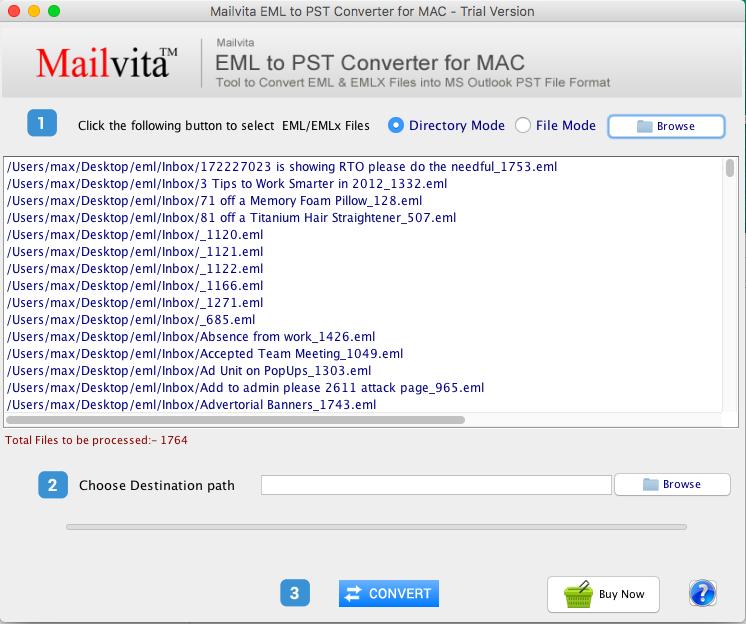
- Download the Windows Live Mail to PST Converter on your desktop and open it.
- Now, click the following button to get two options i.e. choosing “Directory Mode” or “File Mode” then click the "Browse" Button.
- After that, it will provide the Preview of the Windows Live Mail data files.
- Select the destination path then click on the Browse Button.
- In the Final process, Click the Convent Button and start the conversion.
Features highlighted by the Migrate Windows Live Mail to PST.
- Capable of exporting unlimited WLM files with attachments into Outlook.
- Provides advanced filters such as to, from, subject, date, and time, folder exclusion, etc.
- Preserves all email properties, including hyperlinks, attachments, formatting, images, the primary message body, HTML content, etc., as well as the folder architecture.
- Provided a preview of the data prior to its conversion.
- Installation of Outlook is not required for the process.
- There are no file size restrictions, and any file size can be converted to Outlook.
- Used by both professional and non-professional users without issue.
- Compatible with all versions of Mac OS.
- Compatible with all versions of Microsoft Outlook, including 2021, 2019, 2016, 2013, 2010, 2003, etc.
- Supports all Windows operating system versions, including Windows 11, Windows 10, Windows 8.1, Windows 8.0, Windows 7, Windows Vista, and Windows XP, etc.
Conclusion
The Export Windows Live Mail to PST is one of the most reliable and remarkable pieces of software available, delivering 100% accurate conversion results without sacrificing a single bit of data. With this software, anyone can effortlessly learn how to save Windows Live Mail backups of all emails and attachments to Outlook. You can also utilize its complimentary version to export the first few WLM files into PST at no cost.
About the Creator
Antonio Bill
Software development skills from a highly qualified technical specialist. capable of converting emails. powerful analytical skills, as well as a drive for creativity.
Enjoyed the story? Support the Creator.
Subscribe for free to receive all their stories in your feed.
Comments
There are no comments for this story
Be the first to respond and start the conversation.