
How to Convert 3D Models Online: A Step-by-Step Guide
3D models can be saved in many different file formats, and the format that works well for one application may not be suitable for another.


3D models can be saved in many different file formats, and the format that works well for one application may not be suitable for another. A model created in a 3D modeling program, for example, may need to be converted before it can be used for 3D printing, game development, augmented reality, or a web-based viewer.
Online 3D model converters provide a convenient way to change a file from one supported format to another without necessarily installing specialized software. However, conversion is more than simply changing a file extension. Different formats store different types of information, so it is important to understand what may be preserved, changed, or removed during the process.
Why Convert a 3D Model?
3D file formats are designed around different technical requirements. STL is commonly associated with 3D printing, while formats such as FBX are frequently used for animated 3D content. GLB and glTF are widely used for interactive web experiences, and USDZ is commonly associated with Apple's augmented-reality ecosystem.
A model may therefore need to be converted when moving between different applications or stages of a project. For example, an artist might create a model in one application, prepare it for a game engine in another, and later create a simplified version for a website.
Conversion can make this transition easier, but the target format should be selected according to the final purpose of the model.
How to Convert a 3D Model Online
The exact process varies between online converters, but most follow a similar workflow.
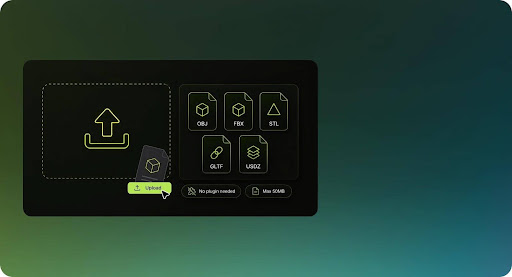
1. Upload the Source Model
Start by selecting the 3D model you want to convert. Common source formats include OBJ, STL, FBX, GLB, and glTF, although support varies between tools.
Before conversion, it is useful to confirm that the source file opens correctly in a 3D viewer. If the original model already contains missing textures, damaged geometry, or other problems, converting it may not resolve those issues.
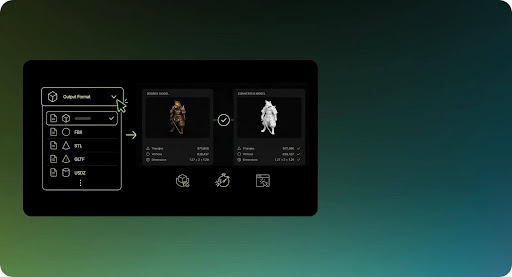
2. Select the Target Format
Choose the format required by the application, printer, game engine, or platform where the model will eventually be used.
The target format matters because different formats preserve different types of information. A conversion from OBJ to STL, for example, may retain the mesh geometry while discarding material and texture information. Similarly, converting an animated model to a format intended primarily for static geometry can result in the loss of animation data.
3. Convert and Download the Result
After selecting the output format, start the conversion. Processing time depends on factors such as polygon count, file size, textures, and whether the conversion requires additional processing.
Once the conversion is complete, download the resulting file and inspect it before using it in a production project.
For a browser-based workflow, use https://www.meshy.ai/3d-tools/file-converter. It follows a simple select-convert-download flow and requires no installation.
A quick preview can reveal problems with geometry, textures, orientation, or scale that may not be obvious from the file name or extension.
Choosing a Suitable 3D Format
There is no single 3D format that is best for every situation. The appropriate choice depends on how the model will be used.
3D Printing
STL remains one of the most widely supported formats for 3D printing because it represents a model as a triangular mesh and is compatible with many slicing applications. One limitation is that STL does not provide the same material and color capabilities available in more modern formats.
3MF was designed specifically to address some of these limitations. It can contain additional information such as materials, colors, and printing-related data, depending on the software being used.
OBJ can also be used for certain printing workflows, particularly when transferring static geometry, although its material and texture information may not be relevant to the printing process.
An important consideration when preparing a model for printing is scale. Some formats do not reliably communicate measurement units, so dimensions should always be checked in the target application before printing.
Games and Interactive 3D Applications
Game development often requires more than basic geometry. Models may contain UV coordinates, textures, materials, skeletons, and animations.
FBX has traditionally been widely used for transferring animated and rigged models between 3D applications and game-development tools. However, compatibility can vary depending on the software and the features used by the original model.
glTF and GLB are also important formats for real-time 3D applications. They are designed to efficiently represent geometry, materials, textures, and animations and are particularly useful for web-based 3D experiences.
OBJ remains useful when only static geometry is required, but it is not designed to carry skeletal animation.
Web and Augmented Reality
GLB is commonly used for displaying 3D models on websites because it can package geometry, materials, and textures into a single binary file.
For Apple-specific augmented-reality workflows, USDZ may be required or preferred. The appropriate format therefore depends on the devices and software used by the intended audience.
When a project targets several platforms, it may be necessary to maintain more than one version of the same model.
What Happens to Textures and Materials?
One of the most important aspects of 3D conversion is understanding that geometry and visual appearance are not necessarily treated the same way.
A model can contain geometry, UV coordinates, textures, material definitions, lighting information, and other data. The target format may support some of these elements but not others.
For example, converting a textured OBJ model to STL generally produces a geometry-only file. The shape remains, but the original textures and material information do not become part of the STL file.
Formats such as GLB can package textures and material information together, which can make them more convenient for applications that require the model's appearance to travel with its geometry.
If textures are important to the final result, always verify that the target format supports the required material system and that texture files are either embedded or correctly referenced.
Privacy Considerations for Online Conversion
Uploading a 3D model to an online service means that the file may be transferred to a remote server, depending on how the converter is designed.
This can be an important consideration for confidential designs, proprietary product models, or unreleased assets. Before uploading sensitive files, review the service's privacy policy and determine whether files are transferred, temporarily stored, or deleted after processing.
Some browser-based applications can perform certain operations locally using technologies such as WebAssembly. In these cases, the file may be processed directly on the user's device rather than uploaded to a remote server.
The important point is not to assume that every browser-based converter works the same way. Data-handling practices should be verified for the specific tool being used.
Common Conversion Problems
A successful conversion does not necessarily mean that every property of the original model has been preserved.
Missing textures are a common problem when moving between formats with different material systems. Checking UV coordinates, texture paths, and material compatibility can help identify the cause.
Geometry can also cause problems. Non-manifold surfaces, holes, duplicated faces, inverted normals, and self-intersecting geometry may produce unexpected results after conversion. Cleaning the original model before conversion can reduce the likelihood of these issues.
Scale and orientation are additional sources of confusion. Different programs can use different coordinate systems or interpret units differently. A model that appears correctly sized in one application may appear too large, too small, or rotated incorrectly in another.
For this reason, the converted model should always be opened in the target application and checked before it is used for printing, animation, publication, or further production work.
Understanding the Limitations of Conversion
File conversion primarily changes how existing data is represented. It does not necessarily recreate information that the target format cannot support.
Basic mesh geometry generally transfers relatively well between common formats, but advanced features can be more difficult. Materials may be simplified, textures may require adjustments, and animation data may not survive a conversion between incompatible formats.
Rigged characters are particularly sensitive because they can contain skeletons, skin weights, constraints, animation clips, and application-specific controls. A converter may preserve some of this information while discarding other elements.
Consequently, conversion should be treated as a compatibility step rather than a guarantee that two formats will contain identical information.
How to Get Better Conversion Results
Preparing the source model before conversion can make the process more reliable. Remove unnecessary geometry, check for damaged surfaces, verify normals, and make sure required textures are available.
It is also useful to determine the requirements of the destination application before choosing a format. A model intended for a 3D printer has different requirements from one intended for a browser-based viewer or an animated game character.
After conversion, inspect the model from several angles and verify its dimensions, geometry, materials, textures, and orientation. For animated assets, test the skeleton and animation playback as well.
Keeping the original source file is also important. If information is lost during conversion, returning to the original model provides an opportunity to export it again using different settings or another format.
Frequently Asked Questions
Is online 3D model conversion safe?
It depends on how the particular service processes uploaded files. For non-sensitive models, an online converter may be convenient. For confidential assets, check the service's data-handling practices and determine whether files are uploaded to a server or processed locally.
What is the most common format for 3D printing?
STL is one of the most widely supported formats for 3D printing. However, 3MF can be a better choice when additional information such as colors, materials, or print-related settings needs to be retained.
Can a GLB model be converted to STL?
Yes. A GLB file can generally be converted to STL when the conversion tool supports both formats. Because STL primarily represents mesh geometry, textures and materials from the GLB file will normally not be included in the resulting STL.
Does converting a 3D model reduce its quality?
Conversion does not automatically reduce geometric quality, but information can be lost when the target format does not support certain features. Textures, materials, animations, or other advanced data may be simplified or removed.
How can I check whether a converted model is correct?
Open the converted file in a compatible 3D viewer or the application where it will ultimately be used. Check the geometry, dimensions, orientation, textures, materials, and animation data where applicable.
Conclusion
Online 3D model conversion can simplify the process of moving assets between different applications and platforms. However, choosing the correct target format is just as important as completing the conversion itself.
Before converting a model, consider what information needs to be preserved and where the resulting file will be used. After conversion, inspect the output carefully for changes to geometry, materials, textures, scale, and animation.
With the right format and appropriate verification, conversion can provide a practical bridge between different parts of a 3D production workflow without requiring every application to support the same file type.
About the Creator
Enjoyed the story? Support the Creator.
Subscribe for free to receive all their stories in your feed.
Comments
There are no comments for this story
Be the first to respond and start the conversation.