
How to Automate License Audit 365 for Compliance & Cost Savings
Streamline Compliance & Cut Costs with Automated Microsoft 365 License Audits

In today’s digital landscape, organizations rely heavily on Microsoft 365 for collaboration, productivity, and communication. However, managing software licenses manually can be time-consuming, prone to errors, and expensive. Automating the license audit for Microsoft 365 ensures compliance, optimizes software usage, and reduces unnecessary costs. This blog explores how organizations can automate Microsoft 365 license audits effectively.
Why Automate License Audit 365?
1. Ensure Compliance & Avoid Penalties
Non-compliance with software licensing agreements can lead to hefty fines and legal risks. Automating the audit process ensures organizations remain compliant by accurately tracking and managing licenses.
2. Optimize Software Usage
Many companies overpay for unused or underutilized licenses. Automated license audits provide detailed insights into license usage, helping organizations reallocate or downgrade licenses where necessary.
3. Save Time & Reduce Human Errors
Manual audits require extensive effort and can lead to data discrepancies. Automation streamlines the process, reducing errors and saving valuable time for IT teams.
4. Improve Financial Planning
By identifying unnecessary expenses and optimizing license allocation, businesses can allocate IT budgets more efficiently and reduce software costs significantly.
Steps to Automate Microsoft 365 License Audit
Step 1: Use an IT Asset Management (ITAM) Tool
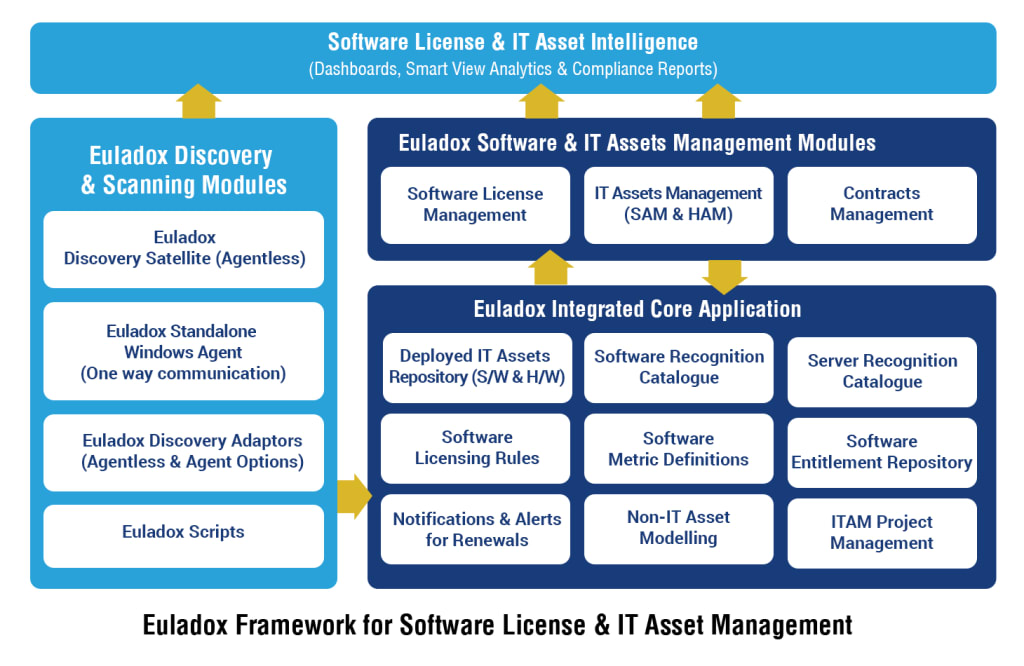
An IT Asset Management (ITAM) tool like Euladox ITAM provides a centralized system to track, manage, and audit Microsoft 365 licenses. ITAM tools automate data collection, ensuring real-time license tracking and compliance monitoring.
Step 2: Integrate with Microsoft 365 Admin Center
Microsoft 365 provides built-in reporting and API access that ITAM tools can leverage to pull license data automatically. Organizations should integrate ITAM solutions with the Microsoft 365 Admin Center to retrieve accurate license information.
Step 3: Implement Automated Reporting & Alerts
Automated reports and alerts help IT administrators monitor:
License allocations across users and departments
Unused or underutilized licenses
Compliance risks and expiration dates
License renewals and downgrades
With automated reporting, businesses can take proactive steps to reassign or remove licenses before renewal deadlines.
Step 4: Establish Role-Based Access Control (RBAC)
Implementing Role-Based Access Control (RBAC) ensures that only authorized personnel have access to license management data. This improves security and prevents unauthorized changes to license allocations.
Step 5: Schedule Regular Audits & Optimization Reviews
Setting up automated license audits at regular intervals ensures continuous compliance and cost control. Organizations can schedule quarterly or bi-annual audits to identify unused licenses, optimize usage, and prevent overspending.
Step 6: Automate Policy Enforcement & Workflows
Organizations can enforce licensing policies automatically by setting up workflows that:
Revoke licenses when employees leave the company
Reallocate unused licenses to new users
Notify IT teams about compliance risks
Automation ensures consistent policy enforcement and eliminates manual intervention.
Benefits of Automating Microsoft 365 License Audit
1. Enhanced Compliance & Audit Readiness
Automated audits help organizations maintain compliance with licensing agreements and be audit-ready at all times.
2. Cost Reduction & License Optimization
By identifying and eliminating unnecessary licenses, businesses can significantly reduce software expenses.
3. Improved Operational Efficiency
Automation reduces administrative burden and enables IT teams to focus on strategic initiatives rather than manual audits.
4. Real-Time Insights & Better Decision-Making
Automated dashboards and reports provide real-time data, allowing businesses to make informed decisions about license management.
Final
Automating Microsoft 365 license audits is crucial for ensuring compliance, reducing costs, and optimizing software investments. With the right ITAM tool like Euladox ITAM, businesses can streamline license management, avoid compliance risks, and enhance operational efficiency. Start automating your license audit today and take full control of your Microsoft 365 environment.
About the Creator
Enjoyed the story? Support the Creator.
Subscribe for free to receive all their stories in your feed.
Comments
There are no comments for this story
Be the first to respond and start the conversation.