
How Office 365 Backup Supports Compliance and eDiscovery?
Protect Microsoft 365 Data for Compliance and eDiscovery


Microsoft 365 is the driving force behind many organizations today, managing the workflow and making sure everything runs smoothly. Since sensitive data is shared and accessed through this platform daily, it’s necessary for admins to take certain measures to protect their data. Taking actions to protect data is crucial for instant recovery and for easy access in case of legal audits and regulatory compliance.
Backing up Office 365 data helps in complying with industry and eDiscovery standards. Admins can backup an organization’s data using Microsoft Purview for instant recovery and for compliance with audits and legal proceedings. In this blog, we’ll talk about the working of Office 365 backup compliance, the role of Microsoft Purview, and why backup is essential for every organization.
What Does Compliance and eDiscovery Exactly Mean in Microsoft 365?
Compliance today isn’t just limited to storing legacy data for an extended period of time. Companies need to make sure that their data is easily recoverable and intact on a regular basis.
What Does Compliance mean in Microsoft 365?
Microsoft offers built-in policies and controls to meet the national, regional, and industry specific standards. These compliance features help organizations and businesses to manage their data effectively and safeguard it against cyberattacks. All this is primarily managed via the Microsoft Purview portal and Microsoft Entra.
An Office 365 compliance backup helps organizations to:
Recover permanently deleted data.
Preserve important files and emails for extended time periods.
Support legal audits and investigations.
Reinforce governance policies and disaster recovery.
What is the role of eDiscovery in Microsoft 365 backup?
Microsoft 365 backup and eDiscovery work well together and still have differing purposes to protect Office 365 data. A Microsoft 365 backup supports eDiscovery by making sure that the archived data like emails, files, chats, channels, etc. are available even if they’re deleted or not covered by retention policies. This helps the compliance teams to easily recover data during legal investigations or audits.
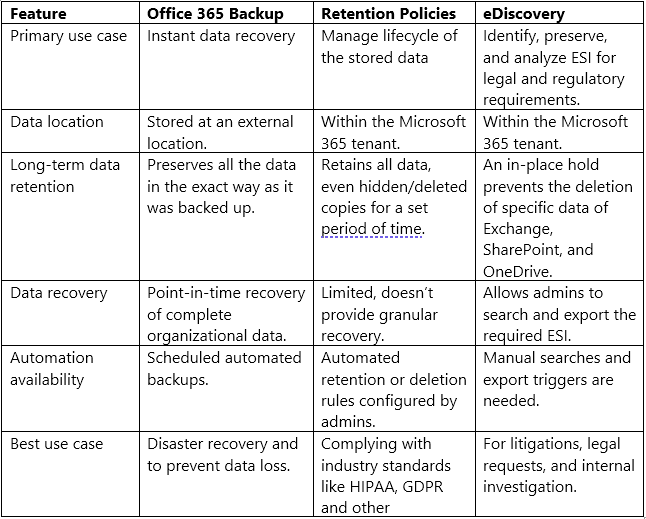
Office 365 backup vs Retention policies vs eDiscovery
It’s a common misunderstanding that these three things are same, but they work differently for data protection. Let’s know the core difference between these three and how they work together to safeguard Office 365 data.
How Office 365 Backup Supports Compliance?
By enforcing a set of compliance policies, organizations can control how their data is accessed, shared, and stored. This helps a lot in reducing cyberattacks, regulatory fines, and legal issues.
Based on the region and specific industry, many organizations are required to retain important business records, take measures to protect sensitive data, and show how they handle data during audits and legal investigations. A true Office 365 backup plan helps comply with each of these things.
Long-term Data Retention
Many organizations have policies that require them to store data for extended periods of time. Along with retention policies of Microsoft Purview, backup also creates multiple immutable copies of data for instant recovery and audit presentation.
Governance of Critical Business Data
Governance mainly helps in managing how important data is created, stored, and protected. Backup helps support governance of important business data by allowing organizations to:
Easily recover legacy data.
Retain and preserve deleted data.
Lower operational risks and unauthorized access.
Preserve audit trails.
Along with Microsoft Purview, backups help form a stronger governance framework to maintain business continuity and maintain compliance requirements.
Protection from Cyberattacks
Cyberattacks targeting cloud platforms have increased in today’s time. If attackers encrypt critical Office 365 data, it can impact workflow and cause data loss. Having a compliance supported Office 365 backup helps protect data from ransomware attacks and accidental deletions.
Quick Audit Preparation
During an audit preparation, admins are required to gather critical information like old emails, files, chats, and even historical SharePoint records. Searching vast environments of organizations isn’t practical and takes a lot of time and resources. This is where having a backup helps. Admins can easily search for historical emails and records in a backup copy of the data without having to waste much time.
How Office 365 Backups Make eDiscovery Better?
Here’s how Office 365 backups support eDiscovery to protect organizational data:
Better Support for Legal Holds
Legal holds help to preserve important data during litigations, legal investigations, or audits. Even though Microsoft Purview can place legal holds on data, having a backup helps to create an additional layer to protect data by creating an additional independent copy of the information.
Better Search Capabilities
Having a backup helps to search and export important data across different Microsoft 365 services. This is particularly helpful when legal investigations, audits, or internal investigations are going on. By performing cross-workload searches across different Microsoft services like Exchange Online, SharePoint, OneDrive and Teams, admins can export relevant data with preserved metadata for legal review.
Easy Data Collection for Legal Audits
An Office 365 backup helps admins to easily collect data from Microsoft services like Exchange Online, SharePoint, OneDrive, and Teams, without altering the original metadata. A backup also helps to preserve file versions, deleted data, historical mailbox information, and any past document revisions.
Quick Access to Legacy Data
Years old information is needed during legal investigations and audits. With the help of a complete backup, administrators can easily recover data from Exchange Online mailboxes, Teams chats, SharePoint sites, OneDrive files, and legacy data. This helps in easy recovery of data and improves the accuracy of investigations and audits.
Why Native Microsoft 365 Backup Features Are Not Enough?
Native backup features offered by Microsoft are not enough to protect the stored data. There’s a big misunderstanding amongst users that all the data stored in Microsoft 365 is automatically backed up, which is wrong. Microsoft operates on a Shared Responsibility model, as in it only maintains the infrastructure and upkeep of the cloud.
The responsibility to protect data is of the customer fully. While native features are perfect for reinforcing governance policies, they can’t be considered as a true backup solution.
Organizations often take the help of a dedicated Office 365 backup software that complements Microsoft’s native capabilities to address these challenges. For example, Kernel Office 365 Backup PRO allows organizations to perform automated backups of data and restore information like emails, documents, chats, and SharePoint data with ease.
Conclusion
As more organizations shift towards cloud platforms, setting policies for compliance and data retention are becoming more important. Now, instead of simply storing data, organizations are focusing on data recoverability. Backup which supports Compliance and eDiscovery requirements helps organizations to improve cyber strength, prevent data breaches, and enhance audit readiness.
About the Creator
Layla Darzi
I’m Layla, a content writer dedicated to creating meaningful, engaging, and results-driven content. I specialize in writing blogs, articles, website copy, and brand stories that blend creativity with strategy.
Enjoyed the story? Support the Creator.
Subscribe for free to receive all their stories in your feed.
Comments
There are no comments for this story
Be the first to respond and start the conversation.