
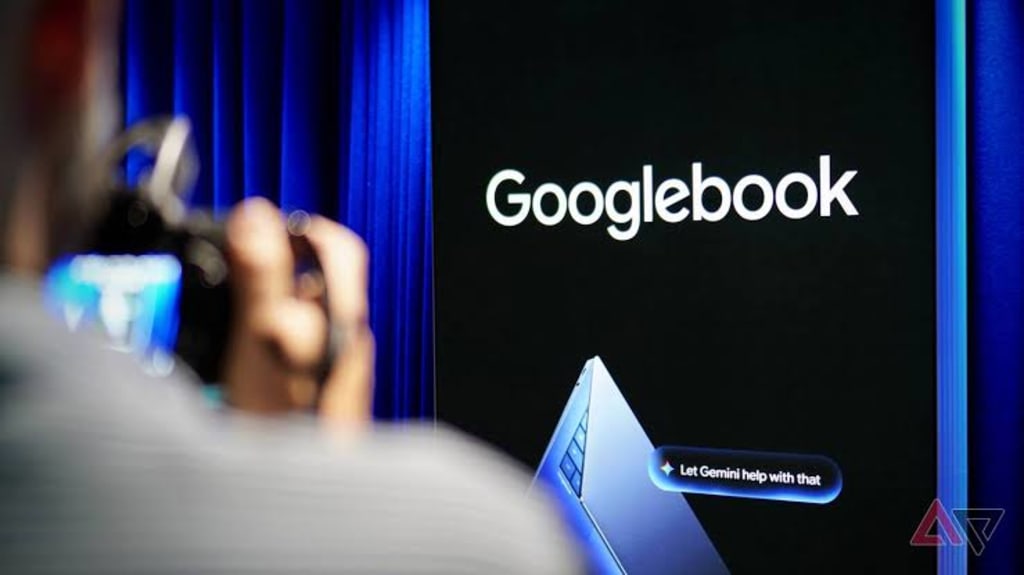
Googlebook OS Is Here. Your Chromebook Might Get It. ChromeOS Won't.
Google confirmed the upgrade path in a quiet support document. The first five Googlebooks go on sale October 4. Here is what we know, what we do not, and why $899 is the number that matters.
On September 23, 2026, Google published a support page for enterprise IT administrators. No keynote. No trailer. No executive blog post with a photograph of a smiling team in a brightly lit office.
The page said ChromeOS would keep getting software and security updates until the middle of 2034. It said some Chromebooks would be allowed to move to something called Googlebook OS. Then it said the details would be shared soon.
That is how the end of a fifteen-year experiment gets filed. On a help page, in a few paragraphs, on a Tuesday afternoon.
The machine that never grew up
ChromeOS shipped in 2011 with an idea simple enough to sound like a joke. The browser was the operating system. Nothing else. Files lived in the cloud. The machine was a window, and the window was enough.
For a while, it was. Schools bought Chromebook carts by the thousand. A district could hand a nine-year-old a laptop, lose it, wipe it, hand it to another nine-year-old, and never once think about a driver. The thing booted in seconds. It did not break. It cost less than a textbook bundle.
Education became the beachhead Google never quite left. Chromebooks took more than half the classroom market. Enterprises adopted them too, quietly, for the same reasons schools did: they were cheap to manage and hard to ruin.
The problem was everything above the beachhead. A Chromebook could write a document and check email. It could not run the professional software that people who buy $1,200 laptops actually need. Google tried to fix this in 2016 by adding Android apps. It did not work well. The apps ran inside a container, translating instructions in real time, and the result felt like borrowing someone else's computer through a fogged window.
Google spent the next decade selling a laptop that was excellent at being a second laptop.
The rebuild nobody called a rebuild
In July 2025, Sameer Samat, who runs Android at Google, said ChromeOS would be rebuilt on top of Android. By late 2025 the project had a codename: Aluminium OS. In March 2026, at Mobile World Congress, Samat confirmed the plan publicly.
None of this sounded like a funeral. It sounded like a merge.
Googlebook OS is not ChromeOS with a new paint job. The bottom layer is the Android stack, the same one running on more than a billion phones. The desktop layer, the windows and the file manager and the multitasking, comes from ChromeOS.
The practical difference is that Android apps now run natively. No container. No translation layer. John Maletis, a Google vice president, put it plainly in an interview: "We now have the ability to run true native Android apps, not emulated. The performance of these apps is incredible."
That single architectural change deletes a decade of complaints. The stutter, the battery drain, the apps that crashed when you resized a window. Gone at the foundation, not patched at the surface.
The system also keeps desktop Chrome and a full Linux environment, which matters more than Google's marketing will admit. Developers who bought Chromebooks precisely because they could run a terminal are not being asked to give that up.
What you will actually touch
Two features are worth more than the spec sheet.
The first is called Magic Pointer. Wiggle the cursor and Gemini wakes up. Hover over anything on screen and ask a question about it, without opening a chat window, without copying text into a prompt box. It is the least dramatic possible implementation of AI, and probably the one people will use.
The second is Cast My Apps, which mirrors phone apps onto the laptop in real time. Alongside it sits Quick Access, which lets you browse files on your phone without a cable or a transfer dialog. These are small conveniences built on a large advantage. Windows and macOS do not have a billion phones to borrow from.
Whether you care depends entirely on which phone is in your pocket.
The number that decides everything
Five laptops go on sale October 4. Acer, Asus, Dell, HP, Lenovo. Every one has at least 16GB of memory, a touchscreen, and either an Intel Core Ultra Series 3 or a Qualcomm Snapdragon X Elite chip. Every one includes a year of Google AI Pro with 5TB of storage, plus three-month trials of YouTube Premium, Adobe Photoshop, and CapCut Pro. Every one gets up to ten years of system updates.
The Acer starts at $899. The Lenovo is $1,099. Dell is $1,199. Asus and HP both start at $1,299.
That $899 is a launch price, and Acer's Kelly Odle told The Verge it will be re-evaluated as component supply and market pressure shift. Memory prices have already climbed across the industry, pushing up machines like MacBook Neo.
The bigger problem is the comparison. A review in PCMag put it without much diplomacy: at $899, the Googlebook costs more than Apple's $699 MacBook Neo and more than plenty of Windows laptops that run software the Googlebook cannot. If you need the full Adobe Creative Suite or desktop Microsoft Office, the value proposition gets thin fast.
Google's answer is that native Android removes the barriers that kept developers away, and that Maletis spends most of his time talking to them. He says traditional app developers "have been fully engaged, rethinking how they want to deliver applications and services to customers." What he has not published is the list. Which apps, by when, at what quality on a 15-inch screen.
The people who have to wait
Here is the part that will frustrate the audience Google already has.
Schools and companies cannot use Googlebook OS properly until the second half of 2027. That is when the first core management features arrive. Until then, an IT administrator has a fleet of new machines and no full set of tools to manage them.
Worse, the licenses do not transfer. A ChromeOS Enterprise Upgrade or Education Upgrade does not carry over to Googlebook. Districts and businesses will need new agreements. Google says active upgrade licenses on existing devices will keep working, which softens the blow for anyone staying put. It does not help anyone planning to move.
And the migration path itself is still a promise. Google's exact words: "Many of our latest Chromebook devices will be eligible to transition to Googlebook OS. Details on migration paths and device eligibility will be shared soon."
The rule of thumb, based on the update clock, is that anything bought from roughly 2025 onward stands a chance. Anything older will simply run out its ten years and stop.
The date on the wall
Every Chromebook gets ten years of updates from the day it ships. ChromeOS as a whole keeps getting updates until mid-2034. Those two facts together produce the policy: if your machine's ten-year window runs past 2034, Google will let it move to the new system. If it does not, your machine has already told you its ending.
That leaves Google eight years to answer the only question that matters. Can a laptop built on Android convince someone to spend $899 on it instead of buying a MacBook Air?
ChromeOS answered a different question, and it answered well. It built a machine for classrooms and warehouses, for people who needed a browser and a keyboard and nothing else. It never built a machine for the person deciding between a Dell and a Mac.
On October 4, five laptops will try again. In 2027, the tools arrive. In 2034, the old system stops.
Somewhere between those dates, a school district will have to decide whether to trust Google a second time.
About the Creator
Jin
Writer of reamstories
https://reamstories.com/jin
Enjoyed the story? Support the Creator.
Subscribe for free to receive all their stories in your feed. You could also become a paid subscriber, letting them know you appreciate their work.
Comments
There are no comments for this story
Be the first to respond and start the conversation.