
Comparing Free and Paid PST Split Tools to Break Oversized PST Files
A Clear Guide to Selecting the Best Tool for Break Oversized PST Files
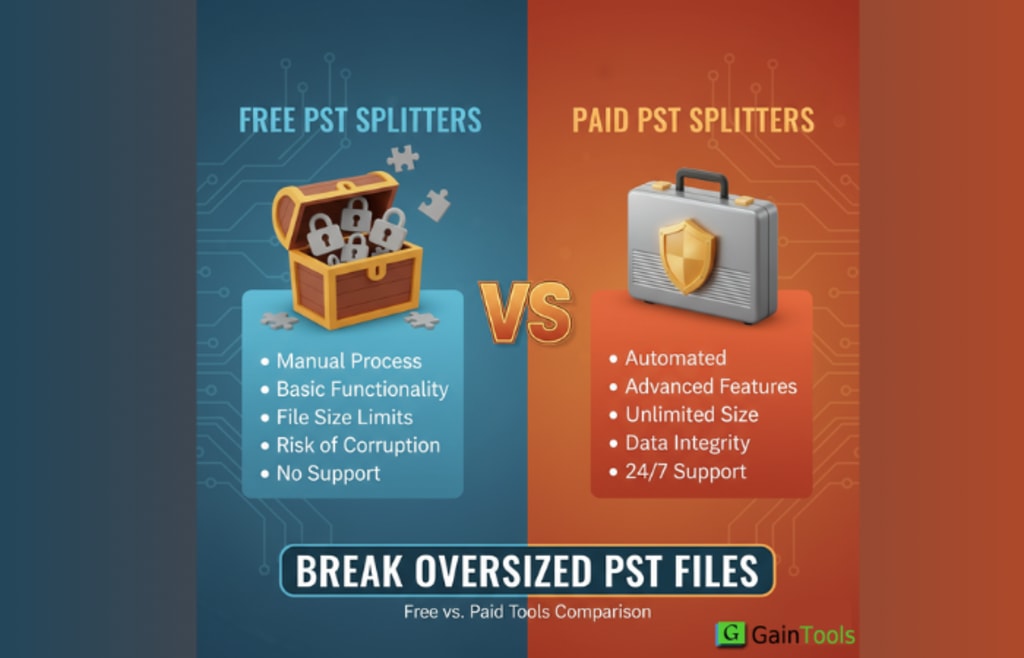
If you use Microsoft Outlook to manage your emails, contacts, calendars and other data, you are probably aware that everything is saved in a PST (Personal Storage Table) file. As additional emails and attachments accumulate, the PST file might grow in size. When a PST file becomes too large, Outlook can slow down, create problems or even become corrupt.
One of the most dependable methods for keeping Outlook functioning well is to break oversized PST files into smaller sections. A variety of tools are available to assist with this task. Some are free, while others cost money. Understanding the differences between free and paid PST split tools will assist you in choosing the most suitable option for your needs.
Why Do PST Files Become Oversized?
Before comparing the methods, it is vital to understand why PST files are so big. Here are a few common reasons:
- Regular email use Daily contact via email including attachments, rapidly increases file size.
- Large attachments pictures, videos and documents sent or received as attachments increase the size of the PST file.
- No regular maintenance Without archiving or cleaning, outdated emails remain in the file and accumulate in number.
When the PST file size exceeds its limit, Outlook start to work slowly. For older versions such as Outlook 2003 and 2007 & the limit is 20 GB. Outlook 2010 and newer versions have a 50 GB restriction. If the file exceeds these restrictions, you risk damage or data loss.
Why is it Necessary to Break Oversized PST Files?
Before we compare the tools, we need to understand why dividing a PST file is necessary.
- Performance A smaller PST file loads faster and increases Outlook's response.
- Data Protection Large files are more likely to become corrupted. Smaller files reduce the chance of losing vital emails.
- Backup and Storage Creating backups or moving data between computers makes it easier to manage multiple little files.
- File Size Limits Older versions of Outlook such as 2003 and 2007, have tight file size restrictions. When the file exceeds such limits & Outlook could stop working properly.
Free PST Split Tools
Free tools are appealing since they are free of charge and can perform basic functions. Here are some common characteristics and disadvantages of free PST splitters
Advantages of Free Tools
- There is no fee, which is useful if you only need to split a PST file once
- Simple functions for simple splitting
- Simple to discover online with a fast search
Limitations of Free Tools.
- Many free tools only allow you to divide PST files of a specific size
- Some could not back the most recent Outlook versions
- Features such as splitting by date, folder or size could not be available
- Free tools could not provide sufficient safety measures & posing a danger when managing sensitive data
- Technical help is typically not offered.
A free tool could be sufficient if you have a little PST file or simply need to split it once. However, for larger files or frequent use, these limits might be frustrating.
Paid PST Split Tools
Paid applications such as GainTools Split PST Software, provide more advanced functionality and increased reliability. They are intended for users who require a secure and efficient approach to break oversized PST files.
Benefits of Using Paid Tools
- Multiple Splitting Options Paid tools allow you to divide files by size, date, year or folder. For example, you can create separate PST files for each calendar year worth of emails.
- Supports all Outlook versions Whether you use Outlook 2007 or Outlook 2021, premium tools stay up to date on the latest formats.
- There is no file size limit Paid software can handle such large PST files without restriction.
- Data integrity High quality tools ensure no data is lost or damaged during the procedure. Emails, attachments and folder structures are preserved.
- Technical assistance Most commercial software offers customer assistance to assist you if you run into any problems.
The Split PST Software is an excellent example. It allows you to split oversized PST files safely. You can divide PST files by size, date, folder or year. The utility is compatible with all Outlook versions and can open both ANSI and Unicode PST files. With an easy to use interface, even non-technical people can manage their PST files successfully.
Differences Between Free and Paid Tools.
When comparing free and premium PST split software, there are numerous key factors to consider. Understanding these elements will assist you to decide which choice best meets your needs.
Free Tools
Free PST split tools can be appealing because they are free & making them ideal for users with basic needs. However, they frequently have significant limitations. Most free applications only support small PST files and could not be compatible with the most recent Outlook versions. Their splitting features are typically fairly basic and allowing you to separate files merely by size. Data security might also be an issue as free software could not provide robust safeguards against data loss or corruption. Another disadvantage is the lack of client service. If something goes wrong, you are usually on your own to troubleshoot and resolve the problem.
Paid Tools
Paid PST splitters, on the other hand, provide a more comprehensive and trustworthy solution. They normally have no file size limitations and can easily break oversized PST files. These applications offer a variety of splitting choices, including dividing by size, date, year and specific folders, allowing you more flexibility over how your data is organized. Paid solutions are also frequently updated to support all versions of Outlook, providing compatibility with both previous and newer systems. Data security is a key priority, so expect a safe process that preserves your emails, attachments and organizational structure. Another advantage is customer assistance if you run into any problems or have queries, someone is accessible to help you throughout the process.
When to Choose a Free Tool
A Free PST Splitter Could be Enough if
- You just have a single tiny PST file to split
- You are running an earlier version of Outlook and don't require additional features
- You are comfortable dealing with modest risks and keep a backup of your data
When to Select a Paid Tool
A Paid PST Splitter Could be Enough if
- Consider using a commercial application for large PST files that require frequent splitting.
- You work with sensitive or critical company information.
- You require sophisticated options such as separating by date or folder.
- You wish to receive continuing technical help.
Tips for Splitting PST Files Safely
Whether you utilize a free or premium tool, follow these guidelines
- Always make a copy of your PST file before splitting it.
- Make sure Outlook is closed while the splitting procedure is ongoing.
- Ensure that your computer has enough capacity to save the separated files.
- After dividing, open the new PST files in Outlook to ensure that all data remains intact.
Final Thoughts
It is important to manage large PST files to utilize Outlook effectively and protect your data. Free software for breaking PST files can be useful for short, temporary or occasional tasks, but it frequently has restrictions and dangers. Good professional priced software such as GainTools Split PST Software and other developer tools, is less hazardous and more flexible.
If you depend on Outlook for emails, whether personal or business or if you work with a large amount of data, it is likely that even if you paid, you'd still be delighted to have that helpful, dependable, professional priced item to save time and keep the data intact.
Choose wisely for your products so that you are able to have clean, planned and organized emails while also operating reliably with Outlook!
About the Creator
Enjoyed the story? Support the Creator.
Subscribe for free to receive all their stories in your feed.
Comments
There are no comments for this story
Be the first to respond and start the conversation.